


Help me: "Snap" does not join the midi notes to the grid
-
- KVRer
- 7 posts since 17 Apr, 2018
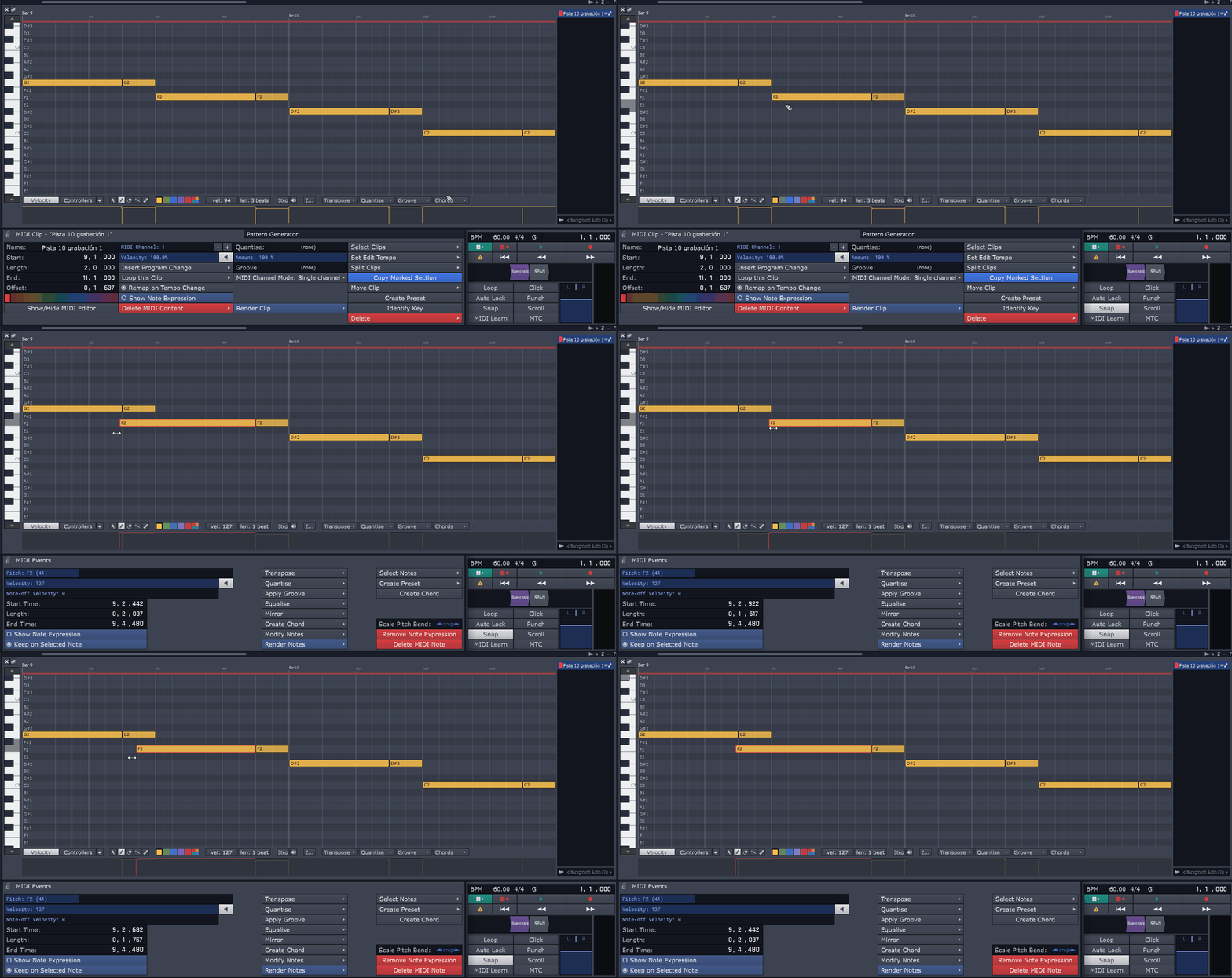
As seen in the image, when I have the option "Snap" activated, WaveForm does not close the note to the grid when I stretch it or move it. I do not know if you have to configure something. Saludos a todos.
-

- KVRian
- 544 posts since 24 Jan, 2004 from Sweden
It should snap to the smallest division in the grid. It certainly does when I try it.
-

- KVRian
- 766 posts since 25 Jul, 2010 from Northern Ireland
I get this happening to me randomly ( which makes it very hard to make a bug report on ) I will see if I can pinpoint an exact cause for it, I'm sure it has to be some sequence of events which is causing it.
-
- KVRAF
- 1790 posts since 30 Dec, 2012
Where is your transport position when you see this? I think it might be picking up the delta from that and snapping to it?
If so, that's probably a bug but should be fixable by setting the transport after you turn snapping on.
If so, that's probably a bug but should be fixable by setting the transport after you turn snapping on.
-
spoontechnique spoontechnique https://www.kvraudio.com/forum/memberlist.php?mode=viewprofile&u=418750
- KVRist
- 492 posts since 7 May, 2018
I've also encountered this issue with both audio and midi. Randomly, Waveform decides it doesn't want to snap precisely to the subdivision it should.
Linux version?
-
- KVRist
- 193 posts since 27 May, 2019
There is a 30 trial, why not download and try it yourself?scalawag wrote: Fri Jul 26, 2019 5:32 pm Is this fixed??
I didn't update to W10 yet because i don't have to upgrade having the same unfixed bugs all over again....
-
- KVRian
- 676 posts since 3 May, 2004
scalawag wrote: ↑Sat Jan 05, 2019 3:58 pm
Logged on into my account with my username and password and downloaded succesfully.
Installed, run it and it asks for my username and password.
Failed!!!
It doesn't accept the same username and password i used to logon on Tracktion website. It only runs in demo mode.
I don't want to hear a voice telling me it's running in demo mode!!
What a good start....
-
- KVRAF
- 2417 posts since 17 Jun, 2003
Possibly because nobody replied to the devs asking questions about the issue reported in the thread.
dRowAudio wrote: Fri Oct 19, 2018 6:14 pm Where is your transport position when you see this? I think it might be picking up the delta from that and snapping to it?
If so, that's probably a bug but should be fixable by setting the transport after you turn snapping on.
"my gosh it's a friggin hardware"