


Good call, I'll add that too. Very handy for, say, triangle waves, as you only need define the first half of the shape.
The plan is to add transforms (a la the sequencers) to the table, including some generative options, so you won't need to manually create sine wave or the like. Maybe CSV import would be handy too?
Architect: Does anyone have a * macro/script
-
- KVRAF
- Topic Starter
- 2728 posts since 25 Aug, 2003 from Bournemouth, UK
Architect, the modular MIDI toolkit, beta now available for macOS, Windows, and Linux.
-
- KVRian
- 724 posts since 15 Feb, 2012 from France
But we're not talking MIDI here, right ?
When using soft synths inside Architect, if similar to other VSTi/AUi hosts I know/own (like Live, Reaper, Numerology, Renoise and Bitwig as far as I can say) I suppose we're talking host's automation resolution... which is infinitely more precise (much more than 14bit CC for example) than even 14bit CCs/NRPN.
I've spent way to much time a few years ago comparing 7bit CCs, NRPN and CV like modulation in Numerology and sometimes the difference was obvious, especially with fast modulation. And whenever you try to build a net of interconnected modulations, it can make a world of difference (in a good way!) : sound is sharper then, and I definitely prefer it that way.
I reckon that the difference isn't as drastic if outputting the modulation to 7bit CCs though.
When using soft synths inside Architect, if similar to other VSTi/AUi hosts I know/own (like Live, Reaper, Numerology, Renoise and Bitwig as far as I can say) I suppose we're talking host's automation resolution... which is infinitely more precise (much more than 14bit CC for example) than even 14bit CCs/NRPN.
I've spent way to much time a few years ago comparing 7bit CCs, NRPN and CV like modulation in Numerology and sometimes the difference was obvious, especially with fast modulation. And whenever you try to build a net of interconnected modulations, it can make a world of difference (in a good way!)
: sound is sharper then, and I definitely prefer it that way.I reckon that the difference isn't as drastic if outputting the modulation to 7bit CCs though.
-
- KVRian
- 724 posts since 15 Feb, 2012 from France
If I was a skilled (Architect) patcher (which I'm not... yet ^^), I'd build something like the 2 plugins by https://dialogaudio.com, add some sort of text-input features to fine-tune whatever I need to and make tons of albums with them and the existing built-in sequencers hehe.
Something like that, working at host's automation resolution, able to be connected to anything and everything the way it's already possible in Architect, would be beyond fantastic for the way too anal computer-music producer I am ;D
Something like that, working at host's automation resolution, able to be connected to anything and everything the way it's already possible in Architect, would be beyond fantastic for the way too anal computer-music producer I am ;D
-

- KVRian
- 698 posts since 7 Dec, 2009 from GWB
Well, I worked a bit, but it looks like it won't please the anal:
Preset: http://vze26m98.net/loomer/lfo-190124.zip
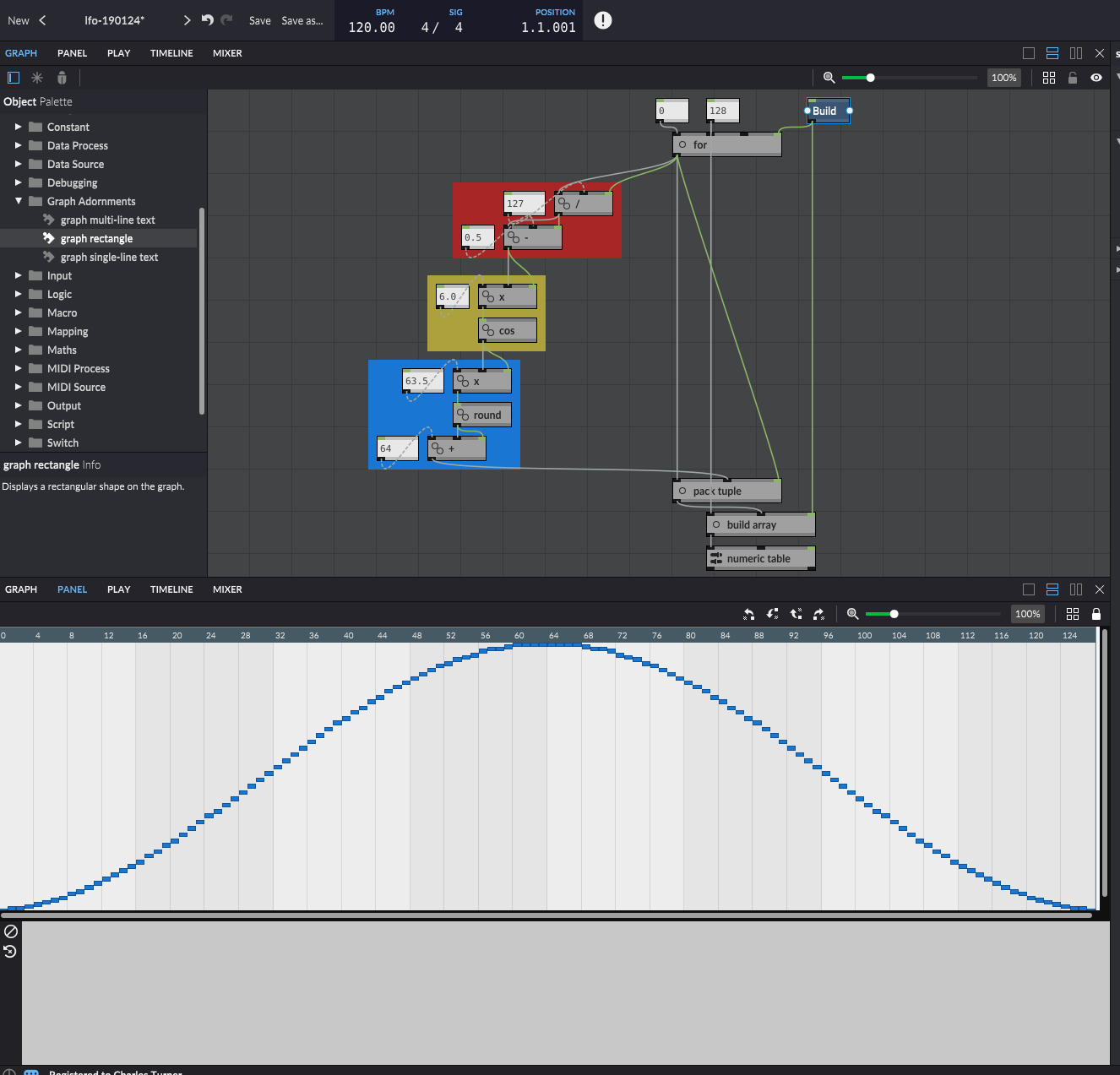
The table is 128 steps of range 0-127. One has to write the table array in one go, so I build an array first. The [for] loop iterates 0-127, and the red area scales it to values friendly to trig functions, ie [cos]. The yellow area actually computes the cosine from the scaled linear sequence 0-127 (essentially a saw-tooth wave at this point), and then the blue area scales the result into something full scale for a 128x128 table of positive integers.
Obviously this could be a lot more fine-grained, but it kind of pushes the limits of what's visualizable ATM.
Hope this is helpful to someone.
Preset: http://vze26m98.net/loomer/lfo-190124.zip
The table is 128 steps of range 0-127. One has to write the table array in one go, so I build an array first. The [for] loop iterates 0-127, and the red area scales it to values friendly to trig functions, ie [cos]. The yellow area actually computes the cosine from the scaled linear sequence 0-127 (essentially a saw-tooth wave at this point), and then the blue area scales the result into something full scale for a 128x128 table of positive integers.
Obviously this could be a lot more fine-grained, but it kind of pushes the limits of what's visualizable ATM.
Hope this is helpful to someone.
-

- KVRAF
- 6533 posts since 9 Dec, 2008 from Berlin
This is something where the Bias and Gain functions can add a lot of functionality and variation (although you have to keep the values between 0 and 1 for it to work correctly, but that's easily achieved).
From just a basic triangle wave you can create most common shapes when you add Bias and Gain (in that order it works best in my experience). Cheers,
Tom
From just a basic triangle wave you can create most common shapes when you add Bias and Gain (in that order it works best in my experience). Cheers,
Tom
You do not have the required permissions to view the files attached to this post.
Last edited by ThomasHelzle on Tue Oct 22, 2019 1:39 pm, edited 1 time in total.
"Out beyond the ideas of wrongdoing and rightdoing, there is a field. I’ll meet you there." · Rumi
UrbanFlow.art · Instagram · YouTube
UrbanFlow.art · Instagram · YouTube
-
- KVRian
- 698 posts since 7 Dec, 2009 from GWB
I realize that "reflect" is the more common term, not "mirror".colin@loomer wrote: Thu Jan 24, 2019 12:29 pmGood call, I'll add that too. Very handy for, say, triangle waves, as you only need define the first half of the shape.
My sense is I hold a minority view, but I'd prefer a toolkit approach, where you could hook these things up to the [numeric table] plus other Architect objects. What I'd like to see for the [numeric table] is indexed write, so I could dispense with having to prepare an array; an auto increment on write and scroll feature; and most importantly a mode where the entire viewport is drawn into the rectangle specified by the component dimensions. Then you could have 32k by 32k data tables where you could display or draw with visual reference to the entire data set.colin@loomer wrote:The plan is to add transforms (a la the sequencers) to the table, including some generative options, so you won't need to manually create sine wave or the like. Maybe CSV import would be handy too?
-
- KVRAF
- Topic Starter
- 2728 posts since 25 Aug, 2003 from Bournemouth, UK
Good suggestions. I've added them all the requests list. Indexed write seems to make sense, bringing it in line with what was requested for the sequencers, too.
Architect, the modular MIDI toolkit, beta now available for macOS, Windows, and Linux.
-
- KVRian
- 698 posts since 7 Dec, 2009 from GWB
There's an aspect of your wishes that implies 32-bit audio rate modulation, which seems beyond Architect's current remit. Which is not to say it shouldn't happen, or that it's and irrelevant desire.nilhartman wrote: Thu Jan 24, 2019 12:58 pmI reckon that the difference isn't as drastic if outputting the modulation to 7bit CCs though.
The point I'd make is that these automation systems for the most part have ranges of zero through infinity, and the actual automation one might want is just a piece of that range. What I've posted has a range of 7 bits or 50% of a 14-bit MIDI CC, but the big difference is that you can have any 7 bits out of that 14 bit range. So, LSB CC modulation with a position-able (and certainly sequence-able) MSB.
And if you wanted to give up the [numeric table] component, I can't see any reason why you couldn't have 32K by 32K arrays driven by [on every tick], but I'd think your audio buffer setting would dictate a lower bound for temporal resolution.
-
- KVRian
- 698 posts since 7 Dec, 2009 from GWB
Scrolling capability enables it to be used as a low-frequency data history, which is hugely handy, but perhaps that's a different (future) component. Max's [multislider] is a useful object that might help define what Architect's [numeric table] should and shouldn't be: https://docs.cycling74.com/max5/refpage ... lider.html
-
- KVRian
- 698 posts since 7 Dec, 2009 from GWB
It's actually pretty simple to test the automation resolution in Architect:
http://vze26m98.net/loomer/automation-190124.zip
It's a preset for the standalone version of Architect. I have ReaJS loaded in order to use the tone generator on Mixer Track 1 as my sound source. (I have no idea what happens if you don't have ReaJS in your plugins path.)
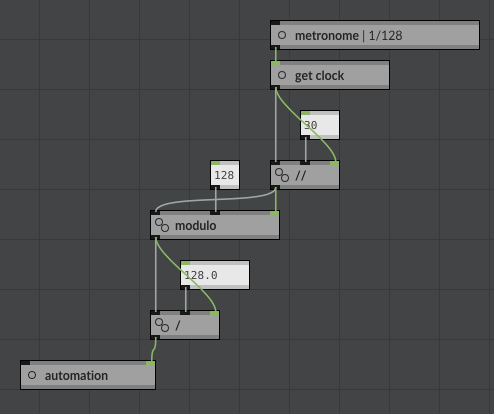
I'm using the metronome set to 128th notes at 120bpm. Automation goes from 0 - 1.0 in 128 steps, modulating Track 1's volume. So the ReaJS tone generator goes from 0 to -12dB, or 0 to 1.0 track automation level in 128 steps. Note that the timebase is the constraint on the granularity of the automation steps. One would have to use 1/256th notes to get twice the granularity. So smoothness of automation is a more function of timebase than data interval, or "number of bits resolution".
(EDIT: Probably still not completely thought through, but resolution seems determined by timebase multiplied by duration of automation. So 7-bits of resolution at 128th note timebase should probably increase to 8-bits of resolution (ie 256) to yield the same effect when "augmenting" from one bar to two bars in duration.)
In one of my other presets here, I have code that uses [get every tick] as a metronome, so some simple modification of that would yield higher resolution, probably limited more by your audio interface than the performance of Architect.
HTH
http://vze26m98.net/loomer/automation-190124.zip
It's a preset for the standalone version of Architect. I have ReaJS loaded in order to use the tone generator on Mixer Track 1 as my sound source. (I have no idea what happens if you don't have ReaJS in your plugins path.)
I'm using the metronome set to 128th notes at 120bpm. Automation goes from 0 - 1.0 in 128 steps, modulating Track 1's volume. So the ReaJS tone generator goes from 0 to -12dB, or 0 to 1.0 track automation level in 128 steps. Note that the timebase is the constraint on the granularity of the automation steps. One would have to use 1/256th notes to get twice the granularity. So smoothness of automation is a more function of timebase than data interval, or "number of bits resolution".
(EDIT: Probably still not completely thought through, but resolution seems determined by timebase multiplied by duration of automation. So 7-bits of resolution at 128th note timebase should probably increase to 8-bits of resolution (ie 256) to yield the same effect when "augmenting" from one bar to two bars in duration.)
In one of my other presets here, I have code that uses [get every tick] as a metronome, so some simple modification of that would yield higher resolution, probably limited more by your audio interface than the performance of Architect.
HTH
-
- KVRist
- 140 posts since 11 Mar, 2014
Generative Midi Machine UPDATE below:
Fixed major timing snafu with my implementation using the Hold module.
Fixed (hopefully): Track Transpose following "Force to Scale", was in the wrong position. Thanks Alberto!
Please refer to the original post for more info.
viewtopic.php?p=7293372#p7293372
https://soundcloud.com/user-332831953/e ... chitect-18
Fixed major timing snafu with my implementation using the Hold module.
Fixed (hopefully): Track Transpose following "Force to Scale", was in the wrong position. Thanks Alberto!
Please refer to the original post for more info.
viewtopic.php?p=7293372#p7293372
https://soundcloud.com/user-332831953/e ... chitect-18
You do not have the required permissions to view the files attached to this post.
Last edited by mannymang on Sat Jan 26, 2019 6:08 am, edited 2 times in total.
-

- KVRist
- 124 posts since 25 Jul, 2004 from Italy
Mannymang wrote:
 Thanks for sharing.
I tried it and seems quite fun. One question anyway: if I "force to scale", "major" and "C", the small keyboards below each Track (channel) should not show any black key pressed or am I misleading something?
Thanks
Alberto
Hi Mannymang, another nice addition!Generative Midi Machine UPDATE below:
Fixed major timing snafu with my implementation using the Hold module.
Thanks for sharing.I tried it and seems quite fun. One question anyway: if I "force to scale", "major" and "C", the small keyboards below each Track (channel) should not show any black key pressed or am I misleading something?
Thanks
Alberto
-
- KVRist
- 140 posts since 11 Mar, 2014
Hi Alberto,
Thanks for pointing that out. If I have Master Transpose and the Track Transpose to "0" it works like it should it seems. The problem is with the Track Transpose I think. I'll upload an update once fixed. If you see something else, please let me know. Thank you again!
Thanks for pointing that out. If I have Master Transpose and the Track Transpose to "0" it works like it should it seems. The problem is with the Track Transpose I think
. I'll upload an update once fixed. If you see something else, please let me know. Thank you again!-
- KVRist
- 140 posts since 11 Mar, 2014
Generative Midi Machine UPDATE below:
Fixed (hopefully): Track Transpose following "Force to Scale", was in the wrong position. Thanks Alberto!
Please refer to the original post for more info.
viewtopic.php?p=7293372#p7293372
Fixed (hopefully): Track Transpose following "Force to Scale", was in the wrong position. Thanks Alberto!
Please refer to the original post for more info.
viewtopic.php?p=7293372#p7293372
You do not have the required permissions to view the files attached to this post.
-
- KVRist
- 124 posts since 25 Jul, 2004 from Italy
Here is a small utility macro - a-linmap - that maps a variable X in an interval X1<X<X2 to a value Y between Y1<Y<Y2 in a linear way. For example given a value between 0 and 1 and you want to map it to the interval [0 127] you do like in the attached image to get 63.5.
Inputs are X1, X2, Y1, Y2 and X. Output is Y. X1 must be < X2 and Y1 < Y2. There is a check to see if X is [X1 <= X <= X2] (otherwise it prints out an error). The value "X" bangs the result and activate the processing.
This is a "fragment": put it in your Fragments folder of Architect and access it via right click in the graph panel under "Externals" (a-linmap).
Hope that can be useful .
Alberto
Inputs are X1, X2, Y1, Y2 and X. Output is Y. X1 must be < X2 and Y1 < Y2. There is a check to see if X is [X1 <= X <= X2] (otherwise it prints out an error). The value "X" bangs the result and activate the processing.
This is a "fragment": put it in your Fragments folder of Architect and access it via right click in the graph panel under "Externals" (a-linmap).
Hope that can be useful
.Alberto
You do not have the required permissions to view the files attached to this post.