

Using a trackball for DAW editing
-

- KVRAF
- 5383 posts since 25 Jan, 2014 from The End of The World as We Knowit
I hover over a parameter with a mouse, then use that mac wireless trackpad to change values. Two-handed. Crazy fast. I am going to try a trackball.
F E E D
Y O U R
F L O W
Y O U R
F L O W
-
 logifuzz-vst-plugins logifuzz-vst-plugins https://www.kvraudio.com/forum/memberlist.php?mode=viewprofile&u=434377
 - KVRist
- 160 posts since 25 Jan, 2019 from Brazil
Had to leave the mouse behind due to tendonitis, trackballs are superior once you get used on a good piece of hardware (Logitech?) but the real superior pointing devices to me are pen tablets, also available in small size. Again, avoid cheapest ones, Wacom's are better than Genius'es (I had both).
"I used to think I was indecisive, but now I'm not too sure."
Checkout my blog: VST Plugins Free Download.
Checkout my blog: VST Plugins Free Download.
-
- KVRAF
- Topic Starter
- 2069 posts since 13 Dec, 2016
To be honest, I can´t imagine controlling my DAW with a pen tablet. If you use one with a display, selecting tracks or clips could be hit or miss and slow down the workflow. And I would need more space than for a mouse or trackball. But interesting enough to try it out..logifuzz-vst-plugins wrote: Fri Jan 25, 2019 11:40 pm Had to leave the mouse behind due to tendonitis, trackballs are superior once you get used on a good piece of hardware (Logitech?) but the real superior pointing devices to me are pen tablets, also available in small size. Again, avoid cheapest ones, Wacom's are better than Genius'es (I had both).
Its over for Bitwig--CUBASE WON !!!!!!!!!!!!!!!!!!!!!!!!!!!!!!!!!
-
logifuzz-vst-plugins logifuzz-vst-plugins https://www.kvraudio.com/forum/memberlist.php?mode=viewprofile&u=434377
- KVRist
- 160 posts since 25 Jan, 2019 from Brazil
I use ones without a display and with a small size, and once you learn your way with absolute tablet/screen mapping they are faster than anything because you can pinpoint clicks near pixel perfect. See if some designer friend of you can borrow one for you to test.enCiphered wrote: Sat Jan 26, 2019 12:00 amTo be honest, I can´t imagine controlling my DAW with a pen tablet. If you use one with a display, selecting tracks or clips could be hit or miss and slow down the workflow. And I would need more space than for a mouse or trackball. But interesting enough to try it out..logifuzz-vst-plugins wrote: Fri Jan 25, 2019 11:40 pm Had to leave the mouse behind due to tendonitis, trackballs are superior once you get used on a good piece of hardware (Logitech?) but the real superior pointing devices to me are pen tablets, also available in small size. Again, avoid cheapest ones, Wacom's are better than Genius'es (I had both).
"I used to think I was indecisive, but now I'm not too sure."
Checkout my blog: VST Plugins Free Download.
Checkout my blog: VST Plugins Free Download.
-

- KVRian
- 988 posts since 25 Dec, 2007 from Copenhagen
Nice question, thinking about it.enCiphered wrote: Fri Jan 25, 2019 9:21 am Does anyone use a trackball for his DAW, audio editing, mixing etc. ? ...
Can some recommend a left-handed friendly PS/2 one?
Intel i7-4790K | Gigabyte Z97X-UD3H | 32GB Crucial Ballistix Sport | RME Babyface Pro | UAD PCIe Octo, Quad | Asus GT 730 | W11 Pro | S1 v6.5
-
- KVRian
- 1201 posts since 25 Sep, 2002
https://www.amazon.co.uk/d/Computer-Mic ... -Left-Hand
Only ever seen (but never tried) this example for lefties.
Otherwise I think it’s a choice of the ambidextrous versions similar to this (which I’ve also used & is pretty good).
https://www.amazon.co.uk/Kensington-Orb ... rbit+mouse
Only ever seen (but never tried) this example for lefties.
Otherwise I think it’s a choice of the ambidextrous versions similar to this (which I’ve also used & is pretty good).
https://www.amazon.co.uk/Kensington-Orb ... rbit+mouse
-

- KVRAF
- 16840 posts since 8 Mar, 2005 from Utrecht, Holland
Touchpad on the MacBookPro, I don't need no mouse anymore.enCiphered wrote: Fri Jan 25, 2019 9:21 am Does anyone use a trackball for his DAW, audio editing, mixing etc. ?
The reason I´m asking is because my desk space is getting smaller and smaller and I reached the point where I can´t move my mouse in any direction without needing to reposition the device itself all the time.
I think I would solve this problem with a trackball. But I´m afraid it could slow down my entire workflow. What are your thoughts guys?
The obvious solution no one dares to touch is to get back some space on the desk. Too crammy, nothing else fits? Clear up the clutter, or expand it!
We are the KVR collective. Resistance is futile. You will be assimilated. 
My MusicCalc is served over https!!
My MusicCalc is served over https!!
-
- KVRian
- 988 posts since 25 Dec, 2007 from Copenhagen
Saved, I`ll take it as a search entry, thank you.don1thedon wrote: Sat Jan 26, 2019 9:21 am https://www.amazon.co.uk/d/Computer-Mic ... -Left-Hand
Only ever seen (but never tried) this example for lefties.
Otherwise I think it’s a choice of the ambidextrous versions similar to this (which I’ve also used & is pretty good).
https://www.amazon.co.uk/Kensington-Orb ... rbit+mouse
Intel i7-4790K | Gigabyte Z97X-UD3H | 32GB Crucial Ballistix Sport | RME Babyface Pro | UAD PCIe Octo, Quad | Asus GT 730 | W11 Pro | S1 v6.5
-
- KVRist
- 211 posts since 1 Nov, 2005
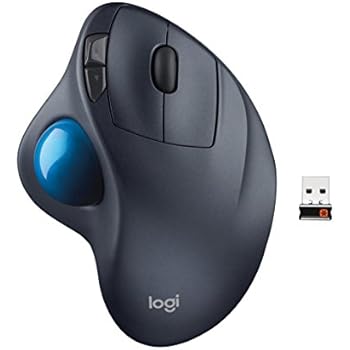
I've been using the Logitech M570 Wireless Trackball mouse for years. I don't use a DAW desk/table anymore. I make music on my bed so the bed is my surface for the mouse. The Trackball works perfectly, you just have to get used to it.
-
- KVRAF
- 2140 posts since 16 Jan, 2013 from USA
I never quite adjusted, but I know people who swear by them. Missle Command.
-
- KVRAF
- Topic Starter
- 2069 posts since 13 Dec, 2016
Thanks for your input, friends!
I finally decided to buy the kensington expert mouse. After a few hours of use I already love it! It feels much more relaxing to work with, and I find myself working slightly faster than before. I can even program the additional buttons to trigger macros in Cubase which speeds up my workflow!
I finally decided to buy the kensington expert mouse. After a few hours of use I already love it! It feels much more relaxing to work with, and I find myself working slightly faster than before. I can even program the additional buttons to trigger macros in Cubase which speeds up my workflow!
Its over for Bitwig--CUBASE WON !!!!!!!!!!!!!!!!!!!!!!!!!!!!!!!!!
-
- KVRAF
- 1858 posts since 26 Nov, 2018
Edit, I forgot to read the last persons decision. Congrats!
-
- KVRian
- 1201 posts since 25 Sep, 2002
Good stuff, I’ve also looked at these as a possible alternative to M570. Did you go for a wired or wireless version?enCiphered wrote: Tue Feb 05, 2019 11:43 pm Thanks for your input, friends!
I finally decided to buy the kensington expert mouse. After a few hours of use I already love it! It feels much more relaxing to work with, and I find myself working slightly faster than before. I can even program the additional buttons to trigger macros in Cubase which speeds up my workflow!
Enjoy!
-
- KVRAF
- 7104 posts since 22 Jan, 2005 from Sweden
I think the kind that looks like a mouse, but has track ball in thumb position works really well.
SpeedLink Aptico
Logitech MX Ergo
Logitech M570
The ones with track ball on top put more strain on wrist, for me.
Drivers matters a lot, if good sensing of acceleration so can move all over screen in smaller movement. Not being linear all the way.
But use regular mouse for right hand since years, combined with Contour Design Shuttle Express for left hand - having no problem with space.
SpeedLink Aptico
Logitech MX Ergo
Logitech M570
The ones with track ball on top put more strain on wrist, for me.
Drivers matters a lot, if good sensing of acceleration so can move all over screen in smaller movement. Not being linear all the way.
But use regular mouse for right hand since years, combined with Contour Design Shuttle Express for left hand - having no problem with space.