


Hive 2.0
-
- KVRAF
- 2082 posts since 13 Dec, 2016
I´m trying to find out how to enter exact parameter values but without any success. Any help appreciated
Its over for Bitwig--CUBASE WON !!!!!!!!!!!!!!!!!!!!!!!!!!!!!!!!!
-

- u-he
- Topic Starter
- 30250 posts since 8 Aug, 2002 from Berlin
Depends on what host you are. Almost all except Logic: just type the value + enter on the last parameter clicked.
-
- KVRAF
- 2082 posts since 13 Dec, 2016
Thank you for the fast reply.
Very strange, I´m on Cubase Pro 10 and nothing happens when typing a value. Even the right-click button doesn´t seem to do anything.
I tried the same in Live 10 and there I can at least right-click and lock any parameter. But not enter a value.
Very strange, I´m on Cubase Pro 10 and nothing happens when typing a value. Even the right-click button doesn´t seem to do anything.
I tried the same in Live 10 and there I can at least right-click and lock any parameter. But not enter a value.
Its over for Bitwig--CUBASE WON !!!!!!!!!!!!!!!!!!!!!!!!!!!!!!!!!
-
- KVRAF
- 2082 posts since 13 Dec, 2016
But Urs, I´m not sure If I understand what you are describing.Urs wrote: Sat Jun 01, 2019 8:34 pm Depends on what host you are. Almost all except Logic: just type the value + enter on the last parameter clicked.
Lets say I want to enter a precise value for the AMP1 attack slider. Actually, I´m expecting to double-click the slider, some kind of input field opens where I can enter the value and submit with enter on my keyboard for example. But double-clicking resets the attack value to 1. So, where am I supposed to enter any value in Hive?
Its over for Bitwig--CUBASE WON !!!!!!!!!!!!!!!!!!!!!!!!!!!!!!!!!
-
- u-he
- Topic Starter
- 30250 posts since 8 Aug, 2002 from Berlin
you click/drag/whatever a knob and then you just type away... but it might not work in all hosts, which bums me so much, you can't believe.
We added it several years ago and it was the best thing ever, but some hosts intercept number keys, or return or +/-. With some hosts it works on the keypad.
We added it several years ago and it was the best thing ever, but some hosts intercept number keys, or return or +/-. With some hosts it works on the keypad.
-
- u-he
- Topic Starter
- 30250 posts since 8 Aug, 2002 from Berlin
-
- KVRAF
- 3729 posts since 3 Nov, 2015
It does not work in Bitwig 2.4.3 (Linux version). Would be neat if it did.Urs wrote: Sat Jun 01, 2019 9:33 pm you click/drag/whatever a knob and then you just type away... but it might not work in all hosts, which bums me so much, you can't believe.
-
- KVRAF
- 2082 posts since 13 Dec, 2016
Ok, now I got it. Yes it works but any host function assigned to a number will be activated as well as soon as I press a number key in Hive. The keypad doesn´t work in Cubase, will have to test in Live.Urs wrote: Sat Jun 01, 2019 9:33 pm you click/drag/whatever a knob and then you just type away... but it might not work in all hosts, which bums me so much, you can't believe.
We added it several years ago and it was the best thing ever, but some hosts intercept number keys, or return or +/-. With some hosts it works on the keypad.
Thanks a lot for your support, very appreciated!
Its over for Bitwig--CUBASE WON !!!!!!!!!!!!!!!!!!!!!!!!!!!!!!!!!
-
- u-he
- Topic Starter
- 30250 posts since 8 Aug, 2002 from Berlin
Exactly. All plug-in standards allow for key input. All hosts denying it should be deemed "not standard compliant".enCiphered wrote: Sat Jun 01, 2019 9:50 pmOk, now I got it. Yes it works but any host function assigned to a number will be activated as well as soon as I press a number key in Hive. The keypad doesn´t work in Cubase, will have to test in Live.Urs wrote: Sat Jun 01, 2019 9:33 pm you click/drag/whatever a knob and then you just type away... but it might not work in all hosts, which bums me so much, you can't believe.
We added it several years ago and it was the best thing ever, but some hosts intercept number keys, or return or +/-. With some hosts it works on the keypad.
I spent weeks on this back then. It was marvellous. You could program Diva entirely from a keyboard, navigating with the cursor keys and using all sorts of inputs and shortcuts. Until I tried that in Logic, and all it did was change the window layout.
It was very depressing. We never spoke of it again.
-
- KVRAF
- 2082 posts since 13 Dec, 2016
Very interesting approach, really. What a shame it can´t work properly as designed due to that host restrictions.Urs wrote: Sat Jun 01, 2019 9:55 pmExactly. All plug-in standards allow for key input. All hosts denying it should be deemed "not standard compliant".enCiphered wrote: Sat Jun 01, 2019 9:50 pmOk, now I got it. Yes it works but any host function assigned to a number will be activated as well as soon as I press a number key in Hive. The keypad doesn´t work in Cubase, will have to test in Live.Urs wrote: Sat Jun 01, 2019 9:33 pm you click/drag/whatever a knob and then you just type away... but it might not work in all hosts, which bums me so much, you can't believe.
We added it several years ago and it was the best thing ever, but some hosts intercept number keys, or return or +/-. With some hosts it works on the keypad.
I spent weeks on this back then. It was marvellous. You could program Diva entirely from a keyboard, navigating with the cursor keys and using all sorts of inputs and shortcuts. Until I tried that in Logic, and all it did was change the window layout.
It was very depressing. We never spoke of it again.
Do your products have a stand-alone version? It might be the only way to make proper use of this workflow.
Its over for Bitwig--CUBASE WON !!!!!!!!!!!!!!!!!!!!!!!!!!!!!!!!!
-
Funkybot's Evil Twin Funkybot's Evil Twin https://www.kvraudio.com/forum/memberlist.php?mode=viewprofile&u=116627
- KVRAF
- 12513 posts since 16 Aug, 2006
Not to add to Urs depression, but some plugins definitely do allow for text entry of values regardless of host. I think every one of those plugins requires a cursor to appear in a text entry box and I'm not sure if that's the key to success, but it definitely can be made to work.
-

- KVRAF
- 19886 posts since 16 Sep, 2001 from Las Vegas,USA
Upgraded to Hive 2 today and am quite impressed. Well done to all at U-He. 
None are so hopelessly enslaved as those who falsely believe they are free. Johann Wolfgang von Goethe
-

- KVRist
- 396 posts since 3 Mar, 2015 from Japan
Playing with Function Generator and noticed that it's bipol when it's in "Follow" or "Follow(Gate)" mode, while unipol in other modes, right?
In Scope, however, it seems that FG is always treated as unipolar, which may cause the line to cross over into another lane.
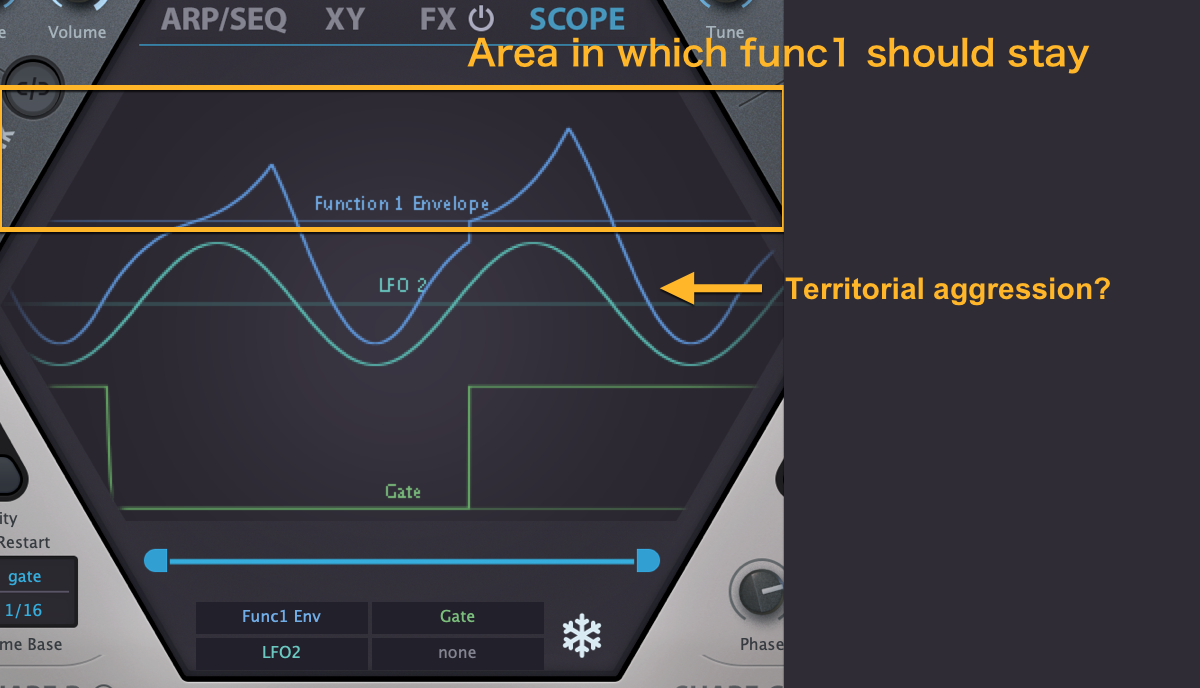
It would be better if Scope detects FG's mode and switch between unipol/bipol visualization.
In Scope, however, it seems that FG is always treated as unipolar, which may cause the line to cross over into another lane.
It would be better if Scope detects FG's mode and switch between unipol/bipol visualization.

-
- u-he
- Topic Starter
- 30250 posts since 8 Aug, 2002 from Berlin
The scope actually used to switch automatically from unipolar to bipolar (half size, shifted, like LFO) display when it encounters negative values.plugmon wrote: Sun Jun 02, 2019 9:25 am Playing with Function Generator and noticed that it's bipol when it's in "Follow" or "Follow(Gate)" mode, while unipol in other modes, right?
In Scope, however, it seems that FG is always treated as unipolar, which may cause the line to cross over into another lane.
However, I think I sneaked in a bug which prevents this from happening anymore. I'll fix!
(we'll try to tackle this issue, user guide typos and the low frame rate issue in some kind of V2.0.1, among other things)
-
- u-he
- Topic Starter
- 30250 posts since 8 Aug, 2002 from Berlin
That is correct. We have to somehow add a hyper-greedy operating system text input control (in a non-plugin overlay window) to make it happen. Which means, there's no way to do the type-away thing and full keyboard control sicne displaying the text input field needs a prior action, either by mouse or by "agreeable hotkey".Funkybot's Evil Twin wrote: Sun Jun 02, 2019 1:19 am Not to add to Urs depression, but some plugins definitely do allow for text entry of values regardless of host. I think every one of those plugins requires a cursor to appear in a text entry box and I'm not sure if that's the key to success, but it definitely can be made to work.