Native Instruments Massive X Synth - Sequel to Massive (Out Now!)

VST, AU, AAX, CLAP, etc. Plugin Virtual Instruments Discussion
Locked New Topic
RELATED
PRODUCTS
Massive Massive X$199.00Buy X-Squared For Massive X

Post

chk071 wrote: Sat Jun 29, 2019 7:23 pm
pdxindy wrote: Sat Jun 29, 2019 7:18 pm
chk071 wrote: Sat Jun 29, 2019 7:13 pm Again, maybe you left the filter on. The filter adds harmonics, so, it won't be a pure sine anymore, obviously.
Also, perhaps filter is not quite the right word. It makes people think it is not a Sine and then you are having to add a filter to make a Sine which some can see as a workaround or not the 'real' thing.

One could also look at it from the other direction. It is a Sine wave and there is a subtle waveshaper that can add harmonic content.
Sure, but, the important thing is that the oscillator obviously produces a pure sine wave, while the harmonics, thus the reason why the sine wave isn't pure anymore, seems to be the filter. So, if you want to judge whether or not the oscillators produce a pure sine wave, you need to deactivate the filter to do so.

I've seen 2 videos now where people didn't do so, and wondered about harmonics, which they called "aliasing" while they aren't. Man, what a mess. :lol:
So, MX is indeed a very good sounding synth.

But I do believe that it has been shown that the osc, without use of the filter, does produce some aliasing, or something, that does not look like harmonics, because the peaks are not evenly distributed from the fundamental. Responses keep emphasizing that the filter needs to be deactivated, but it has been. Other responses are that it is an artifact of the wave table. Others that it is intentionally not a clean sine, because people don’t want a clean sine.

But the point or value of a clean sine in this case, is not the “pure tone” of the wave form, but rather the ability to avoid unexpected and perhaps unwanted behavior when leveraging the modulations, and/or when using distortions - the former being one of it not the key strength of MX. It’s not clear to me that the fact that the aliasing is -130db or below the noise floor doesn’t impact the behavior that low level aliasing has on audio rate modulations.

Again, sine, bypassing filter in routing, exhibits this behavior. Standing alone, aliasing is too low. It may lead to unexpected and unwanted behavior when taking advantage of MX powerful modulations.

Post


Distort the aliasing for some sick dubstep bros.

Post

Functional wrote: Sat Jun 29, 2019 6:54 pm
bartoszkwiecinski wrote: Sat Jun 29, 2019 6:44 pm Yes. But I don‘t get it working. How I have to route the performer for play notes?

See the yellowish modulator at the left osc pitch? That's how. You define your note range there. It's currently +12 in my case, which means that if I play +1 on the performer, it's going to play +1 note (i.e. if I play C and performer is at +1, it plays D).

It's also integral for you to set the performer to the vertical columns overlay at the top (next to "Overlay" text). There you can set the vertical grid to your liking. In my case it's 12, which matches with the +12 modulation. If you want +24 (2 octave grid), you want to set vertical grid to 24.

But as you can imagine, this means that you can't simply play straight up chords and trigger notes like you could in traditional arpeggiator and instead you have to program the sequence yourself. It's kind of a shame that they didn't include a traditional arpeggiator but on the other hand Cubase has couple of them inbuilt and you can always manually arpeggiate the notes you'd like. The sequencer is useful for making inbuilt slides though. Or, because you have 3 of them, you could make a chord progression with triads (or otherwise chords that omit notes) by assigning each one of them to their own oscillators.
Yeah thank you. It starts working, but different to an arp, the notes are not retriggerd so i.e. filter envelope is not retriggering , too. But there is a work around with looping envelopes.

As long we have to use Massive X with a host, an missing arp is not such big thing.

Post

chk071 wrote: Sat Jun 29, 2019 7:13 pm
Again, maybe you left the filter on. The filter adds harmonics, so, it won't be a pure sine anymore, obviously.
I posted a video today about it. In the video, you will see that:

1. I not only turned off the filter but I tested all of them
2. Without the filter, the harmonics are somewhere at -90dB. Your previous post has an image that goes down to -78dB.

I understand that a filter may add harmonics, and this may be a wonderful thing.

I see nothing wrong in having at least one or two filters, that don’t do it, unless I want.

In ZebraHZ, if you try the first six kinds of the VCF, four of them won’t add harmonics on the default setting. The LP Allround and the LP Vintage add.

In Massive X, almost every filter does. And if you find one, that does not, then it’s already there from the oscillator, but lower than where you checked it.

Post

25 pages of aliasing talk. You guys are crazy.

Post

pdxindy wrote: Sat Jun 29, 2019 7:18 pm
chk071 wrote: Sat Jun 29, 2019 7:13 pm Again, maybe you left the filter on. The filter adds harmonics, so, it won't be a pure sine anymore, obviously.
Also, perhaps filter is not quite the right word. It makes people think it is not a Sine and then you are having to add a filter to make a Sine which some can see as a workaround or not the 'real' thing.

One could also look at it from the other direction. It is a Sine wave and there is a subtle waveshaper that can add harmonic content.
I know how to make a sine if I want. In Bazille or Ace, the filters will self-oscillate above a certain resonance. It was not my purpose to make a sine.

It was to test the quality of the software. I believe if it can’t make a sine without harmonics, it will have troubles to do other things. It’s just harder to notice it on a saw wave.

Saturation and harmonics and colors might be wonderful. I think it’s also wonderful if I can decide whether I want or don’t want them.

I don’t consider it the weakness of ZebraHZ that I can find filters that don’t add artifacts by default. If I want to have them, I can get plenty.

Post

Yorrrrrr wrote: Sat Jun 29, 2019 7:41 pm
Distort the aliasing for some sick dubstep bros.
He knows much more about these topics than I do, but anyway, here is my video.


Good night.

Post

Maeldron wrote: Sat Jun 29, 2019 7:54 pm He knows much more about these topics than I do, but anyway, here is my video.
Nope, he doesn't.
Maeldron wrote: Sat Jun 29, 2019 7:54 pm Good night.
'night. ;)

Post

Maeldron wrote: Sat Jun 29, 2019 7:54 pm Good night.
Cracking track :tu:
Best part of the thread thus far.
Last edited by Mushy Mushy on Sat Jun 29, 2019 8:02 pm, edited 1 time in total.
"I was wondering if you'd like to try Magic Mushrooms"
"Oooh I dont know. Sounds a bit scary"
"It's not scary. You just lose a sense of who you are and all that sh!t"

Post

realtrance wrote: Sat Jun 29, 2019 7:38 pm
Functional wrote: Sat Jun 29, 2019 7:28 pm
realtrance wrote: Sat Jun 29, 2019 7:27 pm 70 of those pages dedicated to sustained trolling about non-issues.

Par for the course these days.
now that's an extremely aliased opinion
Lol!

I assume the sequencer can be modulated by LFOs and envelopes, yes? Is this possible per step, and can you create modulation sequences as well with it?

How to do so, if these are possible?
You're breaking my balls here, I honestly don't know. I doubt per-step modulation is possible. The only modulable things as far as I can see are rate & amplitude. I'm not sure what "modulation sequences" means, but if you mean whenever it only works with steps (like stepper in Massive) or it also works like performer in massive, the answer is the latter: yes, you can use modulation shapes there.

There is a really, really good patch called "Obstacles" which utilizes the performers. One runs at 3/4 (kind of...) and one at 4/4 and both pretty much modulate the same parameters. Basically whoever made it has listened to Rival Consoles, because it sounds like it could be from his song "Recovery". A lot of people have actually asked about that, so now there's a Massive X patch demonstrating exactly how one can achieve that effect (although it kind of seemed obvious to me always; just modulate LFO or use a synth with this kind of sequencer).

Post

Functional wrote: Sat Jun 29, 2019 7:19 pm I mean it's entirely plausible for him to do something for a year without being in KVR.
er, no it isn't! :tantrum:
:ud:

Post

Stupid question: Is there any way to assign envelope amount from envelope 2 to a macro control?

Post

chk071 wrote: Sat Jun 29, 2019 8:09 pm Stupid question: Is there any way to assign envelope amount from envelope 2 to a macro control?
Drag a macro knob into env level or one of its boxes. If you mean macro knob as a modulator of env level, I am not 100% sure. Drag both, the envelope and the macro knob into the two boxes of the desired parameter. A circle will now appear. Try playing with that circle, I think it might be a modifier.

I'll do tests myself and see what happens

Post

Functional wrote: Sat Jun 29, 2019 8:13 pm Drag a macro knob into env level or one of its boxes.
Ah... didn't think of that, thanks. :) Should do the trick.

Post

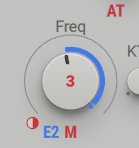
Yup so Image

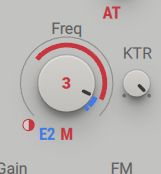
In this setup, the amount of E2 is going to freq parameter is controlled by the amount of M (modwheel). At zero position, E2 will have 0% effect. At max position, E2 will be controlled fully. Note, M does not itself affect the freq parameter in any way. You could make it affect it though and for example make it so that at max position, the freq goes down and the envelope itself affects fully (meaning you can create a smooth transition between a pluck & sustained supersaw thingy with just M).

Here's how that would look like:

Image

Locked

Return to “Instruments”