

Note, that way it also affects _everything_ that particular env is assigned to. The other method I showed will only mod a particular assignment rather than all of them. So it's good to know both of them in case the need for latter ever arises (honestly, with these amount of envelopes... but still, ya never know)

Native Instruments Massive X Synth - Sequel to Massive (Out Now!)
-
- KVRian
- 880 posts since 26 Oct, 2011
-
- KVRAF
- 35671 posts since 11 Apr, 2010 from Germany
Thanks for taking the time to explain, really appreciated.Functional wrote: Sat Jun 29, 2019 8:20 pm Yup so
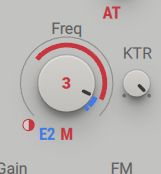
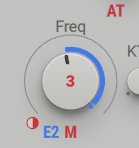
In this setup, the amount of E2 is going to freq parameter is controlled by the amount of M (modwheel). At zero position, E2 will have 0% effect. At max position, E2 will be controlled fully. Note, M does not itself affect the freq parameter in any way. You could make it affect it though and for example make it so that at max position, the freq goes down and the envelope itself affects fully (meaning you can create a smooth transition between a pluck & sustained supersaw thingy with just M).
Here's how that would look like:

-
- KVRian
- 880 posts since 26 Oct, 2011
Can you post a screenshot that includes the voicing section? Alternatively the preset would be fine too, I'll just load it up and see myselfchk071 wrote: Sat Jun 29, 2019 8:39 pm Now i just have to find out why the synth is phasing like mad when i add a insert FX oscillator.
-
- KVRAF
- 35671 posts since 11 Apr, 2010 from Germany
Sounds like PWM square wave, with the phasing. I really have no idea why it's happening, TBH.
When i use just 2 oscillators - everything fine, no phasing. When i add the insert FX oscillator, immediate phasing. Also tried to set the phase to retrigger, and then set the phase differently for each oscillator. With no success. Still phases.
When i use just 2 oscillators - everything fine, no phasing. When i add the insert FX oscillator, immediate phasing. Also tried to set the phase to retrigger, and then set the phase differently for each oscillator. With no success. Still phases.
You do not have the required permissions to view the files attached to this post.
-
- KVRAF
- 2418 posts since 9 Nov, 2016
How is your routing?
-
- KVRian
- 880 posts since 26 Oct, 2011
Right, this is kind of funny but, try inverting the phase of that aux osc. Cause it happens to be an inverted sawtooth in its original position. Kind of seems like a bug, actually. But that's what was causing PWM vibe!chk071 wrote: Sat Jun 29, 2019 8:48 pm Massive_X_ins_FX_OSC.jpg
Sounds like PWM square wave, with the phasing. I really have no idea why it's happening, TBH.
When i use just 2 oscillators - everything fine, no phasing. When i add the insert FX oscillator, immediate phasing. Also tried to set the phase to retrigger, and then set the phase differently for each oscillator. With no success. Still phases.
EDIT: Actually the visual also implies that it's an inverted sawtooth. Kind of curious why they did that!
Last edited by Functional on Sat Jun 29, 2019 9:00 pm, edited 1 time in total.
-
- KVRAF
- 35671 posts since 11 Apr, 2010 from Germany
You're right. Didn't even think of trying that. Thanks again! 
Think i'll report that one to NI.
Thinking about it... i'm not even sure if it is a bug. Actually, the image for the waveform for the ins FX shows the saw inverted to what it looks like on the main oscillators. Maybe it's just a unfortunate design choice.
Think i'll report that one to NI.
Thinking about it... i'm not even sure if it is a bug. Actually, the image for the waveform for the ins FX shows the saw inverted to what it looks like on the main oscillators. Maybe it's just a unfortunate design choice.
Last edited by chk071 on Sat Jun 29, 2019 9:02 pm, edited 1 time in total.
-
- KVRian
- 880 posts since 26 Oct, 2011
Probably no need for reporting, because if you look at the graphical representation, it's also inverted there. It's weird why they did that though, because this is not very beginner-friendly implementation as there will very likely be more people than just you wondering why their 3osc supersaws sound like a superPWMchk071 wrote: Sat Jun 29, 2019 9:00 pm You're right. Didn't even think of trying that. Thanks again!
Think i'll report that one to NI.

Maybe instead of reporting it as a bug, it's better to give feedback about it
EDIT: Or I guess it's actually the uninverted version of a sawtooth while the rest are not. Whatever, but luckily you can flip it.
Last edited by Functional on Sat Jun 29, 2019 9:03 pm, edited 1 time in total.
-
- KVRAF
- 35671 posts since 11 Apr, 2010 from Germany
Yeah, see my edit above.Functional wrote: Sat Jun 29, 2019 9:01 pm Probably no need for reporting, because if you look at the graphical representation, it's also inverted there. It's weird why they did that though, because this is not very beginner-friendly implementation as there will very likely be more people than just you wondering why their 3osc supersaws sound like a superPWM

-
- KVRAF
- 2514 posts since 28 Sep, 2012
I’ve got to say, I love the new knob behavior. Going back to another synth seems weird now.
-
- KVRAF
- 15135 posts since 7 Sep, 2008
Really? I absolutely hate it. Why does a software synth need artificial knob resistance.perpetual3 wrote: Sat Jun 29, 2019 9:41 pm I’ve got to say, I love the new knob behavior. Going back to another synth seems weird now.
"I was wondering if you'd like to try Magic Mushrooms"
"Oooh I dont know. Sounds a bit scary"
"It's not scary. You just lose a sense of who you are and all that sh!t"
"Oooh I dont know. Sounds a bit scary"
"It's not scary. You just lose a sense of who you are and all that sh!t"
-

- addled muppet weed
- 111242 posts since 26 Jan, 2003 from through the looking glass
is that an edm act?
tonight
artificial knob resistance!

support from
lfos over nyquist.
tonight
artificial knob resistance!
support from
lfos over nyquist.

-
- KVRist
- 163 posts since 10 Aug, 2006
Some excellent explanations!
I wasn’t being clear re: modulation sequences.
I am currently possessed by a Microfreak demon, and enjoy using the four “tracks” available in the sequencer usable to record knob movements (like on Ye Olde JP-8000, but different).
Just wondering whether the MX has same. Fine if not, I can just tweeze it with the Microfreak.
Leave the inverted sawtooth as is; teaches the kids to think.
I wasn’t being clear re: modulation sequences.
I am currently possessed by a Microfreak demon, and enjoy using the four “tracks” available in the sequencer usable to record knob movements (like on Ye Olde JP-8000, but different).
Just wondering whether the MX has same. Fine if not, I can just tweeze it with the Microfreak.
Leave the inverted sawtooth as is; teaches the kids to think.
-
- KVRAF
- 2427 posts since 11 Jan, 2009 from Portland, OR, USA
Functional wrote: Sat Jun 29, 2019 8:20 pm Yup so
In this setup, the amount of E2 is going to freq parameter is controlled by the amount of M (modwheel). At zero position, E2 will have 0% effect. At max position, E2 will be controlled fully. Note, M does not itself affect the freq parameter in any way. You could make it affect it though and for example make it so that at max position, the freq goes down and the envelope itself affects fully (meaning you can create a smooth transition between a pluck & sustained supersaw thingy with just M).
Here's how that would look like:
How did you do this, though? How did you make the little circle get "half full" like that? All I can do is drag the first mod source, then the M, and then I just have to different modulations of the cutoff. How do I get the second (M) to scale the first? The little circle on my screen appears completely empty, but I feel like it must be something with that?
This synth sounds great, but man, it is NOT intuitive.