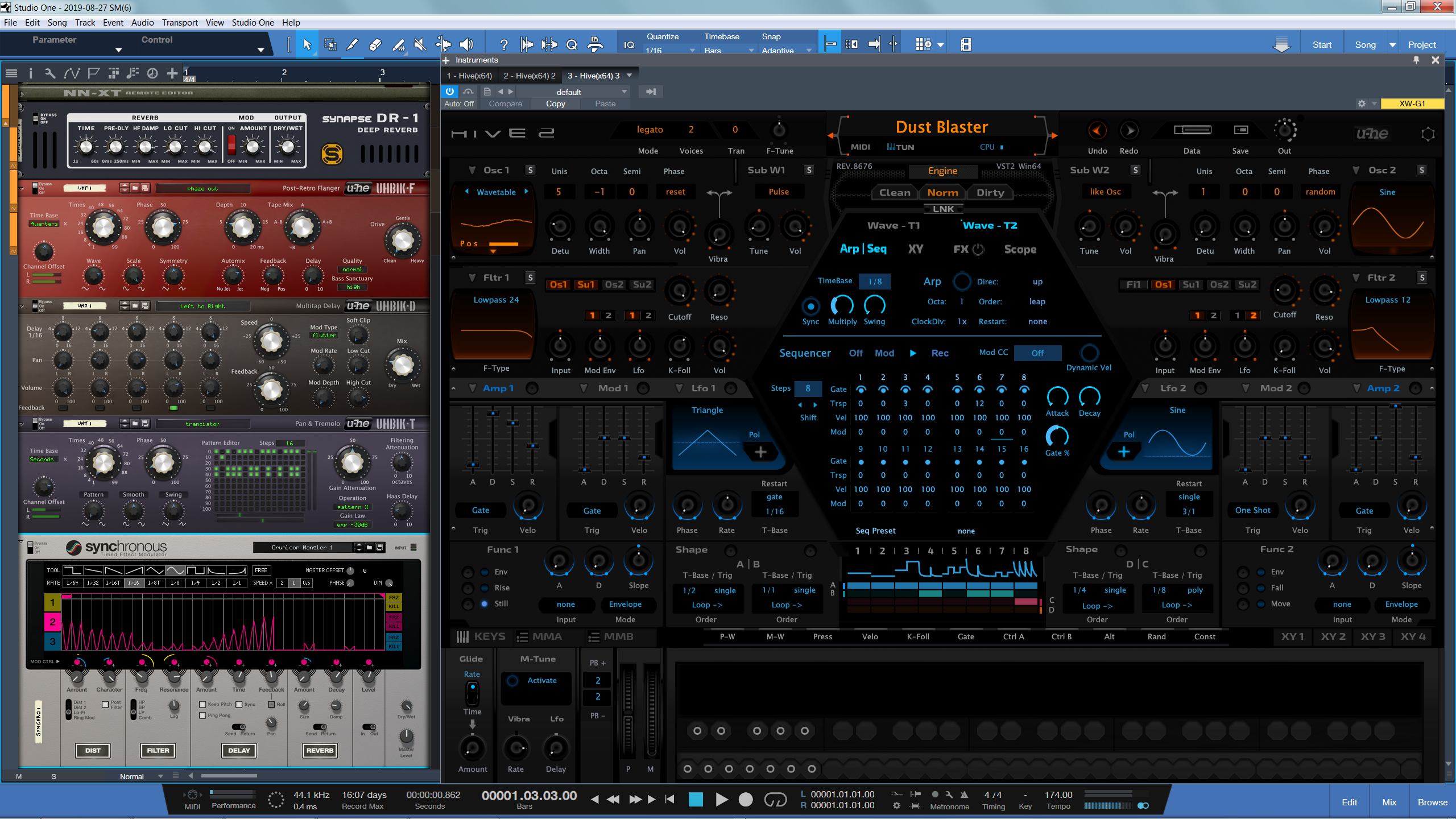
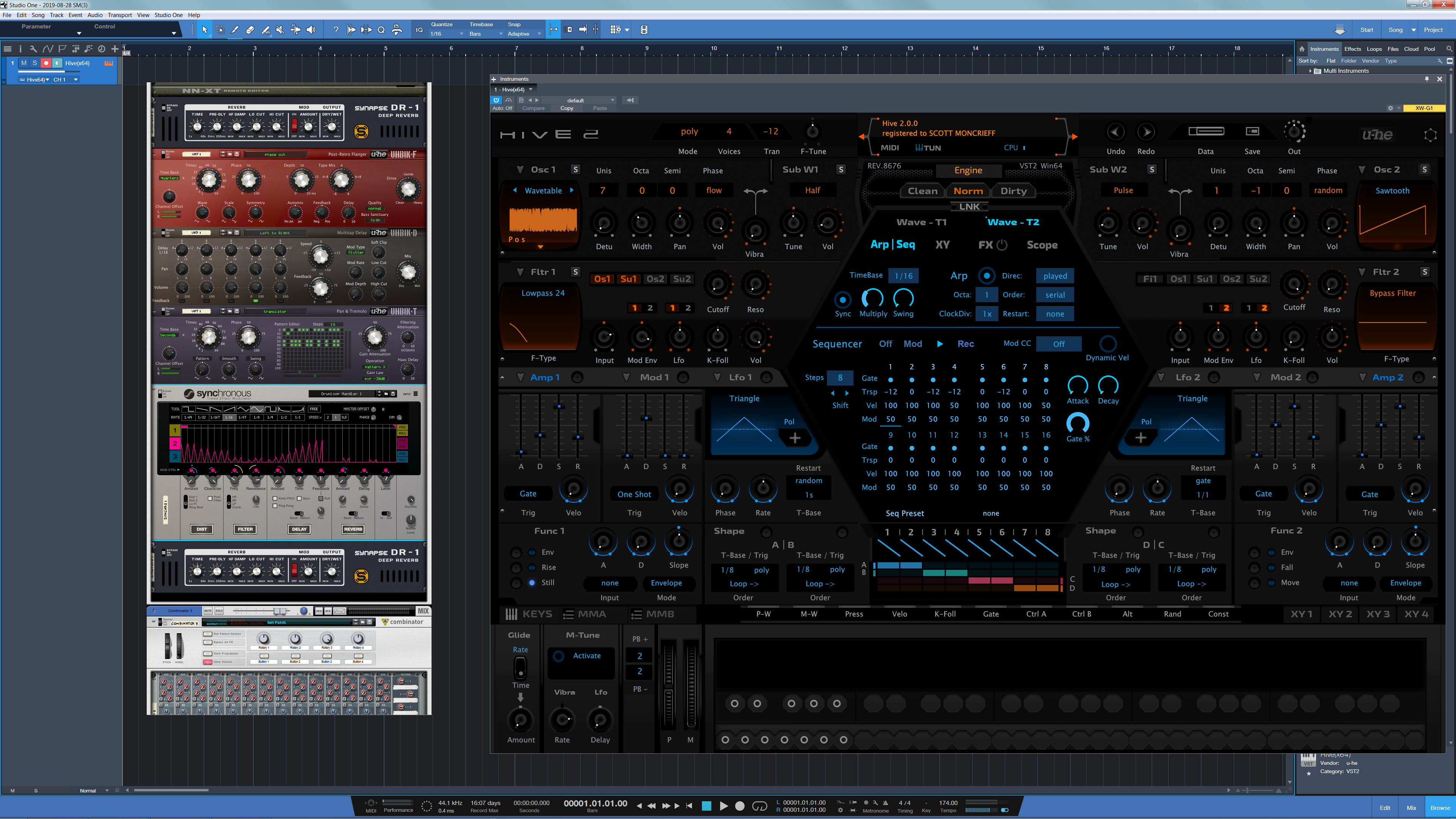
Just how small is Props rack at 1440P & 4K within your DAW ?

Audio Plugin Hosts and other audio software applications discussion
RELATED
PRODUCTS

Post

Right now, I don't have the Rack VST but here's a screengrab to really show the real approximation when working at 1440P resolutions without the surrounding frame that there will be...Of course I could scale down to 1080P to make things more tolerable but it's more of an inconvenience having since moved to higher resolutions. For this test, I'm comparing it with Hive which is scalable. Add your own comparative screenshots if you wish...


Full Size Image

Image
Last edited by THE INTRANCER on Wed Aug 28, 2019 12:37 am, edited 1 time in total.
KVR S1-Thread | The Intrancersonic-Design Source > Program Resource | Studio One Resource | Music Gallery | 2D / 3D Sci-fi Art | GUI Projects | Animations | Photography | Film Docs | 80's Cartoons | Games | Music Hardware |

Post

Reason in 4k native is amazing with the right size monitor... otoh kontakt is complete and utter garbage small.

Nothing is worse than Kontakt in 4k, you'd think for such a popular app you'd hear more about it. Yet all I hear about is Reason, which is perfect in 4k with the right monitor.
Have you tried Vital?

Post

Yup, Reason is amazing at 4K, it's almost invisible, compared to what VST instruments are able to provide..

Reason Rack at 4K Comparison

Image
KVR S1-Thread | The Intrancersonic-Design Source > Program Resource | Studio One Resource | Music Gallery | 2D / 3D Sci-fi Art | GUI Projects | Animations | Photography | Film Docs | 80's Cartoons | Games | Music Hardware |

Post

THE INTRANCER wrote: Wed Aug 28, 2019 12:25 am Yup, Reason is amazing at 4K, it's almost invisible, compared to what VST instruments are able to provide..

Reason Rack at 4K Comparison

Image
Its an argument no one will win with me, because my 50 year old eyes that need both reading and driving glasses sees the proof right in front of me daily about 3' away with no glasses at all. When I went native 4k Reason on a 40" screen, it looks its best by miles, and workflow smoother than any setup prior.

If someone cares enough to have Reason on a 4k screen (or in my case I planned out my entire DAW experience overall), then they need the right hardware for the job. Or they should focus on those other VSTs/DAWS/apps that do, or don't go 4k on a 20" screen, or get used to it, or by all means keep imploring props to vectorize, resize, or whatever.

Regardless, I spent years imploring Props with resizing on their old forums when it looked like a giant pludge and you could barely see more than 1 device in a rack on 800x600 screen, playing musical windows and constantly mousing around and scrolling what a nightmare - only took 15 years and 4k to come out to make it a genuinely comfortable experience.

So ya not perfect for you guys I get it. But I got it long ago, and decided to plan accordingly.
Have you tried Vital?

Post

What a hideous Hive2 skin... :scared:

And BTW, Reason follows Windows scaling factor, so actually it is only so small when you have the scaling set at 100% which means you need to sit very close, because all the other elements would be tiny as well, like the S1 in the background. Nice try :dog:
Music tech enthusiast
DAW, VST & hardware hoarder
My "music": https://soundcloud.com/antic604

Post

antic604 wrote: Wed Aug 28, 2019 4:35 am What a hideous Hive2 skin... :scared:

And BTW, Reason follows Windows scaling factor, so actually it is only so small when you have the scaling set at 100% which means you need to sit very close, because all the other elements would be tiny as well, like the S1 in the background. Nice try :dog:
The Reason GUI now scales based off of the Windows DPI value? The whole GUI will resize based off that value?

Post

Psuper wrote: Wed Aug 28, 2019 2:48 am Its an argument no one will win with me, because my 50 year old eyes that need both reading and driving glasses sees the proof right in front of me daily about 3' away with no glasses at all. When I went native 4k Reason on a 40" screen, it looks its best by miles, and workflow smoother than any setup prior.
4K on a 40" screen is 110 PPI, which is about the same pixel density as a 20" display at 1920x1080. Speaking about resolutions is a bit pointless, since it all comes down to pixel density. Since GUI elements are a fixed number of pixels in size, a smaller screen with a lower resolution will produce a "bigger" image than a larger screen with a higher resolution.

Comparing the Reason rack to the size of other DAWs and plug-ins makes sense, since this gives people a common reference point.
Last edited by AdvancedFollower on Wed Aug 28, 2019 10:14 am, edited 1 time in total.
Take a single oscillator, producing a drone. Send it to the wave shaper, altering the tone.
This can be a triangle, Sawtooth or a square. Modulate the pulse width, nobody will care

Post

Regarding the OP: Well, ya, the Reason rack is small, but, i think we all know that by now. TBH, i don't quite get the point though. I think about everyone of us is using a reasonably big flat screen by now. I sit about 70 cm from it. I can even read small text, and, i don't have the absolute best eyes either.

Post

VitaminD wrote: Wed Aug 28, 2019 4:39 amThe Reason GUI now scales based off of the Windows DPI value? The whole GUI will resize based off that value?
Yes, that is already the case in v10 and probably earlier but I've started with v10 so can't say for sure.

Obviously, because the GUI is low res it will be pixelated (at say 200% scaling it's 2x2 pixels) and/or blurry (at e.g. 125%, 150% or 175%), but it will be of proper, usable size.
Music tech enthusiast
DAW, VST & hardware hoarder
My "music": https://soundcloud.com/antic604

Post

chk071 wrote: Wed Aug 28, 2019 10:12 am TBH, i don't quite get the point though.
It is all about gear porn. Where of course bigger is better. The 'mine is bigger than yours' thing.

Post

AdvancedFollower wrote: Wed Aug 28, 2019 10:09 am Speaking about resolutions is a bit pointless, since it all comes down to pixel density.

Right. I skipped the 1080p displays altogether and went from 22" 1680*1050 to 30" 2560*1600 back in 2010. Still using it! I'll get a 4K screen when I can get a quality one in 40" at an affordable price. I feel anything smaller than 30" would be a reckless waste of pixels as I care more about maximizing the information on screen than about smooth edges.

Post

perfumer wrote: Wed Aug 28, 2019 11:44 am
chk071 wrote: Wed Aug 28, 2019 10:12 am TBH, i don't quite get the point though.
It is all about gear porn. Where of course bigger is better. The 'mine is bigger than yours' thing.
:hihi:

Post

AdvancedFollower wrote: Wed Aug 28, 2019 10:09 am
Psuper wrote: Wed Aug 28, 2019 2:48 am Its an argument no one will win with me, because my 50 year old eyes that need both reading and driving glasses sees the proof right in front of me daily about 3' away with no glasses at all. When I went native 4k Reason on a 40" screen, it looks its best by miles, and workflow smoother than any setup prior.
4K on a 40" screen is 110 PPI, which is about the same pixel density as a 20" display at 1920x1080. Speaking about resolutions is a bit pointless, since it all comes down to pixel density. Since GUI elements are a fixed number of pixels in size, a smaller screen with a lower resolution will produce a "bigger" image than a larger screen with a higher resolution.

Comparing the Reason rack to the size of other DAWs and plug-ins makes sense, since this gives people a common reference point.
Precisely, hence my point:
Psuper wrote:
If someone cares enough to have Reason on a 4k screen (or in my case I planned out my entire DAW experience overall), then they need the right hardware for the job. Or they should focus on those other VSTs/DAWS/apps that do, or don't go 4k on a 20" screen, or get used to it, or by all means keep imploring props to vectorize, resize, or whatever.

Regardless, I spent years imploring Props with resizing on their old forums when it looked like a giant pludge and you could barely see more than 1 device in a rack on 800x600 screen, playing musical windows and constantly mousing around and scrolling what a nightmare - only took 15 years and 4k to come out to make it a genuinely comfortable experience.

So ya not perfect for you guys I get it. But I got it long ago, and decided to plan accordingly.
Have you tried Vital?

Post

antic604 wrote: Wed Aug 28, 2019 11:00 am
VitaminD wrote: Wed Aug 28, 2019 4:39 amThe Reason GUI now scales based off of the Windows DPI value? The whole GUI will resize based off that value?
Yes, that is already the case in v10 and probably earlier but I've started with v10 so can't say for sure.

Obviously, because the GUI is low res it will be pixelated (at say 200% scaling it's 2x2 pixels) and/or blurry (at e.g. 125%, 150% or 175%), but it will be of proper, usable size.
I did give this a try (spent the 3+ hours downloading the trial and testing various dpi scaling values in Windows 10). I will say, you are correct. The GUI does scale... to some degree.

But I will also say, the scaling is all over the board. The Transport is HUGE, the left panel is what I'd consider 'normal' sized, while the hardware rack is only moderately sized. Until I reach 200% then things get silly with the various mismatched scaling.

I think what I was expecting is the rack to scale much larger while the rest of the bars to either remain the same or scale similarly. But they all seem to follow a different sizing... It helps a little on smaller scaling amounts. But on larger values seems to have issues...

Post

"But I will also say, the scaling is all over the board."

thats what i thought too. it took me quite a while to "see" the "inspector" bar haha. the transport bar looks huge compared to it.
i use a 1920x1080 and the rack is really hard to read and looks misproportioned. its not even half the width of the screen. the mixer knobs and fontsand icons are so tiny...
[aˈtoːm] [aːl] [ˈa(ː)tonaːl] IV
https://soundcloud.com/atomaalatonal4

Post Reply

Return to “Hosts & Applications (Sequencers, DAWs, Audio Editors, etc.)”