


If you add a "limit note range" variation to the track, it works just fine.. (in addition to what the editor does)magicmusic wrote: Thu Mar 26, 2020 11:45 amto avoid this, maybe a general for all working variation effect note range can help. this offer to add a note range and what should do with the notes when it is over range. shift 1 octave , ignore or clip to chord note that is nearest range limit. this can then use in all generatorsmusicdevelopments wrote: Sun Mar 22, 2020 7:25 pm Please note that variations may create notes outside the range.
The note range should be respected for the original generated notes.
Now that saving and loading presets work, you can send me a badly behaving melody (.RCmldy files from Documents/RapidComposerV3/MelodyPresets).
v3 Beta Feedback And Discussion (Bugs, Features, Suggestions)
-
- KVRAF
- 2154 posts since 15 May, 2017
-
 musicdevelopments musicdevelopments https://www.kvraudio.com/forum/memberlist.php?mode=viewprofile&u=223336
 - KVRAF
- Topic Starter
- 6013 posts since 9 Jan, 2010
Hi Forrest,forrestlong wrote: Sat Mar 21, 2020 6:28 pm Hi Attila,
I'm having just way tooooo much fun with the new Melody Editor!
One thing I notice is that when I transfer the melody to the MIDI Import tab, it does not retain the key. I'm assuming that Midi Import is performing its own analysis still.
I don't think I replied to your post. Please do not take the melody into the MIDI Import tab, that is not the right workflow.
The melody contains much more information than a plain MIDI file. The button next to the 'heart' button is for dropping the melody onto DAWs in the form of a MIDI file.
If you created a new melody, place the melody into the clipboard, that you can paste into the composition.
Thanks,
Attila
EDIT: the MIDI drag button is on the left side of the presets button
https://www.musicdevelopments.com
Home of RapidComposer, Melodya, MIDI Mutator and Syne
Summer Sale • June 3-15 • 40% off RapidComposer, Melodya, MIDI Mutator, Syne
Home of RapidComposer, Melodya, MIDI Mutator and Syne
Summer Sale • June 3-15 • 40% off RapidComposer, Melodya, MIDI Mutator, Syne
-
- KVRAF
- 2154 posts since 15 May, 2017
in the phrase editor, if i double click on a note to split it, after a couple seconds, it re-glues.. made me laugh..
also in the phrase editor, if you play and loop, if click loop off while it is playing, it continues to loop..
also in the phrase editor, if you play and loop, if click loop off while it is playing, it continues to loop..
-
- KVRAF
- 1752 posts since 30 Nov, 2013
Hi Attila!
Once again (but to no avail)) I tried to compose my chord rules as I imagine it .. First of all, I got a crash.
And maybe someone will tell me (I decided that I don’t know yet)) 1) Is it possible to turn the chord progression into Rules? 2) Is it possible to turn a monophonic melody, well, or a phrase into a scale of Master Track? Surprisingly, even dragging a monophonic phrase from the browser into the Master Track does not allow you to change the scale of the Master Track)
Once again (but to no avail)) I tried to compose my chord rules as I imagine it .. First of all, I got a crash.
And maybe someone will tell me (I decided that I don’t know yet)) 1) Is it possible to turn the chord progression into Rules? 2) Is it possible to turn a monophonic melody, well, or a phrase into a scale of Master Track? Surprisingly, even dragging a monophonic phrase from the browser into the Master Track does not allow you to change the scale of the Master Track)
You do not have the required permissions to view the files attached to this post.
-
- KVRist
- 102 posts since 6 May, 2014
Hi Attila,musicdevelopments wrote: Fri Mar 27, 2020 9:36 am Hi Forrest,
I don't think I replied to your post. Please do not take the melody into the MIDI Import tab, that is not the right workflow.
The melody contains much more information than a plain MIDI file. The button next to the 'heart' button is for dropping the melody onto DAWs in the form of a MIDI file.
If you created a new melody, place the melody into the clipboard, that you can paste into the composition.
Thanks,
Attila
EDIT: the MIDI drag button is on the left side of the presets button
Ah, ok ... yes, that does work better. Thanks!
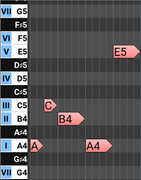
I have another request, where the "Invert Melody Vertically" function is not returning what I would expect. It seems to be flipping around the note in the center of the phrase, the "C" in this example:
Original Phrase:
After variation:
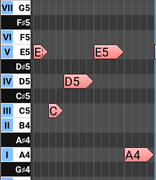
What I would expect is for the phrase to flip around the first note. And, it would also be important for it to be able to flip chromatically, not just diatonically. Adding these two options would make this function much more appealing from a music theory perspective.
Thanks!
Forrest
-
musicdevelopments musicdevelopments https://www.kvraudio.com/forum/memberlist.php?mode=viewprofile&u=223336
- KVRAF
- Topic Starter
- 6013 posts since 9 Jan, 2010
Hi lulukom,
thank you for the crash dump! I fixed this bug and made other improvements with progression rules.
 I implemented this old request today. I remember also BluGenes asked for this feature a few months ago. I will build a new beta version shortly, maybe today.
You can add a progression to a rule:
- from the master track
- from the progression browser
- or from the progression editor
Thanks,
Attila
thank you for the crash dump! I fixed this bug and made other improvements with progression rules.
YES!
I implemented this old request today. I remember also BluGenes asked for this feature a few months ago. I will build a new beta version shortly, maybe today.You can add a progression to a rule:
- from the master track
- from the progression browser
- or from the progression editor
No, this does not work, but it is a good idea.lulukom wrote: Sat Apr 11, 2020 5:46 pm 2) Is it possible to turn a monophonic melody, well, or a phrase into a scale of Master Track?
Thanks,
Attila
https://www.musicdevelopments.com
Home of RapidComposer, Melodya, MIDI Mutator and Syne
Summer Sale • June 3-15 • 40% off RapidComposer, Melodya, MIDI Mutator, Syne
Home of RapidComposer, Melodya, MIDI Mutator and Syne
Summer Sale • June 3-15 • 40% off RapidComposer, Melodya, MIDI Mutator, Syne


-
musicdevelopments musicdevelopments https://www.kvraudio.com/forum/memberlist.php?mode=viewprofile&u=223336
- KVRAF
- Topic Starter
- 6013 posts since 9 Jan, 2010
Vertical inversion works by flipping between the lowest and highest note. So the the lowest note becomes the new highest note and vice versa. Please note that any enabled variations are applied after inversion.forrestlong wrote: Mon Apr 13, 2020 8:51 am I have another request, where the "Invert Melody Vertically" function is not returning what I would expect. It seems to be flipping around the note in the center of the phrase, the "C" in this example:
In the new beta version you will have access to the new melody contour transformation next to the inversion icons. I still need to fix a small bug so I can upload it only tomorrow morning.
Good idea, I will add this!forrestlong wrote: Mon Apr 13, 2020 8:51 am And, it would also be important for it to be able to flip chromatically, not just diatonically. Adding these two options would make this function much more appealing from a music theory perspective.
Thanks!
Forrest
Thanks,
Attila
https://www.musicdevelopments.com
Home of RapidComposer, Melodya, MIDI Mutator and Syne
Summer Sale • June 3-15 • 40% off RapidComposer, Melodya, MIDI Mutator, Syne
Home of RapidComposer, Melodya, MIDI Mutator and Syne
Summer Sale • June 3-15 • 40% off RapidComposer, Melodya, MIDI Mutator, Syne
-
musicdevelopments musicdevelopments https://www.kvraudio.com/forum/memberlist.php?mode=viewprofile&u=223336
- KVRAF
- Topic Starter
- 6013 posts since 9 Jan, 2010
Yes, the UI was not updated, probably I messed up something. I fixed this in the new beta version.BluGenes wrote: Fri Apr 10, 2020 4:17 pm in the phrase editor, if i double click on a note to split it, after a couple seconds, it re-glues.. made me laugh..
Yes, this is how it works right now. It will be fixed later.BluGenes wrote: Fri Apr 10, 2020 4:17 pm also in the phrase editor, if you play and loop, if click loop off while it is playing, it continues to loop..
Thanks,
Attila
https://www.musicdevelopments.com
Home of RapidComposer, Melodya, MIDI Mutator and Syne
Summer Sale • June 3-15 • 40% off RapidComposer, Melodya, MIDI Mutator, Syne
Home of RapidComposer, Melodya, MIDI Mutator and Syne
Summer Sale • June 3-15 • 40% off RapidComposer, Melodya, MIDI Mutator, Syne
-
musicdevelopments musicdevelopments https://www.kvraudio.com/forum/memberlist.php?mode=viewprofile&u=223336
- KVRAF
- Topic Starter
- 6013 posts since 9 Jan, 2010
RapidComposer 3.9b10 is available!
LOTS of improvements in this update! New installers, new plug-ins, lots of useful features in the Melody Editor. Please send me feedback about the plug-ins, especially the AU plug-in if you have tried that.
Improvements:
LOTS of improvements in this update!
New installers, new plug-ins, lots of useful features in the Melody Editor. Please send me feedback about the plug-ins, especially the AU plug-in if you have tried that. Improvements:
- The RapidComposer plug-in was rewritten. RapidComposer includes VST2, VST3 and AU plugins. The plug-ins are self contained, so they do not use the main application. You can use soundfonts and audio tracks in the plug-in.
- The installer is improved, including installing plug-ins. The Windows installer contains 32-bit and 64-bit versions. The installer is the same for demo and unlocked versions.
- The 'entering the license key' screen redesigned with the possibility to start the demo version
- Add selected chords to a progression rule (from the master track, the progression editor, and the browser)
- Contour transformation added to Melody Editor
- Lots of keyboard shortcuts are available in the Melody Editor
- Preview in the Melody Editor will playback the composition together with the melody for Ctrl-Space or Ctrl-click on the PLAY button
- Holding Ctrl while editing melody variations will affect all melody sections at once
- New variation: 'Apply Shape'. It is similar to Apply Melody but uses the new rhythm mapping
- 'Apply Shape' offered when you drop something over a phrase
- Convert phrases to Melody Editor
- Splitting and glueing sections is possible in the Melody Editor
- For first usage font size is automatically set based on the screen resolution
- Additional bigger font sizes offered, suitable for 4K resolution
- Minor UI changes
- The experimental 'Apply Voicing' functionality has been removed
- Fixed a bug when reading soundfonts into the instrument library
- Fixed: splitting phrases does not delete audio
- Fixed: a crash when using incomplete chord progression rules fixed
https://www.musicdevelopments.com
Home of RapidComposer, Melodya, MIDI Mutator and Syne
Summer Sale • June 3-15 • 40% off RapidComposer, Melodya, MIDI Mutator, Syne
Home of RapidComposer, Melodya, MIDI Mutator and Syne
Summer Sale • June 3-15 • 40% off RapidComposer, Melodya, MIDI Mutator, Syne
-

- KVRAF
- 1782 posts since 10 Mar, 2004
-
- KVRAF
- 2154 posts since 15 May, 2017
Incompatible with older compositions.. "unkown" track header.. but, if you create a new comp it's ok..
edit: maybe not, seems it was just that one composition.. unless some one else can re-produce this..

edit: maybe not, seems it was just that one composition.. unless some one else can re-produce this..
-
- KVRAF
- 1752 posts since 30 Nov, 2013
Hi Attila!
Thanks for the new beta!
First impressions are very good, everything works stably and pleasantly. All new features are very good!
Question number one!) How do I change the volume of the preview instruments ? In the Melody Editor, my instrument plays very loudly) I must say right away that the Velocity regulator in % works very unevenly - right away loudly or quietly.
It also seems to me that the Melody Editor lacks the box check “Always play with the Composition” (I’m tired of holding the СTRL button)).
And I would like to apply not only Variations of Generation Melody Editor, but also Variations of Phrases and Track for the Melodic Editor - it would be Super (For example, the Limit of the Generation Range!).
It is a pity that the possibility of dragging the Rhythm from Phrases to the Melodic Editor has not yet been realized! )
Well, an old trifle .. The setting of the playback loop mode along with the Composition is not saved! (Thank you!
Thanks for the new beta!
First impressions are very good, everything works stably and pleasantly. All new features are very good!
Question number one!) How do I change the volume of the preview instruments ? In the Melody Editor, my instrument plays very loudly) I must say right away that the Velocity regulator in % works very unevenly - right away loudly or quietly.
It also seems to me that the Melody Editor lacks the box check “Always play with the Composition” (I’m tired of holding the СTRL button)).
And I would like to apply not only Variations of Generation Melody Editor, but also Variations of Phrases and Track for the Melodic Editor - it would be Super (For example, the Limit of the Generation Range!).
It is a pity that the possibility of dragging the Rhythm from Phrases to the Melodic Editor has not yet been realized! )
Well, an old trifle .. The setting of the playback loop mode along with the Composition is not saved! (Thank you!
-
musicdevelopments musicdevelopments https://www.kvraudio.com/forum/memberlist.php?mode=viewprofile&u=223336
- KVRAF
- Topic Starter
- 6013 posts since 9 Jan, 2010
Using the new plug-in when loading an old composition in a DAW, that is not backward compatible.BluGenes wrote: Thu Apr 16, 2020 1:47 pm Incompatible with older compositions.. "unkown" track header.. but, if you create a new comp it's ok.
However the standalone should load all existing compositions.
https://www.musicdevelopments.com
Home of RapidComposer, Melodya, MIDI Mutator and Syne
Summer Sale • June 3-15 • 40% off RapidComposer, Melodya, MIDI Mutator, Syne
Home of RapidComposer, Melodya, MIDI Mutator and Syne
Summer Sale • June 3-15 • 40% off RapidComposer, Melodya, MIDI Mutator, Syne
-
musicdevelopments musicdevelopments https://www.kvraudio.com/forum/memberlist.php?mode=viewprofile&u=223336
- KVRAF
- Topic Starter
- 6013 posts since 9 Jan, 2010
I will address all issues, thanks! I have fixed 2 bugs in the plug-ins so a new update will be available tomorrow.
Thanks,
Attila
Thanks,
Attila
https://www.musicdevelopments.com
Home of RapidComposer, Melodya, MIDI Mutator and Syne
Summer Sale • June 3-15 • 40% off RapidComposer, Melodya, MIDI Mutator, Syne
Home of RapidComposer, Melodya, MIDI Mutator and Syne
Summer Sale • June 3-15 • 40% off RapidComposer, Melodya, MIDI Mutator, Syne