Thanks for the info. It didn't cross my mind to create an FX channel...Blue Cat Audio wrote: Sun Mar 08, 2020 10:01 amGlad that you like it! It's a very different type of technology than amp sims, and it requires quite a bit of signal analysis, so that's probably why...dgc4rter wrote: Sat Mar 07, 2020 3:53 pm Just bought this and well pleased with it. I'm just a little gobsmacked that no other plugin manufacturer, especially those who specialise in amp modelling (IKMM?) haven't created something like this long before now.If you have something like Axiom or Patchwork, you can simply add the plug-in in a parallel chain and set the dry signal to 0. It also works when placed at the beginning of the signal path in Late Replies.Anyway, I have a technical question please. You say in the manual that you can output just the wet feedback signal to a reverb for more realistic effect but you don't mention how that's done. Could you please enlighten me on how you would go about doing this. I'm using Cubase 10 by the way if that help you to be more specific. Thanks in advance.
In a DAW such as Cubase, you can send the signal track to a aux bus where you place the plug-in (100% wet) and the reverb (100% wet) and it should do the trick. You can also use an amp sim between the two to make it more realistic.
Blue Cat's AcouFiend, the feedback simulation plug-in, is here!
-
- KVRer
- 24 posts since 5 Oct, 2015
-
Blue Cat Audio Blue Cat Audio https://www.kvraudio.com/forum/memberlist.php?mode=viewprofile&u=39981
- KVRAF
- Topic Starter
- 6345 posts since 8 Sep, 2004 from Paris (France)
The idea is to use this plug-in at the very beginning of the chain, or right after a compressor. You put the distortion pedals and amp sims after AcouFiend.tylerdedera wrote: Sun Mar 08, 2020 10:40 am So would this go before a distortion pedal (sim) or between the pedalboard and amp sim? Also, I didn’t really see anything in the videos, but can you modulate the pitch of the feedback with the software or is it strictly dependent on the incoming pitch?
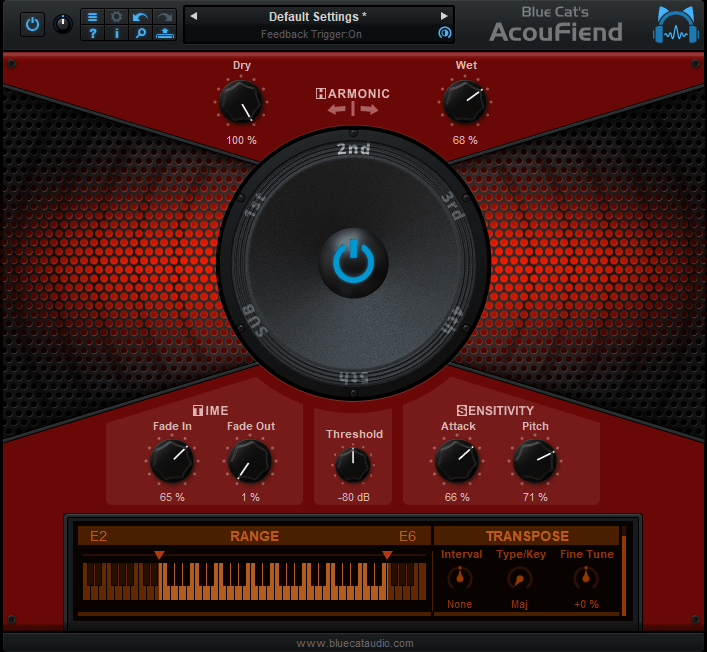
There are several ways to "modulate" the feedback: you can either change the selected harmonic using the big speaker/wheel, or transpose it (these will -re-trigger the feedback, to make it sound more natural). You can also use the "fine tune" setting to modulate the pitch by +-1 semi-tone.

-
- KVRist
- 116 posts since 13 Mar, 2019
Hey thanks! This looks hard to resist, I already use reguitar pickups on anything that I don’t mic, great plugin. Any plans on more pickups or acoustic sounds with reguitar in the near future? Appreciate your help.Blue Cat Audio wrote: Mon Mar 09, 2020 9:37 amThe idea is to use this plug-in at the very beginning of the chain, or right after a compressor. You put the distortion pedals and amp sims after AcouFiend.tylerdedera wrote: Sun Mar 08, 2020 10:40 am So would this go before a distortion pedal (sim) or between the pedalboard and amp sim? Also, I didn’t really see anything in the videos, but can you modulate the pitch of the feedback with the software or is it strictly dependent on the incoming pitch?
There are several ways to "modulate" the feedback: you can either change the selected harmonic using the big speaker/wheel, or transpose it (these will -re-trigger the feedback, to make it sound more natural). You can also use the "fine tune" setting to modulate the pitch by +-1 semi-tone.
![]()
-
Blue Cat Audio Blue Cat Audio https://www.kvraudio.com/forum/memberlist.php?mode=viewprofile&u=39981
- KVRAF
- Topic Starter
- 6345 posts since 8 Sep, 2004 from Paris (France)
tylerdedera wrote: Mon Mar 09, 2020 9:50 am Hey thanks! This looks hard to resist, I already use reguitar pickups on anything that I don’t mic, great plugin. Any plans on more pickups or acoustic sounds with reguitar in the near future? Appreciate your help.

This covers pretty much the full range of possible pickups and more. But maybe we will add more "presets" there, if it can help.
-
- KVRer
- 14 posts since 12 Mar, 2019
Is the Demo fully operational in terms of midi? Seems like it isn't. I can't get any of the midi to work in global settings, and also when creating bindings in my host (Cantabile Performer). It captures the Learn function, but I see no change or controls operating. Further, I know it says the demo will bypass itself periodically, but after just a few notes I can't get it to work any further, even though it indicates it's getting signal and it's feeding back showing the red glow. Very frustrating to even try this out... and I've been working with midi since the 80's, so no... it's not me.
-
Blue Cat Audio Blue Cat Audio https://www.kvraudio.com/forum/memberlist.php?mode=viewprofile&u=39981
- KVRAF
- Topic Starter
- 6345 posts since 8 Sep, 2004 from Paris (France)
Yes, the demo is fully operational. Maybe there is a particular issue with the plug-in in this host.
By the way, once you have learnt a parameter, you need to uncheck the MIDI learn function or it will keep learning from new changes. Also, maybe there are multiple controller messages sent at the same time, so you may want to enter the MIDI CC number by hand instead and see if it works better.
If the plug-in is showing the red glow you should actually hear it. Can you hear anything else from your host?
By the way, once you have learnt a parameter, you need to uncheck the MIDI learn function or it will keep learning from new changes. Also, maybe there are multiple controller messages sent at the same time, so you may want to enter the MIDI CC number by hand instead and see if it works better.
If the plug-in is showing the red glow you should actually hear it. Can you hear anything else from your host?
-
- KVRer
- 14 posts since 12 Mar, 2019
OK, thanks for the quick response. That helps a lot in troubleshooting, I'll go back and try some other approaches. And yes, maybe I was leaving Learn checked. But it's odd in that using my host's midi bindings also didn't work either, and yet they work on all but one other of my 200+ plugs.
On sound issue, it was odd in that it was glowing red, I could hear my unaffected tone just fine. And when I muted the plugin itself in my host, to ensure it was the only signal, no sound at all. Unmute it, try every control possible, change hramonics, etc... no change at all, just my unaffected tone.
Something did occur to me just now, after I installed it I realized I used the default file location instead of my own file location, so while all was closed I moved the entire folder. I'll try uninstall/install to proper location... hopefully that may do the trick. Thanks!
On sound issue, it was odd in that it was glowing red, I could hear my unaffected tone just fine. And when I muted the plugin itself in my host, to ensure it was the only signal, no sound at all. Unmute it, try every control possible, change hramonics, etc... no change at all, just my unaffected tone.
Something did occur to me just now, after I installed it I realized I used the default file location instead of my own file location, so while all was closed I moved the entire folder. I'll try uninstall/install to proper location... hopefully that may do the trick. Thanks!
-
Blue Cat Audio Blue Cat Audio https://www.kvraudio.com/forum/memberlist.php?mode=viewprofile&u=39981
- KVRAF
- Topic Starter
- 6345 posts since 8 Sep, 2004 from Paris (France)
It should not change much, but who knows...! By the way which plug-in format are you using? Maybe another plug-in format will work better...
-
- KVRer
- 14 posts since 12 Mar, 2019
Actually the reinstall to default folder did the trick. I read up on VST3 and Steinberg said VST3 protocol requires that folder. Works great now, even with midi. Will be buying shortly after I actually jam with it... it is very, very cool. I have an expression pedal on my midi footboard so I'm currently experimenting with the best way to control it. Ideally I'd just fade in/out with the pedal, but as of now controlling the wet signal gets a little jump when first engaging it. will see if I can smooth that out with my host by doing midi control direct from the host and using some midi filters. Or maybe I'll just do a paralell signal route to it, fading in/out in my host. Regardless, it's awesome, and I appreciate the help!
-
- KVRer
- 14 posts since 12 Mar, 2019
Got it nice and smooth using my host binding to wet. I did discover something interesting ... It was taking about 2 secs to reach full harmonic, which I know is typically natural, but that was even with the fade in time all the way to the shortest time. But when I reduced the volume a bit on my guitar it came in much faster. And I have nothing between guitar and the plugin, humbucker neck position, vol at 5 it's too slow, vol at 2.5 it's faster. No worries, just interesting... play with your input gain and see how it reacts. Anyway, love this... it's like Carlos in a box! Thanks!
You do not have the required permissions to view the files attached to this post.
-
Blue Cat Audio Blue Cat Audio https://www.kvraudio.com/forum/memberlist.php?mode=viewprofile&u=39981
- KVRAF
- Topic Starter
- 6345 posts since 8 Sep, 2004 from Paris (France)
Glad that it finally worked for you. This timing issue is strange, with fade in set to the minimum it should be extremely fast, as you can see in the various demo and review videos.
One thing that could maybe influence the time to get a stable pitch (and hence the time to get feedback) is the custom range that you have set. Have you tried to extend the lower range (using the keyboard sliders at the bottom)?
-
Blue Cat Audio Blue Cat Audio https://www.kvraudio.com/forum/memberlist.php?mode=viewprofile&u=39981
- KVRAF
- Topic Starter
- 6345 posts since 8 Sep, 2004 from Paris (France)
The first Acoufiend reviews are in, check them out!
-
- KVRer
- 14 posts since 12 Mar, 2019
Yeah I thought that timing thing was a little strange. And yes, I'd tried it with the entire keyboard enabled, no change. Well, I jsut bought it and am downloading that version, maybe when I play with it some more I'll figure out why it did that. Thanks!
Update: In case this helps someone else, I missed the tiny Gain control, top left. Increasing that slightly gave me much better control over fade in time. I've also created some presets with varying fade in times and other settings... jumping between those even while in the middle of a solo can give you great control. Love it!
-
Blue Cat Audio Blue Cat Audio https://www.kvraudio.com/forum/memberlist.php?mode=viewprofile&u=39981
- KVRAF
- Topic Starter
- 6345 posts since 8 Sep, 2004 from Paris (France)
-
Blue Cat Audio Blue Cat Audio https://www.kvraudio.com/forum/memberlist.php?mode=viewprofile&u=39981
- KVRAF
- Topic Starter
- 6345 posts since 8 Sep, 2004 from Paris (France)