Bitwig Studio 3.2 goes into Beta

Audio Plugin Hosts and other audio software applications discussion
RELATED
PRODUCTS

Post

https://www.bitwig.com/en/20/bitwig-studio-3_2.html

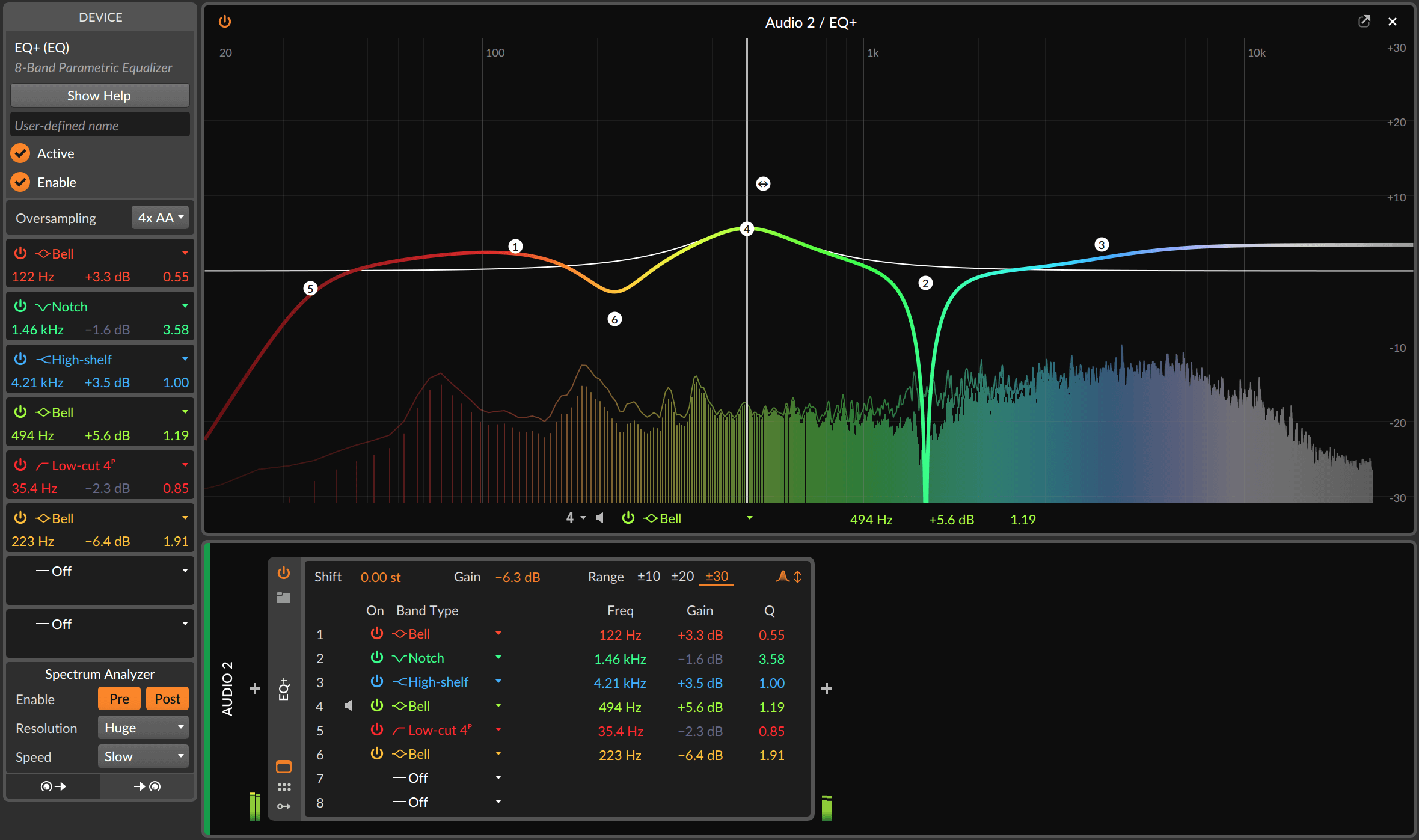
New EQ:

Image

Saturator:

Image

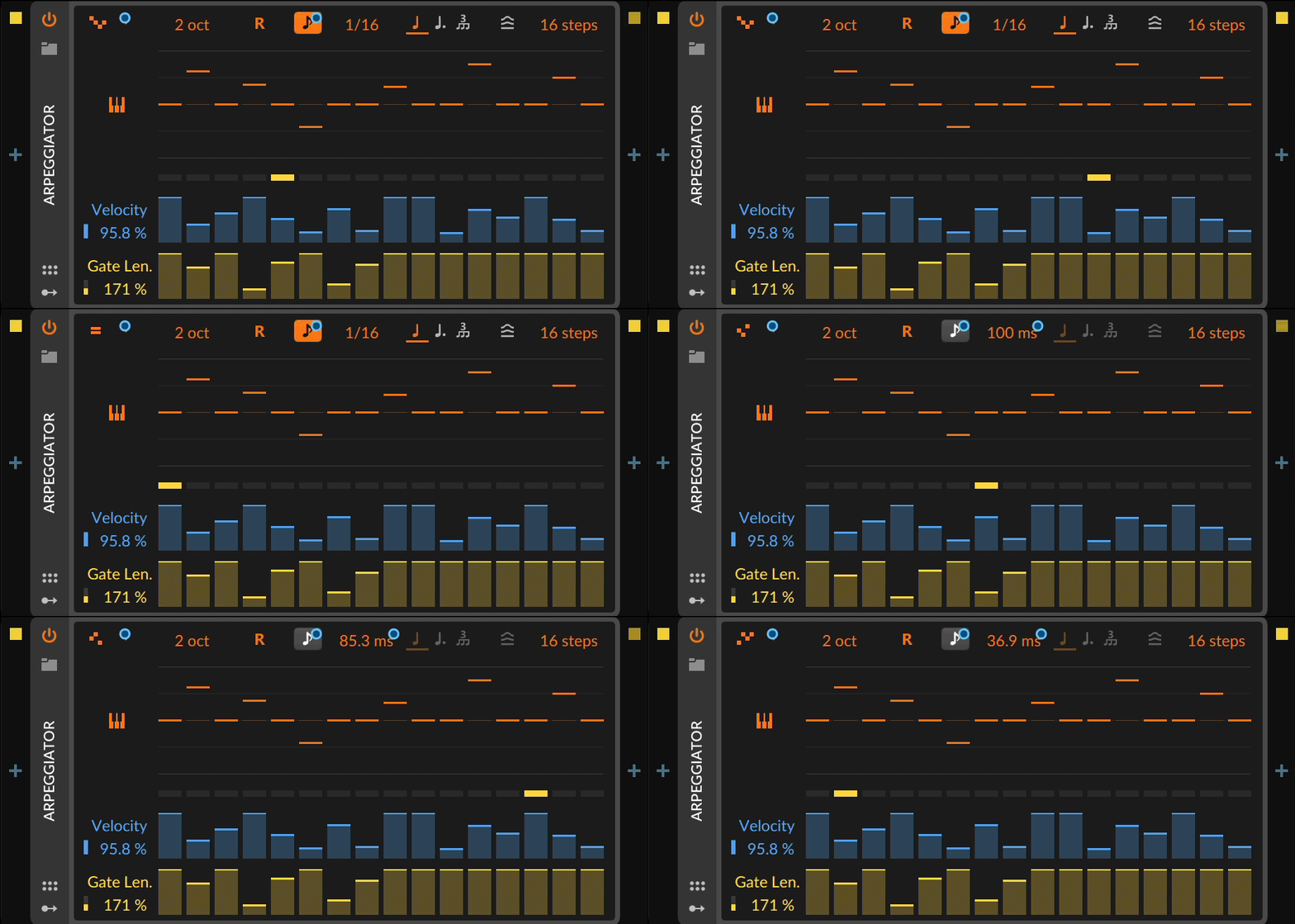
Updated Arpeggiator:

Image

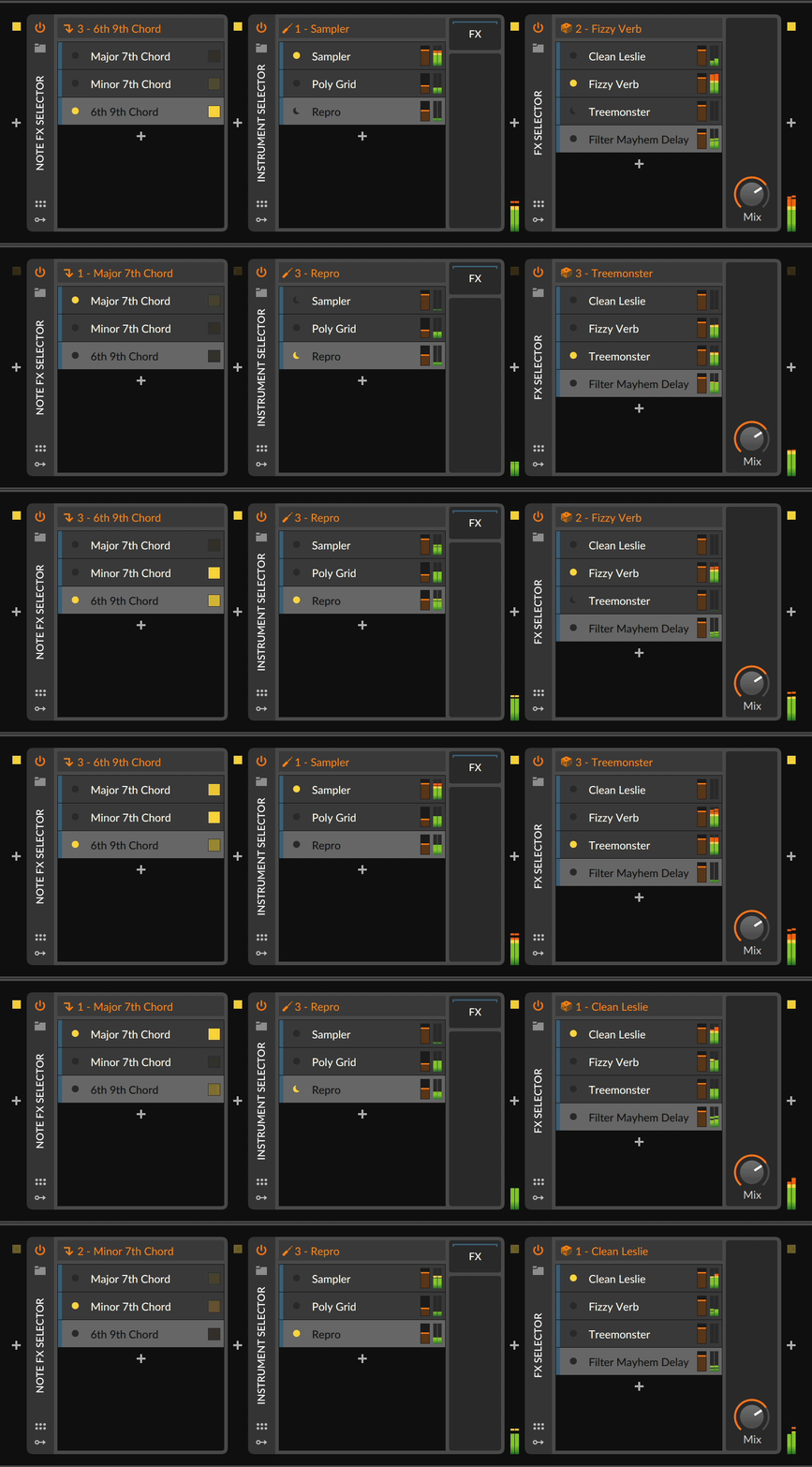
New modes for Selector containers:

Image

Mini displays for inserts in the Mix panel:

Image

Return channels added to Drum Machine:

Image

Few new Grid modules:

Image

Tool finally goes to zero :wheee: :hail:


And lot's more here: https://downloads.bitwig.com/beta/3.2/R ... eta-1.html
Music tech enthusiast
DAW, VST & hardware hoarder
My "music": https://soundcloud.com/antic604

Post

Finally you can take a break for few weeks from checking for new beta version :)

Post

Some of those are interesting. Returns on Drum Machine is nice. The Saturator is much needed. A new Arp is nice. Everything else is meh. What about all the other things they need to fix in the app. Are those getting addressed?
Last edited by apoclypse on Fri Apr 17, 2020 2:52 pm, edited 2 times in total.
Studio One // Bitwig // Logic Pro // Ableton // Reason // FLStudio // MPC // Force // Maschine

Post

apoclypse wrote: Fri Apr 17, 2020 2:42 pmWhat about all the other things they need to fixing the app are those getting addressed?
There's lots more in Release Notes. I'm still reading :)
Music tech enthusiast
DAW, VST & hardware hoarder
My "music": https://soundcloud.com/antic604

Post

Lot of cool stuff, looks like they are still focused on sound design rather than composing/arranging though...some of those new grid modules look very interesting....

Changes in Bitwig Studio 3.2, Beta 1
New Device: EQ+ (EQ)
EQ driven by new algorithms and a unique style of graphic interface
14 filter mode types for each band
Global frequency Shift and Gain controls for moving all bands together
Adaptive-Q option, narrowing the Q of bands as their gain increases
Clicking on the EQ curve creates a new band (eight bands max)
Clicking on the selected band's audition target soloes that band while the mouse/touch is held
Numeric controls for the selected band are shown (with all bands displayed in the Inspector)
Expanded Device View for large/detachable version of the graphical editor (with all bands displayed in the Device Panel)
EQ curve is shown on a rainbow spectrum, with each band's color set by its frequency [Note: other devices also use this spectrum for frequency controls]
New Device: Saturator (Destruction)
Unique signal shaper that works in the log domain (like us )
Basic panel interface with transfer function display, Drive amount, Normalize option, and low-pass controls for just saturated portion of the signal
Expanded curve editor that provides:
Quiet and loud Threshold settings, to define each end of the sound
Quiet and loud Amount settings, controlling how the signal is proportionately changed beyond each Threshold
Quiet and loud Knee settings, for how gradual each transition is
Three Skew controls, for making the loud Threshold, Amount, and Knee controls apply differently to positive and negative amplitudes
An interactive log display of these controls and the incoming signal
New Grid module: Saturator (Shaper) - module version of the device, allowing for polyphonic applications in The Grid
Updated Device: Arpeggiator (Note FX)
Each step now has a pitch offset slider (in addition to the velocity and note length controls)
New Humanize parameter randomizes velocities and step start times and lengths (either earlier or later)
Nine new Pattern options, for 17 in total
Rate can now be set in milliseconds
Micro-pitch expressions are now tracked for each note
Poly Pressure to Velocity option replaces initial note velocities with any polyphonic pressure message (like those from MPE controllers) received
Added option to Allow Overlapping Notes
Trigger Immediately option allows notes to start off the beat grid
Updated Devices: Selectors (Container) Get Voice Modes
Instrument Selector, Note FX Selector, and audio FX Selector now have voice modes in the Inspector for cycling thru the available layers in various ways
Modes (and example uses) include:
Manual (same as the current behavior) - Target layer is set by user, controller, modulator, and/or automation
Round-robin - New note triggers the next layer (for notes in series, or individual notes within a chord)
Free Voice - New note uses the first free layer (ideal for loading multiple layers with HW CV Instrument to create polyphony with Eurorack hardware)
Random - New note randomly selects a layer (nice with a pile of different audio FX)
Keyswitches - Designated notes set the target layer (you define the lowest keyswitch; so if set to note C2 and the Selector has 3 layers, C2 switches to layer 1, C#2 switches to layer two, and D2 switches to layer 3). Good for film scoring with different sounds and articulations.
CC - Designated continuous controller sets target layer (you define a continuous controller [default CC1 - mod wheel], whose full range will morph evenly thru all layers). For example, using mod wheel to cycle thru various note FX.
Program Change - PC messages set the target layer (program change messages map directly to each layer). Common output from pedal controllers, etc.
Other than Manual, all other modes are aware of the layer count. So adding or removing layers will just work without additional configuration.
Delay Options, for Evolving Sounds
New device: Note Delay, to delay an entire device chain/layer either in beats or seconds
ADSR, AHDSR & Note Sidechain modulators: now have a Pre-delay option for delaying their start either in beats or seconds
New Grid module: Logic Delay (Logic), for delaying the high- or low-logic portion of gate signals
New modulator: AHD on Release (Envelope), a triggered envelope that launches at note off
Other New Features
New Grid module: XP (Filter) - a modulatable filter with key tracking and 15 modes, including combos
New Grid module: Array (Data) - a recordable sequencer, for keeping track of up to 1024 events, notes, velocities, or anything else
New Grid module: N-Latch (Logic) - tracks the last trigger received from up to eight inputs, for an exclusive solo-type relationship
Frequency parameters (particularly filter and tuning settings) are now consistently colored with a rainbow spectrum, to help form sonic muscle memory. This is used by at least one parameter in the following:
Instruments: E-Clap, E-Cowbell, E-Kick, E-Snare, E-Tom, FM-4, Phase-4, Polysynth, Sampler
FX: Chorus, Comb, De-Esser, EQ+, EQ-2, EQ-5, Filter, Ladder, Phaser, Resonator Bank, Ring-Mod, Test Tone
Modulators: Audio Rate, HW CV In
Mixer View now has mini displays of various devices, showing EQ curves (for EQ+, EQ-5, and EQ-2) or gain reduction amounts (for Compressor, De-Esser, Dynamics, Gate, and Peak Limiter)
Drum Machine device: now supports internal audio returns
In The Grid : dropping a sample into a Grid patch creates a Sampler module with that audio
Improvements
Drum Machine device: drum cells now swap when dragged on top of each other
EQ-5 and EQ+ devices: spectrum analyzers now have Resolution and fall Speed controls
Spectrum device & Grid module: now have Resolution, fall Speed, Tilt, Scale, Range, and drawing Style controls
Tool device: now has an additional Volume control that bottoms out at silence
Steps (Data) Grid module - new Interpolation option, for crossfading between step values; also a great way to create a lookup table
AD (Envelope) Grid module - new Looping option, to repeat the envelope if the gate signal (often the key) is still held down when the envelope completes
Audio engine: better parameter automation for VST2 and VST3 plug-ins (they now update at least every 64 samples)
When dragging multiple notes, small chords (up to four notes) will preview all notes; larger chords will sound only the note clicked on
When moving multiple notes with the keyboard, only the earliest note will sound
The left/right edge of the clip's loop region can be dragged in the Detail Editor Panel (even when the edge is offscreen)
Note and clip stretching targets (left and right edges) are a bit wider
Both Arranger clips and cue markers can now be renamed with the standard command
User files can be renamed within the Browser Panel
Time selections display their length in minutes and seconds in the Inspector Panel
New preference for whether clicking a mixer solo button should disable all other solos ("exclusive solo") or not. Shift-click performs the inverse behavior.
New preference for whether middle mouse button drags will just pan in note editors, or pan and zoom
ControlSurface API version 11:
Hardware controllers using the new API now have sub-buffer accuracy and no jitter when controlling parameters
Manual MIDI mappings in a project now have lower latency, sub-sample accuracy, and no jitter when controlling parameters
Now possible to map controls to MIDI pitch bend messages
Ability to choose between physical or logical knob/slider for a mapping in mapping browser
Ability to decide if a MIDI note mapping applies always or only when it is used for note input
Fixes
Instrument Selector device: playing the same notes on different channels created stuck notes
Fixed ghost note with some plug-ins when overlapping notes where played
Fixed incorrect value on polyphonically modulated indexed controls
Ignore mapping low level MIDI events that we detect are used for touch or release of a control
X32 and 24C mixers, S88MK3, Live + PUSH 3, Osmose, RedShift 6, Pro3, S4, Tempera, Syntakt, Digitone, OP1-F, OPXY, TR-1000, Eurorack, TD27 Drums, Guitars, Basses, Amps and of course lots of pedals!

Post

This looks tempting. I wish Ableton developed Live at this pace. Well done for Bitwig.
Last edited by Yorrrrrr on Fri Apr 17, 2020 5:04 pm, edited 1 time in total.

Post

Still nothing there imo that will make me use the upgrade code I purchased last year. I guess I'll stick with 3.0.3 for while. I want some fundamental improvements not flashy stuff to hand wave issues away.
Studio One // Bitwig // Logic Pro // Ableton // Reason // FLStudio // MPC // Force // Maschine

Post

apoclypse wrote: Fri Apr 17, 2020 3:50 pm Still nothing there imo that will make me use the upgrade code I purchased last year. I guess I'll stick with 3.0.3 for while. I want some fundamental improvements not flashy stuff to hand wave issues away.
But, but, but...!!! :scared: :roll:
apoclypse wrote: Tue Apr 14, 2020 1:39 pm How is this not basically a subscription again?
Music tech enthusiast
DAW, VST & hardware hoarder
My "music": https://soundcloud.com/antic604

Post

Wow, this is really a nice update!!!
Especially the EQ section of Bitwig was very weak and now they come up with a native solution which doesn´t need to fear any 3rd party competition!!
The saturator looks very nice too... as does the Arp now too!!

Well done Bitwigs!!

Post

Once again some more eye candy to attract new customers, while old (and well known) bugs never get fixed.

It's been like that since v1 and it looks like it will never change.

Post

antic604 wrote: Fri Apr 17, 2020 3:54 pm
apoclypse wrote: Fri Apr 17, 2020 3:50 pm Still nothing there imo that will make me use the upgrade code I purchased last year. I guess I'll stick with 3.0.3 for while. I want some fundamental improvements not flashy stuff to hand wave issues away.
But, but, but...!!! :scared: :roll:
apoclypse wrote: Tue Apr 14, 2020 1:39 pm How is this not basically a subscription again?

Cute, but that comment was about auto renewals which is essentially a subscription. Try to keep up
Studio One // Bitwig // Logic Pro // Ableton // Reason // FLStudio // MPC // Force // Maschine

Post

Is the grid feedback routing still restricted to buffer size ?
Eyeball exchanging
Soul calibrating ..frequencies

Post

gentleclockdivider wrote: Sat Apr 18, 2020 11:09 am Is the grid feedback routing still restricted to buffer size ?
Yes.
Music tech enthusiast
DAW, VST & hardware hoarder
My "music": https://soundcloud.com/antic604

Post

gentleclockdivider wrote: Sat Apr 18, 2020 11:09 am Is the grid feedback routing still restricted to buffer size ?
That is not going to change (my guess)

Post

apoclypse wrote: Sat Apr 18, 2020 1:26 am
antic604 wrote: Fri Apr 17, 2020 3:54 pm
apoclypse wrote: Fri Apr 17, 2020 3:50 pm Still nothing there imo that will make me use the upgrade code I purchased last year. I guess I'll stick with 3.0.3 for while. I want some fundamental improvements not flashy stuff to hand wave issues away.
But, but, but...!!! :scared: :roll:
apoclypse wrote: Tue Apr 14, 2020 1:39 pm How is this not basically a subscription again?

Cute, but that comment was about auto renewals which is essentially a subscription. Try to keep up
Hmm... You mean in the same way updating Cubase every year is essentially a subscription? And upgrading Reason from version 10 to version 11 is also a subscription following that logic.

The only thing that is not true about Bitwig, is that the upgrade becomes more expensive if the version numbers are more apart. Upgrading Bitwig 1.0 to 3.x is just as expensive as upgrading from 2.0 to 3.x or 3.0 to 3.x. Cubase and comparable other DAW's at the other hand...

Anyway - I will do a renewal around next month I guess. I have been waiting for a while, and next month will give me some nice extra cash.

Post Reply

Return to “Hosts & Applications (Sequencers, DAWs, Audio Editors, etc.)”