


Draw automation curves in editor?
-
Jonathan Shepherd Jonathan Shepherd https://www.kvraudio.com/forum/memberlist.php?mode=viewprofile&u=5644
- KVRian
- 748 posts since 28 Jan, 2003
I see that drawing automation curves in the arranger window works fine but in the edit window the draw function doesn't work. Am I missing something? Thanks-
-

- Banned
- 11467 posts since 4 Jan, 2017 from Warsaw, Poland
Unless you mean something very specific, automation drawing works fine for me in both areas (you need to be in Automation panel and use Draw tool, which I guess is obvious):Jonathan Shepherd wrote: Tue Apr 28, 2020 11:53 pm I see that drawing automation curves in the arranger window works fine but in the edit window the draw function doesn't work. Am I missing something? Thanks-
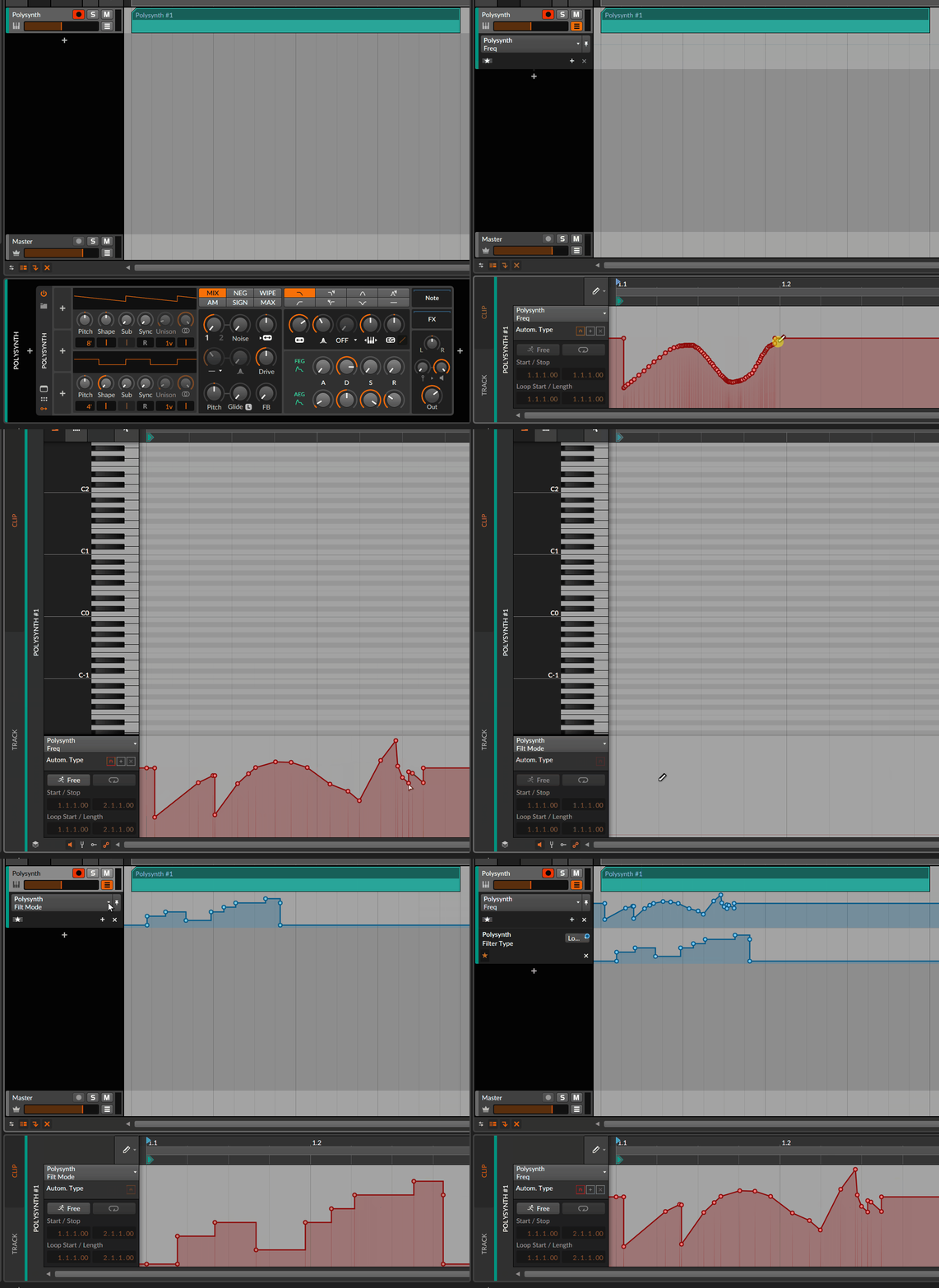
-
Jonathan Shepherd Jonathan Shepherd https://www.kvraudio.com/forum/memberlist.php?mode=viewprofile&u=5644
- KVRian
- Topic Starter
- 748 posts since 28 Jan, 2003
I see what you mean...it's just that sometimes the draw function won't pop up like it should. Make an automation curve and go directly to edit window, then switch to pen mode...it doesn't work. You have to go back to the arranger window and double click on an automation track, and then switch over to pen mode to get it to work. Once I do that I can use pen mode in any screen. I can do it their way, it's just a little wonky. Thanks-
-
- KVRian
- 909 posts since 7 Nov, 2017
It shouldn't work that way and sounds like a bug. If you can reproduce it reliably, send a bug ticket to support@bitwig.com and see if they can help.Jonathan Shepherd wrote: Wed Apr 29, 2020 12:00 pm I see what you mean...it's just that sometimes the draw function won't pop up like it should. Make an automation curve and go directly to edit window, then switch to pen mode...it doesn't work. You have to go back to the arranger window and double click on an automation track, and then switch over to pen mode to get it to work. Once I do that I can use pen mode in any screen. I can do it their way, it's just a little wonky. Thanks-

-
Jonathan Shepherd Jonathan Shepherd https://www.kvraudio.com/forum/memberlist.php?mode=viewprofile&u=5644
- KVRian
- Topic Starter
- 748 posts since 28 Jan, 2003
Yee ha, my first bug, maybe! Thanks for the notification mate. Just sent them a bug report and we'll see---
-
- Banned
- 11467 posts since 4 Jan, 2017 from Warsaw, Poland
BTW, you're NOT talking about using touch screen for drawing automation, are you?
Because in there there's issues not resolved since v1.3
Because in there there's issues not resolved since v1.3
-
- KVRAF
- 12095 posts since 2 Dec, 2004 from North Wales
Fellow Surface user here...one of the reasons I justified buying Bitwig when I was still on Liveantic604 wrote: Wed Apr 29, 2020 5:16 pm BTW, you're NOT talking about using touch screen for drawing automation, are you?
Because in there there's issues not resolved since v1.3

I assume you have raised this and had an acknowledgement? maybe use this 'beta' as a reminder?
PS- is that you?
X32 and 24C mixers, S88MK3, Live + PUSH 3, Osmose, RedShift 6, Pro3, S4, Tempera, Syntakt, Digitone, OP1-F, OPXY, TR-1000, Eurorack, TD27 Drums, Guitars, Basses, Amps and of course lots of pedals!
-
Jonathan Shepherd Jonathan Shepherd https://www.kvraudio.com/forum/memberlist.php?mode=viewprofile&u=5644
- KVRian
- Topic Starter
- 748 posts since 28 Jan, 2003
Nope, no touch screen, though it sounds nice. I got an auto mail saying they got the bug report-
-
- Banned
- 11467 posts since 4 Jan, 2017 from Warsaw, Poland
Yes & yes. That's why I recorded the video - to submit it to Support, long time ago.SLiC wrote: Wed Apr 29, 2020 5:40 pmFellow Surface user here...one of the reasons I justified buying Bitwig when I was still on Liveantic604 wrote: Wed Apr 29, 2020 5:16 pm BTW, you're NOT talking about using touch screen for drawing automation, are you?
Because in there there's issues not resolved since v1.3
I assume you have raised this and had an acknowledgement? maybe use this 'beta' as a reminder?
PS- is that you?
If you want to listen to more of me, here's more

https://www.youtube.com/playlist?list=P ... NKLjjMI4KF
-
Jonathan Shepherd Jonathan Shepherd https://www.kvraudio.com/forum/memberlist.php?mode=viewprofile&u=5644
- KVRian
- Topic Starter
- 748 posts since 28 Jan, 2003
It turns out that the tool selector in the automation editor panel on the arranger page is linked to whatever tool you see pop up on the automation editor on the edit page. The one on the edit page doesn't even have a tool selector, just the piano roll part. Bitwig has great clip memory, or whatever you call it, so I set up clips to open with the pen tool selected on the arrangement automation editor. Now I can switch to the edit page with the pen tool selected. Save as template and the clip behavior will always be that way. The only problem left is that I'd still have to switch back to the arranger page to switch automation tools but that's pretty minor by this point. Edit: doh, I realized after writing this that I can use number keys to switch tools on the edit automation page.
-
- KVRist
- 126 posts since 21 Sep, 2015
Bitwig's lack of addressing any of the problems ,bugs and inconsistencies with touch functionality almost make it seem like Microsoft shitted on them and thus Bitwig abandoned it altogether. The two companies seemed to be forming a mutually beneficial relationship around the Surface and then I stopped hearing about it at all. I'm not saying that's what actually happened but that's how it looks from my end. I reported how adjusting velocity using a touchscreen breaks the undo function until you restart the project and they said basically, ---we know. That was likely two years ago.antic604 wrote: Wed Apr 29, 2020 5:16 pm BTW, you're NOT talking about using touch screen for drawing automation, are you?
Because in there there's issues not resolved since v1.3 :