Struggling to render Midi from LABS

Discussion about: tracktion.com
RELATED
PRODUCTS

Post

I am using Waveform 11 Free

I've put a whole track together, using SI Drums VST (Cakewalk) and a range of sounds from the LABS VST3 range (Spitfire Audio). I'm ready to render to an MP3, but when I render the track to either MP3 or WAV, it only renders the drums... not any of the other midi synth sounds from the LABS Plugin.

The plugins seem to work fine when playing and recording (I'm using a Korg Micro Key), but when I try to render the file it throws up yellow warning triangles on those specific tracks and says that they don't output to a MIDI device or a plugin synthesizer. The only way to get it to work again is to restart the software.

I could really do with some help please.

PS: this is new to me since I got ill. I usually just sit on a stage and play drums, so please assume I don't know what you're talking about :)
Waveform 11 - Win 10 Pro - Korg Keys & Yamaha Drums

Post

Are you rendering the TRACK, or exporting the MIX to an MP3? Presumably the LABS are running on another track, so if you render the drum track, that's all you're going to get.

As for the Micro Key; when you record that, presumably you are recording MIDI events (key presses) and not audio into that track? Normally, in that case, you have a VST (i.e. Labs) on each track on the right side, just before the volume control.
Waveform 13; Win10 desktop/8 Gig; Win11 Laptop; MPK261; VFX+disfunctional ESQ-1

Post

Hi Peter

I suppose I'm exporting the mix, apologies I meant track as in Music Track

I have ten tracks, and each on the right hand side just before the volume for each track, has a plugin set to the sound I want. I used the Korg playing through those VSTs on each track to build up the music as I played and recorded into the track.. including the drums

On the bottom left, I'm clicking Export > Render to a file, which then lets me choose the file type, bit rate etc. Rendering from here only renders the drums tracks, and not the tracks using LABS.
Waveform 11 - Win 10 Pro - Korg Keys & Yamaha Drums

Post

Maybe a screenshot would be helpfull.
Waveform 12 Pro, Cubase Pro 13, Windows 11, i7-13700H

Post

I've had the same issue with labs. I can't render it to a new track. It stops making sound and won't start again.
Linux version?

Post

Okay here are the screenshots

I created a demo:

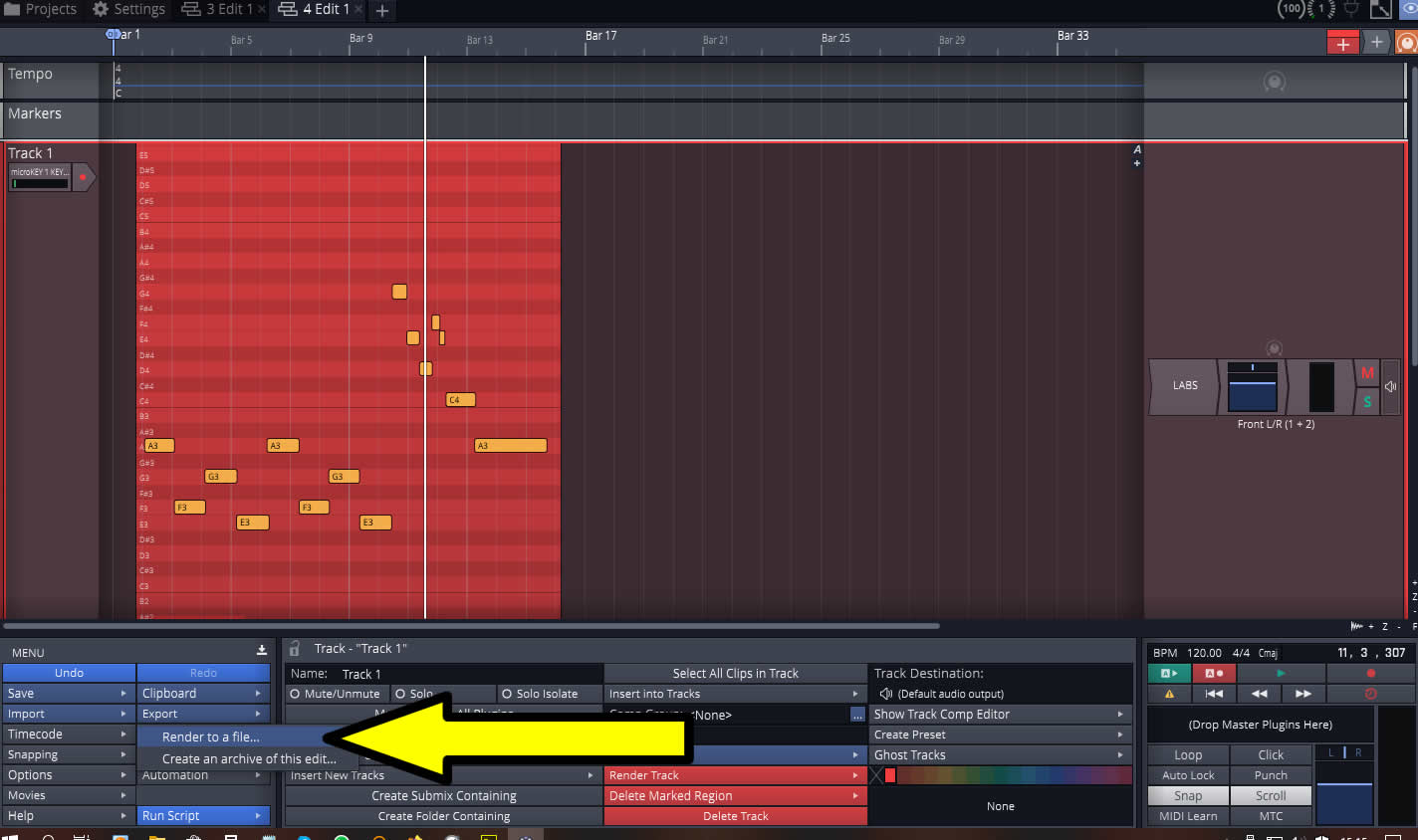
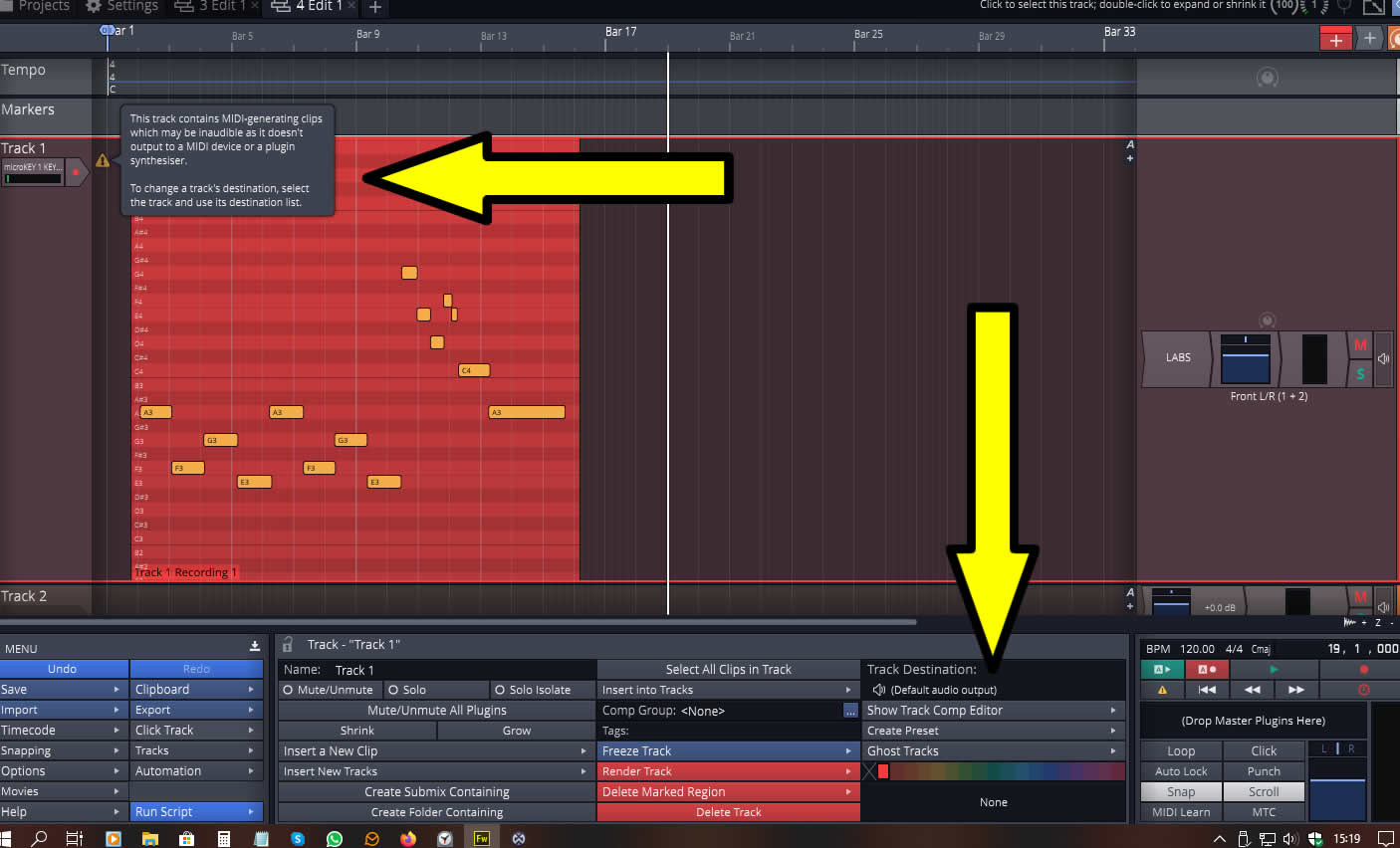
1) I assign the Midi Controller to the left and the the VST to the right (both on the same track), press record and play some notes. While ever it's like this, I can play, record, modify what I've created with no issue. It plays the sound from the VST prefectly. The third arrow here shows the track destination is 'Default Audio Output'. In settings this device is my sound card, using ASIO for the Midi.

Image


2) So after I've built up my mix/music with multiple tracks all set up the same (obviously with different sounds), I'm ready to export to MP3/WAV. I click 'Export' at the bottom and then 'Render to a File'.

Image


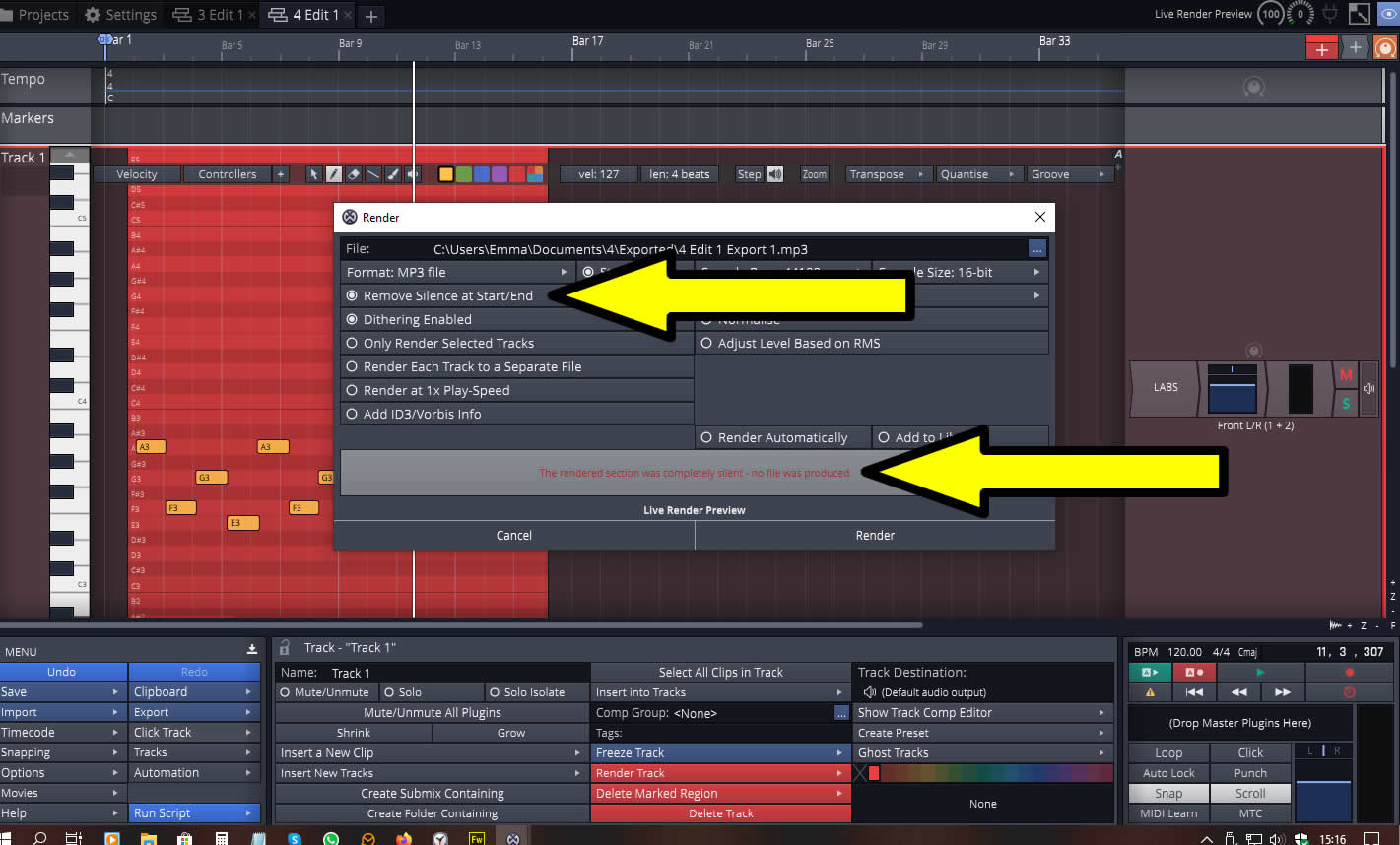
3) I then get this box. If I select 'Remove Silence at Start/End', the export feature refuses to run because it sees nothing even though just seconds ago that sound was playing perfectly. You can see the notes in the background and LABS VST still present. If I untick 'Remove Silence at Start/End', It does render, but it is indeed silent.

Image


4) Then once I go back to the music, I am presented with this yellow warning triangle telling me that the Midi is not outputting to a Midi device and that I should change the track destination. The destination at the botton however has not changed from the setting that was previously playing just fine.

Image

This really has me stuck - I'd love to know what I'm doing wrong.

I have done previous work with this, using recorded (microphone) work and it exported fine. The music I am waiting to export from this, ignores all the MIDI from LABS, but exported the tracks with the Drums on from Cakewalk no problem?
Waveform 11 - Win 10 Pro - Korg Keys & Yamaha Drums

Post

Which LABS are you using and is it a VST3 version? I have just tried with LABS Choir and Sleigh Bells using the VST2 version and it renders fine.

Edit: Sorry, I see you did mention VST3 why not try VST2 version?
'He craved immortality so much, he was prepared to die for it.'

Post

I think it's VST3

I've noticed that there seems to be a Labs 64 Bit installed too - hopefully that's my error.

I'll report back.
Waveform 11 - Win 10 Pro - Korg Keys & Yamaha Drums

Post

It looks like everything should be in place. As a test, can you try changing LABS to 4OSC which is included and pick patches that aren't completely annoying; and see if that renders properly (there are a dozen or so "usable" strings/brass/flute patches in there). Just replace one of the LABS tracks to test if you like.

(or another of your choice. Download 4Front Rhodes 64-bit or Keyzone Classic; both free and quite useful)
Waveform 13; Win10 desktop/8 Gig; Win11 Laptop; MPK261; VFX+disfunctional ESQ-1

Post

Thanks everyone, it seems to be sorted now.

The difference being between using LABS VST3, which worked fine, but would not render, and LABS (64 Bit), which appears to be just VST. I have replaced all the plugins now, which means my levels are all out, but I can work on that. I didn't realise there would be too much difference.

It has exported succesfully to MP3 - phew; I knew it'd be me doing something silly.

Thanks too Peter, I'll have a look at those - more VST's can only be a good thing

I'll stick around!
Waveform 11 - Win 10 Pro - Korg Keys & Yamaha Drums

Post

It seems to look like this topic
viewtopic.php?f=22&t=544890
Waveform Pro 13.5.25 Windows 10

Post

asprog wrote: Thu Jun 11, 2020 4:47 pm It seems to look like this topic
viewtopic.php?f=22&t=544890
It does, thanks - I'll have a read of that too.
Waveform 11 - Win 10 Pro - Korg Keys & Yamaha Drums

Post

Spitfire Audio seems to use JUCE. What's up with VST3 JUCE plugins breaking in Waveform? If nothing else, it should make it easier for TSC to track down the problem.

I have submitted a ticket for this issue.
Surely there must be consensus by now...

Post

Good to know there's a solution. Thanks for the fix!
Linux version?

Post

I'm having the exact same problem. How can I know if I'm using LABS VST3, VST2, VST, or 64bit? I'm really very new to this and I'm trying to fix it but I don't know much about DAWs and fixing tech issues. Thanks!!

Post Reply

Return to “Tracktion”