Choosing a keyboard controller for Waveform Pro

Discussion about: tracktion.com
RELATED
PRODUCTS

Post

I'm looking into getting a keyboard controller for Waveform Pro 11 (which I just recently bought and will be trying to learn) but I really don't know much about them and could need some help (I'm an old-schooler, still stuck in the 80's/90s with MIDI sequencers and am new to DAWs and everything surrounding them).

I'm into hardware synths (I've got several MIDI rack synth-modules and a couple of drum machines) and want to use those by MIDI sequencing and recording them with Waveform, adding EQ/effects etc. within Waveform. In time I might add some soft-synths as well, but first and foremost I want to continue using my MIDI hardware synths.

So the keyboard controller will ultimately replace a couple of 80s MIDI keyboard synths which I no longer need (I have their equivalent 19" rack modules). It has to have a nice keybed (preferrably 61 keys, or at least 49, nice quiet and smooth keyboard action, velocity sensitive, preferrably aftertouch). I see that today's keyboards come with lots of knobs, sliders and pads and understand they can be used to control the DAW and plugin functions -which I think sounds great (I like a more "hands on approach" as opposed to clicking/aiming the mouse for absolutely everything), but am unsure how this all works -and how it works with Waveform Pro.

Can these controls be assigned to work as a virtual analog mixer, to physically control stuff like EQ, panning, levels, effect send/return and so on? It would be so nice to emulate an analog multi-track mixing environment. I have a little analog multitrack studio experience, but by no means an expert, so feel free to comment on this if you have better workflow suggestions.

Back to finding a suitable keyboard: do they basically work the same (the knobs/switches/sliders are assignable for any DAW?) or do they use different standards which means keyboard A only works with a specific DAW and keyboard B works with another DAW?

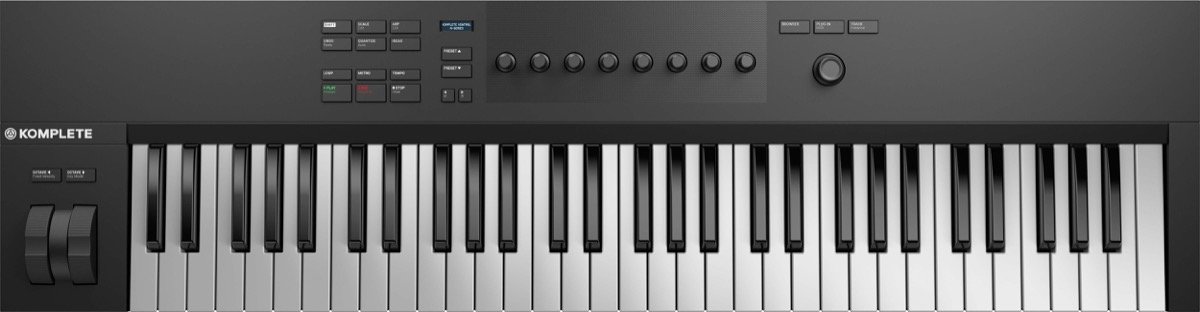
I've got my eyes on the Native Instruments Komplete Kontrol A-series or S-series keyboards (they seem professional unlike many of the "Christmas tree lighting/toy keyboards" around) but don't have that many knobs, nor any sliders or pads (then again I'm not sure how many of those I would need for productive use)....... :?: :?:

Image
(Native Instruments Komplete Kontrol A-61)

Image
(Native Instruments Komplete Kontrol S-61)


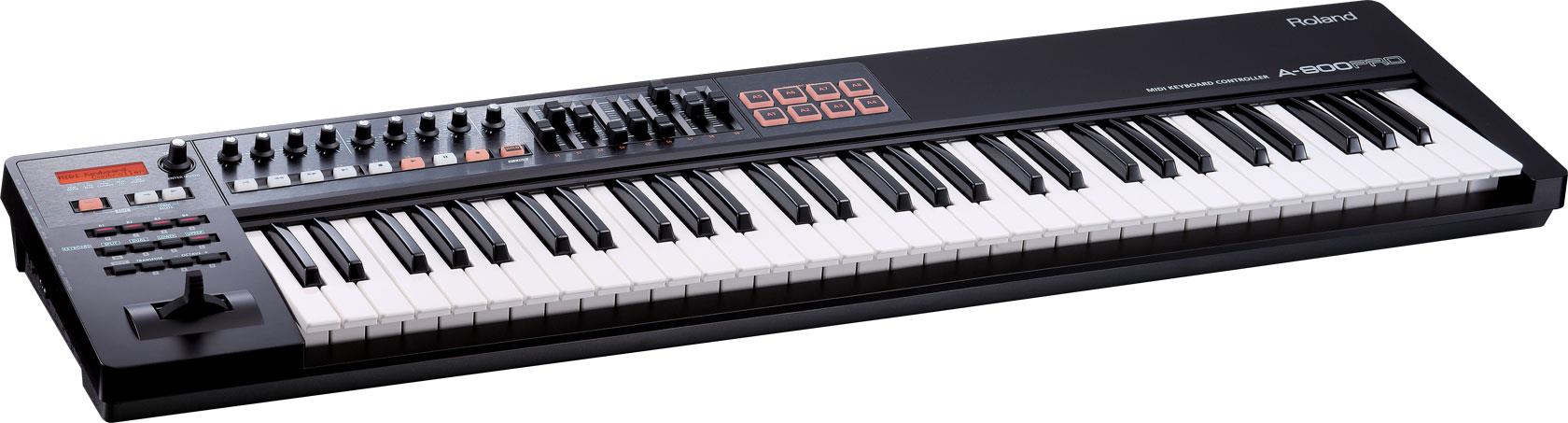
:idea: ......so I'm also considering Roland's A-800 Pro.
Image
(Roland A-800 Pro)

Post

And why you just don't use one of the old beautiful synths as a master keyboard? Do you really need a dedicated MIDI controller keyboard? Furthemore, you've chosen the most expensive keyboards on the market :-D
Waveform 12 Pro, Cubase Pro 13, Windows 11, i7-13700H

Post

Also I suppose you know Espen Kraft's channel on YouTube. He's making the 80's inspired music using the original gear and a modern computer.
Waveform 12 Pro, Cubase Pro 13, Windows 11, i7-13700H

Post

Yes, Espen Kraft (actually a fellow countryman of mine) is truly someone who's knows his stuff and master making 80s music! I've only seen his synth related videos though and didn't know about him using a modern computer (and running a DAW?). I'll have to take a closer look at that.

The MIDI keyboard synths I have are an original DX-7 and a Roland JX-8P. The first one has limited MIDI options, and I don't find the second one's keyboard action to be the best (and it's mechanically very noisy as well).
Also, they can't control any of the DAW functions of course. I'm hoping a modern keyboard controller can control certain functions in much the same way my JX-8P's synth programmer (PG-800) can allow for physical knob access to something which otherwise is more cumbersome to do the traditional way (i.e. a single slider for the value and a couple of buttons for choosing the parameter).
Is that how those buttons/sliders/knobs on a master keyboard controller work?

I know those keyboards I suggested are expensive (especially the Komplete Kontrol S-61, which might be unnecessarily advanced for my use anyway), but I prefer buying lasting quality and frankly I find most of today's keyboard's looking like toys anyway (the exception being actual synths like Sequential's Prophet 6 (which I'm also considering, perhaps later, but perhaps not as a master keyboard controller).

Post

You're right the cheaper ones aren't of the best quality. And yes, you can assign knobs and sliders to various parameters and control them in real time. Perhaps these modern controllers will suit your needs better.
Waveform 12 Pro, Cubase Pro 13, Windows 11, i7-13700H

Post

Sounds great!
Is anyone here using Traction/Waveform with a modern controller like that and can explain how that works? Or a website/video which demonstrates this?
I'll do some searching myself, but Waveform users seem to be a bit on their own compared to people using Ableton Live, Logic and so on. I suppose the principle is the same though.....
Are there any user-configurable parameters in Waveform to make a specific knob on a controller do a specific task?
May I ask if you're using such a controller and how it's being used for this sort of thing?

Post

I've used some off-and-on and they work just fine. Most of the time, though, I'm still setting everything up to record and tapping the spacebar to start recording. I've also remapped an easier-to-remember key combination for abort and restart.

The controller's real strength in in MIDI Learn, which lets you map any knob, switch, or slider (pretty much) on your controller to affect the plugin it's controlling in realtime. All MIDI learn functions are inherently passed through Waveform, so there's not much to worry about: any limitations will be in the plug in, not in Waveform. But, yes, there's a bunch of things you can teach Waveform to do from a controller.

Look for the "MIDI Learn" button in the lower right-hand corner.

Here's an older video that takes you through an enormous amount of detail - - but I promise it's not as hard as this 80-second video makes it seem. Generally, you click MIDI Learn, select the parameter to control on Waveform, and then move the control system on your controller (knob, slider, etc.), and you're done.
Spotify, Apple Music, YouTube, and even Deezer, whatever the hell Deezer is.

More fun at Twitter @watchfulactual

Post

Thanks. Is that MIDI CC messages they all use and is this a common standard for all of today's keyboard controllers?
The procedure for configuring things seems easy enough, but does this also mean that each knob/button/slider has a single function, or do they do different things depending on where in the DAW you are?

For instance, for controlling the parameters of a soft-synth, and the DAW's transport functions, and for instance EQ adjustments, panning, channel output levels, aux levels, effects on/off and so on. These are all instances where I'd very much like to grab a physical fader, switch or knob instead of mousing around.
And with a limited amount of physical knobs/switches/faders -is it a matter of having one rotary knob to select the function (rotating it scrolls through the various function parameters) while another knob(s) change its value(s)?

With my setup I can see that I need a combined MIDI and USB keyboard controller: MIDI because I'll be able to play my MIDI hardware synth rack directly and also record with my Atari ST based MIDI sequencer without involving the DAW/audio interface.
And USB for using the keyboard controller's switches/sliders/knobs for the kind of functions I mentioned above, and of course for playing soft-synths within the DAW. The Roland A-800 Pro seems to fit that bill and has lots of controls as well while the Native Instruments Komplete Kontrol S-61 is much more advanced and better looking (but also more expensive -their A-61 I've just found out doesn't have MIDI ports, so I can pretty much forget about it unless I'm happy to have it dependant on the audio interface in order to control MIDI devices).
I'm still trying to find out if the S-61 works as intended with Waveform 11. It seems hard to find the relevant info (even from the downloadable user manual) and I have a feeling its main intention is to control their own soft-synths. I also have a feeling that I'm a minority in DAW-land still using mostly MIDI-hardware synths as everything these days is centred around plug-in instruments, or so it seems.

Post

UnionS8 wrote: Tue Jun 09, 2020 11:03 am Also I suppose you know Espen Kraft's channel on YouTube. He's making the 80's inspired music using the original gear and a modern computer.
I tried to find a suitable video on his Youtube page, and although there's one why he talks about preferring hardware synths as opposed to plugins, he mentions using plugins for professional work but not which DAW he uses and how.

Post

Dynamo, send Espen a private message. His user name here is elkanah77 and he's on quite frequently.
Spotify, Apple Music, YouTube, and even Deezer, whatever the hell Deezer is.

More fun at Twitter @watchfulactual

Post

Thanks for the suggestion.
He tells me that he prefers using his Roland Alpha Juno 2 as a keyboard controller, and for recording he uses Cubase/Nuendo.
I do however want something that doubles as a master keyboard and DAW controller because of space constraints.

Post

dynamo wrote: Sun Jun 14, 2020 1:21 pm Thanks for the suggestion.
He tells me that he prefers using his Roland Alpha Juno 2 as a keyboard controller, and for recording he uses Cubase/Nuendo.
I do however want something that doubles as a master keyboard and DAW controller because of space constraints.
Nektar Panorama Series might do that. Try the keybed before purchasing.
I owned one but the keys didn't suit me.

Post

I'm gonna use a midi-usb cable and a very old Korg M1 synth with my W11. I expect no controller functions with that setup. I looked what the real controllers offer though, and I would do it in the following way if I were to buy one:

I'm not able recommend any particular kb controller, but your choices will be very few once you decide what you want.
- 1* midi out , (1* midi in?)
- 1 * usb out/in
- 61 keys, (probably full size, synth action?)
- velocity and aftertouch (by channel?)
- pads (4 or 8 should be enough?)
- rotating knobs (4 or 8 should be ok?)
- transport & record buttons
- other assignable buttons (how many?)
- pitch and modulation wheels
- pedal inputs?
- powered by usb (and by mains or battery?)
- number of split zones?
- layers?

If you get more than one kb that fills your requirements, then choose by price and how you like the actual keys?
Last edited by harvon on Mon Jun 15, 2020 4:16 am, edited 1 time in total.
I don't record any instruments live, I construct my music.
Song Contest: Possibilities for new themes

Post

Maybe worth to look at Novation Sl MKIII, it has Automap tool for control assign.

Post

dynamo wrote: Fri Jun 12, 2020 9:24 pm The procedure for configuring things seems easy enough, but does this also mean that each knob/button/slider has a single function, or do they do different things depending on where in the DAW you are?
You are speaking (the second case) about ACT (Active Controller Technology). I wonder if Waveform is capable of using one. As far as I know, it requires some scripts to be written specially for each controller. Maybe someone could explain this topic and tell us if Waveform works with ACT controllers.
Waveform 12 Pro, Cubase Pro 13, Windows 11, i7-13700H

Post Reply

Return to “Tracktion”