


I added "can-copy-device-and-param-ids : true" to get the Param's. The device ID I did get like this (even that when I open the preset in a TextEditor there it is as well).
If I create a Knob (RemoteControll) and right-mouse-click "copy parameter ID to clipboard' I get only 'VALUE' or 'LEVEL' or 'TIME' in my clipboard. That does not make sense to me since the ID's are always the same. So if I add some 3 Volume' Knobs for 3 differend things the 3 'RemoteControll ID are the same each time.
But how do I get the parameter ID?
getControl() vs getItemAt()
-

- KVRAF
- 4898 posts since 13 May, 2004
Don't click on the remote control knobs. Right click on the parameters in the Bitwig plugins itself or on the parameter list if it is a VST plugin and select "Copy Parameter ID tro clipboard".DIZZNESS wrote: Sun Aug 23, 2020 8:43 pm If I create a Knob (RemoteControll) and right-mouse-click "copy parameter ID to clipboard' I get only 'VALUE' or 'LEVEL' or 'TIME' in my clipboard. That does not make sense to me since the ID's are always the same. So if I add some 3 Volume' Knobs for 3 differend things the 3 'RemoteControll ID are the same each time.
But how do I get the parameter ID?
-
- KVRer
- Topic Starter
- 20 posts since 24 Jul, 2020
Yes. I did that. I open the FX Grid and if I right click any button or knob and select "Copy Parameter ID to clipboard" I just copied 'VALUE' or 'LEVEL' or 'TIME'. On VST it's even worst. There I copy only '1', '0' etc.
-
- KVRer
- Topic Starter
- 20 posts since 24 Jul, 2020
Allow me to illustrate my initial idea once more. I wanted to be able to 'learn' the MIDI Modulator (B) a button - pressed on my controller - assigned in my controller script.
I can 'learn' it on the RemoteControl Panel (A). But on the MIDI Modulator (B) it's not recognized.

Maybe there is a way that I missed looking at.
I can 'learn' it on the RemoteControl Panel (A). But on the MIDI Modulator (B) it's not recognized.
Maybe there is a way that I missed looking at.
-
- KVRAF
- 4898 posts since 13 May, 2004
That is correct. These are the names / values you need to feed into:DIZZNESS wrote: Mon Aug 24, 2020 12:10 pm Yes. I did that. I open the FX Grid and if I right click any button or knob and select "Copy Parameter ID to clipboard" I just copied 'VALUE' or 'LEVEL' or 'TIME'. On VST it's even worst. There I copy only '1', '0' etc.
SpecificBitwigDevice
Parameter createParameter (String id)
SpecificPluginDevice
Parameter createParameter (int parameterId)
e.g.
Code: Select all
Parameter bitwigParam = bitwigDevice.createParameter("LEVEL");

Parameter vstParam = vstDevice.createParameter(1);
-
- KVRer
- Topic Starter
- 20 posts since 24 Jul, 2020
Ah. Ok. For the VST's that might work since they are just simply numbered 0,1,2,3,4 etc. For the FX Grid if I have 3x LEVEL they are all called LEVEL. Shouln't they be called like LEVEL#1, LEVEL#2 etc.
-
- KVRAF
- 4898 posts since 13 May, 2004
Interesting. But since this can be anything I guess it does not make sense to implement a specific UI for it on a device anyway.DIZZNESS wrote: Mon Aug 24, 2020 2:32 pm Ah. Ok. For the VST's that might work since they are just simply numbered 0,1,2,3,4 etc. For the FX Grid if I have 3x LEVEL they are all called LEVEL. Shouln't they be called like LEVEL#1, LEVEL#2 etc.
-
- KVRer
- Topic Starter
- 20 posts since 24 Jul, 2020
Hmmm. I'm not sure if I get you on this. My FX Grid Device has several Volume Knobs each for a different part in the patch. If they are all called the same I can not include them in my script.

Any clues on this one? pleeeeeaseDIZZNESS wrote: Mon Aug 24, 2020 12:23 pm I wanted to be able to 'learn' the MIDI Modulator (B) a button - pressed on my controller - assigned in my controller script. I can 'learn' it on the RemoteControl Panel (A). But on the MIDI Modulator (B) it's not recognized.
-

- KVRist
- 393 posts since 12 Apr, 2020
Oh woah... I was trying to wrap my head around this... there isn't a way to rename a parameter is there. That would make it difficult to understand what is going on if your midi device had the display name! Feature Request to rename parameter knobs?DIZZNESS wrote: Mon Aug 24, 2020 4:17 pm Hmmm. I'm not sure if I get you on this. My FX Grid Device has several Volume Knobs each for a different part in the patch. If they are all called the same I can not include them in my script.
I really appreciate the thread and the knowledge that is coming out of these questions.
Still I'm confused as to why you are needing to use this CC method vs just using the remote parameters + cursor device to pin and map everything? other than the labeling issue it would seem to be the simplest approach.
You do not have the required permissions to view the files attached to this post.
----------------------------------------------------------------------
/CTRL → http://slashctrl.io
Music & mixes → http://soundcloud.com/kirkwoodwest
/CTRL → http://slashctrl.io
Music & mixes → http://soundcloud.com/kirkwoodwest
-
- KVRist
- 393 posts since 12 Apr, 2020
I just lol'd to myself and tried something. Its possible to double click the name and edit the parameter name.
You do not have the required permissions to view the files attached to this post.
----------------------------------------------------------------------
/CTRL → http://slashctrl.io
Music & mixes → http://soundcloud.com/kirkwoodwest
/CTRL → http://slashctrl.io
Music & mixes → http://soundcloud.com/kirkwoodwest
-
- KVRer
- Topic Starter
- 20 posts since 24 Jul, 2020
Hi Kirkwood,
hehe. Thanks for checking. Nameing can be changed that's right. To access the knob from your script Bitwig needs the ID and there is where the naming issue is. If you copy the ID's you'll see that they're always the same.
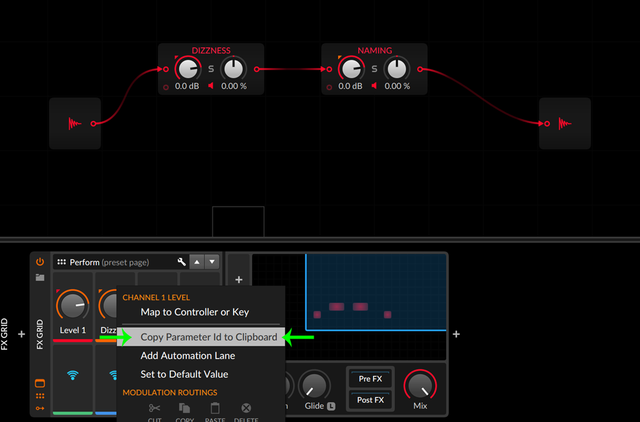
hehe. Thanks for checking. Nameing can be changed that's right. To access the knob from your script Bitwig needs the ID and there is where the naming issue is. If you copy the ID's you'll see that they're always the same.
-
- KVRer
- Topic Starter
- 20 posts since 24 Jul, 2020
The advantage of the CC method is that you can save it with your preset vs. remote parameters set directly to CC's is not.Kirkwood West wrote: Thu Aug 27, 2020 6:32 pmStill I'm confused as to why you are needing to use this CC method vs just using the remote parameters + cursor device to pin and map everything? other than the labeling issue it would seem to be the simplest approach.