TEqualiser has single input/output?

Discussion about: tracktion.com
Post Reply New Topic
RELATED
PRODUCTS

Post

Hi,

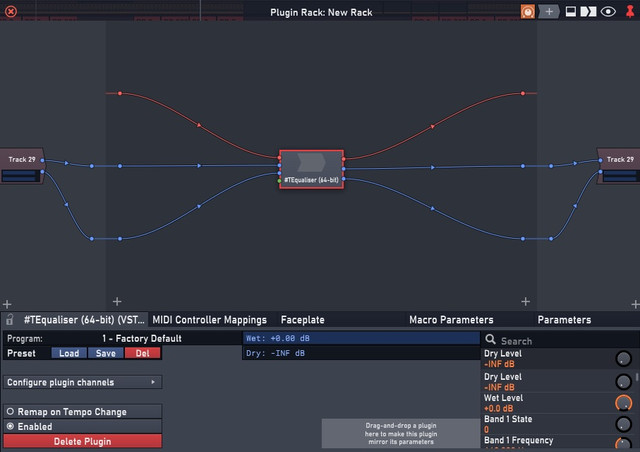
I noticed in racks that TEqualiser has a mono input and output, but the in built 4 band equaliser is stereo?

Image

If I use TEqualiser added to a track normally I can hear it effect the track in stereo.What is it doing in this mode is it just outputting the single output to the left and right speaker?

Post

I was going to ask the same to the Tracktion team, I don't know why but the #TEqualiser is mono, I already notice this when I tried to EQ a stereo audio track, so, I went throught the plugins again and saw that there's 2 #TEqualizer, the other is #TEquilizer 64-bit and that's stereo! Why? I wanna know too...

Here's the proof

Image

Post

I've only got the VST3 version installed I suspect this is an issue with the VST3 version. I bet the VST2.4 works as intended?

Post

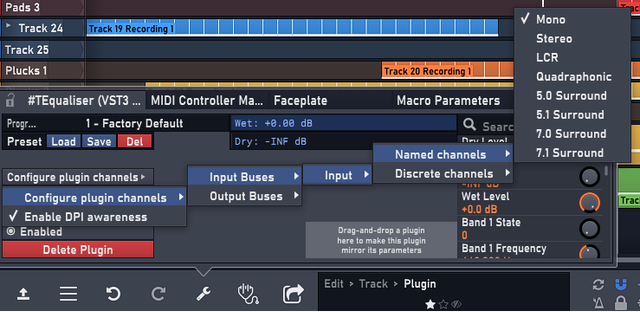
The VST3 version supports multiple channel configurations. Use the menu in the upper left of the plugin window to set it to stereo.

Post

FigBug wrote: Fri Sep 04, 2020 6:42 pm The VST3 version supports multiple channel configurations. Use the menu in the upper left of the plugin window to set it to stereo.
Well, unfortunately, I tried that just now and I'm having this error

Image

Image

Post

FigBug wrote: Fri Sep 04, 2020 6:42 pm The VST3 version supports multiple channel configurations. Use the menu in the upper left of the plugin window to set it to stereo.
Thanks very much for this as that seems to work for me.

Post

John, what version of Waveform and DAW Essentials?

Post

FigBug wrote: Fri Sep 04, 2020 7:17 pm John, what version of Waveform and DAW Essentials?
This is on Waveform 11.1.16 PRO, DAW Essentials 1.0.39 and Windows 10 PRO 64 bits, and plugin sandbox is on

Post Reply

Return to “Tracktion”