
HIVE 2 Wavetable - how to save description?

Official support for: u-he.com
RELATED
PRODUCTS

Post

Hi, I'm making some new wavetables for HIVE2.
Factory wavetables, Even .wav filles, have their description written on them.
How, or where are these metadata stored? I want my own wavetables(.wav) to have such descriptions too.

I found that I can open text input area and am able to edit them at the moment, but cannot figure out how to save them.

Your help is appreciated! :help:


EDITED:
This is solved and below is how to do it.

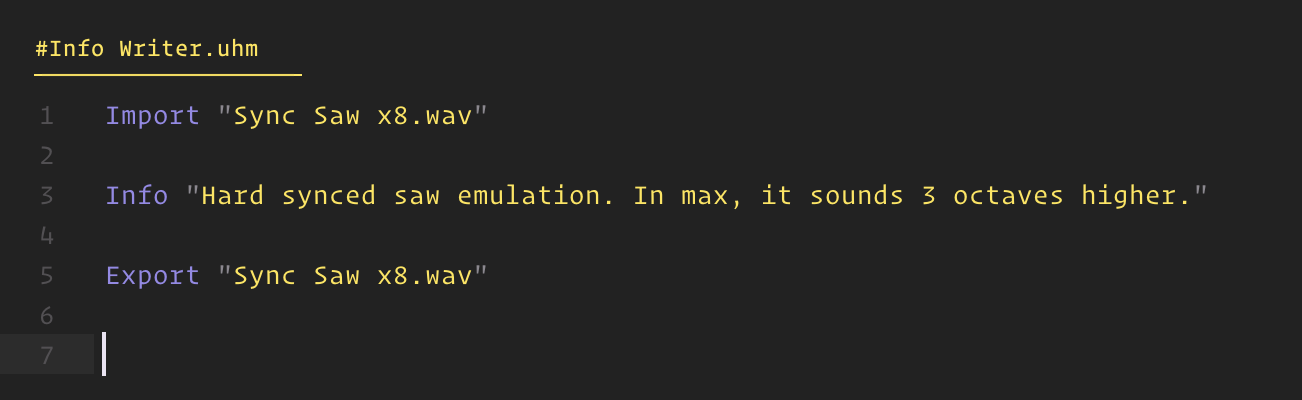
1. Create new UHM file
Besides the target .wav file, another .uhm file is used solely for metadata writing procedure.
Image

You need to write only 3 lines.
Import ... The name of the wavetable file you want to add description
Info ... The info text
Export ... The name of the file exported

If import name and export name is identical (like above), the file will be overwritten.

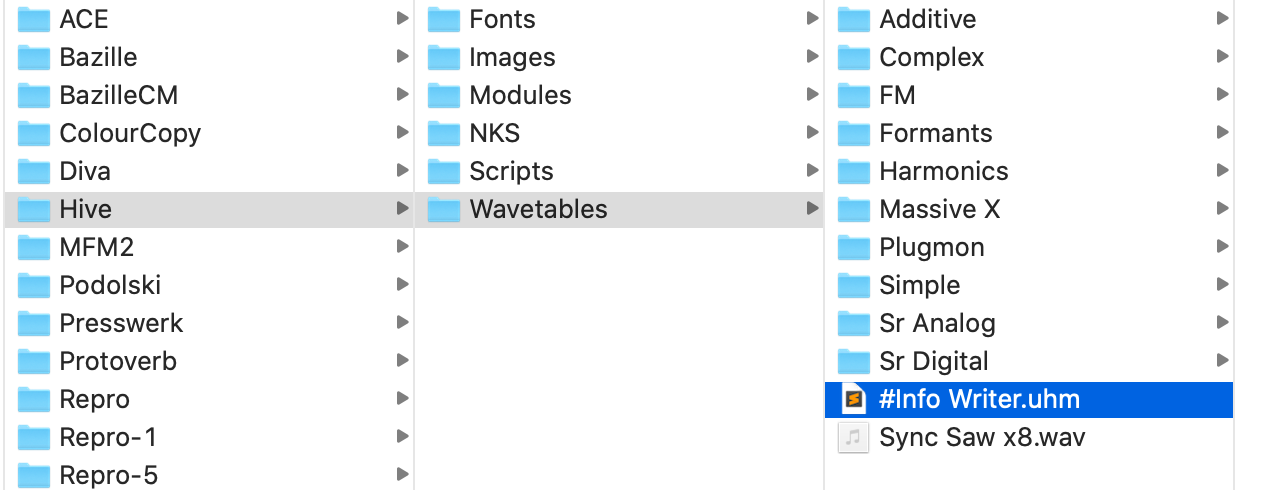
2. Place the UHM file next to the wav file.
Image

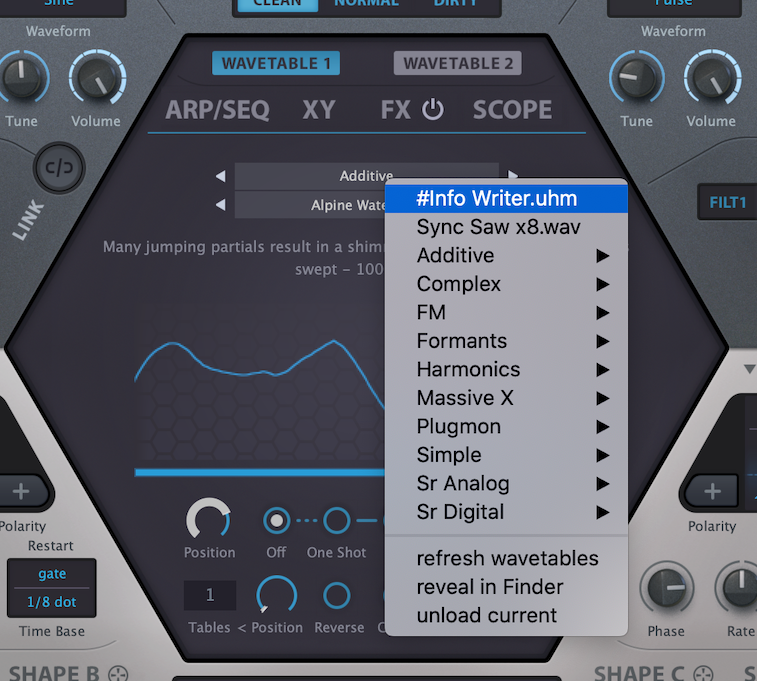
3. Load the UHM file on HIVE.
(If UHM is not shown, you first need to "reflesh wavetables".)
Image

Just load the file and done!

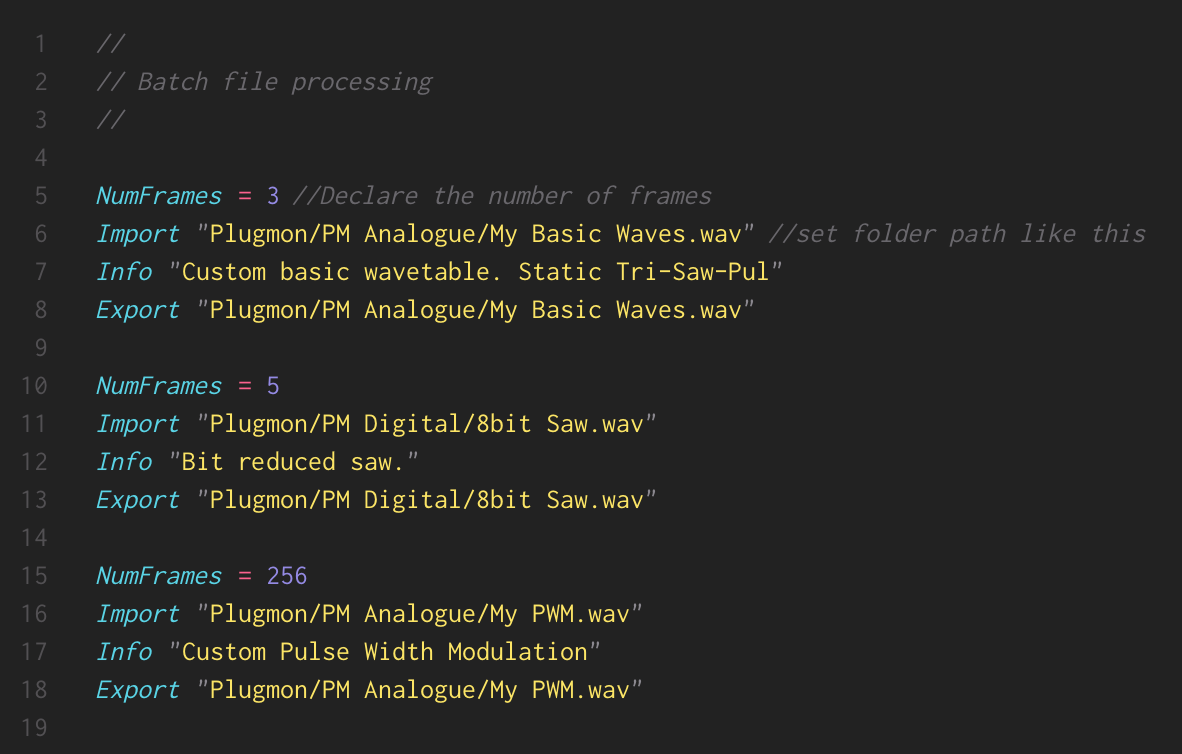
*You can also import/export files inside the folder, by locating paths.
*If the number of frames is fewer than 256, you have to declare it first.
*Batch file processing is possible! But make sure to start from ones with the smallest number of frames to the largest.
Image
Last edited by plugmon on Fri Sep 11, 2020 2:40 am, edited 4 times in total.
ImageMONA, the new skin for DIVA is released! | Follow me on Twitter.

Post

Looks like you on a Mac ? Here on Windows double clicking in the text area opens up the edit box. Hitting OK saves the Text:


H2.png
You do not have the required permissions to view the files attached to this post.
None are so hopelessly enslaved as those who falsely believe they are free. Johann Wolfgang von Goethe

Post

I believe Apply saves them.
rsp
sound sculptist

Post

Teksonik wrote: Wed Sep 09, 2020 5:08 pm Looks like you on a Mac ? Here on Windows double clicking in the text area opens up the edit box. Hitting OK saves the Text:
Yes, I'm using macOS Catalina, HIVE rev9709.
Hitting "apply" can change the text, but once after loading another wavetable & going back, it reverts to the original text again. File permission issue or something..??
ImageMONA, the new skin for DIVA is released! | Follow me on Twitter.

Post

Try changing and saving the text in the .uhm file. Works here. The text you can edit by double clicking in the text area is only saved within a patch. :)

Example:


H2-2.png
You do not have the required permissions to view the files attached to this post.
None are so hopelessly enslaved as those who falsely believe they are free. Johann Wolfgang von Goethe

Post

Teksonik wrote: Wed Sep 09, 2020 6:59 pm The text you can edit by double clicking in the text area is only saved within a patch. :)
Ah, my wavetables are all wav files :neutral:
Is there any chance for wav?
ImageMONA, the new skin for DIVA is released! | Follow me on Twitter.

Post

There must be since the .wav files in the factory content have comments. Check the "gnarlies.wav" in the Simple folder.

I have no idea how though. I don't see any .uhm files for them. How the wav files could contain text is beyond me. I'll keep working on it but maybe someone else can shed some light on the subject.

The manual is not providing any answers to the question. :?

EDIT: Guess I'll have to tap out on this one. I looked at the factory .wavs to see if they had any tags like album or author or description but I don't see anything. The only thing I can think of is the text in factory .wavs is somehow stored in the plugin itself. Hopefully someone else knows what's going on. Maybe it's something painfully obvious and simple.

If nothing else you could get your geek on and learn the .uhm scripting. I use Dune 3 to make wavetables for Hive so have never messed with the .uhm format.
None are so hopelessly enslaved as those who falsely believe they are free. Johann Wolfgang von Goethe

Post

I'm asking the guys about how to add text to WAV tables... might take a short while.
Last edited by Howard on Thu Sep 10, 2020 6:56 am, edited 1 time in total.

Post

Hello Plugmon!
Love your presets :)

The way to do it can be derived from the "Hive Wavetables.PDF" that's included with Hive 2.
Basically you create an UHM file that imports a WAV, then you add the info via the Info command (see page 4 of that PDF), then you export the WAV again.

Let me know if more details are needed. :)

Cheers,
Viktor

Post

The unshushable Coktor wrote: Thu Sep 10, 2020 6:55 am Hello Plugmon!
Love your presets :)

The way to do it can be derived from the "Hive Wavetables.PDF" that's included with Hive 2.
Basically you create an UHM file that imports a WAV, then you add the info via the Info command (see page 4 of that PDF), then you export the WAV again.

Let me know if more details are needed. :)

Cheers,
Viktor
Hi Viktor, this worked! UHM is great. I'm gonna dig into it more :)

And thanks Teksonik and Howard too for helping.
ImageMONA, the new skin for DIVA is released! | Follow me on Twitter.

Post

Oh, are there any ways to "detect and get frame number of the imported file"?
The variable "NumFrames" is by default 256, so for wavetables with fewer frames to be exported correctly, I manually have to add the line like "NumFrames = 5".
Not a big problem, but would be easier if there's some good way.
ImageMONA, the new skin for DIVA is released! | Follow me on Twitter.

Post

The unshushable Coktor wrote: Thu Sep 10, 2020 6:55 am The way to do it can be derived from the "Hive Wavetables.PDF" that's included with Hive 2.
Basically you create an UHM file that imports a WAV, then you add the info via the Info command (see page 4 of that PDF), then you export the WAV again.
Just as a follow up where is the text info stored if there is no .uhm file for the .wav ?
None are so hopelessly enslaved as those who falsely believe they are free. Johann Wolfgang von Goethe

Post

Hi Teksonik,

WAVs aren't limited to audio data alone, they can carry all sorts of metadata, so we embed the info at the start of the file.

Viktor
u-he team

Post

Ok thanks, I looked for the metadata using Audacity but didn't see anything.
None are so hopelessly enslaved as those who falsely believe they are free. Johann Wolfgang von Goethe

Post

Not knowing Audacity well enough, I'd assume it looks for specific pre-defined ones like "artist name" or "album name".

Post Reply

Return to “u-he”