IKs MixBox

VST, AU, AAX, CLAP, etc. Plugin Virtual Effects Discussion
Post Reply New Topic
RELATED
PRODUCTS
MixBox

Post

Ryan_IK wrote: Mon Sep 28, 2020 4:02 pm @stech9 Thanks! :) There have been some great points brought up in this thread and some good comments on the sounds and features. I hope to see the thread keeping going, discussing everything musically.

Update for you guys, the update will be coming shortly, hopefully this week. Stay tuned.

In the meantime, check out this in-depth video from Zo.

Thank you Ryan for sharing that great video from Zozilla!

It shows well how to mix quickly with the good workflow of Mixbox.

Thanks also for the pros and cons. Mixbox needs an internal ducking, just like the IK tape delay (an amazing plugin also)!

Greetings
Alexander

Post

Great news!

MixBox 1.0.1 is now available for download via IK Product Manager.

What's New:
  • Fixed an issue with potential graphic artifacts on larger HD displays
  • Fixed an issue with latency compensation for bypassed modules with altered wet/dry values.
  • Fixed some incorrect Frequency values displayed on the EQ81 Channel Strip.
  • Fixed a potential graphics issue when resizing the GUI to smaller sizes.
  • Fixed text values to display centered in their boxes.

Post

It's still blurry in default size but it's fine when enlarged and it doesn't hurt my eyes anymore. Now I can buy it :)

Edit: But maybe check what GuitrRig 6 can do first. Graphics are much nicer than in MixBox + modulation options. Just 500 rack style is missing. Decisions, decisions... :wink:

Post

pixel85 wrote: Tue Sep 29, 2020 4:51 pm It's still blurry in default size but it's fine when enlarged and it doesn't hurt my eyes anymore. Now I can buy it :)
That's odd, that shouldn't be the case. If your GUI is blurry by default, check with support and send me your ticket number so I can flag your case.
https://www.ikmultimedia.com/contact-support/
freshalex wrote: Tue Sep 29, 2020 9:42 am Thank you Ryan for sharing that great video from Zozilla!

It shows well how to mix quickly with the good workflow of Mixbox.

Thanks also for the pros and cons. Mixbox needs an internal ducking, just like the IK tape delay (an amazing plugin also)!

Greetings
Alexander
Glad you enjoyed it!

Check out this one below, there's been a lot of great videos from users just organically surfacing, we've been adding them here to a community playlist.
Make sure to keep an eye out on the IK Multimedia web site for future news and promotions!

Follow us on Facebook, Instagram, and Twitter!

Post

Peter - IK Multimedia wrote: Tue Sep 29, 2020 2:45 pm Great news!

MixBox 1.0.1 is now available for download via IK Product Manager.

What's New:
  • Fixed an issue with potential graphic artifacts on larger HD displays
  • Fixed an issue with latency compensation for bypassed modules with altered wet/dry values.
  • Fixed some incorrect Frequency values displayed on the EQ81 Channel Strip.
  • Fixed a potential graphics issue when resizing the GUI to smaller sizes.
  • Fixed text values to display centered in their boxes.
Thanks... GUI is much clearer now for me.
rsp
sound sculptist

Post

pixel85 wrote: Tue Sep 29, 2020 4:51 pm It's still blurry in default size but it's fine when enlarged and it doesn't hurt my eyes anymore. Now I can buy it :)

Edit: But maybe check what GuitrRig 6 can do first. Graphics are much nicer than in MixBox + modulation options. Just 500 rack style is missing. Decisions, decisions... :wink:
In that comparison though remember out of the blocks Guitar Rig 6 won't be all it can be, it will be a wip.
Not sure if more stuff will be added to mixbox over time.
rsp
You do not have the required permissions to view the files attached to this post.
sound sculptist

Post

zvenx wrote: Wed Sep 30, 2020 6:31 pm
pixel85 wrote: Tue Sep 29, 2020 4:51 pm It's still blurry in default size but it's fine when enlarged and it doesn't hurt my eyes anymore. Now I can buy it :)

Edit: But maybe check what GuitrRig 6 can do first. Graphics are much nicer than in MixBox + modulation options. Just 500 rack style is missing. Decisions, decisions... :wink:
In that comparison though remember out of the blocks Guitar Rig 6 won't be all it can be, it will be a wip.
Not sure if more stuff will be added to mixbox over time.
rsp
Amount of effects including crush pack + modulators, especially modulators makes it an interesting alternative. I know that GR5 has most of it but GUI operations are quite slow + archaic small graphics in 2020. GR5served me as a quick toolbox in the past very well. MixBox is super fast to shuffle different modules. Maybe GR6 improve in that matter and this is what I want to test.
Also GR6 has very cool graphic design on some of the modules ;) (CryWah, Freak, PsycheDelay) - I know, it has nothing to do with sound but I Iike to have nice view.
Edit: also buying GR6 would mean updating K12 for me (not worth to get just GR6) with much more stuff (that I'll never use :D)

Post

New video up of MixBox from the Tech Talk live streams. Check it out.

Make sure to keep an eye out on the IK Multimedia web site for future news and promotions!

Follow us on Facebook, Instagram, and Twitter!

Post

pixel85 wrote: Tue Sep 29, 2020 4:51 pm It's still blurry in default size but it's fine when enlarged and it doesn't hurt my eyes anymore. Now I can buy it :)
Which DAW? In many of them (Bitwig, Live, Studio One) when using a DPI scaling different than 100% you need to disable plugin stretching for DPI aware plugins.
Music tech enthusiast
DAW, VST & hardware hoarder
My "music": https://soundcloud.com/antic604

Post

antic604 wrote: Wed Oct 07, 2020 10:05 pm
pixel85 wrote: Tue Sep 29, 2020 4:51 pm It's still blurry in default size but it's fine when enlarged and it doesn't hurt my eyes anymore. Now I can buy it :)
Which DAW? In many of them (Bitwig, Live, Studio One) when using a DPI scaling different than 100% you need to disable plugin stretching for DPI aware plugins.
Ableton. But I gave up on MixBox already. It was the only plugin which was more blurry than anything else in DAW.
Does Ableton or Cubase have such option? As I know life they don't :D

Post

pixel85 wrote: Thu Oct 08, 2020 6:41 am Does Ableton or Cubase have such option? As I know life they don't :D
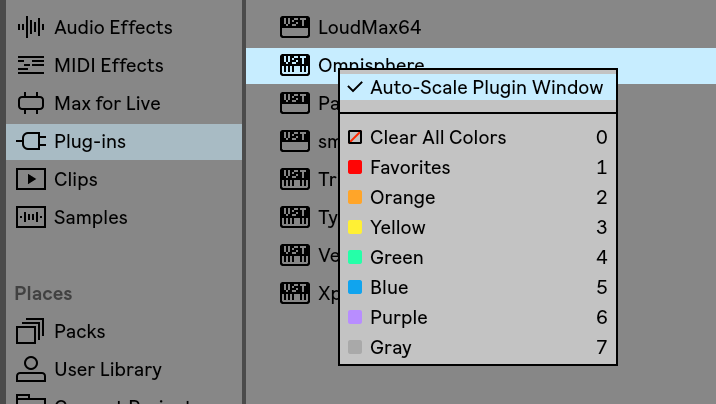
Cubase not, but Ableton does:

Image

You need to disable it for plugins that are DPI-aware and adjust scale by themselves (say FabFilter) and for plugins where user can change size manually (Arturia, U-He, etc.).
Music tech enthusiast
DAW, VST & hardware hoarder
My "music": https://soundcloud.com/antic604

Post

antic604 wrote: Thu Oct 08, 2020 6:44 am
pixel85 wrote: Thu Oct 08, 2020 6:41 am Does Ableton or Cubase have such option? As I know life they don't :D
Cubase not, but Ableton does:

Image

You need to disable it for plugins that are DPI-aware and scale themselves (say FabFilter) and for plugins where user can change size by themselves (Arturia, U-He, etc.).
Thanks :) Seriously I'm blind. I never saw that option

Post

pixel85 wrote: Thu Oct 08, 2020 6:47 am Thanks :) Seriously I'm blind. I never saw that option
It' not there if Hi-DPI isn't enabled in Settings / Look & Feel, which it should if your Windows scaling factor is anything else than 100% )
Music tech enthusiast
DAW, VST & hardware hoarder
My "music": https://soundcloud.com/antic604

Post

@antic604 Thanks for sharing! Great info.

@Pixel85 I do know there are some Hi-DPI settings in the Settings of Cubase. There are some details here.
https://steinberg.help/cubase_artist/v1 ... ral_r.html

Also! there was a great live stream from a user I wanted to share, check it out.
Make sure to keep an eye out on the IK Multimedia web site for future news and promotions!

Follow us on Facebook, Instagram, and Twitter!

Post

We're live for #AESorg (AES 2020) with Calico on MixBox :

http://bit.ly/ikaes2020

Post Reply

Return to “Effects”