
Zebra2/Zebralette/ZebraHZ 2.9.2 (Updated Oct 15th)

Official support for: u-he.com
Post Reply New Topic
RELATED
PRODUCTS

Post

Oct 15th: Zebra2, ZebraHZ, Zebralette 2.9.2 released!

Hello world,

it's been a while, how are ya?

We're about to release updates for Zebra2 and ZebraHZ, version 2.9.2, early next week (Edit: it's out!), if everything goes according to plan (Edit: it did!).
And while we can only post a release candidate for Zebra here, the real spotlight's on The Dark Zebra this time.

Big news, ZebraHZ is now NKS-ready.
In a real mammoth effort, all presets got tagged, level matched, and XYs assigned to add a whole new dimension of sound manipulation to those gorgeous sounds.

We also have a new bank name feature, allowing for better sorting of soundsets.

Another addition to make life a whole lot easier is our new soundset installer feature.
Soundsets can now be delivered in the new uhe-soundset format.
Installation is as easy as drag&dropping a compatible soundset onto the plugin.
We are planning to convert all our existing soundsets to this new format over time.

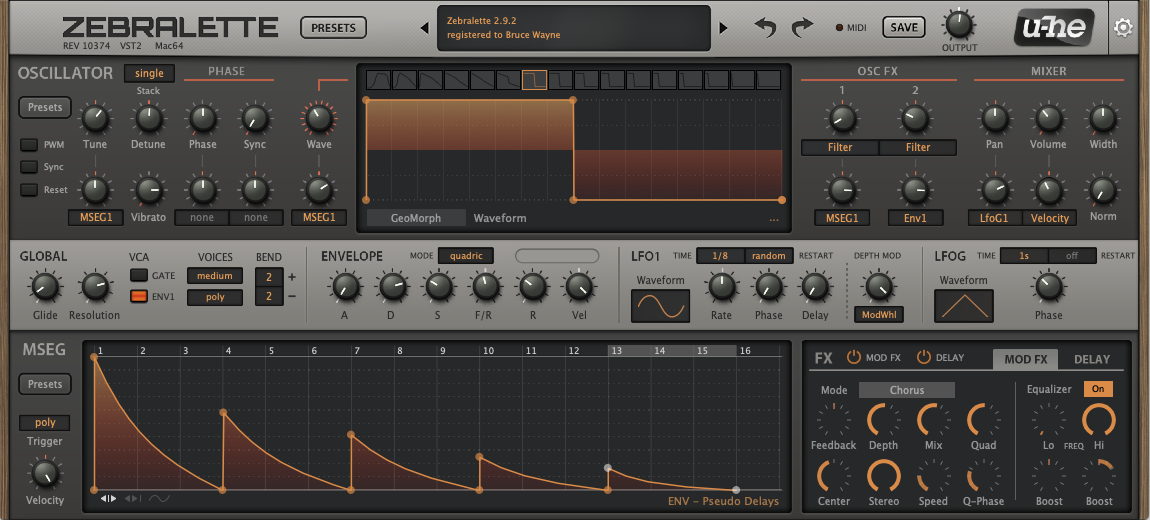
Finally, our tried and trusted freebie Zebralette got a complete GUI makeover, matching looks with its big brother.
Image

Downloads:

Zebra 2.9.2 rev 10409 Mac
Zebra 2.9.2 rev 10409 Win

The Dark Zebra / ZebraHZ V 2.9.2 rev 10374 download links are available by license request.

Linux versions will hopefully be ready in the coming weeks.
If you're already testing the macOS Big Sur beta, give it a try.

Changes since version 2.9.1 revision 9709:

Improvements and Fixes:
  • Big Sur compatibility
  • Soundset installer support
  • Browser: Bank name feature added
  • Browser: Alternative search method using wildcards
  • Browser: Numerous fixes and improvements
  • Loading presets during scan: Issue fixed (Windows only)
  • Reveal in Finder/Explorer behaviour improved
  • Full-size editors: Grid background graphics are back
  • Minor GUI fixes/tweaks
  • Fresh new GUI for Zebralette
  • Zebralette LFO single trigger fixed (was free-running)
  • ZebraHZ: NKS-ready
  • ZebraHZ: All presets now include XY assignments
  • ZebraHZ: All presets are tagged
  • ZebraHZ: Preset volumes are more balanced
Known Issues:
  • MSEG fill gradient graphics glitch (Windows only)
  • Context menus need plugin focus to work (macOS issue)
  • Crash when trying to load script presets (e.g. Randomizer)
  • Zebralette displays unusable option to save as nksf
Enjoy,
Tas
Last edited by tasmaniandevil on Tue Oct 20, 2020 1:21 pm, edited 1 time in total.
That QA guy from planet u-he.

Post

Thanks.
rsp
sound sculptist

Post

Another addition to make life a whole lot easier is our new soundset installer feature.
Soundsets can now be delivered in the new uhe-soundset format.
Tas can you please elaborate on this? Will existing presets that I purchase in zip format be compatible to this new system? There was also a pending Hive update that Urs mentioned a while back but because of covid the update was delayed because some agreement with some nda project?

Post

Wow. That’s some neat improvements for free. Thanks!
..off to play with my music toys - library music production.
http://www.FiveMinuteHippo.com

Post

surreal wrote: Fri Oct 09, 2020 9:45 amTas can you please elaborate on this? Will existing presets that I purchase in zip format be compatible to this new system?
The new soundset format is just an easier way to install things via drag'n'drop. This is particularly cool for NKS stuff where files have to be copied into hidden folders.

Our preset format has not changed, neither has preset browsing, organisation etc. - you can still just install and access the files like you used to.
There was also a pending Hive update that Urs mentioned a while back but because of covid the update was delayed because some agreement with some nda project?
We're still waiting for an official announcement. The composers are afraid that their life will be upside down after this, so they're quite happy that things stay in secret until things hit the public space. Gawd, I really can't wait to reveal this... (I understand though that in the current situation, things have become extremely difficult for everyone involved)

Nevertheless, we are going to move forward with Hive 2.1 soonishly, but we will simply not publish the spectacular soundset until after the secret work is released.

Post

(now uhbik ? :wink: )

Post

nirm123 wrote: Fri Oct 09, 2020 10:14 am (now uhbik ? :wink: )
that too... we're juggling a few things best as we can. Between Hive 2.1, Bazille 1.1.1, Uhbik 2.0, CVilization and Mac Arm updates, things slowly come together.

Post

amazing, thanks.

Post

Nice work!

(of course now I have to go back to the drawing board to integrate all the GUI changes into my skin :dog:)

Post

Urs: perhaps a silly question. I notice that you have integrated a feature that prevents the user from selecting too high a resolution for the skin. Is there a way to override that behavior? I use 200% all the time to check alignment of elements etc. when skin building.

edit: never mind. It looks like I can still select excessive resolutions in the preferences menu. Its a bit more effort because it changes the defaults (that need to be reverted back after use), but it's a reasonable workaround.
Last edited by wombat778 on Fri Oct 09, 2020 11:44 am, edited 1 time in total.

Post

wombat778 wrote: Fri Oct 09, 2020 11:31 am Nice work!

(of course now I have to go back to the drawing board to integrate all the GUI changes into my skin :dog:)
Not at all...
Only thing i have seen changed is the grid is back in Zebra 2....
rsp
sound sculptist

Post

Thank you! New bank name feature in browser look super cool!

Post

zvenx wrote: Fri Oct 09, 2020 11:43 am Z
Not at all...
Only thing i have seen changed is the grid is back in Zebra 2....
I ran a compare of the new DotEight script against the old one, and it looks like there are ~50 changes or so. Some/most of that may be purely internal cleanup, but I need to analyze them. But since my skin is based on ZHZ not DotEight I'll wait for that to release before getting started.

Post

wombat778 wrote: Fri Oct 09, 2020 11:37 am I notice that you have integrated a feature that prevents the user from selecting too high a resolution for the skin. Is there a way to override that behavior?
Hold the SHIFT key before opening the right-click menu to display the resolutions. :wink:
That QA guy from planet u-he.

Post

Then clearly I am blind :).
To my eye, visually all I only noticed the grid.
rsp
sound sculptist

Post Reply

Return to “u-he”