Ableton Live 11

Audio Plugin Hosts and other audio software applications discussion
Post Reply New Topic
RELATED
PRODUCTS
Live

Post

liquidsound wrote: Tue Nov 10, 2020 11:29 pm
My Master used to say:
Never be surprised and if you loose, loose standing!
I don't get that quote.

My master taught me:

"You trust the quality of what you know, not quantity."

He's got me washing and waxing his damn car too.

Post

leeleema wrote: Tue Nov 10, 2020 11:36 pm
liquidsound wrote: Tue Nov 10, 2020 11:29 pm
My Master used to say:
Never be surprised and if you loose, loose standing!
I don't get that quote.

My master taught me:

"You trust the quality of what you know, not quantity."

He's got me washing and waxing his damn car too.
I hope it was a 500 Fiat :hihi:
ABEFLGMOPPRRST :phones:

Post

Going back to the reverb just now, I'm actually quite impressed - the sound is pretty good and it's really flexible. It's nice having freeze and shimmer in there and you can get some cool rhythmic artifacts by pushing the 'vintage' setting right up. Wondering if the 'quartz' algorithm is a Quadraverb thing? Guessing Monolake and all those guys probably have a soft spot for that unit.

It really does have a heavy 'we took the convolution reverb and tried to bolt a load of Valhalla-esque stuff onto it'. But why not, really? It's probably not going to be the be-all and end-all reverb for anyone with a load of plugins but it's definitely vastly more useful than the native one.

Post

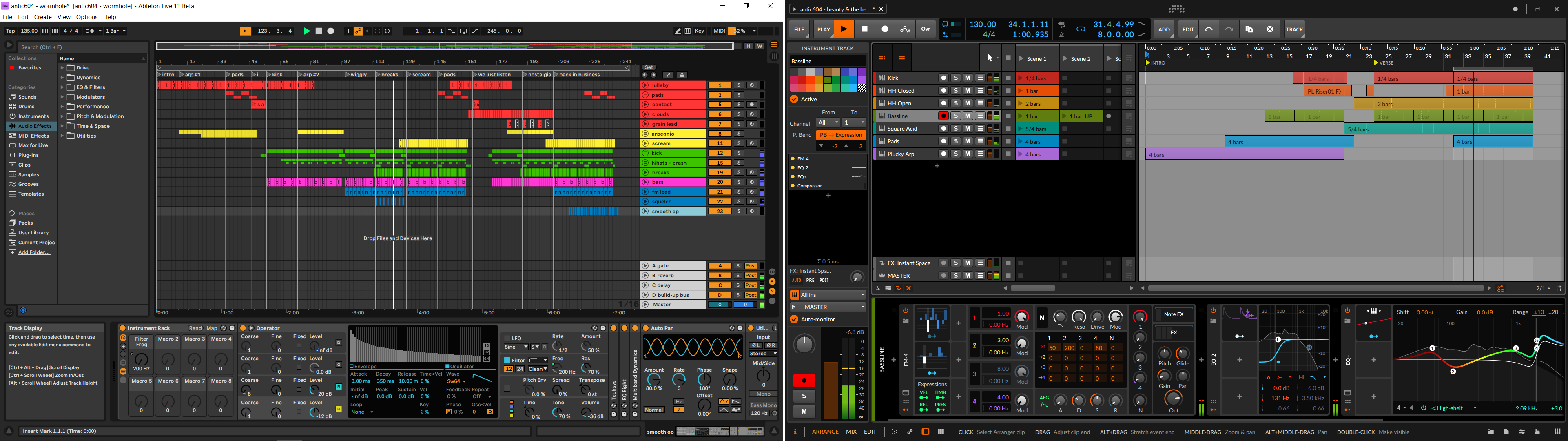
Dalle wrote: Tue Nov 10, 2020 10:08 pmHmm I always thought Live was very efficient with space. Bitwig has that huge top bar that I couldn't figure out how to hide. To that I tried too hard, I just don't like the interface : p
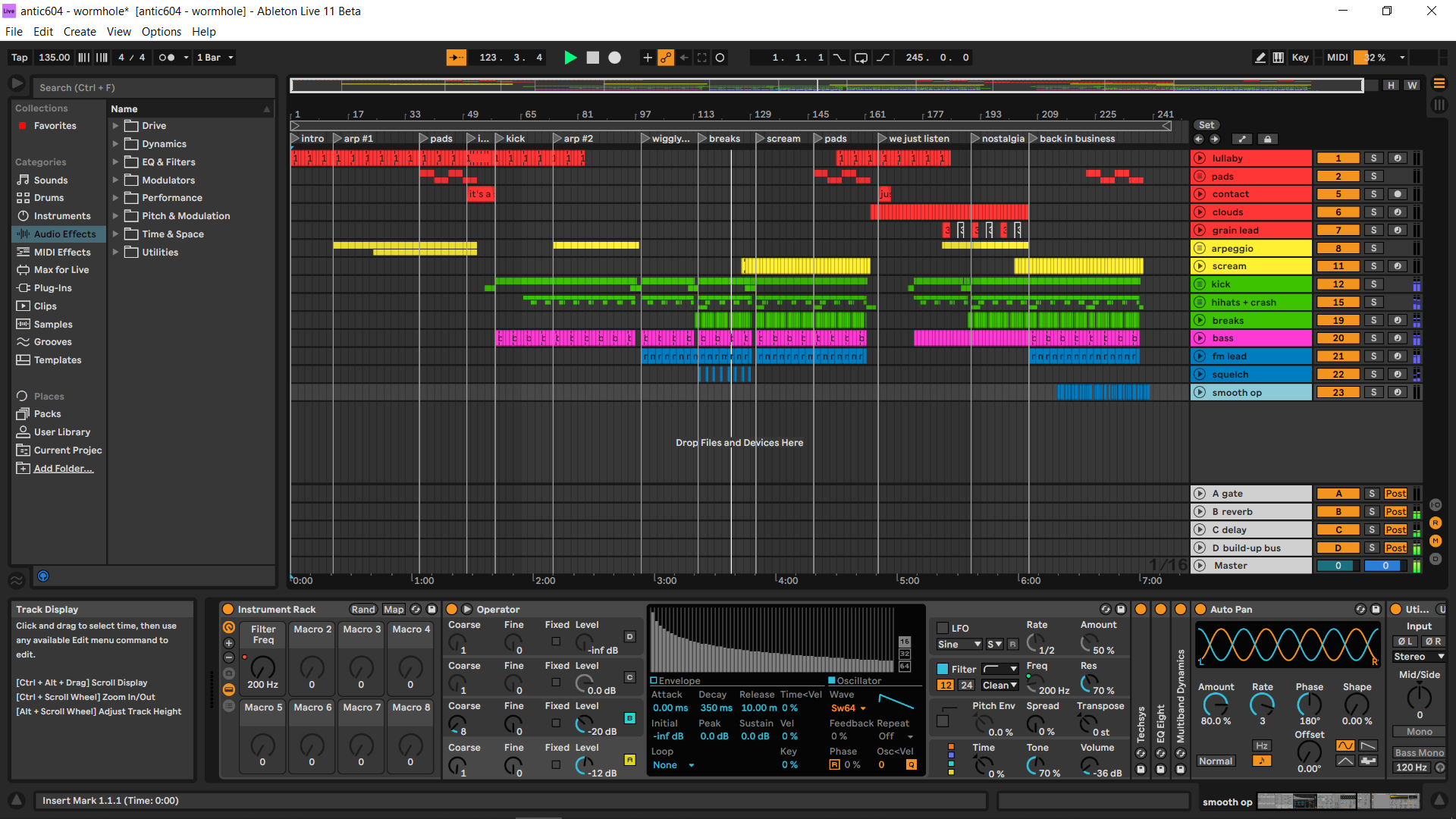
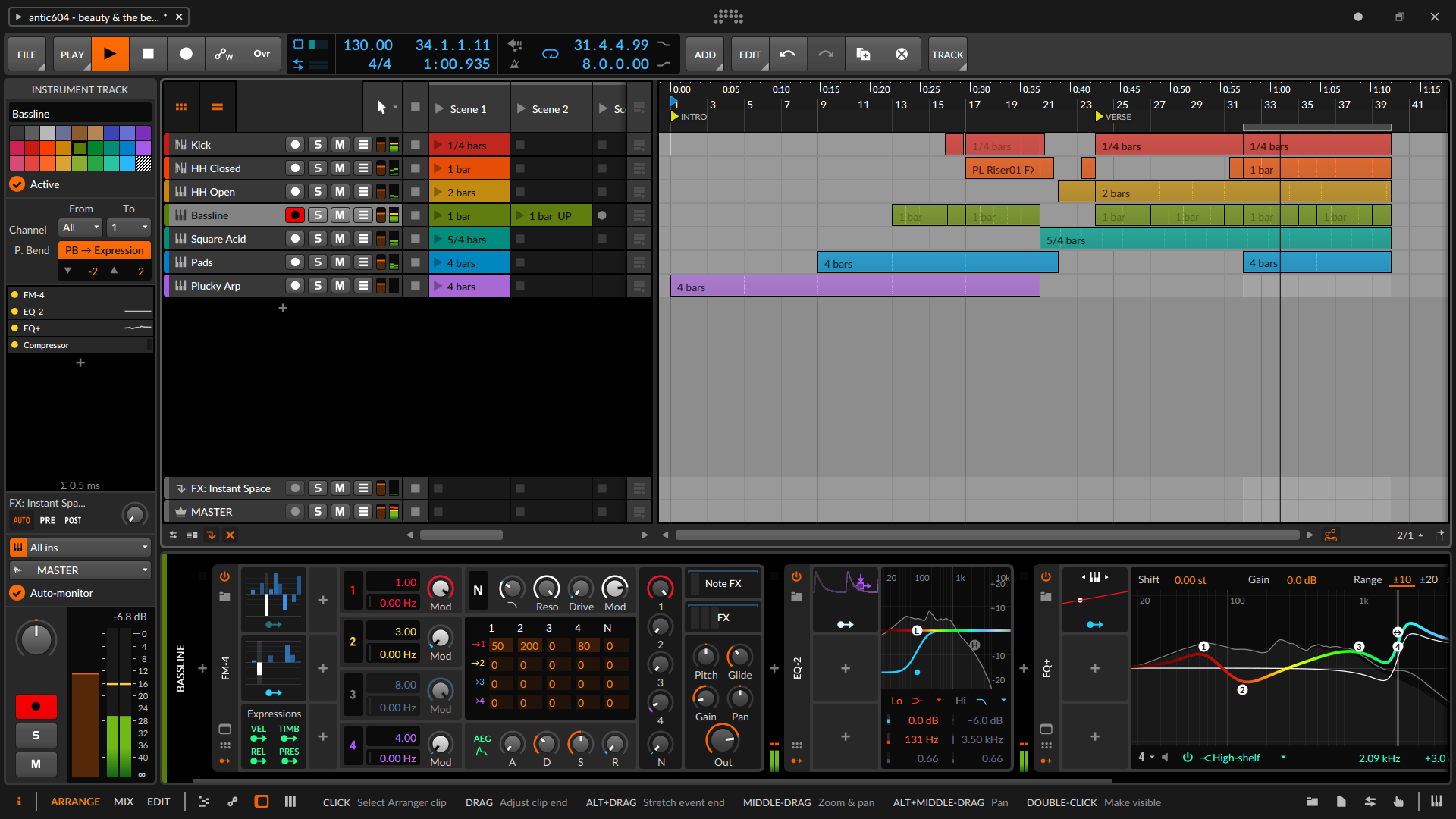
Your reply made me really curious why we both see this differently, so I made a comparison - both 11 beta and 3.3 beta running on a 1080p screen with 125% scaling (that's how I "work").

As you can see, the top portion of the screen taken by controls is similar, because although you can press F11 and go full-screen with Live you're gonna lose access to drop-down menus, whereas this isn't the case with Bitwig as all controls are already there when full-screen.

The "huge" difference however is with devices panel - Bitwig's devices are ~20% taller, which makes them IMO a bit easier to operate. It never occurred to me, but this is probably why I could never find an ideal zoom level for Live - either the devices were OK but everything else was too big, or devices were too small vs. everything else the right size.

BTW, that bright Arranger background in Bitwig really has to go :dog:

Image
Music tech enthusiast
DAW, VST & hardware hoarder
My "music": https://soundcloud.com/antic604

Post

This one on random stuff it's a gem and it really shows it's a great feature and it's worth the upgrade price for me just for how much I can do with it.
Last edited by liquidsound on Wed Nov 11, 2020 12:37 am, edited 2 times in total.
ABEFLGMOPPRRST :phones:

Post

thecontrolcentre wrote: Tue Nov 10, 2020 10:35 pm I'm concerned that they're reccomending Win 10 as a minimum requirement for Live 11 as I'm still on win 8.1 ... I upgraded to a 64 bit system when they dropped 32 bit support, and don't really want to be forced to upgrade again.

Has anyone tried the beta out on Win 8 yet? Thanks.
I tried the beta in Windows7 and authorisation did not work. So can't use it. It would be real nice if Windows7 and 8 were also supported, like in Live10.

Post

antic604 wrote: Wed Nov 11, 2020 12:04 am
Dalle wrote: Tue Nov 10, 2020 10:08 pmHmm I always thought Live was very efficient with space. Bitwig has that huge top bar that I couldn't figure out how to hide. To that I tried too hard, I just don't like the interface : p
Your reply made me really curious why we both see this differently, so I made a comparison - both 11 beta and 3.3 beta running on a 1080p screen with 125% scaling (that's how I "work").

As you can see, the top portion of the screen taken by controls is similar, because although you can press F11 and go full-screen with Live you're gonna lose access to drop-down menus, whereas this isn't the case with Bitwig as all controls are already there when full-screen.

The "huge" difference however is with devices panel - Bitwig's devices are ~20% taller, which makes them IMO a bit easier to operate. It never occurred to me, but this is probably why I could never find an ideal zoom level for Live - either the devices were OK but everything else was too big, or devices were too small vs. everything else the right size.

BTW, that bright Arranger background in Bitwig really has to go :dog:

Image
I was very surprised when I saw on your first post that you don't like Live's way to handle spaces because I also own Bitwig and this is one thing I really don't like from it ...way more space lost in Bitwig than in Live ...Everything is too bulky even at 100% ...and you say you use it at 125% ...I don't understand. Look at the space between devices in Bitwig vs Ableton ...Look at the space between your Fm-4 and the meter. Even with the info panel open and the browser open as in your picture there is more space in Live. And what do you use so often in the drop down menu ? Pressing F11 is very quick for the few time you need it.

Post

sl1914 wrote: Wed Nov 11, 2020 12:32 am
thecontrolcentre wrote: Tue Nov 10, 2020 10:35 pm I'm concerned that they're reccomending Win 10 as a minimum requirement for Live 11 as I'm still on win 8.1 ... I upgraded to a 64 bit system when they dropped 32 bit support, and don't really want to be forced to upgrade again.

Has anyone tried the beta out on Win 8 yet? Thanks.
I tried the beta in Windows7 and authorisation did not work. So can't use it. It would be real nice if Windows7 and 8 were also supported, like in Live10.
Thanks. If that's also the case with 8.1 then I won't be upgrading for a while :(

Post

apoclypse wrote: Tue Nov 10, 2020 9:18 pm
antic604 wrote: Tue Nov 10, 2020 6:46 pm
resistent wrote: Tue Nov 10, 2020 6:40 pm BTW: anyone here who can deliver a screenshot of the new gui of the AAS stuff?
Check at 11:00

This video definitely helped. There were a lot of features that I'm looking forward too there. Stuff I was hoping Bitwig would have by now but they seem to be dragging their feet on. Scales in the PR, Scene Follow Actions, Updated Clips Follow Actions. Comping/Takes. The updated macros system with variation snapshots (missed opportunity to do parameter locking like NI imo). There is a definitely a lot to like in this update, way more then Live 10 imo.
You can lock macro knobs to exclude them from Randomization and/or Variations.

Post

jackmazzotti wrote: Tue Nov 10, 2020 6:26 pm I would like to have midi control over opening and closing plugin windows.
You can now key/midi map the wrench icon to do just that.

Post

Jolaff wrote: Wed Nov 11, 2020 12:54 amI was very surprised when I saw on your first post that you don't like Live's way to handle spaces because I also own Bitwig and this is one thing I really don't like from it ...way more space lost in Bitwig than in Live ...Everything is too bulky even at 100% ...and you say you use it at 125% ...I don't understand. Look at the space between devices in Bitwig vs Ableton ...Look at the space between your Fm-4 and the meter. Even with the info panel open and the browser open as in your picture there is more space in Live. And what do you use so often in the drop down menu ? Pressing F11 is very quick for the few time you need it.
I'm on a laptop and work all day on a computer, so when I have some time for music I don't want to strain my eyes to see anything, hence the 125%. You're right that everything is bigger and bolder, with wider spacing in Bitwig, but that's because since 2.0 it was designed to be operated with touch. And since I also own Surface Pro 4 and Surface Laptop 3, I rather see it as a pro, not a con.

Furthermore, there's also this weird dissonance - GUI elements in Bitwig are indeed bigger most of the time, but they're also sharper and cleaner, thus they feel "light". In Live the screen is packed with detail (most of the time - check the clip properties screen I posted on previous page or one before that) but all the lines are very bold and kind of fuzzy, even though I've got HiDPI enabled and internal Live's zoom is set to 100% (which means it follows Windows 125%) - it makes it feel "heavy" in comparison. It's a night & day difference, to me, at least:

Image

Image
Music tech enthusiast
DAW, VST & hardware hoarder
My "music": https://soundcloud.com/antic604

Post

Rivanni wrote: Wed Nov 11, 2020 1:08 am
jackmazzotti wrote: Tue Nov 10, 2020 6:26 pm I would like to have midi control over opening and closing plugin windows.
You can now key/midi map the wrench icon to do just that.
Just that worth the upgrade :lol:

Post

Rivanni wrote: Wed Nov 11, 2020 1:05 am
apoclypse wrote: Tue Nov 10, 2020 9:18 pm
antic604 wrote: Tue Nov 10, 2020 6:46 pm
resistent wrote: Tue Nov 10, 2020 6:40 pm BTW: anyone here who can deliver a screenshot of the new gui of the AAS stuff?
Check at 11:00

This video definitely helped. There were a lot of features that I'm looking forward too there. Stuff I was hoping Bitwig would have by now but they seem to be dragging their feet on. Scales in the PR, Scene Follow Actions, Updated Clips Follow Actions. Comping/Takes. The updated macros system with variation snapshots (missed opportunity to do parameter locking like NI imo). There is a definitely a lot to like in this update, way more then Live 10 imo.
You can lock macro knobs to exclude them from Randomization and/or Variations.
I meant like in Maschine where if you make a change to parameter it will automatically create a lock state and you can morph between lock states.
Studio One // Bitwig // Logic Pro // Ableton // Reason // FLStudio // MPC // Force // Maschine

Post

Jolaff wrote: Wed Nov 11, 2020 1:26 am
Rivanni wrote: Wed Nov 11, 2020 1:08 am
jackmazzotti wrote: Tue Nov 10, 2020 6:26 pm I would like to have midi control over opening and closing plugin windows.
You can now key/midi map the wrench icon to do just that.
Just that worth the upgrade :lol:
oh, but it is specific to the plugin you set the key command ...not the one in selected channel :scared:

Post

I have ZERO interest in probability and randomness, I want my music to do EXACTLY what I tell it to each time it plays. I sometimes think randomness is for people who can't make decisions...
"and the Word was Sound..."
https://www.youtube.com/user/InLightTone

Post Reply

Return to “Hosts & Applications (Sequencers, DAWs, Audio Editors, etc.)”