


Hi yellukhan ,
At the moment this applying rhythm in idea tool works fine when using RC generators but when it comes to using your own midi custom phrases it doesn't let you apply rhythm in the same way .
so my workaround would be if you convert all phrases to rhythm mapper and have the ability to load them into idea tool. that way it would work the same as the original RC generators ,where the rhythm would change but still Keep the shape of your melody ad chord voicing, this would save a lot of time in regards to preparing midi for generators and the biggest problem of all you wouldn't lose the actual shape or the voicing in which you normally would by converting your own phrases to RC generator.
RapidComposer v4 beta feedback and discussion (locked)
-
- KVRist
- 455 posts since 12 Aug, 2015
-
- KVRAF
- 2154 posts since 15 May, 2017
cool, I'll update my notes.. thanks!musicdevelopments wrote: Thu Nov 12, 2020 1:55 pmPlease note, this is not true anymore. After editing, the phrase generator remains a phrase generator in v4.BluGenes wrote: Wed Nov 11, 2020 5:00 pm But, once the midi has been edited in the phrase editor, it is no longer a generator if was before the double click, e.g., you apply the changes.
EDIT: this is the consequence of the updated internal logic. Now you can edit the generated phrase, the edited notes are stored in the phrase local history, so they are not lost when you regenerate the phrase...
-
 musicdevelopments musicdevelopments https://www.kvraudio.com/forum/memberlist.php?mode=viewprofile&u=223336
 - KVRAF
- Topic Starter
- 6014 posts since 9 Jan, 2010
Hi Steve,sj1 wrote: Thu Nov 12, 2020 4:23 pm
I get the drop1 part, but I don't get why the notes
on the left are: B C# D F#
on the right are: B D E Bb A
Shouldn't the same set of notes appear in both places?
no, if you decide not to use a few chord notes like the third (#3=E) and fifth chord note (#5=A) in Bm11, there will be less notes in the phrase. That is fine, it is not mandatory to use everything.
Thanks,
Attila
-

- KVRian
- 1177 posts since 13 Mar, 2017
Thanks kindly for your reply Attila.
I wish I could say I understood it, but I do not.
The things is, I didn't select or not select any specific notes.
I'm just clicking thru this list:
and observing these results:
What is the relationship between these two displays meant to be if not one of equality?
I wish I could say I understood it, but I do not.
The things is, I didn't select or not select any specific notes.
I'm just clicking thru this list:
and observing these results:
What is the relationship between these two displays meant to be if not one of equality?
You do not have the required permissions to view the files attached to this post.
-
- KVRian
- 1177 posts since 13 Mar, 2017
Sometimes I click on (and cause to darken) a key on the keyboard (making it 'Custom') and I see that note appear in the grid. Other times it does not appear. Such inconsistency I cannot come up with an explanation for.
-

- KVRAF
- 1782 posts since 10 Mar, 2004
Hi,lovemusic15 wrote: Thu Nov 12, 2020 4:32 pm Hi yellukhan ,
At the moment this applying rhythm in idea tool works fine when using RC generators but when it comes to using your own midi custom phrases it doesn't let you apply rhythm in the same way .
so my workaround would be if you convert all phrases to rhythm mapper and have the ability to load them into idea tool. that way it would work the same as the original RC generators ,where the rhythm would change but still Keep the shape of your melody ad chord voicing, this would save a lot of time in regards to preparing midi for generators and the biggest problem of all you wouldn't lose the actual shape or the voicing in which you normally would by converting your own phrases to RC generator.
"Rhythm" can't store (&apply) the original shape of the imported midi files by its nature,
you have to save and use them as Custom Phrase in your case.
-
- KVRAF
- 1782 posts since 10 Mar, 2004
musicdevelopments wrote: Thu Nov 12, 2020 1:23 pmIt was definitely a bug in the Fingerpicking generator that I managed to fix. Thanks for reporting it!yellukhan wrote: Thu Nov 12, 2020 11:40 am here it is
btw. seems doesn't repeat all the time .. tried dragging couple of times before the upload,
it didn't create that Absolute lower note ..
i hope it wasn't false alarm/user error
BTW I am happy that you find it more usable than the previous algorithm! I am very satisfied with this one.
Thanks,
Attila
Oh!

&
 endless possibilities
 -
- KVRAF
- 2154 posts since 15 May, 2017
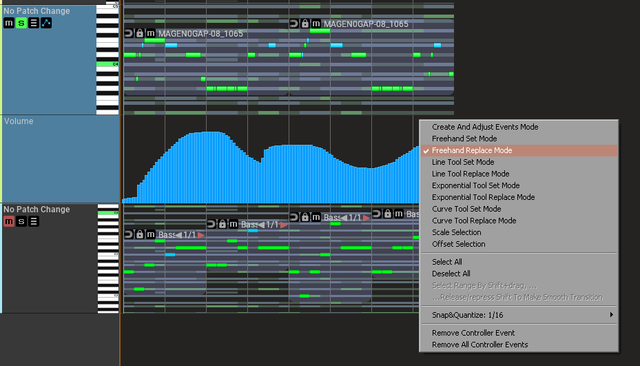
Hey, one important bug I found that can't wait.. I can't seem to edit midi CC's when added to a track. can someone else verify this?
-
- KVRAF
- 1782 posts since 10 Mar, 2004
seems OK here
-
- KVRAF
- 2154 posts since 15 May, 2017
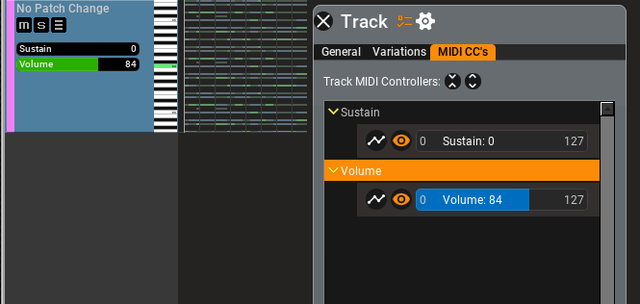
I'm sorry, not the CC lanes, but the slider values in the CC variations of the track.. like sustain, etc...
-
- KVRAF
- 1782 posts since 10 Mar, 2004
hmm.
seems like visual update in the Track/Variation/Slider
if i move slider from track inspector / Midi CC's/Slider,
i see also track control panel/slider moves
but
if i move from track control panel it doesn't update real time
in the track inspector / Midi CC's/Slider
then when i right click to the empty track control panel area i see slider value got refreshed
seems like visual update in the Track/Variation/Slider
if i move slider from track inspector / Midi CC's/Slider,
i see also track control panel/slider moves
but
if i move from track control panel it doesn't update real time
in the track inspector / Midi CC's/Slider
then when i right click to the empty track control panel area i see slider value got refreshed
-
- KVRAF
- 2154 posts since 15 May, 2017
ok well there ya go... thanks
edit: oops, my mistake, I had the lane open when I tried to move the slider.. but you are correct the track not updating the inspector..
edit: oops, my mistake, I had the lane open when I tried to move the slider.. but you are correct the track not updating the inspector..
-
- KVRist
- 455 posts since 12 Aug, 2015
yellukhan wrote: Thu Nov 12, 2020 7:22 pmThe point I'm making is you can import your midi files into rhythm mapper and it keeps everything the same, the only thing it does is changes the rhythm therefore if you could have that feature implemented in the idea tool you could use your custom phrases and have the rhythm mapper apply in the same way .lovemusic15 wrote: Thu Nov 12, 2020 4:32 pm Hi yellukhan ,
Hi,
"Rhythm" can't store (&apply) the original shape of the imported midi files by its nature,
you have to save and use them as Custom Phrase in your case.
That way you wouldn't have to worry about converting your midi into generators and losing the original shape.
Unfortunately RC sees algorithm doesn't convert midi files into generators without losing the original shape in less the original MIDI file is very basic therefore the rhythm mapper seems to be the only solution to be able to use your own custom phrases and change the rhythm inside the idea tool.
-
- KVRist
- 455 posts since 12 Aug, 2015
This is not showing up in new beta.musicdevelopments wrote: Wed Nov 11, 2020 2:56 pmlovemusic15 wrote: Wed Nov 11, 2020 4:06 am suggestions? Maybe "Synth Bass Rhythm"? how about ( retro rhythm)
This is an interesting request.
I want to suggest dragging rhythm (Alt-drag phrases) and dropping it on multiple selected phrases. Select "Replace Generator Rhythm" from the menu. You can replace the rhythm in many phrase generators in one simple operation.
I realized dragging phrases as rhythm stopped working, so I fixed that in beta12 (in about an hour).
Thanks!
Attila
Maybe you could do my last solution ,have the rhythm mapper as part of the idea tool so applying rhythm to custom phrases would work the same way applying rhythm to generators does.
There's no way I can convert my phrases to rc generators without losing the original pattern so this seems to be the only workaround .
-
- KVRAF
- 1782 posts since 10 Mar, 2004
did anyone noticed this "jumpy / strange zoom out" behavior in Note Edit mode?
https://drive.google.com/file/d/1tPxzXM ... sp=sharing
https://drive.google.com/file/d/1tPxzXM ... sp=sharing