Just a heads up, we are probably breaking our usual cadence of a new major version every year as this clean up / bug fix process will take us into the new year to complete. Expect a 11.5 in the new year, rather than 12.
Other key features if you don't want to read the entire change log:
* MIDI typing: Press caps lock and the computer keyboard always acts as a MIDI keyboard.
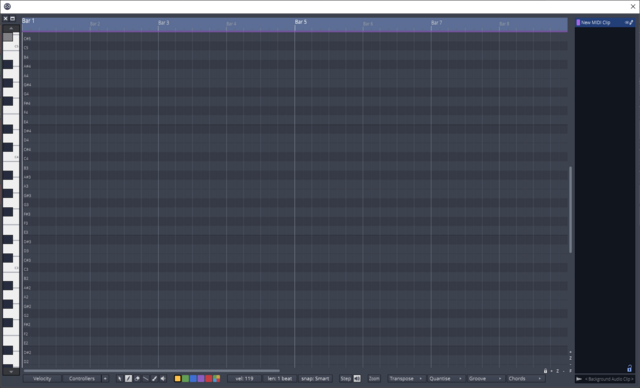
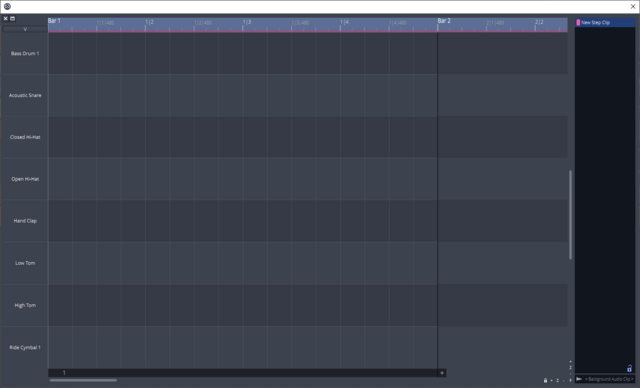
* Step clips now show in the MIDI editor window
* Snap resolution can be selected (audio / midi separate) instead of based on zoom
* Free version gets the actions panel, so the UIs are consistent
* Lots of new keyboard shortcuts
* Lots of new shortcut menus, try right clicking on things that didn't have menus before.
Full list of fixes since the last public beta:
Code: Select all
Waveform ChangeList

11.2.0:
- UI:               Added holding opt/alt to copy clips when dragging
- Macros:           Fixed being able to add parameters to a track's macro list using the "+" button
- UI:               Fixed incorrectly showing folder/submix tracks as frozen
- Racks:            Fixed a possible crash deleting a Rack with automated Macros or Modifiers

11.1.37:
- Files:            Reduced frequency of deleting cached waveforms
- UI:               Fixed setting colour of multi tracks at once
- PluginVal:        Fixed pluginval getting partially deleted from temp folder and failing to re-install
- MIDI:             Tweaks and cleanup of MIDI typing feature
- UI:               Moved snap to bwav from popupmenu to keyboard shortcut and actions/property panel move menu
- UI:               Refactored Edit Clip popup menu
- UI:               Added popup menu to visibility button

11.1.36:
- UI:               Added MIDI onscreen keyboard
- Linux:            Fixed VST3 plugin locations not appearing in the settings
- UI:               Improved step clip popup menu
- UI:               Improved selected midi notes popup menu
- Step Clips:       Default is now 'Repeat Whole Sequence' on
- Step Clips:       Reworking menus and actions
- Step Clips:       Fixed UI not following selection correctly

11.1.35:
- UI:               Fixed typing in values for volume sliders
- UI:               Fixed right clicking on a plugin not selecting a plugin
- Groups:           Fixed arm linking when inputs used on multiple tracks
- UI:               Fixed clicking on clip clears multi selection
- UI:               Clicking below the tracks can no position cursor
- UI:               Fixed setting the colour of multiple clips with the popup menu
- Shortcuts:        Made [cmd/ctrl + del] the defeault key command for "Delete and close gap (ripple delete)"
- Shortcuts:        Made the "Delete and close gap (ripple delete)" work for selected clips if no range is selected
- Engine:           [Experimental] Fixed previewing of mono audio files when they are time-stretched or pitch shifted to match the current Edit
- Plugins:          Fixed saving/loading FXB/FXP files with VST plugins and saving/loading vstpreset files for VST3 plugins with sandboxing enabled
- UI:               Fixed not being able to click on time signatures and key signatures
- macOS:            Added support for Apple Silicon processors
- UI:               Added glow to buttons keyboard focus
- UI:               Added new track button after last track
- Actions:          Free now gets the actions panel
- UI:               Reworked popup menu for MIDI clips
- UI:               Re-added delete to audio clip popup menu
- UI:               Fixed main menu going crazy when rolling mouse over buttons quickly

11.1.34:
- UI:               Fixed drawing glitch when groups panel resizes
- MIDI:             Fixed issue stepping backwards through the chords in the pattern generator
- UI:               Fixed Arranger track time being offset
- UI:               Let user configure snap (disconnected from zoom)
- MIDI:             Allow MIDI files and presets be dragged into the note editor panel
- MIDI:             Added keyboard shortcut for splitting notes in 3
- MIDI:             Added keyboard shortcut for selecting next/previous note
- UI:               Fixed issue where you couldn't right click on a track before a clip
- UI:               Rolled back feature 'Make track gutter fixed size in pixels instead of time', and reimplemented in a safer way
- UI:               Added 'Set loop to range' keyboard shortcut
- UI:               Added 'Loop Follows Selection' option
- UI:               Made suspending scroll less sensitive
- UI:               Made select the default action on drag
- UI:               Select all with nothing selected noe selects all clips
- UI:               Added keyboard shortcut `Create linked clip`
- UI:               Reworked audio clip Popup menu
- Groups:           Fixed 'record' not linking arm state
- UI:               Allow multiple files to be deleted from browser and search panel

11.1.33:
- Bugs:             Fixed crash using revert to saved
- Chord player:     Fixed 'Render Clips' disabling 'Chords in Key' mode
- UI:               Fixed glitch when selection moving away from a track
- MIDI:             Fixed 'Auto update on note resize'
- SOUL:             Updated SOUL to v0.9.59

11.1.32:
- UI:               Add scrollbars to MIDI editor
- UI:               Make track gutter fixed size in pixels instead of time
- Cloudbounce:      Removed Cloudbounce. Was no longer functional.
- UI:               Added option to disable inline midi editor
- UI:               Added transpose button to MIDI clip property panel
- UI:               Fixed transpose hotkey to work on selected clips, not just selected notes
- UI:               Range selection now takes precedence over zooming in inline MIDI editor
- Bugs:             Fixed copy and paste of collection clips pasting into the incorrect track
- Bugs:             Fixed copy and paste of group edit clips
- UI:               Added mini action panel to groups panel. Create new group now includes selected tracks.
- Bugs:             Fixed rendering to separate tracks with the same name overwriting files
- Engine:           [Experimental] Fixed digital noise when using Insert plugins
- Engine:           [Experimental] Fixed Insert plugins
- UI:               Improved clip fade in / out popup menu
- UI:               Fixed right clicking a clip deselecting other clips
- UI:               Grab cursor when scroll enabled
- UI:               Temporarilly disable scroll when user adjusts scroll
- UI:               Disabled snap for audio clip slip (Can still be enabled with command/control)
- UI:               When adding a synth to a track, swap a audio input to midi. Otherwise never swap an existing input.
- Racks:            Added support for dragging plugin presets into racks
- UI:               Added hotkey to toggle visible plugin windows
- UI:               Tracks panel now follows selection of tracks

11.1.31:
- MIDI:             Added 1 click Step Clip <> MIDI Clip conversion
- UI:               Removed option 'Keep cursor on screen'
- UI:               Added popup menu to scroll button
- UI:               Moved automation options to advanced settings
- UI:               Fixed view jumping on stop when "scroll with playback disabled"
- Bugs:             Fixed typing in values for plugin wet and dry params
- Bugs:             Fixed 'Racks: output wiring graphic not refreshed when adding tracks'

11.1.30:
- Groups:           Changed logic for grouping clips in grouped editing
- UI:               Fixed moving or resizing arranger clip from scrolling tracks up
- UI:               Allow for scrolling when dragging Arrangement clips
- UI:               Consolidate save, import and export menus into file menu
- UI:               Moved “Default remapping options” from Timecode menu to Settings > General Behaviour
- UI:               Simplified timecode menu and renamed to sync
- UI:               Simplified timebar popup menu
- UI:               Create MIDI section in Setting > General Behaviour
- UI:               Added view menu to main menu
- UI:               Removed popup menu from new clip creator button
- UI:               Added Advanced settings panel
- UI:               Improved view menu
- UI:               Redid layout of main menu when using compact transport bar
- UI:               Improved zoom menu
- UI:               Cleaned up click menu
- UI:               Removed option 'Only Show Enabled Devices'
- UI:               Added global tracks to tracks panel
- Shortcuts:        Fixed the "Delete marked region of selected clips and move up all on track" action
- Shortcuts:        Added a new "Delete and close gap" shortcut for quick range-selection based ripple editing
- MIDI:             Increased maximum pattern generator chord duration from 16 to 1024 beats
- UI:               Cleaned up snap menu
- UI:               Added PopupMenu to snap and click buttons
- UI:               Increased hit box of automation curve points
- UI:               'Select all plugins of same type' no longer crosses in/out of racks
- Bugs:             Edits will now be marked dirty if a plugin changes a non-automatable parameter
- Engine:           [Experimental] Fixed an issue where a plugins were muted during recording rather than just clips
- Engine:           [Experimental] Fixed an timing of recorded MIDI notes with high latency plugins
- Engine:           [Experimental] Fixed an timing of retrospective recorded MIDI notes with high latency plugins

11.1.29:
- Engine:           [Experimental] Fixed a problem where recordings would be out of sync by one buffer
- Engine:           [Experimental] Fixed a problem where an inserted retrospective record clip would have 0s length

11.1.28:
- UI:               Plugin list context menu operated on incorrect plugin when filter applied
- UI:               Ask for confirmation before deleting plugins from plugin list via context menu
- UI:               Added button to project settings to create backup
- Bugs:             Fixed recalling of single channel step clips
- Bugs:             Fixed favourite star appling to multiple actions
- UI:               Added context menu to new clip button
- UI:               Added context menu for adding clips
- UI:               New clips are now one bar in length by default
- UI:               Fixed some built in plugins not appearing in recent plugins list
- Bugs:             Fixed glitch ungrouping clips
- UI:               Added keyboard shortcut for edge fade
- UI:               Added keyboard shortcuts for track editor
- Bugs:             Fixed glitch unlooping audio clips
- Bugs:             Fixed search panel not playing midi files if autoplay disabled
- UI:               Moved thumbnail zoom slider to right click of thumbnail toggle button
- UI:               Cleaned up options menu, moved some options to settings panel
- Groups:           Editing now applies to pitch changes
- UI:               Fixed not being able to resize last global track if the main track list is scrolled
- UI:               Added maximise button to Quick Actions window
- Bugs:             Fixed clip link status not surviving copy / paste

11.1.27:
- UI:               Changed defaults for MIDI note colours
- UI:               Added options to hide / show arranger, marker, chord, tempo tracks from track header context menu
- UI:               Added hotkey to hide / show arrangement panel
- Sampler:          Fixed next and previous arrow buttons
- UI:               Fixed file import dialog preview
- UI:               Fixed track snapshot menu in action panel
- UI:               'Default input follows selected track' will no longer replace an existing input
- UI:               Always draw muted midi notes in grey when multiple midi clips selected
- UI:               Fixed backwards mute checkbox for selected midi notes
- UI:               Support multi select for deleting backups
- UI:               Fixed automation learn not opening 4OSC plugin UI
- Sampler:          Fixed 'reset to default' when on the pad page leaving multi sampler in an unstable state
- Bugs:             Fixed deadlock trying to cancel freezing a track
- UI:               Added confirmation dialog to files / search panel for deleting files

11.1.26:
- UI:               Fixed 'Delete marked region of selected tracks and close the gaps'
 . So far after a quick play it's seems good.