Waveform 11.2.0 Beta Available (UI Cleanup)

Discussion about: tracktion.com
RELATED
PRODUCTS

Post

Pigments (which I just bought) crushed and crashed Waveform during the Granular tutorial. I have a 9900K running all cores at 5ghz, 96k with 512 samples latency (5.3ms it says) and it hit 90%+ on the CPU and cut out.

At first, I struggled to find where the feature to re-enable the audio engine. Then I found the triangle has taken that functionality on. Then I did a bit more and eventually Waveform just crashed because of the high CPU use. Seems likely a combo of Pigments CPU consumption plus Waveform instability.

EDIT: Also, please do NOT implement the experimental audio engine as the default until it's actually able to work for me :cry: I still cannot get it to function properly when that's enabled on any of the 3 levels when I have Inserts to hardware. Output and input work just fine with the hardware, but I have some effects on an insert (e.g., and Acidbox3). I've mentioned this a few times before. The experimental engine isn't ready for prime time without a lot more testing and fixing.

Post

Pigments is especially CPU intensive, and often unpredictably. And the more you have going in Pigments, the more it eats up. Sometimes, a single Pigments patch can take down the PC with multiple LFOs all going.

I've heard this is quite evident in other DAWs, too, so while I'm not using the beta yet, I would be slow to attribute this to Waveform instability versus the way Pigments performs on hardware. I advocate, if you're doing anything with Pigments, render it to audio as soon as possible and unload the plugin from the project before adding too many other tracks or plugins. It's a terrible resource hog.
Spotify, Apple Music, YouTube, and even Deezer, whatever the hell Deezer is.

More fun at Twitter @watchfulactual

Post

Right clicking on plugins is causing Waveform to crash. Tried 3 different plugin manufacturers. Same thing for all. Using the hybrid engine.
Win 10 x64

Post

Watchful wrote: Sat Nov 21, 2020 6:32 pm Pigments is especially CPU intensive, and often unpredictably. And the more you have going in Pigments, the more it eats up. Sometimes, a single Pigments patch can take down the PC with multiple LFOs all going.

I've heard this is quite evident in other DAWs, too, so while I'm not using the beta yet, I would be slow to attribute this to Waveform instability versus the way Pigments performs on hardware. I advocate, if you're doing anything with Pigments, render it to audio as soon as possible and unload the plugin from the project before adding too many other tracks or plugins. It's a terrible resource hog.
Hmm. I'm liking Pigments for the $69 I paid, but the resource aspect is giving me some regret. I clearly should've done the demo again (I did v1) as I'd clearly forgotten! Thanks for the additional info.

Post

Watchful wrote: Sat Nov 21, 2020 6:32 pm Pigments is especially CPU intensive, and often unpredictably. And the more you have going in Pigments, the more it eats up. Sometimes, a single Pigments patch can take down the PC with multiple LFOs all going.

I've heard this is quite evident in other DAWs, too, so while I'm not using the beta yet, I would be slow to attribute this to Waveform instability versus the way Pigments performs on hardware. I advocate, if you're doing anything with Pigments, render it to audio as soon as possible and unload the plugin from the project before adding too many other tracks or plugins. It's a terrible resource hog.
I've found the opposite, Pigments is very efficient and I've run ridiculous numbers of tracks and had no issues, at least on Mac OS.
Every day takes figuring out all over again how to f#ckin’ live.

Post

Not sure if this counts as UI cleanup, but a few issues I've had continuing through this beta:

1. When tracks containing step clips are expanded, there's a noticeable visual lag.

2. The channel names of step clips "float" compared to the actual channels. It's sometimes hard to get them to stick to their channels so I can click the right one. I have to click the channel name and wait for the white highlight to come up.

3. Files played from the browser play a few ms late, cutting off the transients of drums.
Linux version?

Post

(Evaluating type pause)
• 4OSC sometimes loses track of its instrument settings: the name of the preset is still listed in the dialog, but most of the parameters are garbled. I mainly notice it when rendering submixes, but it happened today on loading a saved edit.
• 4OSC will occasionally fail during looping, after which it will just make a single "blup" at note-on events; temporarily switching to another preset is a workaround.
• The export-render file dialogs (and maybe others) still show the directory name in black text on a dark grey background.

Post

Good morning,
with this version every time I click on a plugin (Serum, Sylenth, Vacuum Pro, Synthmaster 1/2, Ozone) the program crashes. It didn't happen before :( ...

Post

dayvyg wrote: Sat Nov 21, 2020 7:39 pm Right clicking on plugins is causing Waveform to crash. Tried 3 different plugin manufacturers. Same thing for all. Using the hybrid engine.
Win 10 x64
This is happening to me now, too. Not every plugin, though. I've gone to disable a plugin via right click and it freezes for a time then crashes to desktop.

Post

@FigBug

On Linux we still have couple of aesthetic issues, black on dark directory path in borderless dialog windows:
Screenshot_20201123_142147.png
Also WaveForm's icon still not draw in window list. Recent JUCE has fixed icons exporting in X11, so, maybe it's not defined in .jucer.
You do not have the required permissions to view the files attached to this post.

Post

Another way to get 4OSC to lose its mind is to switch to another tab: Settings, Projects; maybe any?

Post

Kott wrote: Mon Nov 23, 2020 4:31 am @FigBug

On Linux we still have couple of aesthetic issues, black on dark directory path in borderless dialog windows:
Screenshot_20201123_142147.png
I found similar with the light theme on windows with white text on a light background making it hard to see. I have feeling the theme has always been like this.
Image
Image

Post

boomt wrote: Mon Nov 23, 2020 12:11 pm
Kott wrote: Mon Nov 23, 2020 4:31 am @FigBug

On Linux we still have couple of aesthetic issues, black on dark directory path in borderless dialog windows:
Screenshot_20201123_142147.png
I found similar with the light theme on windows with white text on a light background making it hard to see. I have feeling the theme has always been like this.
Image
Image
That should be correct if you restart Waveform. Looks like some components aren't correctly getting the colour updates when they change.

I've also fixed the dialog box colours on Linux now.

Post

dRowAudio wrote: Mon Nov 23, 2020 4:51 pm That should be correct if you restart Waveform.
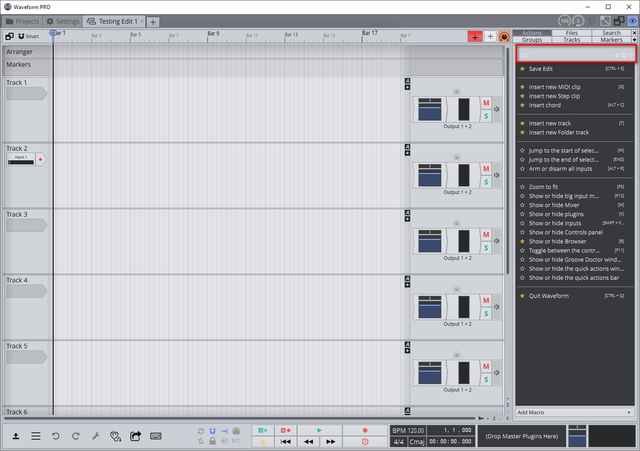
Restarting fixes the text in the settings but it hasn't fixed the white text above the actions bar in the second image.

Post

Yeah, definitely a step in a good direction, overall, with the UI cleanup. I had to revert back to the release version due to instability - it was doing CTDs a lot with the right-click on a plugin action. I look forward to the next beta!

Post Reply

Return to “Tracktion”