

Oh well, the rest of December will be Cyberpunk 2077 so happy new year, Ableton!You're on a waiting list for the upcoming free slots of Beta testing
Ableton Live 11
-
 WatchTheGuitar WatchTheGuitar https://www.kvraudio.com/forum/memberlist.php?mode=viewprofile&u=440193
 - KVRAF
- 13256 posts since 30 Apr, 2019
-
- KVRAF
- 12083 posts since 2 Dec, 2004 from North Wales
Nice to see they are even updating some of the old Live 10 packs...available now to beta testers.
''Chop and Swing, Drive and Glow, Skitter and Step, Electric Keyboards and Grand Piano have been reworked with hundreds of new MIDI clips including drum grooves, basslines, melodies, chord progressions and vamps. Exclusively for Live 11, these updated Packs also contain new demo songs and presets.''
''Chop and Swing, Drive and Glow, Skitter and Step, Electric Keyboards and Grand Piano have been reworked with hundreds of new MIDI clips including drum grooves, basslines, melodies, chord progressions and vamps. Exclusively for Live 11, these updated Packs also contain new demo songs and presets.''
X32 Desk, i9 PC, S88MK3, S1, BWS, Live + PUSH 3, Osmose, RedShift 6 Pro3, Tempera, Syntakt, Digitone II, OP1-F, OPXY, Eurorack, TD27 Drums, Guitars, Basses, Amps and of course lots of pedals!
-
- KVRAF
- 12083 posts since 2 Dec, 2004 from North Wales
Available to download now for beta testers (2Gig):
Mood Reel: Set the scene with a collection of sounds for making music with a modern narrative feel. Evocative layered instruments combine organic and synthetic sounds with textural elements to add mood, space and movement to productions.
Mood Reel: Set the scene with a collection of sounds for making music with a modern narrative feel. Evocative layered instruments combine organic and synthetic sounds with textural elements to add mood, space and movement to productions.
X32 Desk, i9 PC, S88MK3, S1, BWS, Live + PUSH 3, Osmose, RedShift 6 Pro3, Tempera, Syntakt, Digitone II, OP1-F, OPXY, Eurorack, TD27 Drums, Guitars, Basses, Amps and of course lots of pedals!
-
- KVRist
- 120 posts since 11 Oct, 2020
I think Mood Reel is the first time I've gone through a bundled Live Pack and thought 'This is really good!' rather than, 'Well, this is a bit vanilla and utilitarian but I'm sure it could be interesting if you took the time to process it'. It has more character than most of the usual stuff.
-
- KVRAF
- 5144 posts since 3 Oct, 2013
fyi, after 3hours of playing have no issue with beta 20 and Voltage2 and all my modulation issues been solvedEchoes in the Attic wrote: Wed Dec 02, 2020 11:10 pmIt looks to me like these assignments lock Live parameters as well. But I guess you can at least have a modulator like an envelope as well as a macro within the same modulat device, which is somthing. Still seems annoying that the target device parameter will be locked (I assume because it gets greyed out in videos).xbitz wrote: Wed Dec 02, 2020 9:39 pm£91.01 >> https://isotonikstudios.com/product/modulat/ if you needEchoes in the Attic wrote: Wed Dec 02, 2020 1:07 pm Sorry to bring up the modulators again, but I'm confused by why the clip envelopes can be additive (relative to absolute position) but none of the modulators work this way? Is this a Max for Live limitation? Or has nobody made any mod devices that work this way? Or have they? It seems like the obvious way it should work - that is, the modulated position should be indicated by the little blue dot (for sliders) or the blue ring around a knob, as opposed to changing the absolute position of the knob. Do no M4L macros or modulators work in this additive way like clip envelope modulations?
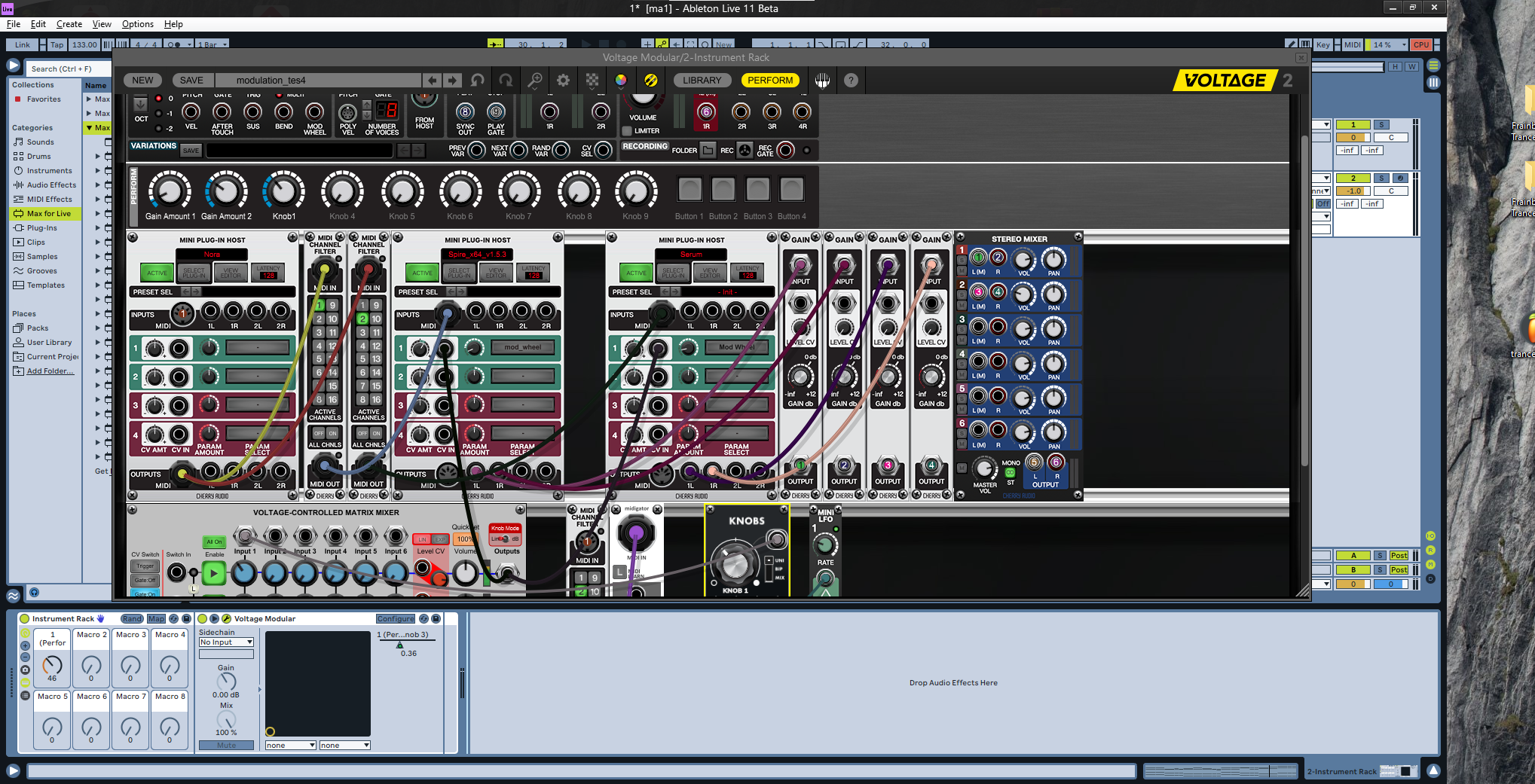
Nora is working, MIDI routing with multi-channel is working too as it should, luckily it has multi-core CPU support so not depend on one track one core AL limitation
"Where we're workarounding, we don't NEED features." - powermat
-
- KVRist
- 89 posts since 10 Jan, 2004 from Augusta, GA
They still can't put a pitch correction plugin in Live? I can't believe they're charging for this crap.
http://www.soundcloud.com/gradynickel
MacBook Pro, iMac, Software, Hardware, Instruments, etc.
MacBook Pro, iMac, Software, Hardware, Instruments, etc.
-
- KVRAF
- 2297 posts since 23 May, 2012 from London
There's comping now, just keeping recording until your vocalist gets it rightjoeyfivecents wrote: Wed Dec 09, 2020 3:41 pm They still can't put a pitch correction plugin in Live? I can't believe they're charging for this crap.

Always Read the Manual!
-
- KVRAF
- 5573 posts since 30 May, 2006 from Hollow Earth
PieBerger wrote: Wed Dec 09, 2020 3:46 pmThere's comping now, just keeping recording until your vocalist gets it rightjoeyfivecents wrote: Wed Dec 09, 2020 3:41 pm They still can't put a pitch correction plugin in Live? I can't believe they're charging for this crap.


ABEFLGMOPPRRST 
-
WatchTheGuitar WatchTheGuitar https://www.kvraudio.com/forum/memberlist.php?mode=viewprofile&u=440193
- KVRAF
- 13256 posts since 30 Apr, 2019
Finally got my beta invite through. Glad something was moving.
-
- KVRAF
- 12083 posts since 2 Dec, 2004 from North Wales
Just dropped for Beta testers - 5 Gigs ! 
Drone Lab is one of Ableton's new Curated Collections in Live 11.
Curated Collections capture the musical threads that tie evolving styles and scenes together. Each Pack is a curated selection of instruments, clips and samples that share a common sonic theme.
Drone Lab is a place of sustain.
Get lost in deep listening with complex, evolving threads of tone and texture, generative noise, multisampled instruments, plus devices and Racks designed for experimentation and improvisation.
Explore continuous sound using this collection of tones and tools created by Ableton with contributions from experimental techno artist Xosar, ambient producer Ami Dang and the ModeAudio sound design team.
Drone Lab is one of Ableton's new Curated Collections in Live 11.
Curated Collections capture the musical threads that tie evolving styles and scenes together. Each Pack is a curated selection of instruments, clips and samples that share a common sonic theme.
Drone Lab is a place of sustain.
Get lost in deep listening with complex, evolving threads of tone and texture, generative noise, multisampled instruments, plus devices and Racks designed for experimentation and improvisation.
Explore continuous sound using this collection of tones and tools created by Ableton with contributions from experimental techno artist Xosar, ambient producer Ami Dang and the ModeAudio sound design team.
X32 Desk, i9 PC, S88MK3, S1, BWS, Live + PUSH 3, Osmose, RedShift 6 Pro3, Tempera, Syntakt, Digitone II, OP1-F, OPXY, Eurorack, TD27 Drums, Guitars, Basses, Amps and of course lots of pedals!
-
- KVRAF
- 2297 posts since 23 May, 2012 from London
Inspired by Nature from Dillon Baston too
 Any unsecured balls will be bounced
Always Read the Manual!
-
WatchTheGuitar WatchTheGuitar https://www.kvraudio.com/forum/memberlist.php?mode=viewprofile&u=440193
- KVRAF
- 13256 posts since 30 Apr, 2019
Perfect timing, now I've just got the Beta I'm downloading and Installing... Cyberpunk 2077 
-
- KVRAF
- 12083 posts since 2 Dec, 2004 from North Wales
Updates coming think and fast now- must be getting close to RC for January release...
11.0b22
New features and improvements:
Hitting the return key when the tempo or time signature widgets are selected selects the scene header.
The left/right arrow keys now navigate to the tempo and time signature widgets as well.
Pressing the return key when the tempo or time signature widgets are selected selects the scene header instead of launching the scene. The scene only launches when the header is selected.
While text editing the scene name, tempo or time signature values, pressing tab or shift+tab navigates to next or previous widget accordingly while remaining in text editing mode. The navigation goes to the next or previous scene when reaching the last or first widget in a scene.
The Release Velocity in NoteLenght is now set to 0 by default.
Spectral Resonator and Spectral Time will now save CPU by deactivating when silent (and by extension deactivating all downstream devices).
When using the arrow/up down keys in the velocity/probability editor to adjust values, the new value range is indicated briefly in the ruler on the left.
Using draw mode with grid enabled in the velocity/probability editor now affects notes based on their precise start/end times. Previously, draw mode would affect notes based on where their "lollipop heads" were visible, which could affect notes outside of the clicked grid cell when zoomed out a lot.
It is now possible to change the note selection in the MIDI editor using the arrow keys in combination with a modifier (Alt on Mac, Ctrl on Windows), even while editing or drawing per-note expression breakpoints.
Updated the What's New in Live lesson.
Upon loading an impulse response that exceeds our maximum possible size, users will now receive a message in the status bar that their impulse response has been shortened and still be able to use the trimmed file, rather than simply receiving a notification that 'The impulse response file is too long.' A previous crash when loading a True Stereo pair where one of the files was an appropriate length but all 4 channels together exceeded the buffer size is also implicitly fixed with this new scheme.
When attempting to load an outdated user remote script, users will see a warning message (with a don't show again option) which explains that the script was written for an old version of Live and needs to be updated.
Previously, the time selection would be cleared on mouse-up when selecting a single note in the per-note-events tabs.
Now, the time selection stays the same when selecting a single note, and gets cleared only when interacting with the events. The time selection is synced back when clicking on the note again, or switching to the notes' tab.
Key name labels come closer to the separator lines when there is not enough space (e.g. full zoom out)
A horizontal line at the top of the key range is removed, and doesn't come across the "C8" label anymore when the ruler is fully zoomed out (in particular, in the "disabled view").
In Envelope mode ("disabled piano ruler"):
Fixed the condition for drawing the keys or not
The vertical separator line at the left of the ruler remains visible
A vertical line is not displayed anymore at the right when keys are invisible
The ruler remains aligned when the MIDI editor contains no notes, in the case where the keys are fully zoomed-out.
Core Library:
Added new (MPE) Instrument Racks and Drum Racks
Added new presets for Spectral Resonator, Spectral Time and Redux
Improved Wavetable default preset: Includes a Press mapping to Warp and a Slide mapping to OSC 1 Position
Please note: File names and locations may change until the official release. Remember to "collect all and save" when working with the Live 11 Beta Core Library and new and updated Packs!
Bugfixes:
The Max MIDI Effect device is now correctly capitalized (was Max Midi Effect)
Live does not crash anymore with a beatseeker assert.
Fixes a bug where dragging a groove onto either the groove box or the clip detail view caused a crash when content editing was disabled (e.g. because not all MIDI clips are looped or because not all audio clips have the same length and set of warp markers).
Fixes a crash that could occur when making a time selection while editing expression envelopes.
When tabbing the session view between windows, the scene name remains in the same position in the scene header.
Fixes a bug whereby LFO would create an additional unnecessary undo step when mapping the device to a parameter. Envelope MIDI now instantiates with MPE active, so that MPE data can pass through and reach other devices in the device chain.
This fixes an issue where wrong values of per-note expression would be played when having ramps or curves between breakpoints.
On macOS, Live does not crash in rare circumstances when audio interfaces change.
Fixes two bugs: a) notes which were made as small as possible and which were located at the left edge of the visible range of the note editor could not be selected with the rubberband, and b) these notes would not be displayed in the velocity and probablility editors.
Deleting an audition take lane will now be correctly reflected in the audio engine. Adding/deleting an auditioned take lane clip will now be correctly reflected in the audio engine.
Fixes a rare crash caused by Live trying to show the user mathematically impossible colors.
Fixes a bug where for unlooped MIDI clips, no notes would be drawn beyond the end of the "unlooped loop" (the clip end marker).
Fixes a crash where pressing a high note on the computer MIDI keyboard would crash when the keyboard octave was set to C8.
Core Library:
Some MIDI clips opened with wrong grooves selected
11.0b22
New features and improvements:
Hitting the return key when the tempo or time signature widgets are selected selects the scene header.
The left/right arrow keys now navigate to the tempo and time signature widgets as well.
Pressing the return key when the tempo or time signature widgets are selected selects the scene header instead of launching the scene. The scene only launches when the header is selected.
While text editing the scene name, tempo or time signature values, pressing tab or shift+tab navigates to next or previous widget accordingly while remaining in text editing mode. The navigation goes to the next or previous scene when reaching the last or first widget in a scene.
The Release Velocity in NoteLenght is now set to 0 by default.
Spectral Resonator and Spectral Time will now save CPU by deactivating when silent (and by extension deactivating all downstream devices).
When using the arrow/up down keys in the velocity/probability editor to adjust values, the new value range is indicated briefly in the ruler on the left.
Using draw mode with grid enabled in the velocity/probability editor now affects notes based on their precise start/end times. Previously, draw mode would affect notes based on where their "lollipop heads" were visible, which could affect notes outside of the clicked grid cell when zoomed out a lot.
It is now possible to change the note selection in the MIDI editor using the arrow keys in combination with a modifier (Alt on Mac, Ctrl on Windows), even while editing or drawing per-note expression breakpoints.
Updated the What's New in Live lesson.
Upon loading an impulse response that exceeds our maximum possible size, users will now receive a message in the status bar that their impulse response has been shortened and still be able to use the trimmed file, rather than simply receiving a notification that 'The impulse response file is too long.' A previous crash when loading a True Stereo pair where one of the files was an appropriate length but all 4 channels together exceeded the buffer size is also implicitly fixed with this new scheme.
When attempting to load an outdated user remote script, users will see a warning message (with a don't show again option) which explains that the script was written for an old version of Live and needs to be updated.
Previously, the time selection would be cleared on mouse-up when selecting a single note in the per-note-events tabs.
Now, the time selection stays the same when selecting a single note, and gets cleared only when interacting with the events. The time selection is synced back when clicking on the note again, or switching to the notes' tab.
Key name labels come closer to the separator lines when there is not enough space (e.g. full zoom out)
A horizontal line at the top of the key range is removed, and doesn't come across the "C8" label anymore when the ruler is fully zoomed out (in particular, in the "disabled view").
In Envelope mode ("disabled piano ruler"):
Fixed the condition for drawing the keys or not
The vertical separator line at the left of the ruler remains visible
A vertical line is not displayed anymore at the right when keys are invisible
The ruler remains aligned when the MIDI editor contains no notes, in the case where the keys are fully zoomed-out.
Core Library:
Added new (MPE) Instrument Racks and Drum Racks
Added new presets for Spectral Resonator, Spectral Time and Redux
Improved Wavetable default preset: Includes a Press mapping to Warp and a Slide mapping to OSC 1 Position
Please note: File names and locations may change until the official release. Remember to "collect all and save" when working with the Live 11 Beta Core Library and new and updated Packs!
Bugfixes:
The Max MIDI Effect device is now correctly capitalized (was Max Midi Effect)
Live does not crash anymore with a beatseeker assert.
Fixes a bug where dragging a groove onto either the groove box or the clip detail view caused a crash when content editing was disabled (e.g. because not all MIDI clips are looped or because not all audio clips have the same length and set of warp markers).
Fixes a crash that could occur when making a time selection while editing expression envelopes.
When tabbing the session view between windows, the scene name remains in the same position in the scene header.
Fixes a bug whereby LFO would create an additional unnecessary undo step when mapping the device to a parameter. Envelope MIDI now instantiates with MPE active, so that MPE data can pass through and reach other devices in the device chain.
This fixes an issue where wrong values of per-note expression would be played when having ramps or curves between breakpoints.
On macOS, Live does not crash in rare circumstances when audio interfaces change.
Fixes two bugs: a) notes which were made as small as possible and which were located at the left edge of the visible range of the note editor could not be selected with the rubberband, and b) these notes would not be displayed in the velocity and probablility editors.
Deleting an audition take lane will now be correctly reflected in the audio engine. Adding/deleting an auditioned take lane clip will now be correctly reflected in the audio engine.
Fixes a rare crash caused by Live trying to show the user mathematically impossible colors.
Fixes a bug where for unlooped MIDI clips, no notes would be drawn beyond the end of the "unlooped loop" (the clip end marker).
Fixes a crash where pressing a high note on the computer MIDI keyboard would crash when the keyboard octave was set to C8.
Core Library:
Some MIDI clips opened with wrong grooves selected
X32 Desk, i9 PC, S88MK3, S1, BWS, Live + PUSH 3, Osmose, RedShift 6 Pro3, Tempera, Syntakt, Digitone II, OP1-F, OPXY, Eurorack, TD27 Drums, Guitars, Basses, Amps and of course lots of pedals!