


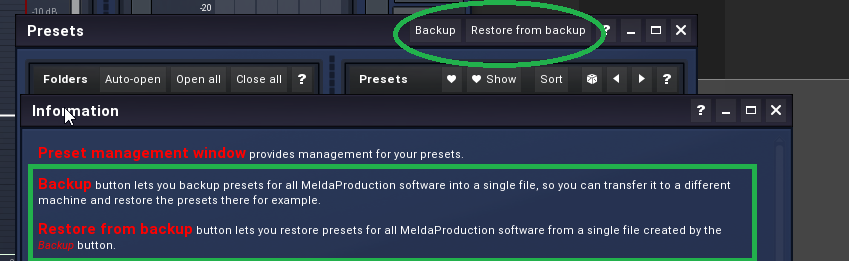
I know that I can export the presets under "Presets" of any Melda plugin, and then import them again on the other computer. But if I have to do this for all my Melda plugins individually....
Is there a way to transfer all my self-created presets from all my Melda plugins to another computer at the same time?
How to transfer all presets to a second computer at once?
-
- KVRer
- 7 posts since 17 Oct, 2020
-

- KVRian
- 710 posts since 7 May, 2002 from Phoenix, Arizona, USA
-
- KVRer
- Topic Starter
- 7 posts since 17 Oct, 2020
Since unfortunately no one answered me, I'll give myself the answer:
Presets can be backed up by using either the Export button, or by saving the actual preset files, which are found in the following directories:
Windows: C:\Users\{username}\AppData\Roaming\MeldaProduction
Mac OS X: ~/Library/Application support/MeldaProduction
Exported preset files can be loaded into the plug-in's preset store using the Import button. Or the preset files themselves can be copied intothe directories named above. Files are named based on the name of the plugin in this format: "{pluginname}presets.xml", for example: MAutopanpresets.xml orMDynamicspresets.xml. If the directory cannot be found on your computer for some reason, you can just search for the particular file.
Presets can be backed up by using either the Export button, or by saving the actual preset files, which are found in the following directories:
Windows: C:\Users\{username}\AppData\Roaming\MeldaProduction
Mac OS X: ~/Library/Application support/MeldaProduction
Exported preset files can be loaded into the plug-in's preset store using the Import button. Or the preset files themselves can be copied intothe directories named above. Files are named based on the name of the plugin in this format: "{pluginname}presets.xml", for example: MAutopanpresets.xml orMDynamicspresets.xml. If the directory cannot be found on your computer for some reason, you can just search for the particular file.
-

- KVRist
- 41 posts since 11 Feb, 2020
Thanks for that Melomaniak, very useful information there. I use SyncBackSE to backup folders, I'll add the Melda preset folders to it's path.
Along the same lines, I've always been a bit paranoid regarding backups. Have all my drives backed up once a week onto an external drive using Macrium Reflect (free). Lost the C drive once and it was simple using Macrium to recover the image onto a new drive. Would recommend it.
https://www.macrium.com/reflectfree
Along the same lines, I've always been a bit paranoid regarding backups. Have all my drives backed up once a week onto an external drive using Macrium Reflect (free). Lost the C drive once and it was simple using Macrium to recover the image onto a new drive. Would recommend it.
https://www.macrium.com/reflectfree
-
- KVRist
- 75 posts since 22 Nov, 2020
Looks like Ericzang answered Tue Nov 24, 2020 11:41 pmMelomaniak wrote: Wed Dec 16, 2020 5:32 pm Since unfortunately no one answered me, I'll give myself the answer: