


At 4m46s into the video when the guy opens the VST, there's a drop-down menu with the list of Diva presets in it. Why don't I have such list in my Ableton 10.1.25?
Thanks.
How to show the Diva preset list in Ableton's device box drop-down menu?
-
- KVRian
- 814 posts since 18 May, 2007 from Berlin
Hi spnc,
since we don't ship our plugins with dedicated Ableton Device presets, these must have been created manually by someone.
Viktor
u-he team
since we don't ship our plugins with dedicated Ableton Device presets, these must have been created manually by someone.
Viktor
u-he team
-
- KVRist
- Topic Starter
- 97 posts since 30 Nov, 2020
Hi thanks. So you're saying by default Ableton Device presets don't work with Diva? And when you say there's a way to create them manually is there any way I could do this? This would be game changer in my workflow, going back and forth to re-open the VST window every time makes me waste a lot of time.The unshushable Coktor wrote: Mon Dec 21, 2020 9:10 pm Hi spnc,
since we don't ship our plugins with dedicated Ableton Device presets, these must have been created manually by someone.
Viktor
u-he team
Thanks again.
-
- KVRist
- 76 posts since 7 Dec, 2020
I did a little experimenting just now, and it depends on what you're looking for - if you use the save icon on the Live Instrument, you can create a Live-recognized preset, but that won't give you the dropdown menu like in the video, on the in-track instrument itself.
It will show up in the browser in two places - your user library folder, and the collapsable menu beneath the instrument itself. Of the two, the "User Library" seems to allow nested folders, while the collapsable instrument menu does not (boo). If you're looking for program browsing via a Push controller, you will now be able to see them there.
It will show up in the browser in two places - your user library folder, and the collapsable menu beneath the instrument itself. Of the two, the "User Library" seems to allow nested folders, while the collapsable instrument menu does not (boo). If you're looking for program browsing via a Push controller, you will now be able to see them there.
-
- KVRist
- Topic Starter
- 97 posts since 30 Nov, 2020
Thanks - would you mind uploading a picture I'm not sure I can see what the "collapsable menu" looks like.neuromod wrote: Mon Dec 21, 2020 10:02 pm I did a little experimenting just now, and it depends on what you're looking for - if you use the save icon on the Live Instrument, you can create a Live-recognized preset, but that won't give you the dropdown menu like in the video, on the in-track instrument itself.
It will show up in the browser in two places - your user library folder, and the collapsable menu beneath the instrument itself. Of the two, the "User Library" seems to allow nested folders, while the collapsable instrument menu does not (boo). If you're looking for program browsing via a Push controller, you will now be able to see them there.
Appreciate cheers.
-
- KVRist
- 76 posts since 7 Dec, 2020
Sure - I mean the menu that appears beneath an instrument title when you click on it in the browser. Note the user library route showing the subfolder, and what I would think of as the "direct" route not showing it.
You do not have the required permissions to view the files attached to this post.
-
- KVRist
- Topic Starter
- 97 posts since 30 Nov, 2020
Yes indeed got ya I think - https://help.ableton.com/hc/en-us/artic ... igurationsneuromod wrote: Tue Dec 22, 2020 5:53 pm Sure - I mean the menu that appears beneath an instrument title when you click on it in the browser. Note the user library route showing the subfolder, and what I would think of as the "direct" route not showing it.
But I still don't understand how they manage to make the Preset drop-down menu appear (INIT - Solid Dynamics in this instance):
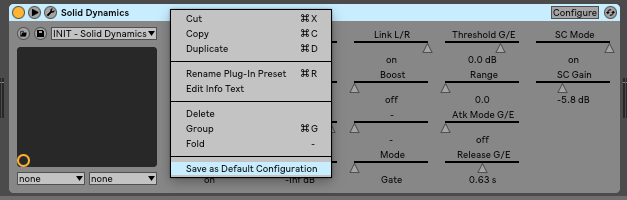
Whenever I try to configure/save presets in a VST instrument, I don't have the Preset drop-down menu appear. I never figured this out in Ableton

Cheers.
-

- KVRAF
- 2251 posts since 10 Apr, 2002 from Saint Germain en Laye, France
The menu you are talking about is managed by standard midi message Program Change and is rarely used with modern preset browsers.
But some virtual synths with no browser show theirs presets here.
Diva uses a special folder called ‘MIDI Programs’ where you copy the presets you want to be managed by Program Change and should appear in this list. Read the manual page 10
But some virtual synths with no browser show theirs presets here.
Diva uses a special folder called ‘MIDI Programs’ where you copy the presets you want to be managed by Program Change and should appear in this list. Read the manual page 10

-
- KVRist
- Topic Starter
- 97 posts since 30 Nov, 2020
Perfect thanks for the info - I'm going to go on with reading the manual good ideacarrieres wrote: Wed Dec 23, 2020 1:36 pm The menu you are talking about is managed by standard midi message Program Change and is rarely used with modern preset browsers.
But some virtual synths with no browser show theirs presets here.
Diva uses a special folder called ‘MIDI Programs’ where you copy the presets you want to be managed by Program Change and should appear in this list. Read the manual page 10

The ‘Local’ folder
Diva’s factory presets are sorted into folders 1 to 8. We recommend that you do not add or remove
any Local presets, but save all your creations and third party soundsets in ‘User’ (see below).
MIDI Programs
‘Local’ also contains a special folder called ‘MIDI Programs’ which is normally empty. When the
first instance of Diva starts, up to 128 presets from that folder are loaded into memory, to be
selected via MIDI Program Change messages. It is a good idea to call those presets e.g. ‘000
rest-of-name’ to ‘127 rest-of-name’, as they are accessed in alphabetical order.
But that’s not all: the ‘MIDI Programs’ folder can contain up to 127 sub-folders, switched via
MIDI Bank Select messages (CC#0). Send Bank Select first, then Program Change. ‘MIDI
Programs’ is bank 0, sub-folders are addressed in alphabetical order starting with bank 1.
Changes to the MIDI Programs folder will only be updated after the host application is restarted.
MIDI Program files cannot be a cannot be added, removed or renamed on the fly!
When Diva receives a program change, it will display the bank and program numbers to the left
of the preset name e.g. “0:0” for the first preset in the first bank. In certain hosts e.g. Ableton
Live, however, the first bank / preset is designated “1” instead of the correct “0”.
To avoid another possible source of confusion, make sure that there are no junked presets in
the MIDI Programs folder. All files there are indexed, whether they are visible or not.