DrivenByMoss: Bitwig extension for many hardware controllers (version 26.6.1)

Post Reply New Topic
RELATED
PRODUCTS
Bitwig Studio 6$399.00Buy Maschine

Post

PrElektra wrote: Mon Dec 14, 2020 11:24 pm
moss wrote: Sun Dec 13, 2020 8:29 pm
PrElektra wrote: Sun Dec 13, 2020 4:51 pm Dear Mr Mossgraber,

I have previously, without any issues been using your script (for which I am most thankful to you - truly amazing work!) with the Native Instruments KK S49 mk I keyboard. Since some time back there is no way I can make the script start (the ”power” button never shifts to orange) and there is no connection to the keyboard at all. At one occasion it actually did work for some reason but I do not know what I did different to make that happen... Now it seems impossible again no matter what I do!
I have tried to go back to older versions but the problem seems to persist.
Would you have any idea what to try?

Driven by Moss 10.9.1 (from November 15)
Bitwig 3.2.8 and later 3.3 on Win 10
NiHostIntegrationAgent 1.10.1.152
NiHardwareService 2.6.1.532

Kind regards // Svante
The implementation for the Mk I does directly access USB and does not use the NI services. On the contrary it can conflict with them. Try to stop them and see if it works.
That was it! Many tanks for the quick response - you are truly the king of controllers! 😀
(Makes me feel a little ashamed that I didn’t even think of stopping the services myself...)

Best wishes,

Svante
Hello again!
Seems it was maybe a little more complicated after all :? . The first time I stopped the NI services everything worked, but now I'm back with same issue no matter what I do! From the script console:

Could not open device: Entity not found
Bdz:
at y3I.zWV(SourceFile:710)
at y3I.xKE(SourceFile:170)
at y3I.<init>(SourceFile:136)
at xOX.xKE(SourceFile:235)
at xOX.yHq(SourceFile:324)
at xOX.xKE(SourceFile:190)
at ivq.run(SourceFile:91)
at xOX.run(SourceFile:106)
Caused by: bMs: Could not open device: Entity not found
at bNJ.xKE(SourceFile:151)
at com.bitwig.flt.control_surface.proxy.UsbDeviceImpl.open(SourceFile:66)
at y3I.zWV(SourceFile:706)
... 7 more

Any ideas?

Regards,

Svante

Post

HI there

For the Fire, is there a combo to select devices within a layer as the APC40 has?

Post

PrElektra wrote: Mon Dec 21, 2020 11:20 pm Seems it was maybe a little more complicated after all :? . The first time I stopped the NI services everything worked, but now I'm back with same issue no matter what I do! From the script console:

Could not open device: Entity not found
Bdz:
at y3I.zWV(SourceFile:710)
Any ideas?
This error means that it is blocked by another process, which likely is the NI hardware service.
Set both NI services to Deactivated and reboot. Check that they are no longer running. Then try again.

Post

melodyz wrote: Tue Dec 22, 2020 12:23 am HI there

For the Fire, is there a combo to select devices within a layer as the APC40 has?
No.

Post

hey Moss,

I found 3rd little bug with Push2. Here is how to reproduce it:
1. you just need to add more than 8 tracks
2. now you add software instrument and look on push2
3. leds are no lighting up until you change the track

here is little video:
https://www.dropbox.com/s/vzdzo7a6uan4g7i/bug3.mov?dl=0

thanks in advance!
wish you all the best and merry christmas :party:


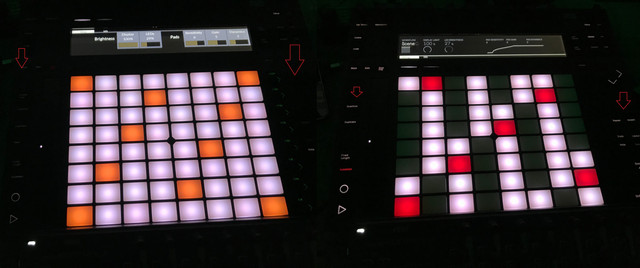
p.s. is there any way to control brightness of side buttons? or at least make them brighter by default?

Image

Post

moss wrote: Wed Dec 23, 2020 1:00 pm
PrElektra wrote: Mon Dec 21, 2020 11:20 pm Seems it was maybe a little more complicated after all :? . The first time I stopped the NI services everything worked, but now I'm back with same issue no matter what I do! From the script console:

Could not open device: Entity not found
Bdz:
at y3I.zWV(SourceFile:710)
Any ideas?
This error means that it is blocked by another process, which likely is the NI hardware service.
Set both NI services to Deactivated and reboot. Check that they are no longer running. Then try again.
Hi and thanks again for replying!
I am now (usually) able to make it work with services off doing some fiddling... Each time Bitwig starts by removing all controllers in settings, disconnecting the controller usb cable, load the script and reconnecting the cable.
Seems like the culprit is the NI hardware driver that interferes in the process somehow but without it it does not seem to work at all.

Cheers,

Svante

Post

Hi Moss,

I'm a big fan of your Bitwig Scripts, you add so much value to this software, it's insane...
So first of all a big thank you for all that you do! :)

I have just a little idea:
Would it be possible to add an option in your script for the APC Mini to use the Master Fader (the 9th one) as e. g. a MIDI CC input and not with a fixed mapping to the master track volume? That would be incredibly helpful!

All the best und einen guten Rutsch
Jo

Post

artsense wrote: Thu Dec 24, 2020 5:19 pm I found 3rd little bug with Push2. Here is how to reproduce it:
1. you just need to add more than 8 tracks
2. now you add software instrument and look on push2
3. leds are no lighting up until you change the track
Thanks for the report, I can reproduce it. Seems to be a little Bitwig bug. Will report it.
artsense wrote: Thu Dec 24, 2020 5:19 pm p.s. is there any way to control brightness of side buttons? or at least make them brighter by default?
Are you running the controller without the power plug? It looks pretty similar when I compare it with Ableton with power connected but not without. I have no idea what is the difference or what Ableton is doing differently. I checked again the Push 2 documentation as well as the Ableton script but cannot see a difference.

Post

PrElektra wrote: Sun Dec 27, 2020 11:07 pm
moss wrote: Wed Dec 23, 2020 1:00 pm
PrElektra wrote: Mon Dec 21, 2020 11:20 pm Seems it was maybe a little more complicated after all :? . The first time I stopped the NI services everything worked, but now I'm back with same issue no matter what I do! From the script console:

Could not open device: Entity not found
Bdz:
at y3I.zWV(SourceFile:710)
Any ideas?
This error means that it is blocked by another process, which likely is the NI hardware service.
Set both NI services to Deactivated and reboot. Check that they are no longer running. Then try again.
Hi and thanks again for replying!
I am now (usually) able to make it work with services off doing some fiddling... Each time Bitwig starts by removing all controllers in settings, disconnecting the controller usb cable, load the script and reconnecting the cable.
Seems like the culprit is the NI hardware driver that interferes in the process somehow but without it it does not seem to work at all.
This sounds more like a hardware issue. Do you use an USB hub? Is the Kontrol directly connected to the computer? Have you tried different ports and a different USB cable?

Post

Jervant wrote: Mon Dec 28, 2020 12:36 am Would it be possible to add an option in your script for the APC Mini to use the Master Fader (the 9th one) as e. g. a MIDI CC input and not with a fixed mapping to the master track volume? That would be incredibly helpful!
You can already remap all controllers in Bitwig (which I normally do not suggest). Right click on the knob/fader you want to control and select learn, then move the master fader. Internal devices can be mapped directely; if you need MIDI CC for an external device, use the MIDI CC device.
Jervant wrote: Mon Dec 28, 2020 12:36 am All the best und einen guten Rutsch
Rutsch auch gut! :D

Post

moss wrote: Tue Dec 29, 2020 11:31 am Thanks for the report, I can reproduce it. Seems to be a little Bitwig bug. Will report it.
thank a lot for your work :!:
moss wrote: Tue Dec 29, 2020 11:31 am Are you running the controller without the power plug? It looks pretty similar when I compare it with Ableton with power connected but not without. I have no idea what is the difference or what Ableton is doing differently. I checked again the Push 2 documentation as well as the Ableton script but cannot see a difference.
No, power is always pluged in..
I noticed that brightness of side buttons depends on LEDs knob...
But if your LEDs on low levels (29%) then side buttons almost not readable in pretty dark room..
if i put LEDs to max then better with side buttons but too much with brightness of pads.
I think just need to change ballance..
I gave an example pic bitwig vs ableton...
There you can see that side buttons are very bright even on low LEDs levels in ableton.
This is just little thing.. but it could help a lot at night :)
Thank you again!

Post

moss wrote: Tue Dec 29, 2020 11:37 am
Jervant wrote: Mon Dec 28, 2020 12:36 am Would it be possible to add an option in your script for the APC Mini to use the Master Fader (the 9th one) as e. g. a MIDI CC input and not with a fixed mapping to the master track volume? That would be incredibly helpful!
You can already remap all controllers in Bitwig (which I normally do not suggest). Right click on the knob/fader you want to control and select learn, then move the master fader. Internal devices can be mapped directely; if you need MIDI CC for an external device, use the MIDI CC device.
Jervant wrote: Mon Dec 28, 2020 12:36 am All the best und einen guten Rutsch
Rutsch auch gut! :D
Great idea, didn't even think of that!
Thanks Moss!

Post

DrivenByMoss 10.9.6 is online!

Get it from http://mossgrabers.de
  • Requires Bitwig 3.2.5+
  • All devices
    • Fixed: Some configuration values were not initialised correctly after startup (e.g. LED brightness).
  • APC40 MkI
    • Fixed: Drum sequencer crashed.
  • Generic Flexi
    • New: Added new function Track Selected: Toggle Pin.
    • New: Added new function Track Selected: Set Pin.
    • New: Added new function Device: Toggle Pin.
    • New: Added new function Clip: Toggle Pin.
  • Launchpad
    • New: First button in Shuffle view toggles now Groove. 3rd and 4th button selects shuffle rate.
    • Fixed: Shuffle view could not be closed.
  • MCU
    • New: Toggle Use faders like knobs has been moved to the Flip button to be more consistent with the intended MCU behaviour. Toggling instrument/audio and effect tracks is now on Shift+Flip.
  • OSC
    • Documented all OSC commands in the manual.
    • New: New command for send and receive /track/selected/pinned {0,1,-}.
    • New: New command for send and receive /device/pinned {0,1,-}.
    • New: New command for send /clip/exists {0,1}
    • New: New command for send /clip/color with rgb(r,g,b); r,g,b = 0..255.
    • New: New command for send and receive /clip/pinned {0,1,-}.
    • New: New command for receive /clip/{+,-}.
    • New: New command for receive /clip/launch.
    • New: New command for receive /clip/stop.
    • New: New command for receive /clip/record.
    • New: New command for receive /clip/quantize.
  • Midi Monitor
    • Fixed: Crashed on startup.
Enjoy!

Post

Apologies if this has been covered elsewhere, but I'm not sure how to search it --

With Ableton (on Mac, Catalina), my Push 2 holds its state and control of Live regardless of the active application. Like, I can switch over to VS Code or anything else, and Push looks the same, and is immediately responsive if I hit the Play button, etc.

With Bitwig, when I switch the active application, after a few seconds, the Push pads and screen go out, and the buttons are not immediately responsive, like it takes a second to 'wake up.'

This might be a Bitwig thing vs. a (wonderful and very appreciated) Moss script thing. Maybe there's a way in MacOS to dedicate a thread? Maybe other controllers behave differently? It kind of tilts me toward using Live, because I like to be able to reach out and goof with a loop while doing real work during the day.

Post

Danke Jürgen für Deine Arbeit. Guten Rutsch ins neue Jahr.

Post Reply

Return to “Controller Scripting”