


Situation is currently a bit difficult as you might imagine. All of the team have little kids and schools and daycare are all closed due to the lockdown. So, give them a break, I am sure they do the best they can.melodyz wrote: Wed Jan 06, 2021 11:43 amHeres Bitwigs response when I asked about all this. "those scripts are exclusively developed by Moss instead of us. Please be sure to report any bugs with them to him.moss wrote: Mon Jan 04, 2021 6:29 pmI only know that the latest Bitwig release is pretty buggy and read in the forum that support suggested to stay 3.2.8 for the time being.melodyz wrote: Mon Jan 04, 2021 4:38 pm Fire issue 2 - For some reason the send FX1 (added Delay 2) on the drums are still sending even though I turned it down to minus infinity db. Not all the pads but the kick is frozen with a delay on it.
He also has a direct contact to us if he has to report any bugs in Bitwig he finds while working on his scripts."
DrivenByMoss: Bitwig extension for many hardware controllers (version 26.6.3)
-

- KVRAF
- Topic Starter
- 4911 posts since 13 May, 2004
-
- KVRAF
- Topic Starter
- 4911 posts since 13 May, 2004
Sorry, I have no experience with Monome. Maybe someone else can chime in.jeanclaudevanlee wrote: Wed Jan 06, 2021 11:09 am Hi guys!
I'm trying to setup a simple clip luncher in Bitwig with Monome 128 via OSC in Max/MSP.
I managed to make the connection and launch clips and scenes in Bitwig with Monome but I don't really know how to setup udpreceive to make all the clips visible on Monome.
I tried /track/1/clip/1/hasContent message to udpreceive but it didn't work.
I'm not very experienced with Max but can build simple stuff. I'm really stuck with setting up response from Bitwig back to Monome. Would really appreciate some help!
Thank you so much!
-
- KVRAF
- Topic Starter
- 4911 posts since 13 May, 2004
Yes, you are right. It is currently only implemented for channel 1. Will change this in the next update.shpa wrote: Wed Jan 06, 2021 2:10 pm Hi, just wanted to let you know that I appreciate all you do for bitwig and support for these controllers.
I have an issue though with KK S88 MK2, it seems that in midi mode only channel 1 is working, if I split my keyboard and have more than one channel non works except channel 1.
I did the same test with the Novation 49SL MK3 and all channels are working.
I do see all midi inputs using midi monitor and the same does work in ableton so looks like it's a bug with the NI KK S driver.
-
- KVRist
- 316 posts since 12 Jul, 2015
Hello , i don't own a monome but as i can understand the osc messages of monome are different from the OSC4Bitwig messages. you had to convert through max the messages from the Moss script to Monome with max like : "/track/1/clip/1/hasContent" to "/grid/led/set x y s" where y is track 1 , x is clip 1 and "S" is 1 if 'hasCotent" is 1 or S is 0 if "hasContent" is 0 .moss wrote: Wed Jan 06, 2021 5:14 pmSorry, I have no experience with Monome. Maybe someone else can chime in.jeanclaudevanlee wrote: Wed Jan 06, 2021 11:09 am Hi guys!
I'm trying to setup a simple clip luncher in Bitwig with Monome 128 via OSC in Max/MSP.
I managed to make the connection and launch clips and scenes in Bitwig with Monome but I don't really know how to setup udpreceive to make all the clips visible on Monome.
I tried /track/1/clip/1/hasContent message to udpreceive but it didn't work.
I'm not very experienced with Max but can build simple stuff. I'm really stuck with setting up response from Bitwig back to Monome. Would really appreciate some help!
Thank you so much!
With conditional statement , like if/then ?
i suppose ?
refs :
https://monome.org/docs/serialosc/osc/
https://docs.cycling74.com/max7/refpages/if
https://github.com/git-moss/DrivenByMos ... l-(OSC).md
-
- KVRian
- 784 posts since 29 Mar, 2016
Hi
FIRE- So playing with sendfx1 on the Drum Machine. i used the drum pad mode to record a few kicks and 1 clap. Then I switched to the drum sequencer mode and I then switched to the channel mode and tried applying the Delay2 FX to the clap only. Turning the filter knob would not adjust the sendfx past -inf db. I then deleted the clap note on the fire and retapped one in and now it responded to the send fx. So there is the problem recording notes from the 16 Drumpads wont work with the sendfx on channel mode.
It also seems that the filter knob is responsive to turning when in the drum pad mode if we switch over from the drum sequencer right away. But then it isnt. So there is something there in connection with switching to drumpad mode. It seems to be some issue with switching layers in the drum sequencer - its hit or miss if the send fx knob will be responsive.
FEATURE - Maybe we could still switch the layer when in drumpad mode? Would that fix the issue? Maybe pressing the pad would switch it?
ISSUE - Another thing that makes the turning the filter knob to apply sendfx responsive, is cycling back through the modes back to channel mode. Then turning the knob makes it responsive again. But just for that moment. after a few switching of the layers it locks up and we have to cycle through the modes back to channel again to get the sendfx working again.
FIRE- So playing with sendfx1 on the Drum Machine. i used the drum pad mode to record a few kicks and 1 clap. Then I switched to the drum sequencer mode and I then switched to the channel mode and tried applying the Delay2 FX to the clap only. Turning the filter knob would not adjust the sendfx past -inf db. I then deleted the clap note on the fire and retapped one in and now it responded to the send fx. So there is the problem recording notes from the 16 Drumpads wont work with the sendfx on channel mode.
It also seems that the filter knob is responsive to turning when in the drum pad mode if we switch over from the drum sequencer right away. But then it isnt. So there is something there in connection with switching to drumpad mode. It seems to be some issue with switching layers in the drum sequencer - its hit or miss if the send fx knob will be responsive.
FEATURE - Maybe we could still switch the layer when in drumpad mode? Would that fix the issue? Maybe pressing the pad would switch it?
ISSUE - Another thing that makes the turning the filter knob to apply sendfx responsive, is cycling back through the modes back to channel mode. Then turning the knob makes it responsive again. But just for that moment. after a few switching of the layers it locks up and we have to cycle through the modes back to channel again to get the sendfx working again.
Last edited by xtreme sounds on Thu Jan 07, 2021 2:01 pm, edited 7 times in total.
-
- KVRian
- 784 posts since 29 Mar, 2016
Sometimes it works and sometimes it doesnt. I just posted a new finding about this regarding recording drums using the drumpads above this post. If we could just get the drum sequencer feature working flawlessly this thing would work 99% of the time.moss wrote: Mon Jan 04, 2021 6:29 pmI only know that the latest Bitwig release is pretty buggy and read in the forum that support suggested to stay 3.2.8 for the time being.melodyz wrote: Mon Jan 04, 2021 4:38 pm Fire issue 2 - For some reason the send FX1 (added Delay 2) on the drums are still sending even though I turned it down to minus infinity db. Not all the pads but the kick is frozen with a delay on it.
-
- KVRer
- 11 posts since 18 Apr, 2012
Hi there !
Your tools seem to be like a new rabbit hole...
I've been directed to your work by lucid.network. But not sure where to find if what I'm looking for is possible with your script.
I would need a launchpad working with an android tablet for Bitwig, pretty much like touchable does it for ableton. Any clue / link to direct me to if that is possible yet ?? This guy told me the combo of Open Stage Control and your script could maybe do ?
Not looking for crazy features, just the launchpad grid that you can navigate through, that offers good color + clip name display.
This is a dream of a controller for me as it is much clearer than a standard launchpad. It's portable, you can go around your studio to jam with your synths while playing with your loops...etc.
Thanks a lot !
Edit : ... actually never mind my first post... I've dug into Open Stage Control using your script and checked the documentation.. It pretty much made me no sleep for 1 night and just get my head into it... What you've done is impressive.. when I saw the documentation I was bluffed !! Thumbs up for sharing all this.
Pretty much succeeded what I want to do.. just got blocked with apparently 8 channels limitation where bitwig returns a OSC error "Index 9 out of bounds for length 8" when I want to have clip control for the channels above track 8.. changed my method to a switch to change channel pages instead.
Thanks man.. I think you could easily open your own forum channel with dedicated topics rather than this KVR single discussion. Hopefully you make cool living from something else because what you share out with the community here for free is brillant !
Your tools seem to be like a new rabbit hole...
I've been directed to your work by lucid.network. But not sure where to find if what I'm looking for is possible with your script.
I would need a launchpad working with an android tablet for Bitwig, pretty much like touchable does it for ableton. Any clue / link to direct me to if that is possible yet ?? This guy told me the combo of Open Stage Control and your script could maybe do ?
Not looking for crazy features, just the launchpad grid that you can navigate through, that offers good color + clip name display.
This is a dream of a controller for me as it is much clearer than a standard launchpad. It's portable, you can go around your studio to jam with your synths while playing with your loops...etc.
Thanks a lot !
Edit : ... actually never mind my first post... I've dug into Open Stage Control using your script and checked the documentation.. It pretty much made me no sleep for 1 night and just get my head into it... What you've done is impressive.. when I saw the documentation I was bluffed !! Thumbs up for sharing all this.
Pretty much succeeded what I want to do.. just got blocked with apparently 8 channels limitation where bitwig returns a OSC error "Index 9 out of bounds for length 8" when I want to have clip control for the channels above track 8.. changed my method to a switch to change channel pages instead.
Thanks man.. I think you could easily open your own forum channel with dedicated topics rather than this KVR single discussion. Hopefully you make cool living from something else because what you share out with the community here for free is brillant !
Last edited by lebarde on Fri Jan 08, 2021 9:07 pm, edited 2 times in total.
-
- KVRist
- 266 posts since 20 May, 2018
Hello Moss, (see edit below 
I have finally tried your work after getting a Novation SL49 MkIII today, but it's not going well. I'm on the latest Bitwig, 3.3.1, but I tried 3.2.8 as well, and only your latest v11. I'm on Linux, if that matters.
The best description I have of the behavior is that it seems like the screens are only _partially_ updating, usually in somewhat-meaningful groups like "every other top-right label" or "third and sixth knob." It doesn't seem very deterministic, since going back-and-forth between two Parameter Pages will update different portions. Although sometimes it's consistent, like a bottom-left-label might be highlighted incorrectly for the first three pages, but not highlight for all others. Most often, pieces are just missing; almost no knobs are shown, maybe 4 top labels total, 2 value labels come and go. Needless to say, but it's a mess lol.
Almost every backlight reacts very quickly, and the BW<->Controller updates are also quick. Some functionality, like the key-lights based on the Scale in the I/O Panel, doesn't seem to work at all, since all lights are always on and in the same/original color.
EDIT: Sorry to bother! I booted a Windows VM and updated the firmware via Components. It works perfectly fine now, and I am so excited for this! I only desire a Group Entry/Exit behavior, so I might hack around with that.
I have finally tried your work after getting a Novation SL49 MkIII today, but it's not going well. I'm on the latest Bitwig, 3.3.1, but I tried 3.2.8 as well, and only your latest v11. I'm on Linux, if that matters.
The best description I have of the behavior is that it seems like the screens are only _partially_ updating, usually in somewhat-meaningful groups like "every other top-right label" or "third and sixth knob." It doesn't seem very deterministic, since going back-and-forth between two Parameter Pages will update different portions. Although sometimes it's consistent, like a bottom-left-label might be highlighted incorrectly for the first three pages, but not highlight for all others. Most often, pieces are just missing; almost no knobs are shown, maybe 4 top labels total, 2 value labels come and go. Needless to say, but it's a mess lol.
Almost every backlight reacts very quickly, and the BW<->Controller updates are also quick. Some functionality, like the key-lights based on the Scale in the I/O Panel, doesn't seem to work at all, since all lights are always on and in the same/original color.
EDIT: Sorry to bother! I booted a Windows VM and updated the firmware via Components. It works perfectly fine now, and I am so excited for this! I only desire a Group Entry/Exit behavior, so I might hack around with that.
Creator of Bitwiggers, the place to share Bitwig Presets.
Advocate for Bitwish, the place to vote on Feature Requests and discuss Bitwig.
Advocate for Bitwish, the place to vote on Feature Requests and discuss Bitwig.
-
- KVRer
- 3 posts since 9 Jan, 2021
Hello Moss, thanks for the work for the community.
MAJOR ISSUE with FIRE and Bitwig 3.3.1 (&3.2. on Catalina OS X.
Does anyone experienced pad + display lagging? It looks like display and pads (but not the buttons) are refreshing very slowly, looks like the events remain in queue and are processed up slowly, i mean very slowly. Feels like on old computer when you type too fast and you have to wait until the computer handles all the keystrokes. But the fire's buttons and daw response is very fast. Only display refresh and pads color refresh are slow. But this unfortunately makes the controller is practicaly unusable. I can make an video.
Could be something wrong with my environment, or with some setting?
Thanks, regards ... rndrfero
MAJOR ISSUE with FIRE and Bitwig 3.3.1 (&3.2.
on Catalina OS X.Does anyone experienced pad + display lagging? It looks like display and pads (but not the buttons) are refreshing very slowly, looks like the events remain in queue and are processed up slowly, i mean very slowly. Feels like on old computer when you type too fast and you have to wait until the computer handles all the keystrokes. But the fire's buttons and daw response is very fast. Only display refresh and pads color refresh are slow. But this unfortunately makes the controller is practicaly unusable. I can make an video.
Could be something wrong with my environment, or with some setting?
Thanks, regards ... rndrfero
-
gorillaknuckles gorillaknuckles https://www.kvraudio.com/forum/memberlist.php?mode=viewprofile&u=173524
- KVRer
- 3 posts since 14 Feb, 2008
Hi Moss, thanks so much for sharing your excellent work! I have a question though - how do I manually set up a Novation Remote SL MKI? It is not being detected automatically after installing your extension, and the instructions are not very clear. All I could find was: "Alternatively, select Add controller manually. In that case note that the extension does not start until you configured the necessary in- and outputs!"
Can you explain where/how I configure the necessary in- and outputs?
Can you explain where/how I configure the necessary in- and outputs?
-
- KVRer
- 3 posts since 3 Feb, 2013
I tried the Generic Flexi script with Faderfox EC4. I am unable to get CC feedback to the EC4 (Send value to device is activated). I noticed that your script for Novation SL MKII works great with regard to CC feedback to the SL MKII (thank you very very much!!!). I also noticed that in Bitwig's Controllers Settings page, the MIDI port configuration for the SL MKII includes a single MIDI Out port called 9-SLMKII and two MIDI IN ports: MIDIIN2(9-SLMKII) and 9-SLMKII. I only see a single MIDI in and a single MIDI Out port for the Faderfox EC4.
- Does the Generic Flexi script require two MIDI In ports (like the SLMKII) in order to provide CC feedback to my Faderfox EC4?
>> If so, any idea how to get two MIDI In ports for the Faderfox EC4 ? ... and is this something Faderfox needs to provide?
>> If not, any idea why CC feedback to the EC4 is not happening when I use the Generic Flexi script?
Note that Faderfox claims that the EC4 supports CC Feedback.
- Does the Generic Flexi script require two MIDI In ports (like the SLMKII) in order to provide CC feedback to my Faderfox EC4?
>> If so, any idea how to get two MIDI In ports for the Faderfox EC4 ? ... and is this something Faderfox needs to provide?
>> If not, any idea why CC feedback to the EC4 is not happening when I use the Generic Flexi script?
Note that Faderfox claims that the EC4 supports CC Feedback.
-

- KVRist
- 143 posts since 20 Nov, 2013
First of all: thank you moss!
I'm having some oddities with the setup of a NI KompleteKontrol M32 in Bitwig.
The moss manual says:
1. Select the MIDI input and output ending with “DAW” as the first channel.
2. Select the MIDI input and output without an ending as the second
But I can't set it up that way because of this error:
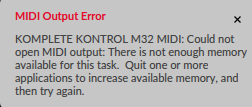
This is a pretty weird error to me. I have no clue what kind of "memory" this refers to
RAM? Can't be, or can it?
However, I think the M32 works as expected when setting it up like this:
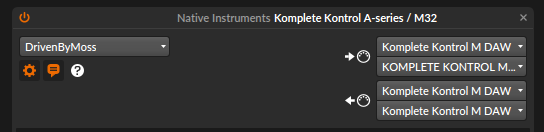
This is the only combination it works with, all other combos are leading to that "memory" error.
So, the M32 is working with that setup above. I just wanted to report this, because this doesn't seem to be the intended way.
And I'd like to take the chance and ask if someone knows if it's possible to setup an AKAI MIDImix as a controller with working LED lights?
There's a three years old script by "klingtnet" on GitHub, but that's setup mainly for track/mixer control. I'm having other controllers for that and I'd like to use the knobs, buttons and faders of the MIDImix exclusively to control e.g. synth parameters or modulations.
In fact I'm doing this already (as generic keyboard), but it would be fantastic if I could do this in conjunction with the LED lights.
I'm having some oddities with the setup of a NI KompleteKontrol M32 in Bitwig.
The moss manual says:
1. Select the MIDI input and output ending with “DAW” as the first channel.
2. Select the MIDI input and output without an ending as the second
But I can't set it up that way because of this error:
This is a pretty weird error to me. I have no clue what kind of "memory" this refers to
RAM? Can't be, or can it?
However, I think the M32 works as expected when setting it up like this:
This is the only combination it works with, all other combos are leading to that "memory" error.
So, the M32 is working with that setup above. I just wanted to report this, because this doesn't seem to be the intended way.
And I'd like to take the chance and ask if someone knows if it's possible to setup an AKAI MIDImix as a controller with working LED lights?
There's a three years old script by "klingtnet" on GitHub, but that's setup mainly for track/mixer control. I'm having other controllers for that and I'd like to use the knobs, buttons and faders of the MIDImix exclusively to control e.g. synth parameters or modulations.
In fact I'm doing this already (as generic keyboard), but it would be fantastic if I could do this in conjunction with the LED lights.
-
- KVRAF
- Topic Starter
- 4911 posts since 13 May, 2004
It is pretty hard to understand what you are doing. Could you please give some clear steps to reproduce your issue and also add what happens and should happen.melodyz wrote: Thu Jan 07, 2021 1:48 pm Hi
FIRE- So playing with sendfx1 on the Drum Machine. i used the drum pad mode to record a few kicks and 1 clap. Then I switched to the drum sequencer mode and I then switched to the channel mode and tried applying the Delay2 FX to the clap only. Turning the filter knob would not adjust the sendfx past -inf db. I then deleted the clap note on the fire and retapped one in and now it responded to the send fx. So there is the problem recording notes from the 16 Drumpads wont work with the sendfx on channel mode.
It also seems that the filter knob is responsive to turning when in the drum pad mode if we switch over from the drum sequencer right away. But then it isnt. So there is something there in connection with switching to drumpad mode. It seems to be some issue with switching layers in the drum sequencer - its hit or miss if the send fx knob will be responsive.
FEATURE - Maybe we could still switch the layer when in drumpad mode? Would that fix the issue? Maybe pressing the pad would switch it?
ISSUE - Another thing that makes the turning the filter knob to apply sendfx responsive, is cycling back through the modes back to channel mode. Then turning the knob makes it responsive again. But just for that moment. after a few switching of the layers it locks up and we have to cycle through the modes back to channel again to get the sendfx working again.
Like:
1) There is 1 track with a drum device
2) Select drum sequencer by pressing ...
-
- KVRAF
- Topic Starter
- 4911 posts since 13 May, 2004
Yes, that is sadly a known issue noted in the "Known issues" section of the manual. The problem seems to be with the sysex implementation of Bitwig on Macos (doesnt happen with my Reaper version). Problem is reported but I am afraid it is very low on their todo list...rndrfero wrote: Sat Jan 09, 2021 6:41 pm Hello Moss, thanks for the work for the community.
MAJOR ISSUE with FIRE and Bitwig 3.3.1 (&3.2.
Does anyone experienced pad + display lagging? It looks like display and pads (but not the buttons) are refreshing very slowly, looks like the events remain in queue and are processed up slowly, i mean very slowly. Feels like on old computer when you type too fast and you have to wait until the computer handles all the keystrokes. But the fire's buttons and daw response is very fast. Only display refresh and pads color refresh are slow. But this unfortunately makes the controller is practicaly unusable. I can make an video.
Could be something wrong with my environment, or with some setting?
Thanks, regards ... rndrfero
-
- KVRAF
- Topic Starter
- 4911 posts since 13 May, 2004
The manual also says in 20.1:gorillaknuckles wrote: Sat Jan 09, 2021 10:26 pm Hi Moss, thanks so much for sharing your excellent work! I have a question though - how do I manually set up a Novation Remote SL MKI? It is not being detected automatically after installing your extension, and the instructions are not very clear. All I could find was: "Alternatively, select Add controller manually. In that case note that the extension does not start until you configured the necessary in- and outputs!"
Can you explain where/how I configure the necessary in- and outputs?
If you added the controller manually, choose the 2nd MIDI port of the device as in-/output. Select the first port as the 2nd input.
1) Go to Bitwig Settings
2) Select "Controller"
3) Click on "Add Controller"
4) Select Hardware Vendor "Novation"
5) Select Product "SL MkI"
6) Click on "Add"
7) Choose in-/outpus as described above