


The feedback does only work if the LED message is identical to the one sent by the button. E.g. if a button sends CC 30 with value 127 on press and 0 on release, the LED is turned on by sending 127 to the device and 0 to turn it off. For all other cases you need a specific script.perfprof wrote: Sun Jan 10, 2021 4:19 am I tried the Generic Flexi script with Faderfox EC4. I am unable to get CC feedback to the EC4 (Send value to device is activated). I noticed that your script for Novation SL MKII works great with regard to CC feedback to the SL MKII (thank you very very much!!!). I also noticed that in Bitwig's Controllers Settings page, the MIDI port configuration for the SL MKII includes a single MIDI Out port called 9-SLMKII and two MIDI IN ports: MIDIIN2(9-SLMKII) and 9-SLMKII. I only see a single MIDI in and a single MIDI Out port for the Faderfox EC4.
- Does the Generic Flexi script require two MIDI In ports (like the SLMKII) in order to provide CC feedback to my Faderfox EC4?
>> If so, any idea how to get two MIDI In ports for the Faderfox EC4 ? ... and is this something Faderfox needs to provide?
>> If not, any idea why CC feedback to the EC4 is not happening when I use the Generic Flexi script?
Note that Faderfox claims that the EC4 supports CC Feedback.
DrivenByMoss: Bitwig extension for many hardware controllers (version 26.6.2)
-

- KVRAF
- Topic Starter
- 4910 posts since 13 May, 2004
-
- KVRAF
- Topic Starter
- 4910 posts since 13 May, 2004
Since this one gets asked from time to time it is in the "Known Issues" section of the manual, chapter 3.mesamask wrote: Sun Jan 10, 2021 8:54 am First of all: thank you moss!
I'm having some oddities with the setup of a NI KompleteKontrol M32 in Bitwig.
The moss manual says:
1. Select the MIDI input and output ending with “DAW” as the first channel.
2. Select the MIDI input and output without an ending as the second
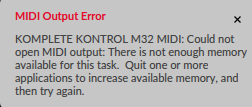
But I can't set it up that way because of this error:
This is a pretty weird error to me. I have no clue what kind of "memory" this refers to
RAM? Can't be, or can it?

-
jeanclaudevanlee jeanclaudevanlee https://www.kvraudio.com/forum/memberlist.php?mode=viewprofile&u=455430
- KVRer
- 27 posts since 19 Jan, 2020
Great, thanks for help. I managed to get it work, good tips with conditional statements!zengel wrote: Wed Jan 06, 2021 6:49 pmHello , i don't own a monome but as i can understand the osc messages of monome are different from the OSC4Bitwig messages. you had to convert through max the messages from the Moss script to Monome with max like : "/track/1/clip/1/hasContent" to "/grid/led/set x y s" where y is track 1 , x is clip 1 and "S" is 1 if 'hasCotent" is 1 or S is 0 if "hasContent" is 0 .moss wrote: Wed Jan 06, 2021 5:14 pmSorry, I have no experience with Monome. Maybe someone else can chime in.jeanclaudevanlee wrote: Wed Jan 06, 2021 11:09 am Hi guys!
I'm trying to setup a simple clip luncher in Bitwig with Monome 128 via OSC in Max/MSP.
I managed to make the connection and launch clips and scenes in Bitwig with Monome but I don't really know how to setup udpreceive to make all the clips visible on Monome.
I tried /track/1/clip/1/hasContent message to udpreceive but it didn't work.
I'm not very experienced with Max but can build simple stuff. I'm really stuck with setting up response from Bitwig back to Monome. Would really appreciate some help!
Thank you so much!
With conditional statement , like if/then ?
i suppose ?
refs :
https://monome.org/docs/serialosc/osc/
https://docs.cycling74.com/max7/refpages/if
https://github.com/git-moss/DrivenByMos ... l-(OSC).md
I've just noticed the maximum width visibility is 8 columns. I have monome 128 and wanted to use all 16 columns for clip launching. It's possible to change display of rows in OSC control Bitwig settings but I can't see a way of changing the width.
-
gorillaknuckles gorillaknuckles https://www.kvraudio.com/forum/memberlist.php?mode=viewprofile&u=173524
- KVRer
- 3 posts since 14 Feb, 2008
Thanks! Working now.
-
- KVRAF
- Topic Starter
- 4910 posts since 13 May, 2004
DrivenByMoss 11.5.0 is online!
Get it from http://mossgrabers.de
Get it from http://mossgrabers.de
- Requires Bitwig 3.2.5+
- Komplete Kontrol Mk2
- New: Allow all MIDI channels for the keyboard, so far only channel 1 was enabled.
- Launchkey Mk3
- New: Added support for models 25, 37, 49 and 61
- Launchkey Mini Mk3
- Fixed: Session clip indication was no enabled.
- Fixed: Improved contrast between selected and unselected scene.
- Fixed: Long pressing a mode pad did crash.
- Launchpad
- Fixed: Pro Mk3: Fixed Length button was missing in simulator.
- APC40, Fire, HUI, MCU, Kontrol MkI/MkII, SL MkIII
- New: Double click the stop button when playback is stopped to move the play cursor to the end of the project.
-
- KVRian
- 784 posts since 29 Mar, 2016
ok here is the issue with the fire drum sequencer send fx
1. load drum machine into track and select Jackin House Kit (set fire to channel mode)
2. switch to drum pads mode and record some kicks and claps for a bar or 2
3. load a delay2 fx on the sendfx1 (use the mouse for this)
4. switch to drum sequencer mode and use the select knob to locate the kick layer to apply the sendfx by turning the filter knob.
5. use the select knob to locate the clap layer and then turn the filter knob to apply the send fx.
6. switch back to the drum pads mode and then back to the drum sequencer mode. and try steps 4 and 5. (what will happen is trying to turn the filter knob will lock up)
7. the only way to bring it back online is to toggle through the modes (mixer, user1,user2 and back to channel mode) in order for the filter knob to respond again.
The issue nearly always occurs if we leave the drum sequencer mode to go to drum pads mode and then back again.
1. load drum machine into track and select Jackin House Kit (set fire to channel mode)
2. switch to drum pads mode and record some kicks and claps for a bar or 2
3. load a delay2 fx on the sendfx1 (use the mouse for this)
4. switch to drum sequencer mode and use the select knob to locate the kick layer to apply the sendfx by turning the filter knob.
5. use the select knob to locate the clap layer and then turn the filter knob to apply the send fx.
6. switch back to the drum pads mode and then back to the drum sequencer mode. and try steps 4 and 5. (what will happen is trying to turn the filter knob will lock up)
7. the only way to bring it back online is to toggle through the modes (mixer, user1,user2 and back to channel mode) in order for the filter knob to respond again.
The issue nearly always occurs if we leave the drum sequencer mode to go to drum pads mode and then back again.
-
- KVRian
- 784 posts since 29 Mar, 2016
HI sorry one more quick question. Can the pads on the fire or apc40 mk2 be used as button triggers or toggles? Or is there another way?
-
- KVRAF
- Topic Starter
- 4910 posts since 13 May, 2004
Yes, I can reproduce that. It is the same issue already documented: https://github.com/teotigraphix/Framewo ... issues/269melodyz wrote: Mon Jan 11, 2021 10:50 am ok here is the issue with the fire drum sequencer send fx
1. load drum machine into track and select Jackin House Kit (set fire to channel mode)
2. switch to drum pads mode and record some kicks and claps for a bar or 2
3. load a delay2 fx on the sendfx1 (use the mouse for this)
4. switch to drum sequencer mode and use the select knob to locate the kick layer to apply the sendfx by turning the filter knob.
5. use the select knob to locate the clap layer and then turn the filter knob to apply the send fx.
6. switch back to the drum pads mode and then back to the drum sequencer mode. and try steps 4 and 5. (what will happen is trying to turn the filter knob will lock up)
7. the only way to bring it back online is to toggle through the modes (mixer, user1,user2 and back to channel mode) in order for the filter knob to respond again.
The issue nearly always occurs if we leave the drum sequencer mode to go to drum pads mode and then back again.
-
- KVRAF
- Topic Starter
- 4910 posts since 13 May, 2004
Meanwhile, you can remap any button on a controller with the normal Learn function in Bitwig but you will then loose the script functionality of this button. So, if you have a button which you do not use you can totally do that.melodyz wrote: Mon Jan 11, 2021 1:10 pm HI sorry one more quick question. Can the pads on the fire or apc40 mk2 be used as button triggers or toggles? Or is there another way?
-
- KVRer
- 3 posts since 9 Jan, 2021
Thanks for a quick response. I will submit this bug too. Its a shame for the development team that this kind of bugs and the cooperation with you as a core community member is "low priority" for them.moss wrote: Sun Jan 10, 2021 9:15 amYes, that is sadly a known issue noted in the "Known issues" section of the manual. The problem seems to be with the sysex implementation of Bitwig on Macos (doesnt happen with my Reaper version). Problem is reported but I am afraid it is very low on their todo list...rndrfero wrote: Sat Jan 09, 2021 6:41 pm Hello Moss, thanks for the work for the community.
MAJOR ISSUE with FIRE and Bitwig 3.3.1 (&3.2.on Catalina OS X.
Does anyone experienced pad + display lagging? It looks like display and pads (but not the buttons) are refreshing very slowly, looks like the events remain in queue and are processed up slowly, i mean very slowly. Feels like on old computer when you type too fast and you have to wait until the computer handles all the keystrokes. But the fire's buttons and daw response is very fast. Only display refresh and pads color refresh are slow. But this unfortunately makes the controller is practicaly unusable. I can make an video.
Could be something wrong with my environment, or with some setting?
Thanks, regards ... rndrfero
-
- KVRist
- 55 posts since 28 Mar, 2010
Moss, please give it a try.moss wrote: Wed Dec 02, 2020 10:28 pmI am not sure if you can do much with it other than Studio One.rumpelkind wrote: Wed Dec 02, 2020 9:31 pmany news on this one? i was about to start a topic but then decided to search for it first...are there any people out there in bitwiggin bitwigland who have tried making a script of the presonus atom sq for bitwig? it would be damn nice...
The Atom SQ looks like a great controller. I know you can cook up something great for use in Bitwig.
It integrates well with Studio One & Ableton Live out the box which makes me think Moss can get this working well with Bitwig
You do not have the required permissions to view the files attached to this post.
Fender Studio Pro 8.1 Mac OS Tahoe 26.5
-
- KVRer
- 3 posts since 9 Jan, 2021
Hi Moss,
ad AKAI FIRE & slow sysex on OS X known issue:
After working with it for a while I realize, that slow response of pads is something that you can get with, as long as you dont move the knob. CC are generating too much messages causing controller to take many seconds to "take breath". So partial workaround will be the configuration option to do not to display CC on Fire's display. Do you think is that possible? This will at least make the controller possible to use.
I allready submited the known bug to the Bitwig support system, I am curious with the answer.
Many thanks, regards, Fero
ad AKAI FIRE & slow sysex on OS X known issue:
After working with it for a while I realize, that slow response of pads is something that you can get with, as long as you dont move the knob. CC are generating too much messages causing controller to take many seconds to "take breath". So partial workaround will be the configuration option to do not to display CC on Fire's display. Do you think is that possible? This will at least make the controller possible to use.
I allready submited the known bug to the Bitwig support system, I am curious with the answer.
Many thanks, regards, Fero
-
- KVRer
- 6 posts since 13 Jan, 2021
I cant seem to get Native Instruments Maschine mk3's pads to do anything while using the latest Driver/download by Moss templates 11.5.0. Most all the other buttons and knobs work but no pads/keys/drums/chord/scale functionality. Hopefully its something easy. Midi/contoroller appears to be wired up right.
Thanks =] lookin forward to using these scripts.

Thanks =] lookin forward to using these scripts.
-
- KVRer
- 6 posts since 24 Sep, 2020
Feature Request: AAAB Function for Drum Computer.
I love the drum computer for the APC 40 in your script, but find working with more than one bar very complicated.
I would love an AAAB Feature where one would just edit two different Clips on the hardware and get a four bar Loop in Bitwig.
Maybe one could even extend this to other patterns as 'BAAA', 'AAABAAAC' or 'ABABABAC'.
For this a function to duplicate the A clip into the B Clip with a single button would be very nice.
As always, thank you for your incredible work!
I love the drum computer for the APC 40 in your script, but find working with more than one bar very complicated.
I would love an AAAB Feature where one would just edit two different Clips on the hardware and get a four bar Loop in Bitwig.
Maybe one could even extend this to other patterns as 'BAAA', 'AAABAAAC' or 'ABABABAC'.
For this a function to duplicate the A clip into the B Clip with a single button would be very nice.
As always, thank you for your incredible work!
-
- KVRAF
- Topic Starter
- 4910 posts since 13 May, 2004
Could you post a screenshot of your settings?benbee wrote: Wed Jan 13, 2021 1:54 pm I cant seem to get Native Instruments Maschine mk3's pads to do anything while using the latest Driver/download by Moss templates 11.5.0. Most all the other buttons and knobs work but no pads/keys/drums/chord/scale functionality. Hopefully its something easy. Midi/contoroller appears to be wired up right.
Thanks =] lookin forward to using these scripts.