


Fire requests - 1. Ok hopefully the bitwig bug can be fixed to make the drum sequencer work better in the future.
2. Can we get scale and root note select on the Step sequencer mode (first bottom left button mode)
3. Can we have that note mode work so that a pressing a new note overrides an existing one just by pressing the new step and placing the note over the top? Currently when we tap a pad with a note, the fire first erases the old note and we have to press the pad again to apply the new note.\
4. any way to get the drum sequencer (channel mode) to have the pan settings return to 0?) Maybe its because I changed the sensitivity? So it doesnt center now but varies from right to left the more I turn the knob.
5. If I select a track using the mouse, the fire loses focus on it, so the user 1 and 2 knobs dont work. I have to first use the elector knob to select the track instead before turning the knobs. Conflict with how fire see a track selected by the mouse.
6. can we use alt plus selector knob to change tracks on user 1 and 2 modes? (mixer as well I guess)
7. can we get an option in the settings to flip the functionality of using selector knob to change note range of keyboard verses selecting track? Making it so we have to press alt and selector knob to change note range instead and just selector knob to switch tracks? (this would be better for performance where midi tracks are already made)
8. I found something strange but cool. If i select a midi track and press shift plus selector knob when in step mode, I can transpose the midi notes. Maybe thats deliberate?
DrivenByMoss: Bitwig extension for many hardware controllers (version 26.6.2)
-
- KVRian
- 784 posts since 29 Mar, 2016
-

- KVRian
- 1060 posts since 17 Jan, 2005 from London
Q: Is there an alternative to using Toggle Mute with Generic Flexi + Akai Midimix [SOLVED]
I then decided it would be nice to map the Mute buttons so that when pressed the volume of the track would automatically cut out/in. I've mapped the buttons to "Toggle Mute" but as expected this simply mutes the sounds instantly for the track. I'm using Delay/Reverb on the 3 FX Send tracks and I was hoping that when I hit Mute, it would be like suddenly pulling the fader down, so that the Delay/Reverb tails would still be audible, for that sudden Dub effect. I've been through all the possible mappings I can see but have not found anything that fits the bill.
UPDATE: Panic over. I've just tried it again, this time at a decent volume, and the Toggle Mute is working as I had hoped.
Jürgen, many thanks for putting Generic Flexi together. I reckon you can get any hardware to do anything with Bitwig! I've just pulled out my little used Korg nanoPAD2 and am just trying to dream up some sonic tomfoolery - maybe mapping the XY pad onto a filter Freq/Rez combo
The thing that inspired me to do this, and indeed to buy the Akai Midimix in the first place, was a desire to emulate this in Bitwig...
If anyone is interested, here is the properties file for the patch so far...
Just use the Load/Save options in the Generic Flexi settings to load it...
- Akai Midimix controller
- Bitwig Studio 3.3.1
- macOS 10.14.6
I then decided it would be nice to map the Mute buttons so that when pressed the volume of the track would automatically cut out/in. I've mapped the buttons to "Toggle Mute" but as expected this simply mutes the sounds instantly for the track. I'm using Delay/Reverb on the 3 FX Send tracks and I was hoping that when I hit Mute, it would be like suddenly pulling the fader down, so that the Delay/Reverb tails would still be audible, for that sudden Dub effect. I've been through all the possible mappings I can see but have not found anything that fits the bill.
UPDATE: Panic over. I've just tried it again, this time at a decent volume, and the Toggle Mute is working as I had hoped.
Jürgen, many thanks for putting Generic Flexi together. I reckon you can get any hardware to do anything with Bitwig! I've just pulled out my little used Korg nanoPAD2 and am just trying to dream up some sonic tomfoolery - maybe mapping the XY pad onto a filter Freq/Rez combo

The thing that inspired me to do this, and indeed to buy the Akai Midimix in the first place, was a desire to emulate this in Bitwig...
If anyone is interested, here is the properties file for the patch so far...
Just use the Load/Save options in the Generic Flexi settings to load it...
You do not have the required permissions to view the files attached to this post.
Bitwig 6.1b4 + Akai MIDIMix + Launchpad X + MF Twister
ExpressiveE Osmose Keyboard + Universal Audio Apollo Twin X
Mac Mini M1 16GB/4TB + macOS 26.5.2 Tahoe
ExpressiveE Osmose Keyboard + Universal Audio Apollo Twin X
Mac Mini M1 16GB/4TB + macOS 26.5.2 Tahoe
-
- KVRer
- 6 posts since 13 Jan, 2021
moss wrote: Wed Jan 13, 2021 7:42 pmCould you post a screenshot of your settings?benbee wrote: Wed Jan 13, 2021 1:54 pm I cant seem to get Native Instruments Maschine mk3's pads to do anything while using the latest Driver/download by Moss templates 11.5.0. Most all the other buttons and knobs work but no pads/keys/drums/chord/scale functionality. Hopefully its something easy. Midi/contoroller appears to be wired up right.
Thanks =] lookin forward to using these scripts.

You do not have the required permissions to view the files attached to this post.
-

- KVRAF
- Topic Starter
- 4910 posts since 13 May, 2004
Had a longer chat today with Bitwig and I think I got the error (complicated mixup between layer banks and drum pad banks). Did some first tests but need to do some rewrite and in-depth testing.melodyz wrote: Wed Jan 13, 2021 8:25 pm Fire requests - 1. Ok hopefully the bitwig bug can be fixed to make the drum sequencer work better in the future.
-
- KVRAF
- Topic Starter
- 4910 posts since 13 May, 2004
Why did you add 2 machine instances? Remove the second one and restart Bitwig.benbee wrote: Wed Jan 13, 2021 10:16 pmmoss wrote: Wed Jan 13, 2021 7:42 pmCould you post a screenshot of your settings?benbee wrote: Wed Jan 13, 2021 1:54 pm I cant seem to get Native Instruments Maschine mk3's pads to do anything while using the latest Driver/download by Moss templates 11.5.0. Most all the other buttons and knobs work but no pads/keys/drums/chord/scale functionality. Hopefully its something easy. Midi/contoroller appears to be wired up right.
Thanks =] lookin forward to using these scripts.
-
- KVRer
- 6 posts since 13 Jan, 2021
moss wrote: Wed Jan 13, 2021 11:48 pmWhy did you add 2 machine instances? Remove the second one and restart Bitwig.benbee wrote: Wed Jan 13, 2021 10:16 pmmoss wrote: Wed Jan 13, 2021 7:42 pmCould you post a screenshot of your settings?benbee wrote: Wed Jan 13, 2021 1:54 pm I cant seem to get Native Instruments Maschine mk3's pads to do anything while using the latest Driver/download by Moss templates 11.5.0. Most all the other buttons and knobs work but no pads/keys/drums/chord/scale functionality. Hopefully its something easy. Midi/contoroller appears to be wired up right.
Thanks =] lookin forward to using these scripts.
I usually have to do that in ableton to get midi to certain places.
I tried to remove the second controller, restart Bitwig and system and the problem still persists... No pad control/response, sequencer, mute, solo, etc...
=[
-
- KVRer
- 6 posts since 13 Jan, 2021
Any other suggestions? Really looking forward to getting this thing up and running and using it!moss wrote: Wed Jan 13, 2021 11:48 pmWhy did you add 2 machine instances? Remove the second one and restart Bitwig.benbee wrote: Wed Jan 13, 2021 10:16 pmmoss wrote: Wed Jan 13, 2021 7:42 pmCould you post a screenshot of your settings?benbee wrote: Wed Jan 13, 2021 1:54 pm I cant seem to get Native Instruments Maschine mk3's pads to do anything while using the latest Driver/download by Moss templates 11.5.0. Most all the other buttons and knobs work but no pads/keys/drums/chord/scale functionality. Hopefully its something easy. Midi/contoroller appears to be wired up right.
Thanks =] lookin forward to using these scripts.
-
- KVRAF
- Topic Starter
- 4910 posts since 13 May, 2004
1) First check the installation notes in the manual (sections 16.1 and 16.2).benbee wrote: Thu Jan 14, 2021 2:50 amAny other suggestions? Really looking forward to getting this thing up and running and using it!moss wrote: Wed Jan 13, 2021 11:48 pmWhy did you add 2 machine instances? Remove the second one and restart Bitwig.benbee wrote: Wed Jan 13, 2021 10:16 pmmoss wrote: Wed Jan 13, 2021 7:42 pmCould you post a screenshot of your settings?benbee wrote: Wed Jan 13, 2021 1:54 pm I cant seem to get Native Instruments Maschine mk3's pads to do anything while using the latest Driver/download by Moss templates 11.5.0. Most all the other buttons and knobs work but no pads/keys/drums/chord/scale functionality. Hopefully its something easy. Midi/contoroller appears to be wired up right.
Thanks =] lookin forward to using these scripts.
2) Post a screenshot of what is in the drop down list of the MIDI in-/output port selection box in the settings.
3) Check the Javascript console for any errors (click the button in the right hand pane under "Studio").
-

- KVRist
- 143 posts since 20 Nov, 2013
I'm having a Midimix as well and got two questions, if you don't mind.
First is: are the LED buttons illuminated when you're using it in Bitwig? Not working on my device.
Second: how the heck can I setup the buttons to act as toggle buttons?
I can only manage them to serve as temporary "push" buttons, not as On/Off buttons. (I hope I'm using the right terms, no native english...).
Tried with a setup as BWs Generic Keyboard and with Moss' Generic Flexi. With Flexi I set the knob mode to "Absolute (toggle button)" but it's not working, still acting as push button.
In Bitwig's mapping I could set the value to Absolute 100% - 100%, but then I have to use a second button all the time just for deactivation.
In the Midimix Editor my default setting is to use the buttons as "CC", not the factory setting with buttons as "Note". But I tried several times with both variants. No success.
You do not have the required permissions to view the files attached to this post.
-
- KVRAF
- Topic Starter
- 4910 posts since 13 May, 2004
1) As explained in the manual to light the LEDs they must receive the exact same value (CC or note) as they send to Bitwig as well as the same MIDI channel.mesamask wrote: Thu Jan 14, 2021 9:12 amI'm having a Midimix as well and got two questions, if you don't mind.
First is: are the LED buttons illuminated when you're using it in Bitwig? Not working on my device.
Second: how the heck can I setup the buttons to act as toggle buttons?
I can only manage them to serve as temporary "push" buttons, not as On/Off buttons. (I hope I'm using the right terms, no native english...).
Tried with a setup as BWs Generic Keyboard and with Moss' Generic Flexi. With Flexi I set the knob mode to "Absolute (toggle button)" but it's not working, still acting as push button.
In Bitwig's mapping I could set the value to Absolute 100% - 100%, but then I have to use a second button all the time just for deactivation.
In the Midimix Editor my default setting is to use the buttons as "CC", not the factory setting with buttons as "Note". But I tried several times with both variants. No success.
2) The knob setting does not mean what you want to control in Bitwig but instead what the physical button sends. I do not know the device and its' editor but if you have set the button to "toggle" in the editor then set it to "Absolute (toggle)" in Generic Flexi. If not, use the other setting.
If you want to use the mapping function in Bitwig with Generic Flexi. Map the button to one of the "User"-parameter functions.
-
- KVRian
- 784 posts since 29 Mar, 2016
Thanks. I look forward to it.moss wrote: Wed Jan 13, 2021 11:47 pmHad a longer chat today with Bitwig and I think I got the error (complicated mixup between layer banks and drum pad banks). Did some first tests but need to do some rewrite and in-depth testing.melodyz wrote: Wed Jan 13, 2021 8:25 pm Fire requests - 1. Ok hopefully the bitwig bug can be fixed to make the drum sequencer work better in the future.
-
- KVRist
- 143 posts since 20 Nov, 2013
Ok, thanks.
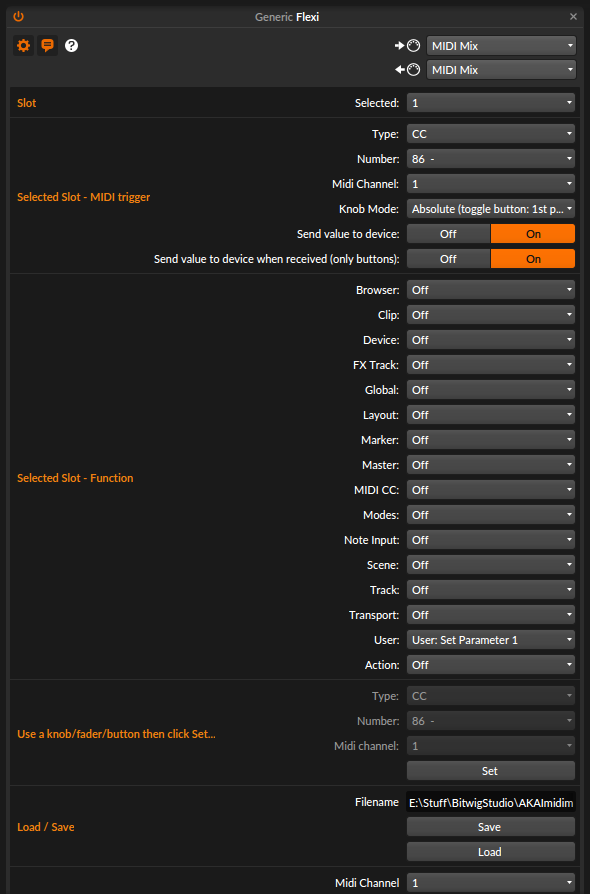
When I'm pressing button CC86 it's still only pushing, not toggling. As soon as I release the button the value's jumping back. I described this before.
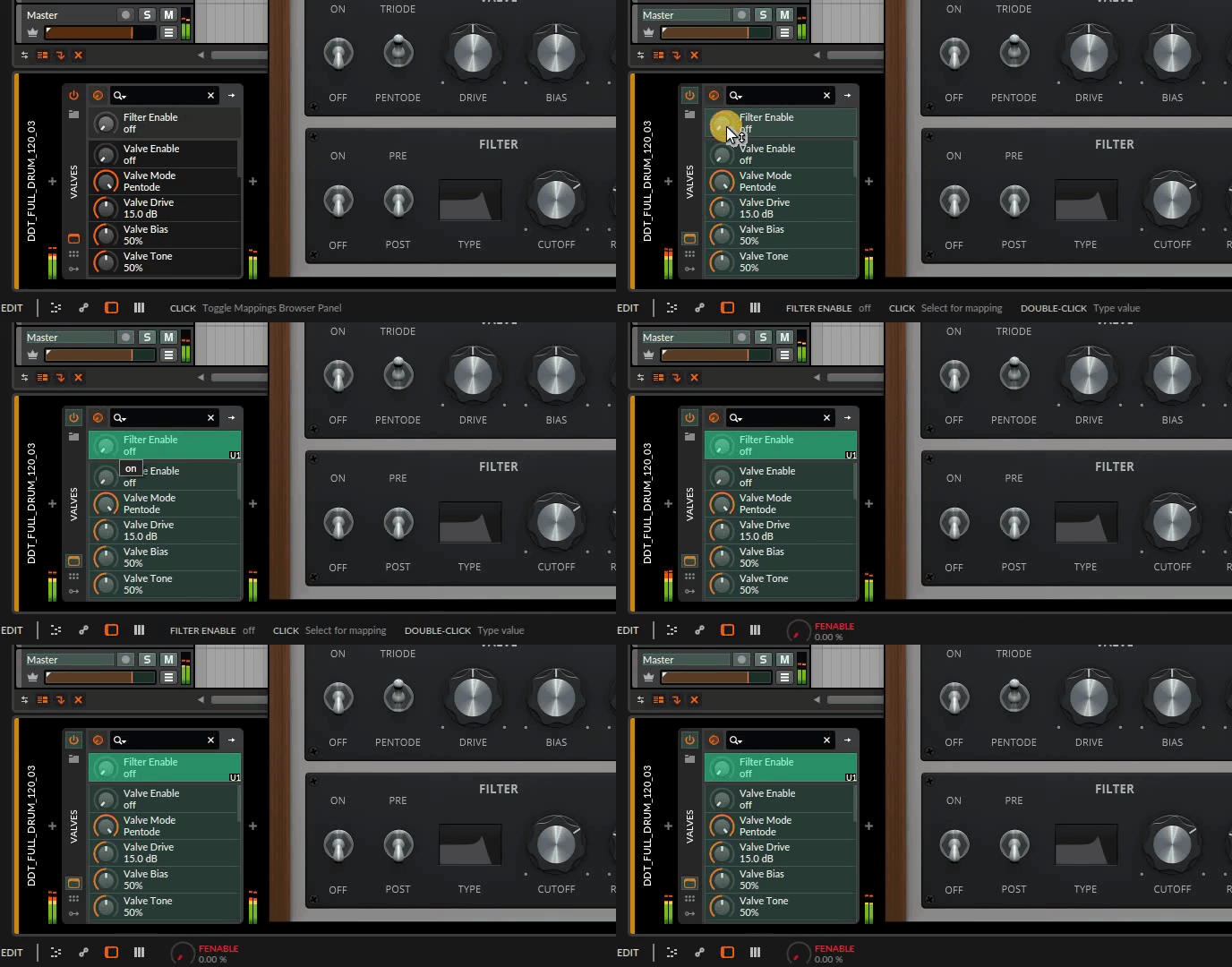
1) Which manual? Maybe I'm blind but I can't find anything about the LEDs in the MidiMix manual, the MidiMix Editor manual, or in the Moss manual.moss wrote: Thu Jan 14, 2021 9:58 am 1) As explained in the manual to light the LEDs they must receive the exact same value (CC or note) as they send to Bitwig as well as the same MIDI channel.
I'm aware of that.moss wrote: Thu Jan 14, 2021 9:58 am 2) The knob setting does not mean what you want to control in Bitwig but instead what the physical button sends.
The MidiMix Editor doesn't provide an option to set the buttons to "toggle". Only options are for setting the CC/Note values and the MIDI channel.moss wrote: Thu Jan 14, 2021 9:58 am... I do not know the device and its' editor but if you have set the button to "toggle" ...
I already did that before. But maybe this is not correct
When I'm pressing button CC86 it's still only pushing, not toggling. As soon as I release the button the value's jumping back. I described this before.
-

- KVRer
- 20 posts since 14 Oct, 2020
still have this problem..artsense wrote: Thu Dec 24, 2020 5:19 pm hey Moss,
p.s. is there any way to control brightness of side buttons? or at least make them brighter by default?
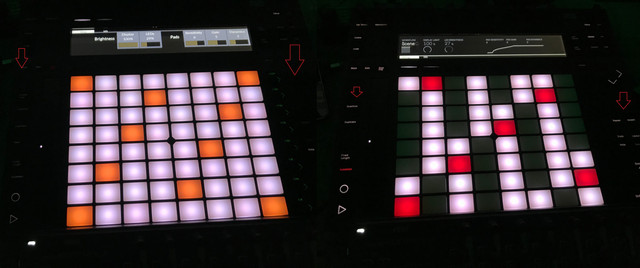
side buttons are too dark on low LEDs levels..
on high LEDs levels situation is better, but then LEDs are so bright that blowing my head..
im working with connected power adapter.
side buttons are much brighter in ableton on low LEDs level
-
- KVRian
- 1060 posts since 17 Jan, 2005 from London
No, I haven't worked out how to do this yet.mesamask wrote: Thu Jan 14, 2021 9:12 am First is: are the LED buttons illuminated when you're using it in Bitwig? Not working on my device.
All I did was these steps:mesamask wrote: Thu Jan 14, 2021 9:12 am Second: how the heck can I setup the buttons to act as toggle buttons?
[1] Select slot number
[2] Press button on Midimix
[3] Choose function eg. Track -> Track 1 Toggle Mute
So long as the selected function is a toggle function, the first press of the button should activate it, the second should deactivate it, and so on.
UPDATE: I've just seen the video you posted. I was referring to built in Bitwig functions, with a toggle function available. I'm not sure how you would control VSTs. I wonder if there is a way of setting up a button modulator, using that to control the VST parameter, and using the Midimix via the Flexi Generic to control that. I'm just thinking aloud, though, and I can't check it because I've got to go downstairs and prepare some food
Bitwig 6.1b4 + Akai MIDIMix + Launchpad X + MF Twister
ExpressiveE Osmose Keyboard + Universal Audio Apollo Twin X
Mac Mini M1 16GB/4TB + macOS 26.5.2 Tahoe
ExpressiveE Osmose Keyboard + Universal Audio Apollo Twin X
Mac Mini M1 16GB/4TB + macOS 26.5.2 Tahoe