

just should be copied
 especially the per control transition one, just the transition curves should be editable as is in HoneyMapper
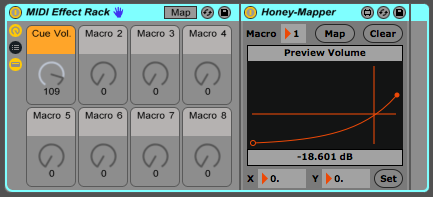 especially the per control transition one, just the transition curves should be editable as is in HoneyMapper
The way the thread is going I could just put some cash aside and keep readingPieBerger wrote: Wed Jan 20, 2021 9:05 amIf you're on the fence, you could always wait until after it's released, to try the demo (if you weren't able to get on the beta) and then grab it on sale in the summer.melomood wrote: Wed Jan 20, 2021 6:19 am They want me to upgrade my copy to Live 10 Suite for 295 and I'll get 11 free. I have the Sampler. I guess it wouldn't kill me to have a couple other synths & the convolution reverb. It wouldn't be a giant leap from what I already have in the toolbox. Do I want all that just for comping? Would I even be used to having it after *counts fingers and toes* 16 years?
https://www.ableton.com/en/release-notes/live-11-beta/Ableton wrote: 11.0b24 Release Notes
New features and improvements:
Bugfixes:
- Devices have been moved from the Core Library into the application bundle.
- Core Library:
- Added new (MPE) Instrument Racks
- Added presets for MPE Control
- Added new Grooves
- Added new MIDI Clips
- Macro colours, names and positions got refined
- Acoustic Drum Racks now have Macro Variations and improved effects processing
- Please note: File names and locations may change until the official release. Remember to "collect all and save" when working with the Live 11 Beta Core Library and new and updated Packs!
- Updated the What's New in Live lesson.
- Updated info text translations in German, Spanish, French, Italian, Japanese, and Chinese languages.
- Unified the outline color of the Arrangement Overview, Clip View Selector, and Device View Selector.
- The CPU overload notification can now be disabled in the Control Bar via a new "CPU Overload Indication" entry in the CPU meter's dropdown menu, and in the Overload Indicator's context menu.
- There is no longer a double border around the automation/velocity/probability value editing/display box.
- A recording clip will no longer show the fades of any clips that are overridden.
The following markers now look slightly different:- Clip start/end and loop start/end markers in the Detail View (when a single clip is selected)
- The Follow Action Time marker in the Detail View
- Loop start/end markers in the Arrangement
- The insert marker in the Arrangement
- The MPE Control device's background now respects Live's themes.
- When using the Hybrid device, the Status Bar will now only show the notification that an IR has been trimmed upon dragging and dropping a file, or selecting an IR from the User category. The notification will now also disappear immediately upon loaded an IR that is not trimmed.
- Added a dedicated info text for source highlights on take lanes.
- On Push 2, the Corpus device shows a graph visualization for its filter and has an improved UI.
- Updated the Scene View's background color.
- Added some visual changes to the piano roll and MIDI Note Editor:
- The width of scale highlighting on piano roll keys has increased from three pixels to eight pixels.
- Scale highlighting now starts on the very first pixel of the MIDI Note Editor's key tracks.
- A shaded vertical line is drawn on MIDI notes when they are cut on the left.
- In Automation Mode, when creating a selection on a linked track's automation lane, choosing one of the following commands from the context menu will now apply that action to all linked tracks: Rename, Deactivate Clip, Split, Consolidate, Create Fade, Reset Fades, Freeze Track, Crop Clip(s), and Reverse Clip(s). After the action is applied, Live selects the content of affected lanes, and undoing the action restores the initial content selection.
- When copying and pasting clips from a folded Group Track, take lane clips are no longer copied and take lanes are not considered as target lanes for pasting clips. Also, whether a target Group Track is folded or unfolded, pasting clips there from a folded Group Track now produces the same result.
- Users should see more reliable engine performance on machines with the Apple M1 CPU.
The spacing between the buttons that are used to toggle velocity, probability, and per-note expression lanes in the MIDI editor is improved.- Users will have to wait less time when creating new sets.
- Changed the label on the "probability" lane of the MIDI editor, and reduce the width of the vertical rulers.
- Plugin windows are not animated on Mac anymore when the plugin asks for a resize, which looks better.
- Max for Live users will get access to Hybrid Reverb properties available in the Live API.
- Max for Live
- Updated the bundled Max build to version 8.1.9 Beta 3e5058b
- Fonts: fixed crash on startup when font doesn't have a display name or full name
- live.banks: fixed bank renaming in response to '-' argument
- live.banks: fixed crash when adding a new bank with index 1 when banks are empty
- Max for Live: fixed crash when deleting some devices
Core Library:
- Added missing groove previews
- On Push 2, the Spectral Resonator device's PBend Range control is now shown in semitone units and is more sensitive.
- Fixed a crash that could occur when Live attempted to select a hidden track, under certain circumstances.
- Previously, some menu commands would not work correctly, or could even crash, when switching between note editing and per-note expression editing.
- Previously, right-clicking on a track header's link icon would not select all linked tracks, if that track had been nested within a Group Track multiple times.
- In Session View, when a track is highlighted but no slot is selected, pressing the left/right arrow key now moves the highlight to the previous or next track.
- When clicking on a scene number, the selection behavior is now consistent with clicking in the adjacent scene name area.
- Fixed the following bugs in the MPE Control device:
- Previously, Global Pitch Bend messages were interpreted as Note Pitch Bend messages, under certain circumstances.
- Previously, Global AT values could be reset to zero when a new note was triggered.
- The Hybrid Reverb device is now correctly displayed on Push 2.
- Previously, when zooming closely enough on a MIDI clip that its notes displayed their note names, altered notes such as "A#" were clipped to only show "A". Now, note names that do not fit the view are no longer displayed.
- Fixed a crash that could occur when merging tracks from existing Sets that contained multichannel Max for Live devices.
- Nudging behaves as expected when used while the Tempo Follower is active (i.e., the tempo does not change in the Control Bar when a Nudge button is pressed).
- Control surface preferences are reset, and saving and recalling control surface preferences works correctly again.
- The parameters for Phaser-Flanger are grouped meaningfully on Push 1+2. Parameter names on Push are now correct.
- Fixed a crash that could occur when applying extreme modulation to filters within various built-in devices.
- Fixes a bug that caused the loss of all expression data in a clip when changing note velocities using the draw tool in the velocity editor.
- Fixes a bug when the only selected note’s curve could be dragged similarly to a multi-curve drag scenario.
- Fixes that the source highlight info text would not be shown on the top part of a highlight in draw mode.
- Fix that adding new tracks via keyboard shortcuts or from the "Create" menu would not consider the current selection of take lanes and automation lanes and always add them at the end of the tracks.
Not now, but they do plan it for 'later', guess as soon as 11 is out.simmo75 wrote: Fri Jan 22, 2021 5:22 pm Hopefully they’ll have it M1 ready before release. It performs pretty well already and would be incredible if they can make it and M4L M1 native.

It's quite refreshing seeing such attention to detail.

 I bought the upgrade (Standard to Suite from Thomann as it is cheaper than Ableton's) and they said that I qualify for version 11 when they release it.
  So I decided to keep them all and use them all. I'm doing every track in a DAW! Let's see if Live 11 will take the lion share of my work/usage
Lol, welcome to my worldEnGee wrote: Sat Jan 23, 2021 12:23 amI'm torn between Live and Cubase (and now I added S1 to them!). Anyway, I keep selling and buying them again and again

An upgrade from Standard -> Suite should provide you with lots to do already, so when 11's out it's only cherry on the topEnGee wrote: Sat Jan 23, 2021 12:23 amWaiting for the stable release
Submit: News, Plugins, Hosts & Apps | Advertise @ KVR | Developer Account | About KVR / Contact Us | Privacy Statement
© KVR Audio, Inc. 2000-2026
