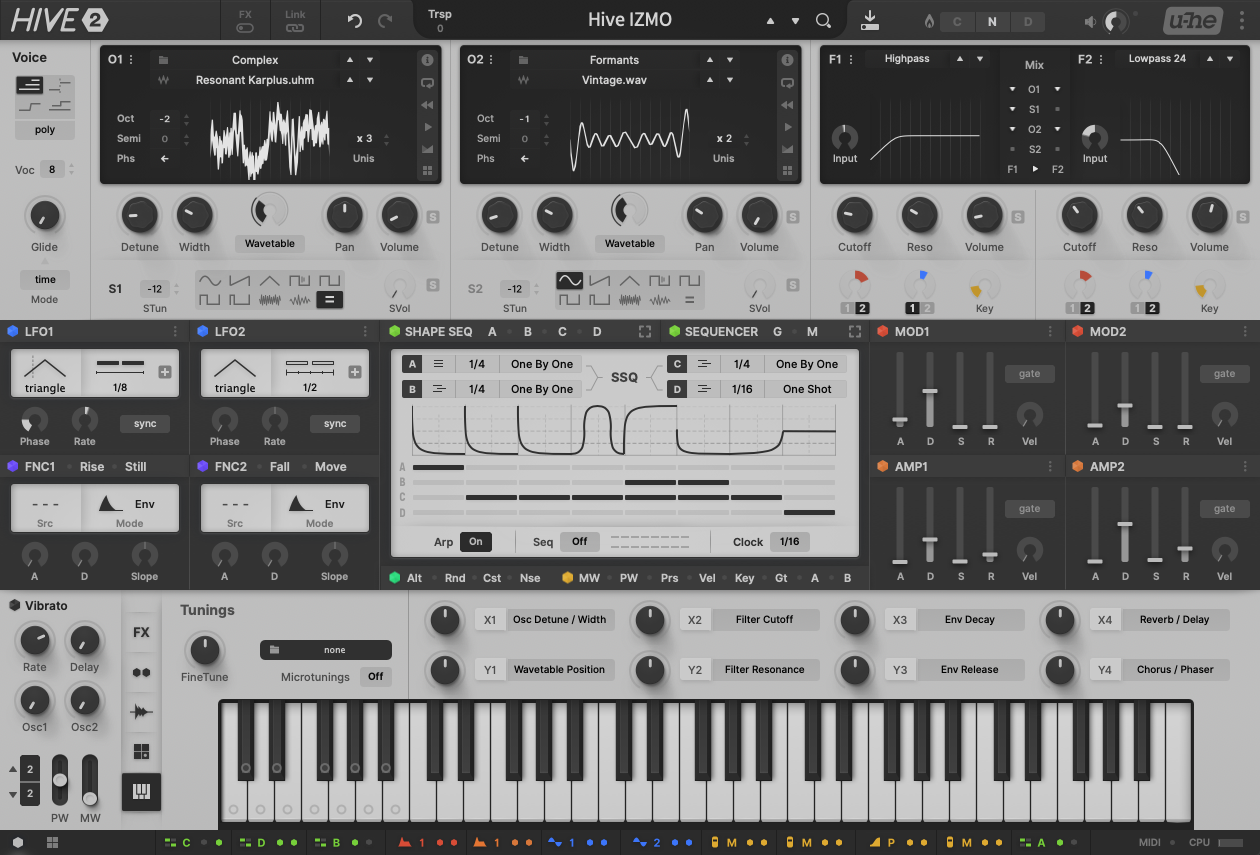
Hive 2.1 Izmo skin by Plugmon

Official support for: u-he.com
Post Reply New Topic
RELATED
PRODUCTS

Post

tasmaniandevil wrote: Fri Jan 22, 2021 10:42 am
Funkybot's Evil Twin wrote: Thu Jan 21, 2021 5:14 pm Yeah, that did the trick. The missing elements are back. Weird.
However, neither PW or MW are moving.
Hmm, not sure what the problem would be.
Do you maybe have an older (non SSE) hard drive?
Or do you have a lot of third party skins installed for Hive?
If there are too many skins, the loading of the assets might be slowed down.
If you got many skins installed, could you remove some, to check if Izmo then loads all grpahics and the Pitch Bend and Mod Wheel sliders work?
Maybe the issue is: I'm trying to move the wheels with a mouse. On further testing, happens on all skins. Not sure if it's new to 2.1 or something that always happened. Try this:

1. Open the GUI (Izmo or Original in 2.1)
2. Click and drag the MW up

Result: You'll see "internal modwheel" increase in the display up top. But the modwheel doesn't move.

3. Do the same with pitch wheel.

Result: Same.

Expected Result: the MW/PW would move.

Why did I do this? I was checking out the new GUI while multi-tasking during meetings at work and didn't have any MIDI gear on so was just using the mouse and poking at things.

This is on Windows, VST2 x64, in Reaper. In case any of that's relevant. It's a non-SSD hard drive, and I have a few Hive skins installed, removed two of them, it made no difference.

Post

MW/PW both work for me in Cubase vst2 mac 10.14.6 using mouse on the GUI. Both original and Izmo skin.
Let me go try on Windows.
sound sculptist

Post

Funkybot's Evil Twin wrote: Fri Jan 22, 2021 3:24 pm Maybe the issue is: I'm trying to move the wheels with a mouse. On further testing, happens on all skins. Not sure if it's new to 2.1 or something that always happened.
Ok, good to know it's not a problem of the Izmo skin.
What you describe works perfectly fine over here, whether using the real Mod Wheel and Pitch Bend from the hardware controller, or the mouse to drag them. In Windows 10, with Reaper and the VST2.
We also didn't receive any similar reports in the past, so it might be something in your setup or a problem with the installation.
It's very well possible that one of the other installed skins is causing this.
If you want to dig deeper into this, it might be best to contact our support, so we can investigate this together.
https://u-he.com/support/#contact
That QA guy from planet u-he.

Post

tasmaniandevil wrote: Fri Jan 22, 2021 3:47 pm
Funkybot's Evil Twin wrote: Fri Jan 22, 2021 3:24 pm Maybe the issue is: I'm trying to move the wheels with a mouse. On further testing, happens on all skins. Not sure if it's new to 2.1 or something that always happened.
Ok, good to know it's not a problem of the Izmo skin.
What you describe works perfectly fine over here, whether using the real Mod Wheel and Pitch Bend from the hardware controller, or the mouse to drag them. In Windows 10, with Reaper and the VST2.
We also didn't receive any similar reports in the past, so it might be something in your setup or a problem with the installation.
It's very well possible that one of the other installed skins is causing this.
If you want to dig deeper into this, it might be best to contact our support, so we can investigate this together.
https://u-he.com/support/#contact
Ok, will trouble shoot here (back up skins, uninstall ,reinstall from scratch, test, and add skins one at a time until it comes back). I'll reach out to support if I can't get it figured out. Just knowing it works elsewhere helps. Thanks Tas and zvenx. :tu:

Post

I briefly tried this new skin and it's a big no from me. I think the v2 of Hive UI is excellent. This new UI doesn't add anything and it's just worse in every aspect.

My first impression was "is this a copy of Massive X?". I mean, look at this:

Image

Image

In terms of UX it doesn't make the layout any more clear, quite contrary, I find it quite confusing. For example, why are the filters relegated to a corner when they should be center stage? Specially the right up corner which is where users tend to focus less. There are many UX studies on this, search for "ux heatmaps" and "ux gutenberg diagram".

There's also this color coding of the modulators which looks nice as it adds a dash of color but also doesn't make any sense UX-wise. Do you expect users to memorize blue for LFO and slightly more purple for functions? Just no. The bottom row of modulators is like looking at a hieroglyph that needs to be deciphered.

Aesthetically, even ignoring it looks like a copy of Massive X, it's just so flat and boring. If you're going for a monochromatic look, at least add some more contrast.

Look at this quick demo. I added a bit of contrast to the right side and now it looks way more sharp and modern:

Image

Post

it looks like plugmons own monolith more like Massive X to me, and that one was all dark first.
Image

Post

pierb wrote: Fri Jan 22, 2021 5:47 pm Image
I think that example in the right would really trigger complaints about the white being too much. Yeah, it's higher contrast, but it's significantly more retinal burning.

Post

pierb wrote: Fri Jan 22, 2021 5:47 pm The bottom row of modulators is like looking at a hieroglyph that needs to be deciphered.
Just to make this point clear :
The bottom row modulation indicators -- what I call "footer matrix" or "mini mod matrix" -- has 3 main purposes.

Image

(1)Check how many slots are used
In the default skin I often fail to assign a mod, not knowing the MM slots are already full. This is because MM of the default skin has 2 pages long. The footer matrix informs you of current MM usage. It also indicates inactive state of a mod. For this purpose, you need not decipher hieroglyphs ;)


(2)Help you overview mod usage
There're patches using AMP or VIB as mod sources. In these cases you have to be more careful of adjusting AMP/VIB than those not using them as mods. Again, single paged MM list surely help you notice this.

In v2 mod assigner system, users will frequently click mod assigner to see where it's routed. Footer matrix helps this kind of actions. Say you see some orange(=Amp) in footer, you notice AMP is used for mod, then click AMP mod assigner to see how it is used.

It also tells you the basic tendency of mod usage. This is helpful when you load an existing preset. If green all over, it intensively uses sequencer. If yellow, it's very sensitive to MIDI. To grasp an overview of a patch, you don't need to look at an icon one by one. proportion of colors tells you.


(3)Swap modulation sources
There're cases where you want to swap a modulation for another -- like changing all LFO2 mods for FNC1, to use LFO2 for different purpose.
For this kind of task the footer matrix is convenient since all sources are listed in a single line.

---
So the point is, footer matrix is abstract by its nature -- because it's only 25px height. But with that 25px it does some job, some even without clearly distinguishing each icon. I believe that purpose (1) alone can be a sufficient reason to place footer matrix. It saves you from needless drags and clicks.

For general modulation tasks, you can use "mod assigners" and "full mod matrix editor".

That said, the point that LFO(blue) and FNC(purple) are close in color is fair criticism. Making it more like light blue / red purple may improve distinction.
Also, currently most mod sources are expressed in 1 character e.g. "M" for modwheel, "V" for vibrato and velocity and such. If I make some space by moving MIDI/CPU meter to left-top of header, 2 characters may be able to be put -- "A1" for Amp1, "M1" for Mod1... by this readability could be improved, or clutter? Not sure but worth trying if other people also have trouble in distinguishing them.
ImageMONA, the new skin for DIVA is released! | Follow me on Twitter.

Post

That skin is sexy as hell. Love it!

Post

I agree, it has a great potential.

Post

So I've been tinkering with this skin, as I really do like the layout and prefer the Shape Sequencer and regular Sequencer too. It appears if I manually scale the images that show the most aliasing when I'm viewing the skin at 100%, the aliasing all but disappears. I scaled KnobMainBG.png and FXRingBG.png by 50% in GIMP and they now look much better :-
HiveA.png
It would appear there's something odd going on in the scaling that Hive performs. You'll notice the q in 'Square' is fixed too - I changed all instances of Inter font to Vera. Also, changing the bright white waveform/filter displays to orange has a noticable effect on how bright I perceive the skin to be!

Something else that's weird is the Scope display. A picture paints a thousand words :-
HiveW1.png
HiveW2.png
Firstly notice the x-axis is missing from most of the display of LFO1 - it appears to get 'overwritten', also the awful aliasing on the 'downward' section of the waveform. Neither of these occur in the default skin :?:

[EDIT]
My specs: Windows 7 64bit, Reaper 6.20 64bit, Hive VST2 @100% Zoom
[/EDIT]
You do not have the required permissions to view the files attached to this post.
"Micro Kid speaks digi-talk.."

Post

Shifrin wrote: Sat Jan 23, 2021 8:48 amawful aliasing
That's my fault. Instead of properly downsampling 4 seconds of audio/modulation by factor 10000 every time the scope draws, I'm just reducing blocks piecewise into min/max samples. This saves a gazillion cycles of CPU.

There's always been the plan to cache a downsampled - antialiased - graph for the fully zoomed out scope, but - being a minor visual glitch - it hasn't ascended into our top priorities.

Post

plugmon wrote: Sat Jan 23, 2021 4:40 am
pierb wrote: Fri Jan 22, 2021 5:47 pm The bottom row of modulators is like looking at a hieroglyph that needs to be deciphered.
Just to make this point clear :
The bottom row modulation indicators -- what I call "footer matrix" or "mini mod matrix" -- has 3 main purposes.

Image
This is one of the bits I find hard to use as its too tiny and no tooltips make it hard to see what does what without clicking on each tiny icon.

Post

Reference: used Hive since release and HUGE fan of Workflow-Efficient original skin. Windows 7hp premium custom Scan 3xs portable audio production system; i7-10750H @ 2,60GHz, 32GB ram, GeForceGTX1650.

Opinion (initial): WOW, the EFFORT you put unto this shows the love you have for the synth. When I opened it for the first time and clicked around the interface I was lost several times lol. This is definitely a skin one must warmup to, esp being a regular Hive user. HOWEVER, some of the additions are quite thoughtful, like the WT x-y when folding and stackibg a table, also your quick mixer is an interesting addition that makes me work with the sound design slightly differently than in the original...hmm. I don't use the ShpSeq as muchxas some people but I like what you've done there (maybe bring back its personality by adding a TOUCH more colour seperated elements..perhaps the a-d seq tracks (like original). I really like what user drzhnn said about the interface; agreed. Interface not too bright here, looks off-white almost beige here..hmm. The full-screen scope is cool (noticed you stripped the colour from this as well, whereas no game-changer...would prefer this as it were..using your pallete of course (i find it useful when monitoring more than 2-3 mods) (matbe it's enuff if you somehow make the signal labels in the scope matchvthe colour of the mods themselves). Like the love tonality you gave the MM. I too like seeing the modules of the same function togerher for both (sides) of the synth. You kept the Linking and so it is no real change for me in workflow... rather a slight improvement. Not sure how I feel about bnot seeing the Shape and Arp/Seq panels together as before. This was one aspect about the hive version i feltcwas nice to have depending on how i used the shpseq. Your sequencer takes up a lot of real estate which doesn't allow for the same observation as on the original. Well, I wish I had more time to spend. I will be back to this AFTER I attempt to use your skin in a project. These are some initial thoughts. Thanks for the effort. I think HONESTLY what I might find myself doing is SWITCHING back and forth to both skins, like two pages..lol.. depending on my design.
Last edited by snigelx on Sat Jan 23, 2021 12:01 pm, edited 1 time in total.

Post

The new skin, mixed feelings. I was never really a huge fan of the old blue v1.0 one, and was hoping for a darker version of the Original Skin, (like the black and pastel version that was teased at the start of v2.0) however when presented with the latest Original version and the new plugmon one, I must say the new blue version just feels so much more mature, everything is clear (apart from the wavetable position circle, Hint) and easily found, I have got rather used to working from the centre out.
As for the new plugmon, one its too light, that's not true, its kind of odd, I'm no expert, but the previous comments around contrast might be right. The use of colour too minimal for me and where their is colour, its too bright and primary. Some features feel just superfluous like the icons for the voice mode. I keep losing the scope and the mix control, and the effects should switch on from the header. Im not keen on tiny icons in the wavetable picker box where some are switches and others list pickers. There are too many tiny unlabelled icons for important functions (my memory not what it used to be, this elongates the learning process and I would rather be making noise), and why use a down arrow to represent a on off state in the filter matrix?
It has good points, I do like the note selector in the sequencer, I agree with previous comments about it appearing more like one synth rather than two layers. Unfortunately I'm likely to go back to old version “at present” but can understand why others may not.

Post Reply

Return to “u-he”