

Ableton Live 11
-
- KVRAF
- 3401 posts since 6 Nov, 2006
apologies if this is answered somewhere already. i'm not on the beta. wondering about support for mono files. specifically, if put mono samples in drum racks then render/record those out will they stay mono or become stereo like they do now? i find it annoying to be forced into stereo for everything unless i'm working with recorded mono files of course. i often take things out live and sum to mono if it's something that started in mono.
-
- KVRian
- 906 posts since 25 Jan, 2014
Yeah we should be able to collapse that section with a keyboard shortcut...antic604 wrote: Sat Jan 23, 2021 4:32 pmThey're not planning to do anything with this wasted space, do they?
poly at live 11.png

-
- KVRAF
- 2297 posts since 23 May, 2012 from London
Stereo tracks only still in Live 11 Betadayjob wrote: Sun Jan 24, 2021 1:54 am apologies if this is answered somewhere already. i'm not on the beta. wondering about support for mono files. specifically, if put mono samples in drum racks then render/record those out will they stay mono or become stereo like they do now? i find it annoying to be forced into stereo for everything unless i'm working with recorded mono files of course. i often take things out live and sum to mono if it's something that started in mono.
Always Read the Manual!
-
- KVRAF
- 9144 posts since 7 Oct, 2005
You can use the "Utility" effect. There is Mono button there. I'm telling this from v10 though:dayjob wrote: Sun Jan 24, 2021 1:54 am apologies if this is answered somewhere already. i'm not on the beta. wondering about support for mono files. specifically, if put mono samples in drum racks then render/record those out will they stay mono or become stereo like they do now? i find it annoying to be forced into stereo for everything unless i'm working with recorded mono files of course. i often take things out live and sum to mono if it's something that started in mono.
You do not have the required permissions to view the files attached to this post.
Using: Cubase Pro 15, Reason 13, Tascam US-4x4HR, MODX6, DM12D, LaunchKey 49, Yamaha guitar(Pacifica 612v) and bass (BB234) and some virtual instruments and synths.
-
- KVRAF
- 3401 posts since 6 Nov, 2006
yeah i know that. but it still records the file as stereo in the track. I want a mono track since the sample is mono. i usually have all my drum tracks in mono except some effects. i make sample libraries with hardware and almost always mono sounds for drums. so dropping those into drumracks is great.. but then when i record multi outs to audio tracks they all become stereo. there's no mono fx or devices anywhere live and it's a bummer. i usually mix in Logic for this reason.EnGee wrote: Sun Jan 24, 2021 8:16 amYou can use the "Utility" effect. There is Mono button there. I'm telling this from v10 though:dayjob wrote: Sun Jan 24, 2021 1:54 am apologies if this is answered somewhere already. i'm not on the beta. wondering about support for mono files. specifically, if put mono samples in drum racks then render/record those out will they stay mono or become stereo like they do now? i find it annoying to be forced into stereo for everything unless i'm working with recorded mono files of course. i often take things out live and sum to mono if it's something that started in mono.
-
- KVRAF
- 9144 posts since 7 Oct, 2005
I don't record live drums, but when I insert a mono sample, it seems it is still mono and when I insert a stereo sample, it is a stereo. The only thing is I can't tell which one is mono or stereo from the browser (unlike Studio One for example):
You do not have the required permissions to view the files attached to this post.
Using: Cubase Pro 15, Reason 13, Tascam US-4x4HR, MODX6, DM12D, LaunchKey 49, Yamaha guitar(Pacifica 612v) and bass (BB234) and some virtual instruments and synths.
-
- KVRAF
- 5144 posts since 3 Oct, 2013
fyi, the piano roll replacement of Isotonik finally able to run at on acceptable speed (L11b4)antic604 wrote: Sat Jan 23, 2021 10:07 pmYeah, not holding my breath for this one.Dalle wrote: Sat Jan 23, 2021 10:04 pmYeah, but I doubt that will happen. Having tabs not be at the top wouldn’t make sense, and the jumping would be ugly and confusing to many. It would just be a weird mismatch of UI elements. I agree there’s some wasted space, but it was improved a little in the latest beta, and like you said, you can collapse one panel and hide the help view if you really need the space.
and the feature set of it far better than the built-in one (-MPE)
Code: Select all
https://www.youtube.com/playlist?list=PL7OBQax2-EZGYumROJlTnu7CQZvnPwbAq
Last edited by xbitz on Sun Jan 24, 2021 10:49 am, edited 1 time in total.
"Where we're workarounding, we don't NEED features." - powermat
-
 WatchTheGuitar WatchTheGuitar https://www.kvraudio.com/forum/memberlist.php?mode=viewprofile&u=440193
 - KVRAF
- 13256 posts since 30 Apr, 2019
Oh from the browser. Yeah, that could do with an overhaul.
-
- KVRAF
- 5144 posts since 3 Oct, 2013
xbitz wrote: Sat Jan 23, 2021 7:25 pm fyi, there is a workaround for relative macroing in AL, absolute goes to the left which can be tweaked with the right ones
https://maxforlive.com/library/device/3196/knobmath
created quickly a MIDI version from it
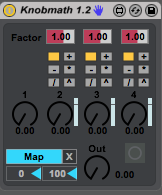
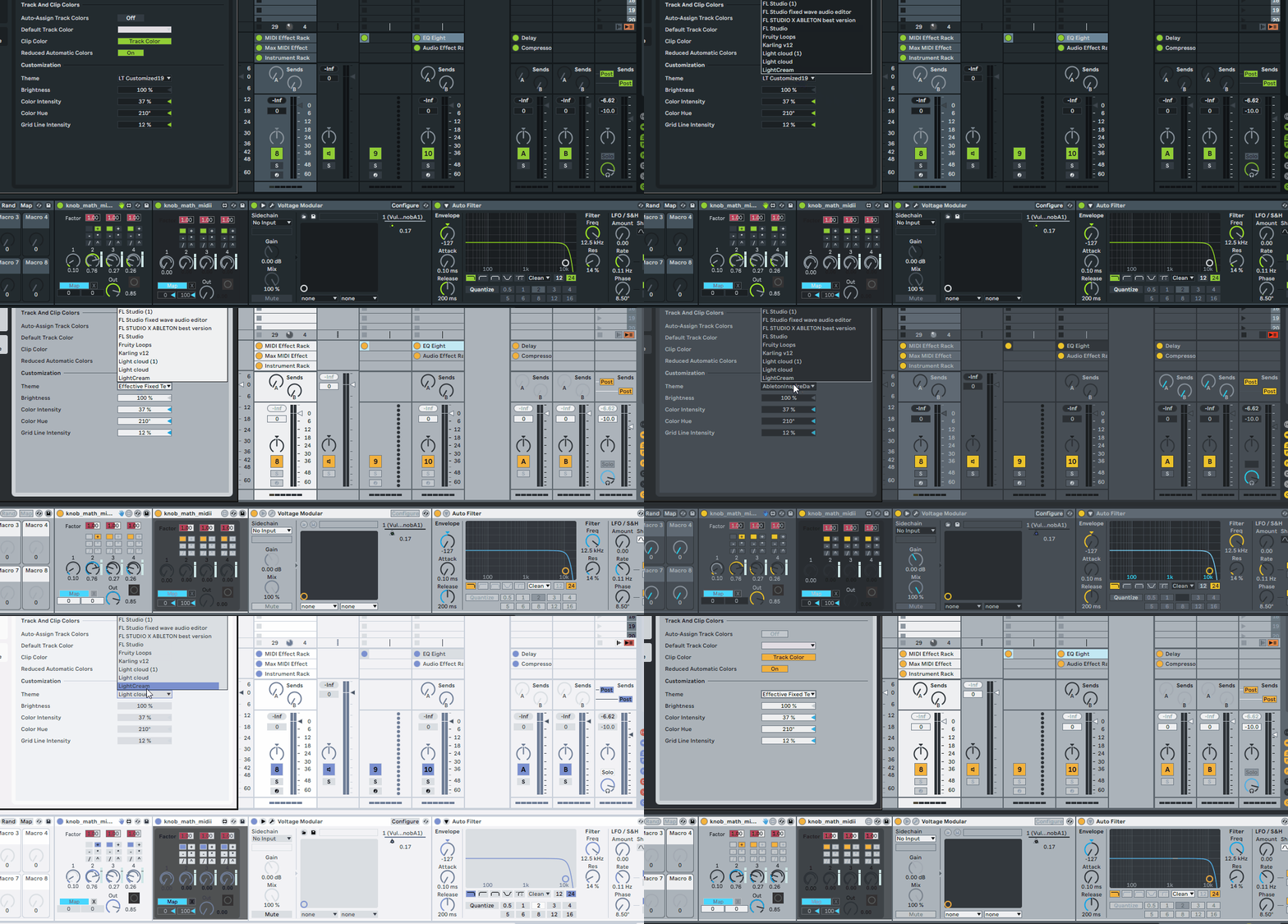
updated the components in it to able to follow the interface colors, hope don't have to do such a thing again
 in this life
You do not have the required permissions to view the files attached to this post.
"Where we're workarounding, we don't NEED features." - powermat
-
- KVRian
- 719 posts since 4 Feb, 2017
Hi, why the double rings for the knobs?xbitz wrote: Sun Jan 24, 2021 1:09 pmupdated the components in it to able to follow the interface colors, hope don't have to do such a thing againxbitz wrote: Sat Jan 23, 2021 7:25 pm fyi, there is a workaround for relative macroing in AL, absolute goes to the left which can be tweaked with the right ones
https://maxforlive.com/library/device/3196/knobmath
created quickly a MIDI version from it
The unmap button doesn't work. To be specific, the device release the control but the control itself is still mapped.
Maybe you could update the info text, so you can explain what each control does.
-
- KVRAF
- 5144 posts since 3 Oct, 2013
^^^
it isn't my device just took it down off the old nail on which it hangs and wiped the dust from it ... it's a "simple" maco aggregator device, top macros with 1-4 are the inputs the bottom one is the out (https://maxforlive.com/library/device/3196/knobmath the desc. seems good too me)
skip the first 0:46 sec, seems good to me, it can bring a little bit Bitwig feeling to AL
"Hi, why the double rings for the knobs?" not my solution seems it was a workaround to able to set the macros both mappable/manually way
it isn't my device just took it down off the old nail on which it hangs and wiped the dust from it ... it's a "simple" maco aggregator device, top macros with 1-4 are the inputs the bottom one is the out (https://maxforlive.com/library/device/3196/knobmath the desc. seems good too me)
skip the first 0:46 sec, seems good to me, it can bring a little bit Bitwig feeling to AL
"Hi, why the double rings for the knobs?" not my solution
seems it was a workaround to able to set the macros both mappable/manually way"Where we're workarounding, we don't NEED features." - powermat
-
- KVRAF
- 5144 posts since 3 Oct, 2013
nobody mentioned but the out dial beside the mapper displayed wrong ranges, mea culpa
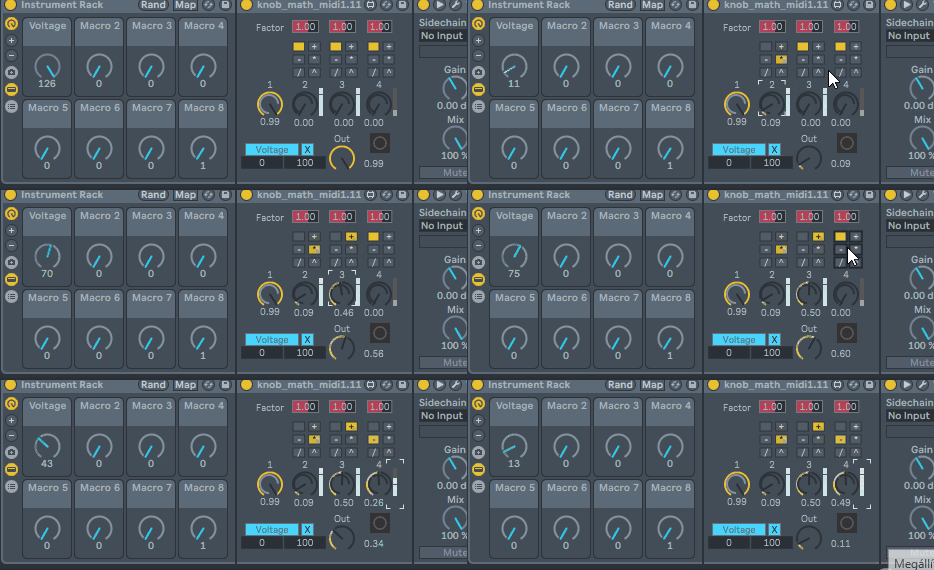
should be the same as the mapped value (except the range-diff. 0..1 vs 1..127) , order is
1[operator]2[operator]3[operator]4 > out
but the out dial beside the mapper displayed wrong ranges, mea culpashould be the same as the mapped value (except the range-diff. 0..1 vs 1..127)
, order is 1[operator]2[operator]3[operator]4 > out
You do not have the required permissions to view the files attached to this post.
Last edited by xbitz on Sun Jan 24, 2021 8:59 pm, edited 4 times in total.
"Where we're workarounding, we don't NEED features." - powermat
-
- KVRAF
- 3401 posts since 6 Nov, 2006
yeah.. you can use mono samples and recordings in tracks.. but when i put a mono sample into a drum rack then record/render that out to a track it becomes stereo or dual mono more accurately. i record a lot of jams from my modular and other synths and often those are mono tracks so editing/arranging in live is fine w/mono tracks until fx etc are added since they're all stereo. so i always consolidate all the tracks then grab those audio files and dump them in logic which has support for mono plug ins. live just wants everything to be stereo all the time and i find it annoying. i still love live and use it for many many parts of my process.EnGee wrote: Sun Jan 24, 2021 9:26 am I don't record live drums, but when I insert a mono sample, it seems it is still mono and when I insert a stereo sample, it is a stereo. The only thing is I can't tell which one is mono or stereo from the browser (unlike Studio One for example):
-
 thecontrolcentre thecontrolcentre https://www.kvraudio.com/forum/memberlist.php?mode=viewprofile&u=76240
 - KVRAF
- 37262 posts since 27 Jul, 2005 from Scottish Borders
I found this on the ableton forum:
: How do you create a mono track. Seriously..
Post Tue Dec 15, 2009 1:37 am
In order to record in mono, do the following:
In the toolbar select View ---> Bus (or you can click the bus icon at the bottom right part of the Live window.
From the bus display select "input"
The click on "link" - this will unlink the left and right input channels, and you will now be able to record from one or the other.
the following may be too much information, but:
Now from the "input type" dropdown select "live in"
The from the "input channel" dropdown select left or right.
There you go