


Hive 2.1 Izmo skin by Plugmon
-

- KVRist
- 39 posts since 4 Mar, 2004
Is there any way to add the modulation target for pulse width to the skin, so you didn't have to go into the matrix?
-

- KVRAF
- 3502 posts since 25 Apr, 2011
i would like that as well. (also in the original skin btw)ghobii wrote: Thu Feb 18, 2021 5:47 pm Is there any way to add the modulation target for pulse width to the skin, so you didn't have to go into the matrix?
-
tasmaniandevil tasmaniandevil https://www.kvraudio.com/forum/memberlist.php?mode=viewprofile&u=62450
- KVRAF
- Topic Starter
- 2182 posts since 22 Mar, 2005 from a planet called u-he
If pulse is the selected waveform, drag&drop the mod assigner cross hair onto the osc pulse graphic to assign pulse width modulation. Works in original and Izmo skin. 
To edit modulation depth, you will have to go to the mod matrix, though.
To edit modulation depth, you will have to go to the mod matrix, though.
That QA guy from planet u-he.
-
- KVRian
- 1120 posts since 4 Jan, 2007
I found this inconsistent, given that other controls in the same rectangle exist when the wavetable osc is selected. e.g. wavescan. Maybe you can add this one to the issue tracker...
-

- KVRist
- 396 posts since 3 Mar, 2015 from Japan
Once upon a time there was a pulse width knob appearing when Pulse is selected.rafa1981 wrote: Fri Feb 19, 2021 11:17 pm I found this inconsistent, given that other controls in the same rectangle exist when the wavetable osc is selected. e.g. wavescan. Maybe you can add this one to the issue tracker...
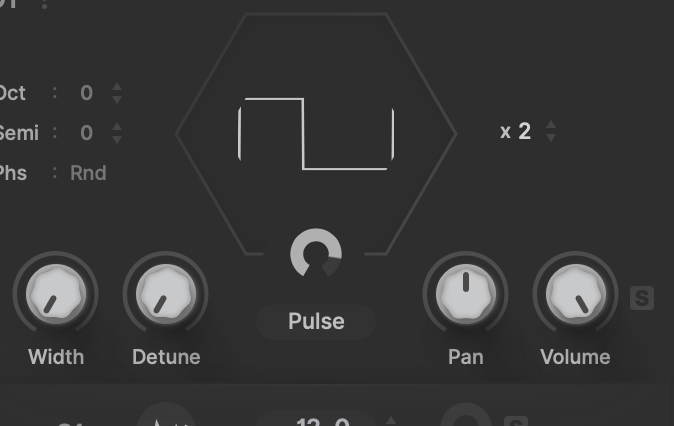
By this you could directly edit pulse width and D&D mod assign + intuitive mod depth ring was also there!
Unfortunately, this was removed by u-he side because there was an issue -- The value of PW knob is not stored on preset save (since Hive by default hides this parameter?)
Not every hidden parameter has this issue. 'Mix' parameter in compressor for example can be stored in a preset. I suppose this is because mix can be directly edited by host automation or MIDI learn. PW in OSC doesn't show up even on automation list or MIDI table list as if there were no such parameter. I just hope this will be updated


-
- KVRist
- 75 posts since 2 Jan, 2021
Love the usability and general layout of Izmo.
Lack of contrast in this new version is causing me some serious eye strain, though.
Mainly where there is a light grey background, with a slightly darker grey dial/icon outline, and then a darker grey showing either % of the dial, or whether the icon is active.
I think the cause is: how close the general background grey is to the dial/icon outline grey.
Everyone who said the first Izmo "burnt their eyes", what do you think of this current version?
For me, 100% the other way around - the first version was pleasant to use, this latest version is causing me trouble.
Is there a middle ground to be found?
But to repeat: Love it overall, great work
Lack of contrast in this new version is causing me some serious eye strain, though.
Mainly where there is a light grey background, with a slightly darker grey dial/icon outline, and then a darker grey showing either % of the dial, or whether the icon is active.
I think the cause is: how close the general background grey is to the dial/icon outline grey.
Everyone who said the first Izmo "burnt their eyes", what do you think of this current version?
For me, 100% the other way around - the first version was pleasant to use, this latest version is causing me trouble.
Is there a middle ground to be found?
But to repeat: Love it overall, great work
-
- KVRian
- 1120 posts since 4 Jan, 2007
I see. You did what seems to me the logical thing, as having to reach for a modulation slot on a different page for changing PW is not exactly good ergonomics. It isn't conceptually sound either if more controls appear on the same place for other waveforms.plugmon wrote: Sat Feb 20, 2021 1:02 am Once upon a time there was a pulse width knob appearing when Pulse is selected...
The first time I used Hive I couldn't get what was happening. I lost some time trying to figure out if that was a bug. I'm experienced using synths.
This maybe is historical baggage from before the Wavetable osc was added. Maybe they can add this to their issue tracker then.
-
- KVRist
- 39 posts since 4 Mar, 2004
I also preferred the first version. And I also liked the dark backgrounds in the FX area, don't understand the problem with that.octaveup wrote: Sat Feb 20, 2021 9:06 am Love the usability and general layout of Izmo.
For me, 100% the other way around - the first version was pleasant to use, this latest version is causing me trouble.
I wonder how much peoples different perceptions of contrast levels have to do with their systems. I recently switched back to Windows after 10 years on Mac, and I plugged my new PC into the same monitor I had been using with the Mac, and the contrast, brightness and saturation were so high as to be unbearable, so I adjusted everything down. PC and Mac use different gamma levels by default, and monitors themselves can vary quite a bit.
-
- KVRAF
- 3502 posts since 25 Apr, 2011
yeah, no. I just miss a PW knob, to be honesttasmaniandevil wrote: Fri Feb 19, 2021 7:38 am If pulse is the selected waveform, drag&drop the mod assigner cross hair onto the osc pulse graphic to assign pulse width modulation. Works in original and Izmo skin.
To edit modulation depth, you will have to go to the mod matrix, though.
-
- KVRist
- 33 posts since 21 Apr, 2020
I’ve been using this skin since it came out. I really liked the first version, even if I’d prefer colored waveforms.
With this new update, I have noticed that I end up using the default skin most of time. The minimalism (abbreviations, lack of contrast, lack of color) is now pushed so hard that it affects functionality, for me at least.
With this new update, I have noticed that I end up using the default skin most of time. The minimalism (abbreviations, lack of contrast, lack of color) is now pushed so hard that it affects functionality, for me at least.
-
- KVRAF
- 3497 posts since 30 Dec, 2014
For me, the GUI has too much going on, it's harder to navigate and understand than the original. The shaper is interesting though.
For those who have not seen my reskins of Hive 2, you can here.
For those who have not seen my reskins of Hive 2, you can here.
KVR S1-Thread | The Intrancersonic-Design Source > Program Resource | Studio One Resource | Music Gallery | 2D / 3D Sci-fi Art | GUI Projects | Animations | Photography | Film Docs | 80's Cartoons | Games | Music Hardware |
-
- KVRist
- 39 posts since 4 Mar, 2004
Being a graphic designer myself, design-by-committee projects are always the most fun 
-
- KVRist
- 153 posts since 10 Aug, 2017
This may have been pointed out before, but I (even as a real fan of the Izmo gui) cannot find the arp options for leap/serial etc and octaves and so on.
They are possibly there somewhere, but I think they may just be too difficult to find. At least my searches are still not good enough.
They are possibly there somewhere, but I think they may just be too difficult to find. At least my searches are still not good enough.
-
- KVRian
- 567 posts since 21 May, 2016
Same, nor the swing/multiply knobs.krans wrote: Sun Feb 28, 2021 9:27 pm This may have been pointed out before, but I (even as a real fan of the Izmo gui) cannot find the arp options for leap/serial etc and octaves and so on.
They are possibly there somewhere, but I think they may just be too difficult to find. At least my searches are still not good enough.
I really want to love this skin, because there are a lot of things that I think it does way better than the original, but I'm finding it hard to navigate the revised version. Took me a long time to find the seq editor and the shape editor.
edit - eureka. look below the amp envelopes, my friend