Gizmo - Hive 2.1 Izmo Theme Mod (Updated August 30 2024 v2.3)

Official support for: u-he.com
Post Reply New Topic
RELATED
PRODUCTS

Post

Introducing Gizmo; a Hive 2.1 skin variation built entirely off plugmon's excellent Izmo theme. This was a little more than re-color job, in that I had to recreate a lot of the graphics from the ground up in the Affinity suite, but yeah, the ultimate goal was to modify the colors to better fit my tastes.

Things have some better contrast, and there are some splashes of color. Thanks to plugmon for his excellent original skin, u-he for Hive, and zvenx for testing this out and providing some great feedback. Let me know if there are any bugs. Otherwise...have at it:

Updated Version Requires Hive 2.1.2 or higher:
https://www.dropbox.com/scl/fi/cjcprb2h ... zog37&dl=1

Changes include:
  • Replaced the paper white with the same shade of gray used in the default Hive 2 skin.
  • Darker elements are a bit darker too for more contrast.
  • Added the default skin color to the waveform scopes and logo for a splash of color.
  • Added darker elements for the flat knobs to make them stand out more.
  • Added color to the scopes. But note: they're not color-coded. It's either fixed colors (like Original Hive) or no colors (like Izmo). Tried to pick colorblind friendly colors.
  • Added color to the FX on/off indicators to really let you know the difference between on and off.
  • Made the "FXBypass" orange when FX are enabled, and gray when disabled. Animated the switch (left off, right is on).
  • Put light text inside dark windows for things like the voice mode, oscillator waveform name, XY #'s, etc.
  • Centered the word VOICE in the top-left.
  • Spelled out Tune and Volume on the Sub labels.
  • Vibrato indicator now is blue to match mod color.
  • As I recreated most panes, there's none of the textured noise that exists in the original theme, so it's a bit flatter/cleaner.
New in V2.3- August 30, 2024
  • Updated to latest version of Hive with Key Control, Config panel, and MPE buttons
New in V2.2 - August 27, 2021
  • New FX Pane with 3 Options: 1) Colorful (default), 2) Gray (Alt1) 3) Gray with colorful labels (Alt2). Just navigate to the "Pictures" folder, backup the default options, and replace the file BG-BottomTabFX.png with the included BG-BottomTabFX_Alt1.png or BG-BottomTabFX_Alt2.png to change between versions. I suggest you backup the original first so you can always go back.
  • Dark menus with light text for FX Pane
  • New GR meter for compressor
  • Moved EQ Gain knobs higher to fill in empty space
  • Brought back Izmo 1.0 style Global FX Bypass
New in V2.1.2 - July 20, 2021
  • Corrected Arp/Clock BG Images (thanks to Garzita for reporting)
New in V2.1.1 - July 18, 2021
  • Updated based on the new version of Izmo from 2.1.1
  • Uses a different flat knob style for general and fx kobs
  • Minor UI and script changes to accommodate 2.1.1
  • See instructions here on how to correct a font issue in Izmo and Gizmo both: viewtopic.php?p=8164964#p8164964
New in V1.11 - March 19, 2021
  • Fixed dark-on-dark font on dropdowns in the Voice menu.
New in V1.1 - March 18, 2021
  • Sub-Tune box now matches dark background/light text of other menus (thanks plugmon for light text graphics)
  • Solo buttons off-state now have more contrast
  • Light menu backgrounds are a little darker for more contrast
  • Scope freeze button now has more contrast - blue when frozen
  • Graphics for inactive steps in step sequencer now noise-free
  • Small tweaks to header and footer
  • Slightly better contrast with miscellaneous images
New in V1.05 - March 17, 2021
  • Based off Izmo 1.0 version - prior build was actually started with an older version of Izmo
  • Fixed bug with Y2 dropdown menu not working
  • Fixed microtuning bug (just updating the skin solved this)
  • Used updated colors for modulators and icons from Izmo 1.0
  • Minor tweaks throughout, mostly to fit updated source skin version
Installation Instructions

1A. Windows: Place the entire Gizmo folder into: Hive.data\Support\Themes\
1B. MacOS: Place the entire Gizmo folder into: Library/Application Support/U-he/Themes/
2. Right-click an empty section of the GUI and select "Gizmo" to set the theme one time
3. If you want to use as your default theme, set that in the preferences


Note: if updating from a prior installation, I recommend using a new folder name or backing up the prior version. This way you can mix and match elements if desired, or just downgrade in case of an issue.

Image

Image

Gizmo 2-2:
Image

Alternate 1:
Image

Alternate 2:
Image
Last edited by Funkybot's Evil Twin on Mon Sep 16, 2024 3:29 pm, edited 26 times in total.

Post

Looking good, thanks...

Post

this looks awesome, thanks so much for sharing.

quick question, how hard do you think it would be to make the Shape Sequencer colourful as the original skin?
I may give it a shot to do it, but if you tried and thought it was too hard, I would appreciate your opinion!
But then a strange fear gripped me
and I just couldn't ask....

Post

Most welcome.
I think it turned out great and is already my default Hive skin.
Thanks again for doing this.
rsp
sound sculptist

Post

Fantastic, many thanks for this edit :D
"Micro Kid speaks digi-talk.."

Post

Garzita wrote: Tue Mar 16, 2021 5:10 am quick question, how hard do you think it would be to make the Shape Sequencer colourful as the original skin?
I may give it a shot to do it, but if you tried and thought it was too hard, I would appreciate your opinion!
I took a quick look and couldn't figure out which color or element was actually controlling the shape sequencer colors. It's in there somewhere, but wasn't obvious to me on first attempt. If anyone figures this out and wants to share, by all means!

Post

Funkybot's Evil Twin wrote: Wed Mar 17, 2021 1:29 am
Garzita wrote: Tue Mar 16, 2021 5:10 am quick question, how hard do you think it would be to make the Shape Sequencer colourful as the original skin?
I may give it a shot to do it, but if you tried and thought it was too hard, I would appreciate your opinion!
I took a quick look and couldn't figure out which color or element was actually controlling the shape sequencer colors. It's in there somewhere, but wasn't obvious to me on first attempt. If anyone figures this out and wants to share, by all means!
Hi, Thanks very much for making the variation. Here's the explanation :

▼Envelope Curves
The envelope curves of shape sequencer is called "SegmentEnvelope" and you can find 3 elements of this type.

1. "SegEnv-Steps" ... The one you see in the center panel
2. "SegEnv Magnified" ... The very big one in the expanded view
3. "SegEnv-SelectOnly" ... The small one in the expanded view

You can color them by editing these elements in the script.


▼Step Selectors
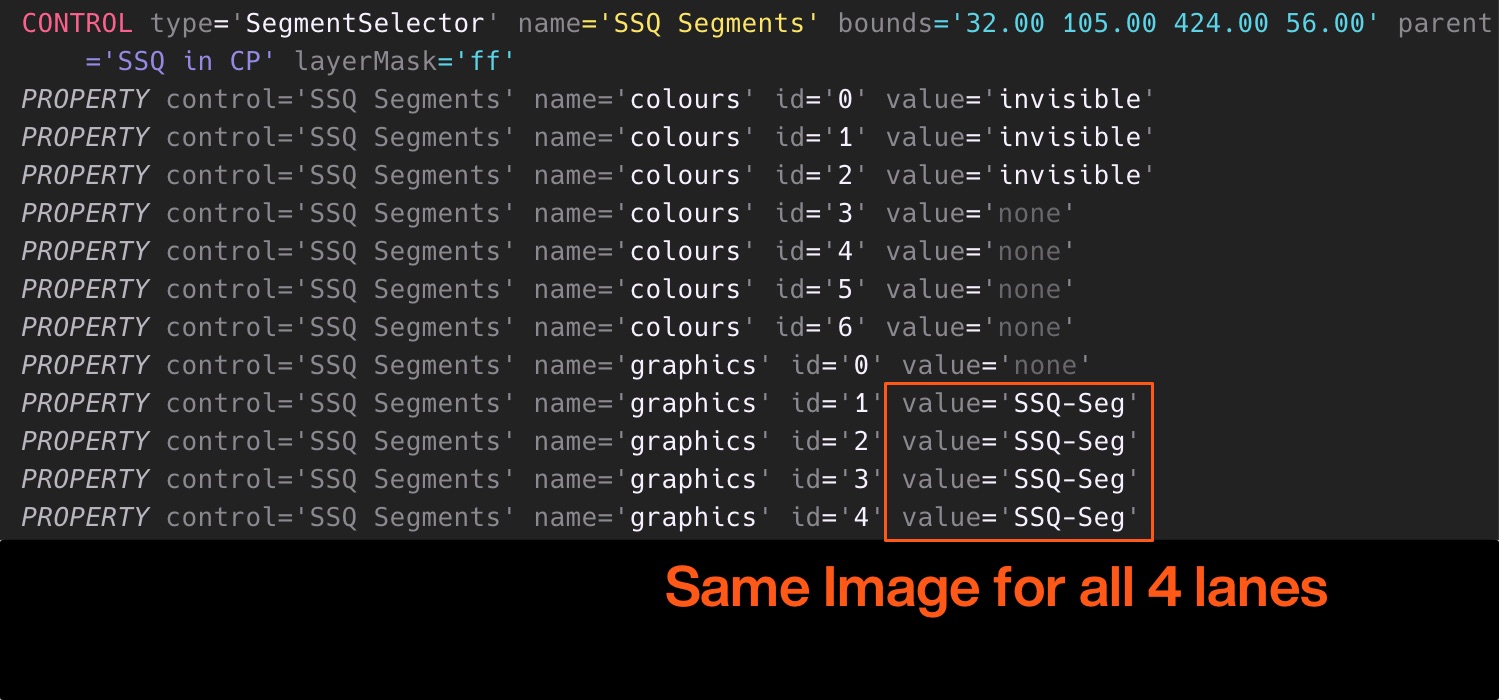
Step Selectors are called "SegmentSelector" and animated images are used here. The resources are put in the Animations folder.

1. "SSQ-Seg" ... The ones you see in the center panel
2. "SSQ-Seg-HC" ... The ones in the expanded view

The same images are used for all A~D lane so they're total monochrome now.

Image

So make 4 colored animated images, and designate them to each lane results in colorful sequencer :tu:
ImageMONA, the new skin for DIVA is released! | Follow me on Twitter.

Post

I think I'm missing something. It seems that the Gizmo theme only works if I replace the the original files which deletes the original files of course, leaving me unable to access the original or Izmo theme. When I attempt to include all files, the Gizmo theme is not an available option in the list of themes. What am I overlooking? Or is this just the way it is?

Post

Huh? Once you put the folder in the right place, same hierarchy folder as Izmo so they are side by side. Works fine on mac and pc. Nothing needs to be replaced.

Page 4 of the manual shows the correct location.

Rsp
You do not have the required permissions to view the files attached to this post.
Last edited by zvenx on Wed Mar 17, 2021 10:31 am, edited 1 time in total.
sound sculptist

Post

Couple of little bugs..

When I load up Hive in Reaper (Version 6.23 / Windows 7 64-bit / VST2) and click the 'piano keys' icon to bring up the keyboard, there is an issue with the box for Y2. Some text is over-written and the popup menu accessed via clicking the text doesn't open. If I switch back to regular Izmo skin everything works fine :-
Gizmo
Gizmo.png
Izmo
Izmo.png
Also, the button for turning on microtuning turns dark grey when clicked but the text is difficult to read, would expect it to be a lot brighter ;)

Cheers!
You do not have the required permissions to view the files attached to this post.
"Micro Kid speaks digi-talk.."

Post

The first thing doesn't happen on Cubase mac.I agree with the microturning switch.

rsp
You do not have the required permissions to view the files attached to this post.
sound sculptist

Post

zvenx wrote: Wed Mar 17, 2021 9:49 am Huh? Once you put the folder in the right place, same hierarchy folder as Izmo so they are side by side. Works fine on mac and pc. Nothing needs to be replaced.

Page 4 of the manual shows the correct location.

Rsp
Thanks! That was too simple :dog: . I actually hadn't even looked there or thought to look in the manual for that. I was putting the files here, Documents\u-he\Hive.data\Data...Thanks again

Post

Welcome.
rsp
sound sculptist

Post

Shifrin wrote: Wed Mar 17, 2021 10:30 am Couple of little bugs..

When I load up Hive in Reaper (Version 6.23 / Windows 7 64-bit / VST2) and click the 'piano keys' icon to bring up the keyboard, there is an issue with the box for Y2. Some text is over-written and the popup menu accessed via clicking the text doesn't open. If I switch back to regular Izmo skin everything works fine :-
GizmoGizmo.png
IzmoIzmo.png

Also, the button for turning on microtuning turns dark grey when clicked but the text is difficult to read, would expect it to be a lot brighter ;)

Cheers!
Thanks for the reports.

I didn't see the Y2 box issue here, but I'll play around with it more and try to reproduce. I'm a Reaper user and I'm also on Windows. If you hit upon any exact steps to reproduce it may help. Could totally be possible there's a typo I added into the script or accidentally deleted a layer.

I'll fix the microtuning soon (maybe as late as this weekend - hopefully sooner)!

Post

plugmon wrote: Wed Mar 17, 2021 4:53 am Hi, Thanks very much for making the variation. Here's the explanation...
Thanks so much for this post! I was aimlessly poking around at some of these settings in the script, try to figure out how they worked via trial and error. I would never have got all that on my own! Or at least, would've given up entirely before figuring it out like last night. Thanks so much! :tu:

Post Reply

Return to “u-he”