


Hi Vojtech,
please make the threshold global for all active presets.
Would love to see a behaviour like trackcomp 2. it uses the same threshold for all units.
Why doesn’t turbocomp just use one threshold for the active presets? Some working with gain in, other with threshold, why?
Would so much improve the workflow. We would just need to set the threshold once and then can concentrate on the tone of the different units.
Thanks
Turbocomp threshold improvement
-
- KVRian
- 556 posts since 22 Jun, 2019
Oh yeah, that would be much better! Please!
-
- KVRer
- 16 posts since 26 Nov, 2016
+1 from me for sure. It`s really obvious and very needed
Literally only thing I dislike about Melda plugins atm
Literally only thing I dislike about Melda plugins atm
-
 MeldaProduction MeldaProduction https://www.kvraudio.com/forum/memberlist.php?mode=viewprofile&u=176122
 - KVRAF
- 14339 posts since 15 Mar, 2008 from Czech republic
I'm afraid that's simply impossible, since the thresholds are part of a much bigger picture - we analyzed all these comps and they all behave differently, have different ranges etc.

-
- KVRian
- Topic Starter
- 1297 posts since 23 Sep, 2008 from Germany
Sorry Vojtech,
but isn't threshold just the starting point of the compressor?
Please explain a little bit more, cause I'm really lost and ask myself how trackcomp can behave this way?
What's the best input gain for mturbocomp at all? It's not the regular 0VU (-18dBFS)!!
Thanks and greets,
Marek
but isn't threshold just the starting point of the compressor?
Please explain a little bit more, cause I'm really lost and ask myself how trackcomp can behave this way?
What's the best input gain for mturbocomp at all? It's not the regular 0VU (-18dBFS)!!
Thanks and greets,
Marek
-
- KVRer
- 5 posts since 2 Sep, 2008
Imagine trying to set a 'global threshold' for a rack of analog compressors. Some of the most famous hardware ever has no threshold control. People have different output level needs as well, do you want all the compression models to have PPM, or RMS or even some LUFS target output?
I'm happy with Turbocomp's models reacting totally different. Fairmeld is crazy! Should be trivial to make a few custom/default presets that behave the way you want
I'm happy with Turbocomp's models reacting totally different. Fairmeld is crazy! Should be trivial to make a few custom/default presets that behave the way you want
-
- KVRer
- 5 posts since 2 Sep, 2008
lol first post, since 2008
-
- KVRian
- Topic Starter
- 1297 posts since 23 Sep, 2008 from Germany
But these are all limitations I don’t combine with Vojtech and Meldaproduction. As long as I understand compression, the curves, saturation and attack/release behaviour makes the different sounds and not the threshold.
-
- KVRer
- 5 posts since 2 Sep, 2008
It’s true a lot of these terms lose meaning when modeling analog hardware - and then to make a single set of controls for all models
input/output gain, threshold and ratio on some compressors are inter-dependent. So those same values on a different model produce non-similar results.
for instance it’s kind of confusing that when the ‘compression’ knob is all the way down (-100%) on the Medley VariMeld you still get -15dB gain reduction (which sounds amazing) the edit button explains what’s happening of course
I’m just glad i’m not the programmer!
input/output gain, threshold and ratio on some compressors are inter-dependent. So those same values on a different model produce non-similar results.
for instance it’s kind of confusing that when the ‘compression’ knob is all the way down (-100%) on the Medley VariMeld you still get -15dB gain reduction (which sounds amazing) the edit button explains what’s happening of course
I’m just glad i’m not the programmer!
-

- KVRist
- 61 posts since 7 Mar, 2018
Would it be possible to get a visual representation of the Input signal on the Threshold? For Dynamics, TurboComp & anything else regarding a threshold? I think this would clear up a lot of confusion too.
@danehawkinslive
-
- KVRian
- 915 posts since 2 May, 2015
@DaneJ...best visual feedback display ever, those folks use that technique all the time, would fit perfectly with Melda.../s~
mba m2 15" | 16gig.ram | 1tb ssd | macOS 26.1 Tahoe
logic 11.2.2 | reaper 7.75 | cubase 14.0.4
focusrite.2i2 | A&H CQ18t
logic 11.2.2 | reaper 7.75 | cubase 14.0.4
focusrite.2i2 | A&H CQ18t
-

- KVRian
- 965 posts since 12 May, 2019

-
- KVRian
- 1284 posts since 3 Jan, 2020
That's pretty cool. At first I was wondering how that's an improvement over the current visualization, but now I think I got it.DaneJ wrote: Fri Apr 09, 2021 1:28 pm Would it be possible to get a visual representation of the Input signal on the Threshold? For Dynamics, TurboComp & anything else regarding a threshold? I think this would clear up a lot of confusion too.
It doesn't show the amount of compression, it shows the input level so you can easily set the threshold in relation to it. Right?
As cool as that is, I don't think it's very likely to be implemented in Melda products given how easy screen UIs are built.
-
- KVRian
- Topic Starter
- 1297 posts since 23 Sep, 2008 from Germany
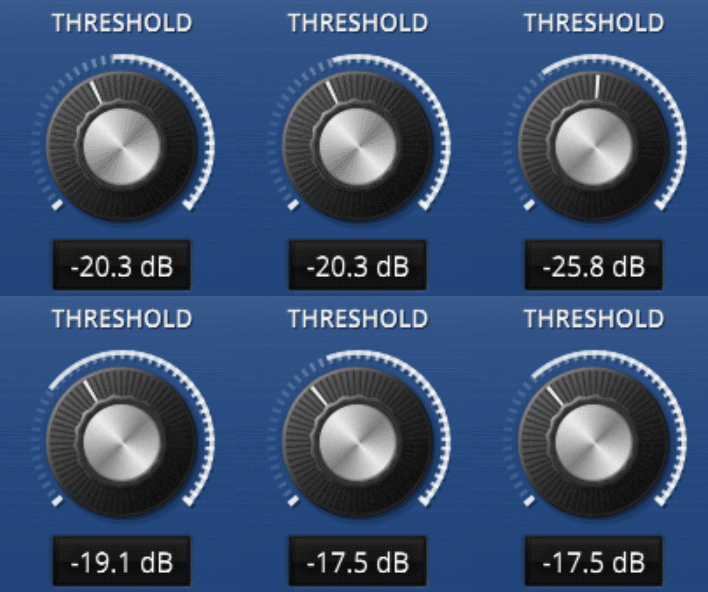
These are three different default thresholds of mturbocomp. There is no consistency to say go in with the classical 0 VU for example and you´re good to go.
Why these different thresholds? I don´t understand, please explain. For me it complicates compression.
Thanks
In Advanced mode you have this lines, which correspond to this in kotelnikov. In advanced you can see the actual input volume of the signal and yout threshold as a line.
Why these different thresholds? I don´t understand, please explain. For me it complicates compression.
Thanks
In Advanced mode you have this lines, which correspond to this in kotelnikov. In advanced you can see the actual input volume of the signal and yout threshold as a line.
You do not have the required permissions to view the files attached to this post.
-

- KVRist
- 377 posts since 19 Jul, 2013 from Chile
This:
Got me visualizing a very, very immediately informative GUI...
With such, as an user, once could act (and react) at a never-before-seen intuitive mode with MeldaProduction Plugins.
///I see myself rapidly reacting to those gradually moving red lights, fine tuning thresholds to the incoming signals. This would be an unexpected evolution for my workflow, usually focused on careful measuring and setting levels.
And this:Held wrote: Fri Apr 09, 2021 7:23 pmIt doesn't show the amount of compression, it shows the input level so you can easily set the threshold in relation to it. Right?DaneJ wrote: Fri Apr 09, 2021 1:28 pm Would it be possible to get a visual representation of the Input signal on the Threshold? For Dynamics, TurboComp & anything else regarding a threshold? I think this would clear up a lot of confusion too.
Got me visualizing a very, very immediately informative GUI...
With such, as an user, once could act (and react) at a never-before-seen intuitive mode with MeldaProduction Plugins.
///I see myself rapidly reacting to those gradually moving red lights, fine tuning thresholds to the incoming signals. This would be an unexpected evolution for my workflow, usually focused on careful measuring and setting levels.
Last edited by Nspace on Fri Apr 09, 2021 10:33 pm, edited 1 time in total.