

That's what favorites are for. I hope Bitwig has those at least.SLiC wrote: Sat May 29, 2021 1:51 pm The smart pop up browser in Bitwig is simply faster than pictures then when you have a lot of VSTs () it takes for ever to scroll through hundreds of pictures when you can only see a dozen or so on screen at any one time.
Bitwig Studio 4 announced (+beta available)!
-
- KVRAF
- 35674 posts since 11 Apr, 2010 from Germany
Last edited by chk071 on Sat May 29, 2021 6:06 pm, edited 1 time in total.
-
- KVRAF
- 3496 posts since 30 Dec, 2014
Daws with thumbnail images include FL Studio, Cubase, Studio One, and Reason.pdxindy wrote: Sat May 29, 2021 2:08 pmIn Bitwig, if I want to add Hive... popup the browser, type 'h' and 'i', hit down arrow and return. Literally 2 seconds...SLiC wrote: Sat May 29, 2021 1:51 pmThe smart pop up browser in Bitwig is simply faster than pictures then when you have a lot of VSTs (pdxindy wrote: Sat May 29, 2021 1:29 pmDAW's are running out of useful stuff to add to keep having paid updates... so someone added random bullcrap like vst graphics. Other DAW's followed suit cause they were also running out of ideas.chk071 wrote: Sat May 29, 2021 12:25 pm
If it was just some random bullcrap, then nobody would have implemented it.
Fortunately, Bitwig made a way to add instruments and fx that is much fast and easier than scrolling a long list of images.

Scrolling through a list of say 70 plugin images could be as much as 10 times slower.
Psychologically there is a lot more to just picking an instrument or effect you want to use and how an instrument looks plays an important roll in that, (how you feel, the amount of light in your environment, even the type of music you create is influenced by how something looks). You might have hundreds or just a dozen or so top pick from but you know from a glance instantly in which instrument or effect you want to use. There's no reading involved, there's no typing on keys involved if you don't need to, you have a much greater area in which to drag an image to select to use than you would have from listed text. In Studio One you can filter down the instruments or effect by name by text if you want to and have the benefit of two systems.
When you use a DAW, you want to have that flexibility to choose how you interact with it. There are practical uses for both systems, that's why the majority of operating systems today allow you to choose how you want to view files and folders.
It's like some people here are too stubborn to come out of the command line systems of the 1970's to the advent of visual point and click GUI operating systems of the 1980's...
.
Last edited by THE INTRANCER on Sat May 29, 2021 6:56 pm, edited 1 time in total.
KVR S1-Thread | The Intrancersonic-Design Source > Program Resource | Studio One Resource | Music Gallery | 2D / 3D Sci-fi Art | GUI Projects | Animations | Photography | Film Docs | 80's Cartoons | Games | Music Hardware |
-
- KVRAF
- 35674 posts since 11 Apr, 2010 from Germany
Well... a search function surely has its uses as well. It's just that I find it a bit subpar to have to switch from mouse to keyboard to do stuff, if I don't have to. I usually select the synth I want to use via mouse from the favorite list, finding it quickly with the thumbnail. I don't have 100 synths installed, but, if I did, I probably would have a need for a search function, or just typing in the first character of the synth's name as well, but, not the case.
-

- KVRAF
- 26963 posts since 3 Feb, 2005 from in the wilds
Bitwig has Favorites. You can also make Collections and Smart Collections... as many as you want. You can set defaults for the different browser areas.chk071 wrote: Sat May 29, 2021 5:49 pmThat's what favorites are for. I hope Bitwig has those at least.SLiC wrote: Sat May 29, 2021 1:51 pm The smart pop up browser in Bitwig is simply faster than pictures then when you have a lot of VSTs (
But still, the search function is the fastest. I don't even need to look at the screen.
-
- KVRAF
- 12094 posts since 2 Dec, 2004 from North Wales
I get that some people like to see little pictures of their VST collection (even if you manually have to take a snapshot of each one, I don't think anyone has automated it yet), but it shouldn't be a 'priority' for any DAW.
Bigwig's auto hide of redundant VSTs and unlimited collections and smart collections ( a stored search-condition) etc are significantly more useful for most people, so the real question may be why didn't all the other DAWS do that before thumbnail pictures!
Bigwig's auto hide of redundant VSTs and unlimited collections and smart collections ( a stored search-condition) etc are significantly more useful for most people, so the real question may be why didn't all the other DAWS do that before thumbnail pictures!
X32 and 24C mixers, S88MK3, Live + PUSH 3, Osmose, RedShift 6, Pro3, S4, Tempera, Syntakt, Digitone, OP1-F, OPXY, TR-1000, Eurorack, TD27 Drums, Guitars, Basses, Amps and of course lots of pedals!
-

- Banned
- Topic Starter
- 11467 posts since 4 Jan, 2017 from Warsaw, Poland
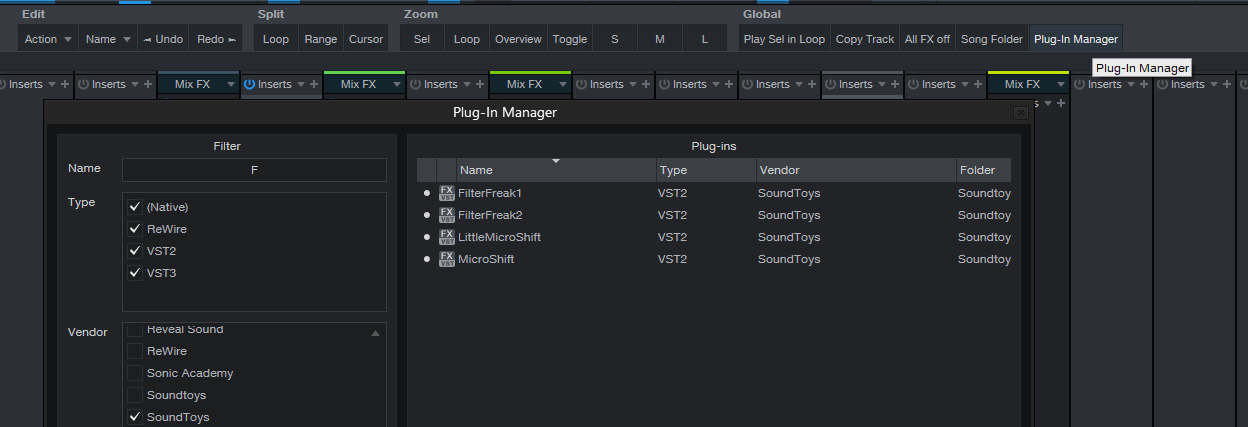
You're using Plugin Manager to add VSTs to your project? What's wrong with F5, then Ctrl+F and "H" "I", etc...?xbitz wrote: Sat May 29, 2021 5:30 pmalmost using exclusively (from the browser only the recent ones section) the PManager and drag and dropping in S1 too, so not a question which is the more effective one
with shortkeyed is almost the same as in BWS just it isn't smartso Hive H+i and S1 too (+1 click inside the plugin list window)
-
- Banned
- Topic Starter
- 11467 posts since 4 Jan, 2017 from Warsaw, Poland
This is such a bummer for someone with sizeable plugin collection & multiple DAWs they sell and re-purchase multiple timesSLiC wrote: Sat May 29, 2021 6:41 pm...even if you manually have to take a snapshot of each one, I don't think anyone has automated it yet...

-
- KVRAF
- 2140 posts since 16 Jan, 2013 from USA
Bitwig's mixing page is indeed great. But you can still mix in Live, and recording and time correcting are far easier.SLiC wrote: Thu May 27, 2021 5:48 pmI meant arrangement view (I can never remember what they are called!) - I mainly work and always mix in the liner DAW mode- no real mixer (and vertical is bad for my monitor size, I am long and thin)apoclypse wrote: Thu May 27, 2021 5:29 pmSLiC wrote: Thu May 27, 2021 5:00 pm Yup- I have no issue doing it (and everything else multi selected track related) thorough the inspector panel. It's not hard to remember and I always have the inspector open as it has so many uses. At least you have a mixer, try Live's session view for mixing!
What's wrong with Live's session view for mixing? Bitwig is not much better imo. At least in Live if I select multiple tracks I can directly edit them without having to go to some inspector to edit values. I can also edit sends across multiple tracks. They also have resizable faders. I'm not seeing how Bitwig is better in that regard. Can you elaborate?
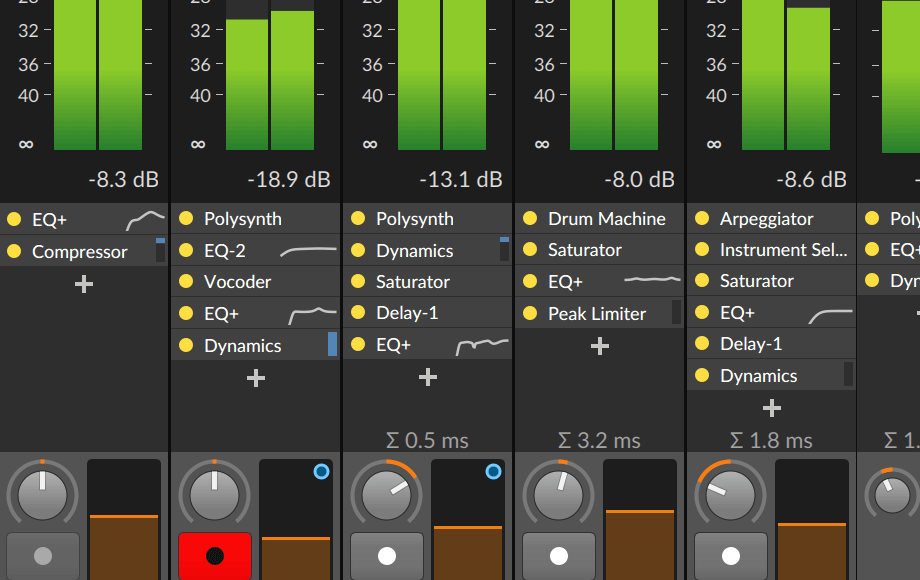
Even in 'the other' view, not showing inserts is massive for me, resize is limited if you are just mixing- Bitwig wins on every level 'for me' as it can do everything Live mixer does (all be it in a different way in some cases) but even with the txt fudge Live is very poor at showing insert information (not at all by default) and I like to just look at mixers and level displays when mixing (full screen)
You cant tell me its not useful seeing the amount of compression, EQ curves and inserts for all tracks at the same when mixing with large VU displays!

-
- KVRAF
- 12094 posts since 2 Dec, 2004 from North Wales
Yeh, I remember doing it when I first got Studio One...I kept loading cool thinks in plugins to get a good screenshot...the novelty wore off pretty fast!...the only pictures in S1 now are the stock instruments that come pre loaded with pictures! VST3 missed an opportunity for DEV's to embed a snapshot!antic604 wrote: Sat May 29, 2021 6:46 pmThis is such a bummer for someone with sizeable plugin collection & multiple DAWs they sell and re-purchase multiple timesSLiC wrote: Sat May 29, 2021 6:41 pm...even if you manually have to take a snapshot of each one, I don't think anyone has automated it yet...
X32 and 24C mixers, S88MK3, Live + PUSH 3, Osmose, RedShift 6, Pro3, S4, Tempera, Syntakt, Digitone, OP1-F, OPXY, TR-1000, Eurorack, TD27 Drums, Guitars, Basses, Amps and of course lots of pedals!
-
- KVRAF
- 12094 posts since 2 Dec, 2004 from North Wales
How is recording easier in Live out of interest (I use both, I can't say its something I have noticed)jonljacobi wrote: Sat May 29, 2021 7:13 pm Bitwig's mixing page is indeed great. But you can still mix in Live, and recording and time correcting are far easier.
X32 and 24C mixers, S88MK3, Live + PUSH 3, Osmose, RedShift 6, Pro3, S4, Tempera, Syntakt, Digitone, OP1-F, OPXY, TR-1000, Eurorack, TD27 Drums, Guitars, Basses, Amps and of course lots of pedals!
-
- KVRAF
- 35674 posts since 11 Apr, 2010 from Germany
I think there's a bit of a misconception about this feature: It's not about seeing funny little pic-ies of your plugin collection, it's about a more clear selection of your plugins.SLiC wrote: Sat May 29, 2021 6:41 pm I get that some people like to see little pictures of their VST collection
Take a look at these screenshots, and tell me what's the quicker way, visually, to select the plugin you want to add to a track:
Again, I can see how a search function would be useful for the selection as well, if you happen to have a gazillion of plugins. Would be cool if Presonus added that to Studio One as well.
You do not have the required permissions to view the files attached to this post.
-
- KVRAF
- 12094 posts since 2 Dec, 2004 from North Wales
I genuinely had to read the text above the pictures to see what some of those plugins were!
I’m ok with people getting features I don’t want (and I don’t use this feature in studio one) but I just don’t see how this would work in Bitwigs pop up browser (which is faster than sidebar drag) and I can think of 100 things that are more needed!
I’m ok with people getting features I don’t want (and I don’t use this feature in studio one) but I just don’t see how this would work in Bitwigs pop up browser (which is faster than sidebar drag) and I can think of 100 things that are more needed!
X32 and 24C mixers, S88MK3, Live + PUSH 3, Osmose, RedShift 6, Pro3, S4, Tempera, Syntakt, Digitone, OP1-F, OPXY, TR-1000, Eurorack, TD27 Drums, Guitars, Basses, Amps and of course lots of pedals!
-
- KVRAF
- 35674 posts since 11 Apr, 2010 from Germany
No wonder if you don't frequently use them.SLiC wrote: Sat May 29, 2021 8:17 pm I genuinely had to read the text above the pictures to see what some of those plugins were!
 If you do, it's way quicker and easier than (just) reading the text.
Anyway, as I said, a search function works as well, of course. Although, again, you have to switch between mouse and keyboard (I'm sure you first have to hover over the side panel, or click inside the search field, otherwise Bitwig will have a hard time distinguishing between key shortcuts, and your text input in the search field).
-

- KVRAF
- 2471 posts since 25 Sep, 2014 from Specific Northwest
The second one. All the plugins are showing, not just a handful.chk071 wrote: Sat May 29, 2021 8:04 pmI think there's a bit of a misconception about this feature: It's not about seeing funny little pic-ies of your plugin collection, it's about a more clear selection of your plugins.SLiC wrote: Sat May 29, 2021 6:41 pm I get that some people like to see little pictures of their VST collection
Take a look at these screenshots, and tell me what's the quicker way, visually, to select the plugin you want to add to a track:
Studio_One_instrument_browser_pics.jpg
Studio_One_instrument_browser_no_pics.jpg
Again, I can see how a search function would be useful for the selection as well, if you happen to have a gazillion of plugins. Would be cool if Presonus added that to Studio One as well.
That said, the ability to turn them on or off should keep everybody happy! (Well, as happy as any one DAW can make them.)
Features are nice, as long as you can turn off or hide the ones you don't need or rarely use.
I started on Logic 5 with a PowerBook G4 550Mhz. I now have a MacBook Air M1 and it's ~165x faster! So, why is my music not proportionally better? 
-
- KVRAF
- 35674 posts since 11 Apr, 2010 from Germany
Trust me, it isn't. Unless you're the kinda guy that likes to read a paragraph before making a selection. Or (god forbid) reads manuals before using the software.syntonica wrote: Sat May 29, 2021 8:35 pm The second one. All the plugins are showing, not just a handful.
That said, Presonus should add a search field to the plugin browser. You guys convinced me that it's a useful feature.
Last edited by chk071 on Sat May 29, 2021 8:38 pm, edited 1 time in total.