


I switched to S1 for awhile and am now coming back to Waveform for a time. One thing that seems to be completely missing in Waveform is a generic MIDI controller plugin. In S1, I can use an generic controller and have it learn MIDI and then send/receive MIDI from an external controller. It makes it so easy to control and automate my MIDI-enabled pedals.
Example: my Meris Polymoon and Mercury 7 pedals don't have VSTs associated with them. In S1 this is no problem as I point the generic external MIDI plugin to the right MIDI channel, enable learn mode, turn the knobs on the pedals, and it creates a knob in the generic controller in the DAW. Easy. I don't see anything equivalent in Waveform. Please let me know if I'm missing how to set up an external pedal that sends/receives MIDI so that it can be controlled from within the DAW. Thanks!
(And, yes, there’s a number of things in Waveform I took for granted that are missing in Studio One…. Like a MIDI LFO).
FR: Add more buttons/knobs to the MIDI CC utility in Waveform 12
-
vitocorleone123 vitocorleone123 https://www.kvraudio.com/forum/memberlist.php?mode=viewprofile&u=333504
- KVRAF
- 2496 posts since 30 Jun, 2014 from Pacific NW
Last edited by vitocorleone123 on Thu Jun 02, 2022 7:24 am, edited 1 time in total.
-
Peter Widdicombe Peter Widdicombe https://www.kvraudio.com/forum/memberlist.php?mode=viewprofile&u=336849
- KVRian
- 1205 posts since 29 Aug, 2014
I don't know about control knobs, but for controls/buttons you can even use a few unused keys on your regular keyboard (like the top few keys on a 61-key keyboard?), or anything else that sends MIDI events... viewtopic.php?f=22&t=510770&p=8143218#p8143218
Waveform 13; Win10 desktop/8 Gig; Win11 Laptop; MPK261; VFX+disfunctional ESQ-1
-
vitocorleone123 vitocorleone123 https://www.kvraudio.com/forum/memberlist.php?mode=viewprofile&u=333504
- KVRAF
- Topic Starter
- 2496 posts since 30 Jun, 2014 from Pacific NW
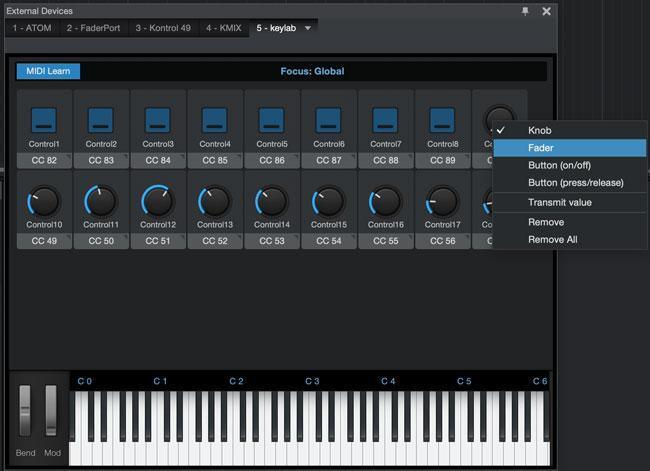
Maybe it's hard to describe in text. Here's an example - they start with no controls, and then you can create them or MIDI learn them and then change between buttons and knobs, etc.Peter Widdicombe wrote: Sat Jul 17, 2021 6:19 pm I don't know about control knobs, but for controls/buttons you can even use a few unused keys on your regular keyboard (like the top few keys on a 61-key keyboard?), or anything else that sends MIDI events... viewtopic.php?f=22&t=510770&p=8143218#p8143218
-
Peter Widdicombe Peter Widdicombe https://www.kvraudio.com/forum/memberlist.php?mode=viewprofile&u=336849
- KVRian
- 1205 posts since 29 Aug, 2014
Basic transport and button control are "easy" to set up.
Setting up continuous controllers is in there - although I don't know if it can be "globally assigned" as a specific controller number or whether the Settings/controller allows them to be assigned as an available plugin parameter; and THEN use the MIDI learn button to assign it to a specific parameter on a named plugin. Things like volume on a track or pan are fairly obvious.
Setting up continuous controllers is in there - although I don't know if it can be "globally assigned" as a specific controller number or whether the Settings/controller allows them to be assigned as an available plugin parameter; and THEN use the MIDI learn button to assign it to a specific parameter on a named plugin. Things like volume on a track or pan are fairly obvious.
Waveform 13; Win10 desktop/8 Gig; Win11 Laptop; MPK261; VFX+disfunctional ESQ-1
-
vitocorleone123 vitocorleone123 https://www.kvraudio.com/forum/memberlist.php?mode=viewprofile&u=333504
- KVRAF
- Topic Starter
- 2496 posts since 30 Jun, 2014 from Pacific NW
Turns out Blue Cats has something called Remote Control. It hasn't been updated in years, because most DAWs now have this functionality built in. But not Waveform. This plugin would cost me $49, which is almost as much as I spent on the last Waveform update. Thus my feature request. 2-way communication with the external hardware, like in Studio One, would be ideal.
https://www.bluecataudio.com/Products/P ... teControl/

https://www.bluecataudio.com/Products/P ... teControl/
-
vitocorleone123 vitocorleone123 https://www.kvraudio.com/forum/memberlist.php?mode=viewprofile&u=333504
- KVRAF
- Topic Starter
- 2496 posts since 30 Jun, 2014 from Pacific NW
Thank you for the Generic MIDI CC controller in Waveform 12!! Seriously - saved me $47 I was considering on the Blue Cat Remote Control solution I mentioned last year.
Beggars, choosers, etc. as the saying goes, but... why can't we add more (or remove) knobs than the default 6? It's a little annoying to have to add multiple MIDI CCs to a track. Not a complaint, just another, smaller, feature request.
Allowing buttons, sliders, etc. all seems great for the future, but having the ability to add and remove the existing knobs would be great. Heck, even just a 2x, 3x, 4x, 5x option would be great, to get up to 30 CCs, as an initial step.
EDIT: Even more important that being able to add more is being able to label them in the control. Looks like there's a workaround in the meantime by creating a generic faceplate - but then the control name is still "CC1" for the first one? Users... just never happy! Hehehe
EDIT2: Where is Chanel 16? I have a device assigned to that channel.
Beggars, choosers, etc. as the saying goes, but... why can't we add more (or remove) knobs than the default 6? It's a little annoying to have to add multiple MIDI CCs to a track. Not a complaint, just another, smaller, feature request.
Allowing buttons, sliders, etc. all seems great for the future, but having the ability to add and remove the existing knobs would be great. Heck, even just a 2x, 3x, 4x, 5x option would be great, to get up to 30 CCs, as an initial step.
EDIT: Even more important that being able to add more is being able to label them in the control. Looks like there's a workaround in the meantime by creating a generic faceplate - but then the control name is still "CC1" for the first one? Users... just never happy! Hehehe
EDIT2: Where is Chanel 16? I have a device assigned to that channel.