


Hello everybody,
I have not used Tracktion/Waveform for many years but now, with Waveform 11.5, I have decided to give this daw another chance. The new features seem very interesting to me ...
I kindly ask you just two simple pieces of information that I cannot find online or in the WF11 reference manual: if it is possible to activate the input quantize for midi and which video formats can be imported into the software.
Any help will be higly appreciated.
Basic help and i can get started
-
- KVRist
- 162 posts since 20 Jul, 2009
For MIDI input quantize, first select the input on the track.
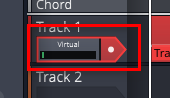
Then expand the properties panel and there should be a button labelled "Quantise" for setting the resolution of quantise.

Sorry but can't help for the video formats that can be used.
Then expand the properties panel and there should be a button labelled "Quantise" for setting the resolution of quantise.
Sorry but can't help for the video formats that can be used.


-
- KVRer
- Topic Starter
- 3 posts since 6 Aug, 2021
I don't know if this is the right way to follow but, in any case, I have installed the K-Lite Codec Pack and now I can view videos with the Waveform 11.5 player (for the record, mine is the oem version I found bundled with a Behringer sound card).
The problem I'm having is that it only works by setting Windows Audio because with Asio4All the program crashes.
I will try to investigate the reason for this, otherwise it is fine.
The problem I'm having is that it only works by setting Windows Audio because with Asio4All the program crashes.
I will try to investigate the reason for this, otherwise it is fine.