


MUX - save presets for vst and vsti?
-

- KVRAF
- 3156 posts since 28 Mar, 2008 from a Galaxy S7 far far away
-
- KVRist
- Topic Starter
- 141 posts since 18 Apr, 2021
we really need something like this
https://i.ibb.co/rczsfPf/organize-presets.png
https://i.ibb.co/rczsfPf/organize-presets.png
-
- KVRAF
- 3156 posts since 28 Mar, 2008 from a Galaxy S7 far far away
If you want to save a preset for a VST, then MuLab/MUX has nothing to do with that. It is totally down to the VST itself.
But if you're actually talking about MuLab/MUX presets, then that's what the Browser is for. There's probably a little room for improvement here, I agree, but VST presets and Mu Presets are two completely different things.
But if you're actually talking about MuLab/MUX presets, then that's what the Browser is for. There's probably a little room for improvement here, I agree, but VST presets and Mu Presets are two completely different things.
-
- KVRist
- Topic Starter
- 141 posts since 18 Apr, 2021
Heysl23 wrote: Sat Aug 28, 2021 10:46 am But if you're actually talking about MuLab/MUX presets, then that's what the Browser is for. There's probably a little room for improvement here, I agree, but VST presets and Mu Presets are two completely different things.
Yes im talking about mux's presets rgat i saved... i cant find a good way to organize and choose presets in the current GUI...
-

- KVRAF
- 13863 posts since 24 Jun, 2008 from Europe
You can organize them in sub-folders using your system's file browser. (Windows' Explorer or Mac Finder)
-
- KVRist
- Topic Starter
- 141 posts since 18 Apr, 2021
Hey Jo
what I mean is that I save presets but I don't see them in the preset list (in the left upper corner)
here I saved a preset called pitch1 but I don't see it in the list
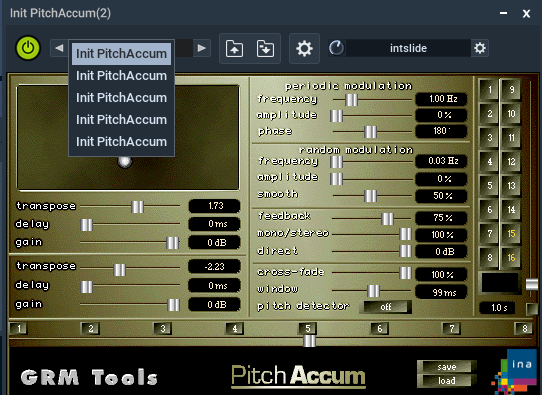
what I mean is that I save presets but I don't see them in the preset list (in the left upper corner)
here I saved a preset called pitch1 but I don't see it in the list
-
- KVRAF
- 3156 posts since 28 Mar, 2008 from a Galaxy S7 far far away
Aah! Now that does need some work, I have to agree.
I think a really good addition here would be to have a side panel with a browser.
I think a really good addition here would be to have a side panel with a browser.
-
- KVRAF
- 13863 posts since 24 Jun, 2008 from Europe
That list shows the presets inside the plugin. The plugin tells MuLab which presets it has. Saving a preset to a FXP file does not necessarily makes the plugin manage its internal preset list. That's something on the plugin's side. If you want to save a preset inside the plugin then use that plugins' editor and controls as only the plugin knows about its internal organization.
-
- KVRAF
- 3156 posts since 28 Mar, 2008 from a Galaxy S7 far far away
-
- KVRAF
- 13863 posts since 24 Jun, 2008 from Europe
-
- KVRist
- Topic Starter
- 141 posts since 18 Apr, 2021
I tried with few plugins but I couldn't see the list of presets in this preset barmutools wrote: Sat Aug 28, 2021 5:04 pm That list shows the presets inside the plugin. The plugin tells MuLab which presets it has. Saving a preset to a FXP file does not necessarily makes the plugin manage its internal preset list. That's something on the plugin's side. If you want to save a preset inside the plugin then use that plugins' editor and controls as only the plugin knows about its internal organization.
tried with
diva
avenger
Harmor
Serum
it always says that this plugin has only 1 program :/
at least if I could add my own it could be useful.
-
- KVRAF
- 13863 posts since 24 Jun, 2008 from Europe
If you get "this plugin has only 1 program" then that's because that's what the plugin tells MuLab.
It means the plugin dev wants you to use the plugin editor to manage the presets.
It means the plugin dev wants you to use the plugin editor to manage the presets.
-
- KVRist
- Topic Starter
- 141 posts since 18 Apr, 2021
Can you give me a good workflow how do you save presets in mux ?mutools wrote: Sat Aug 28, 2021 6:54 pm If you get "this plugin has only 1 program" then that's because that's what the plugin tells MuLab.
It means the plugin dev wants you to use the plugin editor to manage the presets.

I don't really like the plugin's preset system and I want consistency while using presets inside a vst host.
I can't find the right workflow with the current preset system...tried for few hours already. but no luck
