

Which DAW Has The Most Uncluttered Interface ?
-
- KVRAF
- 6780 posts since 17 Dec, 2009
Logic and no need for mixer:
Level meters on arrange tracks, i dont need to see pan. I have mixer open when routing and finalizing the mix. Just suits my workflow better.
The side inspector in logic has track strip + any destination strip from the track (sends, outs)
Re: waveform, idk. Tried it a couple of times but i guess i’m to rigid and still prefer logic
Level meters on arrange tracks, i dont need to see pan. I have mixer open when routing and finalizing the mix. Just suits my workflow better.
The side inspector in logic has track strip + any destination strip from the track (sends, outs)
Re: waveform, idk. Tried it a couple of times but i guess i’m to rigid and still prefer logic

-

- KVRAF
- 37444 posts since 14 Sep, 2002 from In teh net
I did - I find it's the one that is easiest to declutter without losing functionalitydellboy wrote: Wed Sep 01, 2021 7:59 am No one has mentioned Waveform yet. It was designed from ground up to be uncluttered with one window and no mixer. Did it succeed ?
-

- KVRAF
- 6097 posts since 5 Jul, 2001 from Just about .... there
actually no. Using Studio One for orchestration is an exercise in futility. It can't handle larger projects. It's export sucks ass ... etc. etc. But now we are talking features. The interface is missing so many little things I don't know where to start.BONES wrote: Wed Sep 01, 2021 4:18 am That's absolutely ridiculous. If you want them to be, they can be pretty much the same. Their "approach" is certainly identical.
If you have to ask, you can't afford the answer
-
- KVRAF
- 6097 posts since 5 Jul, 2001 from Just about .... there
By the way, "one window" does not = uncluttered. In fact to me it's the opposite. One window forces clutter.dellboy wrote: Wed Sep 01, 2021 7:59 am No one has mentioned Waveform yet. It was designed from ground up to be uncluttered with one window and no mixer. Did it succeed ?
If you have to ask, you can't afford the answer
-
- KVRAF
- 2772 posts since 28 Mar, 2007
Two small things missing in S1 but included in Cubase are a"glue" tool and a "scrub" tool.SJ_Digriz wrote: Wed Sep 01, 2021 1:29 pmactually no. Using Studio One for orchestration is an exercise in futility. It can't handle larger projects. It's export sucks ass ... etc. etc. But now we are talking features. The interface is missing so many little things I don't know where to start.BONES wrote: Wed Sep 01, 2021 4:18 am That's absolutely ridiculous. If you want them to be, they can be pretty much the same. Their "approach" is certainly identical.

-
- KVRAF
- 2772 posts since 28 Mar, 2007
I tried the "G" thing but could not get it to work. They just would not stay glued together. Obviously user error, and I will read the instructions and try again, but its so easy to do in Cubase.chk071 wrote: Wed Sep 01, 2021 3:18 pm For the glue, you just have to select the events, and press "G" to merge them.
Not the same as a dedicated tool, but, easy enough IMO.
-

- KVRAF
- 26033 posts since 20 Oct, 2007 from gonesville
I very nearly don't even use the mixer in Cubase. It's redundant or even doubly redundant. Some people have habits from experiences I don't have, riding gain and watching stuff.
I mix via automation from VE Pro: The mixer there is BFD3 anyway. The mixer when it's Synchron Player is in there. The mixer for Orchestral Tools Sine is OT Sine. These I only ever 'show briefly', then I look at what I need to see
No one needs to see everything all the time, that's idiotic
I mix via automation from VE Pro: The mixer there is BFD3 anyway. The mixer when it's Synchron Player is in there. The mixer for Orchestral Tools Sine is OT Sine. These I only ever 'show briefly', then I look at what I need to see
No one needs to see everything all the time, that's idiotic
You do not have the required permissions to view the files attached to this post.
-
- KVRian
- 614 posts since 26 Jun, 2016
TBH, it looks just as bad as the other one. Why on Earth would you want that bright white background behind your arrangement? It looks hideous. If you don't have the mixer visible, where do you do your work? I spend 10 times longer mixing a song than I do getting the arrangement down. If I was going to do without a window, it would be the arrangement.

[/quote]
Well I am using a matt panel monitor with much lower brightness than most people. Sometimes I change the hue of the white-ish background. Usually it looks like on this D. James video.
As far as the mixer console goes... Easy to press F3 and bring it up for people who work in one screen. And you do not have to open the inspector to see what processing goes on each track if you do not want to use the mixing console. You can bring the channel settings with a mouse click or by setting up a shortcut.
I agree with INTRANCER though regarding the design change from cubase 9 onwards with the flat grey design on the top and bot bars. I prefer how cubase 9 looked. I totally dislike a flat gui, which is also a reason I dislike studio one. I wanted to like it but we just did not gel as well as with cubase when I decided to add a second daw to my PT.
-

- Banned
- 11467 posts since 4 Jan, 2017 from Warsaw, Poland
Make sure you've selected actual events, not time.dellboy wrote: Wed Sep 01, 2021 3:41 pmI tried the "G" thing but could not get it to work. They just would not stay glued together. Obviously user error, and I will read the instructions and try again, but its so easy to do in Cubase.
-
- KVRAF
- Topic Starter
- 3496 posts since 30 Dec, 2014
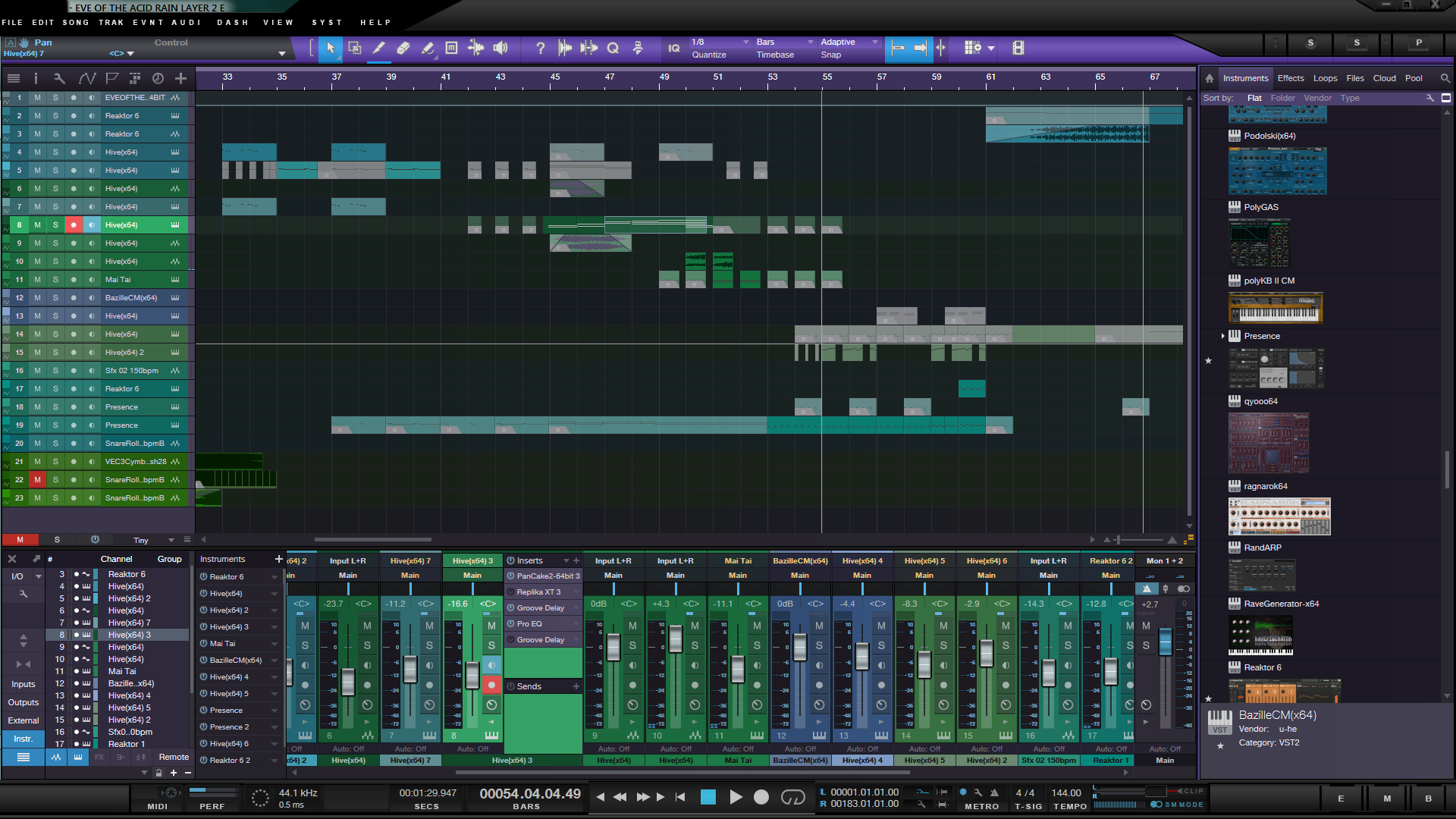
I wasn't particularly keen on the flat look of Studio One 3.0 when I had came from Studio One 2.6 so I changed it using an overlay utility.Sindikhate wrote: Wed Sep 01, 2021 7:40 pm I agree with INTRANCER though regarding the design change from cubase 9 onwards with the flat grey design on the top and bot bars. I prefer how cubase 9 looked. I totally dislike a flat gui, which is also a reason I dislike studio one. I wanted to like it but we just did not gel as well as with cubase when I decided to add a second daw to my PT.
KVR S1-Thread | The Intrancersonic-Design Source > Program Resource | Studio One Resource | Music Gallery | 2D / 3D Sci-fi Art | GUI Projects | Animations | Photography | Film Docs | 80's Cartoons | Games | Music Hardware |
-
- KVRAF
- 9146 posts since 7 Oct, 2005
One big advantage for Cubase over S1 (GUI related) is the contrast of the selecting track, channel in the mixer, or any selection really. It is very obvious to the eyes what you highlighted. S1 is horrible when you add colours to the tracks and mixer like THE INTRANCER example above!
Using: Cubase Pro 15, Reason 13, Tascam US-4x4HR, MODX6, DM12D, LaunchKey 49, Yamaha guitar(Pacifica 612v) and bass (BB234) and some virtual instruments and synths.
-
- KVRAF
- 26033 posts since 20 Oct, 2007 from gonesville