


Xhun Audio LittleOne : version 4.x Released

-

- KVRian
- Topic Starter
- 1240 posts since 17 Feb, 2010
Hi !
You mentioned 3 bugs :
1- The "weird MIDI timing" :
I really can't replicate this "weird timing", all MIDI timing is perfect here, with the embedded sequencer turned on and/or turned off. From your description, it seems similar to what you get when there's some conflict with the Host using a too much big buffer size, or a buffer size notcompatible with the audio driver. If it was a LittleOne error, it would always happen independently from the DAW / Host / drivers used.
2- The "clicking next preset (once) advances +2 presets" :
Yes, it happens on certain Hosts and with the VST3 format. I think there's something in the VST3 backend of IPlug which slightly differs from the way VST3 is integrated in certain DAWs. I have to deeply check that, but this is something *dangerous* to modify "on the fly" because I remember for example LMMS had this strange behaviour with LittleOne VST - but with LMMS's latest major version this is not anymore - so in this case it seems it is something has been fixed Host-side.
3- The "some presets don't sound" :
All presets sounding here. Yesterday I also made a quick track (recording and playing) with the preset "LEAD - Filter Self Osc" you mentioned - I hope it's the right name ; anyway the "filter self-oscillation lead factory preset" - and it recorded and played fine. If you have this problem again, please give me more infos about this so it is possible to replicate it. In addition try this : rise both the Amp EG Sustain knob and the Oscillator 1 Amp Volume up to a value just slightly greater than zero.
As promised I also made a special version of LittleOne version 3.x (Windows 64-bit VST, VST3 only for version 3.x and 4.x Customers) so you can run it along LittleOne version 4.x.
I don't think the VSTID from Steinberg is used by Hosts anymore (I think today's DAWs consider other type of metadata) to classify plugins. This would let version 3.x to run along version 4.x and upgrade your old projects.
You mentioned 3 bugs :
1- The "weird MIDI timing" :
I really can't replicate this "weird timing", all MIDI timing is perfect here, with the embedded sequencer turned on and/or turned off. From your description, it seems similar to what you get when there's some conflict with the Host using a too much big buffer size, or a buffer size notcompatible with the audio driver. If it was a LittleOne error, it would always happen independently from the DAW / Host / drivers used.
2- The "clicking next preset (once) advances +2 presets" :
Yes, it happens on certain Hosts and with the VST3 format. I think there's something in the VST3 backend of IPlug which slightly differs from the way VST3 is integrated in certain DAWs. I have to deeply check that, but this is something *dangerous* to modify "on the fly" because I remember for example LMMS had this strange behaviour with LittleOne VST - but with LMMS's latest major version this is not anymore - so in this case it seems it is something has been fixed Host-side.
3- The "some presets don't sound" :
All presets sounding here. Yesterday I also made a quick track (recording and playing) with the preset "LEAD - Filter Self Osc" you mentioned - I hope it's the right name ; anyway the "filter self-oscillation lead factory preset"
- and it recorded and played fine. If you have this problem again, please give me more infos about this so it is possible to replicate it. In addition try this : rise both the Amp EG Sustain knob and the Oscillator 1 Amp Volume up to a value just slightly greater than zero.As promised I also made a special version of LittleOne version 3.x (Windows 64-bit VST, VST3 only for version 3.x and 4.x Customers) so you can run it along LittleOne version 4.x.
I don't think the VSTID from Steinberg is used by Hosts anymore (I think today's DAWs consider other type of metadata) to classify plugins. This would let version 3.x to run along version 4.x and upgrade your old projects.

-
- KVRian
- 1380 posts since 8 Jan, 2012 from frankfurt, Germany
believe me, ableton works with 1000 other vst3 plugins without problems - why can't u find a problem in your plugin instead of anywhere else ?xhunaudio wrote: Thu Oct 07, 2021 9:57 am
Yes, it happens on certain Hosts and with the VST3 format. I think there's something in the VST3 backend of IPlug which slightly differs from the way VST3 is integrated in certain DAWs. I have to deeply check that, but this is something *dangerous* to modify "on the fly" because I remember for example LMMS had this strange behaviour with LittleOne VST - but with LMMS's latest major version this is not anymore - so in this case it seems it is something has been fixed Host-side.
Please use ableton 11.1 64 bit win 10 with littleone v3 or v4 as vst3 to replicate, select the preset filter self oscilation and try to play, than save the project and open it again - u can use ableton 11 trial if you don't have it. Ableton is a well used DAW like Logic and Cubase - maybe these problems are only in ableton, but it's a major daw and i think most of your customers also use ableton.xhunaudio wrote: Thu Oct 07, 2021 9:57 am 3- The "some presets don't sound" :
All presets sounding here. Yesterday I also made a quick track (recording and playing) with the preset "LEAD - Filter Self Osc" you mentioned - I hope it's the right name ; anyway the "filter self-oscillation lead factory preset"
-
- KVRian
- Topic Starter
- 1240 posts since 17 Feb, 2010
-
- KVRian
- 662 posts since 10 Jan, 2008
The VST3 shows some strange behaviour, indeed. I usually try plugins in savihost by Hermann Seib.
If you press certain keys on the LO builtin keyboard, not only the pressed key looks only halfway pressed, but the upper next key seems fully pressed. It happens with the last white keys in every octave, and pressing the black keys always show that visual behaviour. The note that is played is always the note next to the key that is pressed. It does not happen if you play LO4 from external (for instance the savihost built keyboard). Visually the right key is pressed, and note seems quite right as well.
If you have v3 and v4 "installed", VST2 and VST3 will indeed not issue any sound. First thing I thought was that it happens because I copied the v4 presets into the preset folder, but this seems to be a problem with the keyfile instead - it differs between v3 and v4, and v3 is flagged as "not authorized".
Seems you can't use v3 and v4 at the same time, since the keyfile is named the same, but the content is not.
Luckily I did a backup of the old keyfile, just in case - I assume you can't download older releases and older keys in the user area anymore, so be shure to keep a copy while playing around with both versions...
If you press certain keys on the LO builtin keyboard, not only the pressed key looks only halfway pressed, but the upper next key seems fully pressed. It happens with the last white keys in every octave, and pressing the black keys always show that visual behaviour. The note that is played is always the note next to the key that is pressed. It does not happen if you play LO4 from external (for instance the savihost built keyboard). Visually the right key is pressed, and note seems quite right as well.
If you have v3 and v4 "installed", VST2 and VST3 will indeed not issue any sound. First thing I thought was that it happens because I copied the v4 presets into the preset folder, but this seems to be a problem with the keyfile instead - it differs between v3 and v4, and v3 is flagged as "not authorized".
Seems you can't use v3 and v4 at the same time, since the keyfile is named the same, but the content is not.
Luckily I did a backup of the old keyfile, just in case - I assume you can't download older releases and older keys in the user area anymore, so be shure to keep a copy while playing around with both versions...
You do not have the required permissions to view the files attached to this post.
-
- KVRian
- Topic Starter
- 1240 posts since 17 Feb, 2010
Yes, this is why I made a special LittleOne version 3.x, which can be run together with version 4.x - JUST for 1-1 comparisons when required (LittleOne version 3.x is not maintained anymore - officially - since the introduction of version 4.x).
As I said before, the VST3 GUI glitches are due to the VST3 backend in the Framework, something related to the way parameters interact with the GUI thread. Before handling and modifying that kind of things you must take *extreme* care of any aspect, so I'll investigate that with attenton before issuing premature modifications.
In general is no mystery the VST3 standard has never been fully adopted by Hosts as it happened for VST2. The fact VST3 GUI glitches are well known is due to the fact that Hosts handle that in different, non uniform ways, in my opinion.
As I said before, the VST3 GUI glitches are due to the VST3 backend in the Framework, something related to the way parameters interact with the GUI thread. Before handling and modifying that kind of things you must take *extreme* care of any aspect, so I'll investigate that with attenton before issuing premature modifications.
In general is no mystery the VST3 standard has never been fully adopted by Hosts as it happened for VST2. The fact VST3 GUI glitches are well known is due to the fact that Hosts handle that in different, non uniform ways, in my opinion.
-
- KVRian
- 662 posts since 10 Jan, 2008
I was just interested in that "no sound when preset xyz is loaded" so I tried and reported what I found. Since I don't use VST3 that much I haven't seen that special GUI behaviour before. Basically it was pure curiosity 
-
- KVRian
- Topic Starter
- 1240 posts since 17 Feb, 2010
Eheh, that is the reason indeed.
In general, although VST3 has a lot of good points in its design (also extreme ones, like the missing support for MIDI) it is a de facto "secondary standard", while VST2 is THE plugin format still today.
In two words, since VST3 has been considered "secondary" for a lot of years, Frameworks (and some DAWs) developers didn't put in VST3 the same attention as VST2, hence the glitches.
-
- KVRist
- 275 posts since 12 Jan, 2016
At least you should try to fix the presets skipping, even if it's too dangerous to mess with the framework. Because with this issue the "reminders" of additional presets don't make much sense, people will be using arrows to switch them, but knowing that some presets will be skipped they won't be tempted to buy these presets and use them. And yes, they will be using VST3, because there is a choice. Some preset browser would be nice actually
Regarding MIDI bug: i strongly feel that this is the bug, because no other synths behave like this. I tested it with the lowest buffer size, 32, and i trust my drivers, Steinberg made a really good ones for UR22 mkII, the best i've ever had, and i had M-Audio Fast Track C400 with really unreliable drivers and Audient ID4 with slightly better drivers, and that weird timing was present in any configuration
So yes, it is indeed related to the buffer size in both Reaper and Live, but it isn't a host issue. Only LittleOne does this. And i really can't run it on 32 buffer size, where it behaves the best, because it's a very heavy synth, i always render/freeze it in every project. Can't run lower than 1024 but with a horrible timing where some notes are rushing pretty bad. It's okay to have a sequencer for some simple 16th notes basslines, especially with the new "swing" feature in v4, but again, not everything is possible to play with that
Also in Reaper i have a weird interface reset thing on playback start, that's something new, no such thing in Live
I forgot to turn off the mic, sorry for that!
Regarding MIDI bug: i strongly feel that this is the bug, because no other synths behave like this. I tested it with the lowest buffer size, 32, and i trust my drivers, Steinberg made a really good ones for UR22 mkII, the best i've ever had, and i had M-Audio Fast Track C400 with really unreliable drivers and Audient ID4 with slightly better drivers, and that weird timing was present in any configuration
So yes, it is indeed related to the buffer size in both Reaper and Live, but it isn't a host issue. Only LittleOne does this. And i really can't run it on 32 buffer size, where it behaves the best, because it's a very heavy synth, i always render/freeze it in every project. Can't run lower than 1024 but with a horrible timing where some notes are rushing pretty bad. It's okay to have a sequencer for some simple 16th notes basslines, especially with the new "swing" feature in v4, but again, not everything is possible to play with that
Also in Reaper i have a weird interface reset thing on playback start, that's something new, no such thing in Live
I forgot to turn off the mic, sorry for that!
-
- KVRian
- Topic Starter
- 1240 posts since 17 Feb, 2010
Thank you for the infos. Do you have plugin delay / latency compensation in your Hosts ?
-
- KVRist
- 275 posts since 12 Jan, 2016
Yes, alwaysxhunaudio wrote: Fri Oct 08, 2021 9:12 am Thank you for the infos. Do you have plugin delay / latency compensation in your Hosts ?
-
- KVRian
- 1380 posts since 8 Jan, 2012 from frankfurt, Germany
where to find these 2 versions ?xhunaudio wrote: Thu Oct 07, 2021 9:57 am
As promised I also made a special version of LittleOne version 3.x (Windows 64-bit VST, VST3 only for version 3.x and 4.x Customers) so you can run it along LittleOne version 4.x.
I don't think the VSTID from Steinberg is used by Hosts anymore (I think today's DAWs consider other type of metadata) to classify plugins. This would let version 3.x to run along version 4.x and upgrade your old projects.
-
- KVRian
- Topic Starter
- 1240 posts since 17 Feb, 2010
Hi,
ok, the bug with the Factory Preset "LEAD - Filter Self Oscillation" has just been isolated and corrected.
The Factory Library has been updated accordingly.
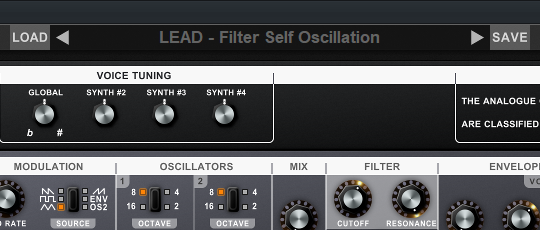
ok, the bug with the Factory Preset "LEAD - Filter Self Oscillation" has just been isolated and corrected.
The Factory Library has been updated accordingly.
-
- KVRAF
- 2169 posts since 7 Dec, 2005
xhunaudio: Pm'd 
-
- KVRian
- Topic Starter
- 1240 posts since 17 Feb, 2010
Hi goldenanalog, I just replied.
Indeed, my apologies to anyone for my missing email Support, yesterday (for about 12 hours). All up and running now.
Indeed, my apologies to anyone for my missing email Support, yesterday (for about 12 hours). All up and running now.