


I hope that UX (User experience) improvements are on high priority
that's the main reason I'm being lazzy and don't use MUX/Mulab vst it as much as I wish and need to.
Easier/Faster/Automatic connection between modules can really improve the UX.
Modular area workflow
-

- KVRist
- 41 posts since 19 Sep, 2021
-

- KVRAF
- 13885 posts since 24 Jun, 2008 from Europe
Please elaborate and let me know which is your single main improvement request wrt connecting modules. Of course also other users may reply on this and lets see which main improvement request wrt connecting modules is the most common one. Then depending on the dev time it would take to implement it (i really have to draw a line somewhere otherwise M9 never gets released) i'll do my best to add at least 1 improvement in M9.0 and will take note for more for M9.x)MightyMouse wrote: Mon Feb 14, 2022 12:35 pm I hope that UX (User experience) improvements are on high priority
that's the main reason I'm being lazzy and don't use MUX/Mulab vst it as much as I wish and need to.
Easier/Faster/Automatic connection between modules can really improve the UX.
-
- KVRist
- 439 posts since 17 Nov, 2020
So here are my thoughts on this:
1. Modular patching will always have some drawbacks, due to power and flexibility, in this case the victim is workflow.
2. The easiest way to improve connections without any development is to increase gui size, as everything gets bigger it becomes easier to connect the pins. I've been doing that for a while but longed for the screenspace, so gui size back to 100%
3. Mux could offer workflow similar to Zebra/MSoundFactory, whilst I've never touched Zebra I have MSF and I'm not a big fan of its workflow, therefore I'll skip this point.
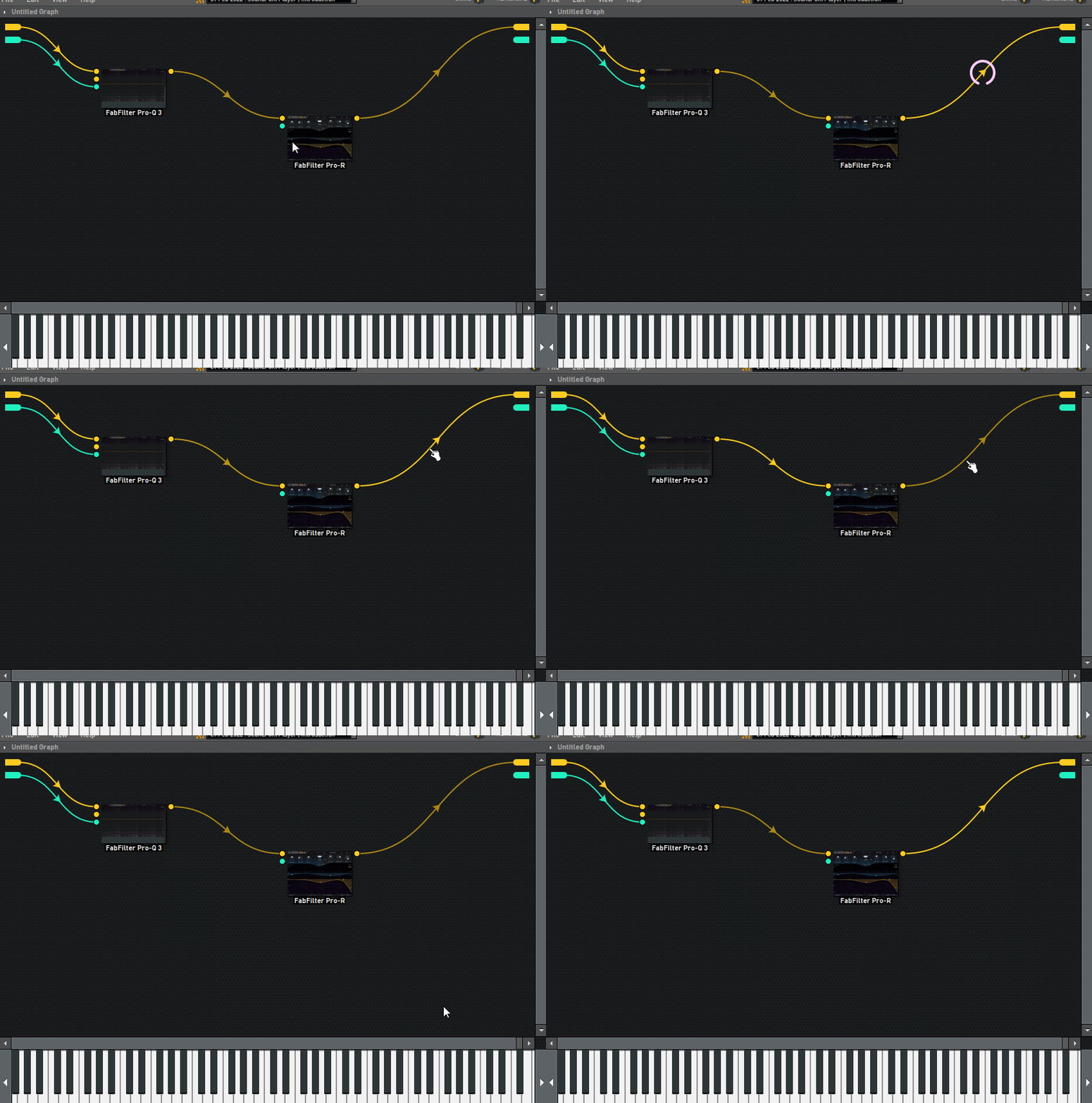
4. Mux could offer workflow similar to BWS Grid/Bespoke/VCVrack in the way that all modular componets have visible parameters and don't need to be clicked before adjustment (see the screen capture for visualisation). It would require additional modular area zoom development. The user could then easily jam modular-style without the need of building a front panel. When the modules are big it'd be easy to target them with connections, I often miss the connection pin
5. Keyboard>mouse in terms of speed: I'm not sure what to write in here, all I can is mention Renoise - in Renoise DAW you can do everything without touching the mouse, ok, I might be wrong on this one but the point is so much can be done with keyboard only and it's lightning fast.
6. Personally, while there definitely is space for improvement, workflow wouldn't be on the top of my wish list
1. Modular patching will always have some drawbacks, due to power and flexibility, in this case the victim is workflow.
2. The easiest way to improve connections without any development is to increase gui size, as everything gets bigger it becomes easier to connect the pins. I've been doing that for a while but longed for the screenspace, so gui size back to 100%
3. Mux could offer workflow similar to Zebra/MSoundFactory, whilst I've never touched Zebra I have MSF and I'm not a big fan of its workflow, therefore I'll skip this point.
4. Mux could offer workflow similar to BWS Grid/Bespoke/VCVrack in the way that all modular componets have visible parameters and don't need to be clicked before adjustment (see the screen capture for visualisation). It would require additional modular area zoom development. The user could then easily jam modular-style without the need of building a front panel. When the modules are big it'd be easy to target them with connections, I often miss the connection pin
5. Keyboard>mouse in terms of speed: I'm not sure what to write in here, all I can is mention Renoise - in Renoise DAW you can do everything without touching the mouse, ok, I might be wrong on this one but the point is so much can be done with keyboard only and it's lightning fast.
6. Personally, while there definitely is space for improvement, workflow wouldn't be on the top of my wish list
You do not have the required permissions to view the files attached to this post.
-
- KVRist
- 439 posts since 17 Nov, 2020
2 more ideas:
1. (Already mentioned) copying and pasting modules with keeping connections
2. Targeting a bunch of modules and then connecting a cable to 1 of them connects them all if possible, say:
1 oscillator, 10 amps, select 10 amps then connect oscillator output to one of the amps, now all the amps get input from that oscillator
1. (Already mentioned) copying and pasting modules with keeping connections
2. Targeting a bunch of modules and then connecting a cable to 1 of them connects them all if possible, say:
1 oscillator, 10 amps, select 10 amps then connect oscillator output to one of the amps, now all the amps get input from that oscillator
-
- KVRAF
- 13885 posts since 24 Jun, 2008 from Europe
Quick tip: Note that, when drawing a connection, you can also drop the connection end on the module box itself (instead of the connector pin), which is a much more easy mouse target.humanboeing wrote: Mon Feb 14, 2022 2:51 pm 2. The easiest way to improve connections without any development is to increase gui size, as everything gets bigger it becomes easier to connect the pins. I've been doing that for a while but longed for the screenspace, so gui size back to 100%
-
- KVRAF
- 13885 posts since 24 Jun, 2008 from Europe
Question: Imagine you have a modular area with embedded module editors. Now what if in the future some used module editor changes layout and size eg. due to new extra features. Then it suddenly gets bigger in the modular area and could start covering other components...humanboeing wrote: Mon Feb 14, 2022 2:51 pm 4. Mux could offer workflow similar to BWS Grid/Bespoke/VCVrack in the way that all modular componets have visible parameters and don't need to be clicked before adjustment (see the screen capture for visualisation).
That's a practical issue. Do you see a practical solution for this?
-
- KVRist
- 439 posts since 17 Nov, 2020
I thought that this view should not be the only choice, the modules could have an expand/hide icon somewhere like windows in Windows
If a problematic module is detected then it could be collapsed by the program, but of course it's easier said than done.
If a problematic module is detected then it could be collapsed by the program, but of course it's easier said than done.
-
- KVRist
- 439 posts since 17 Nov, 2020
Or perhaps it could be written in a way that the modules can't overlap as they can now, and if they do they push themselves for space?
-
- KVRAF
- 13885 posts since 24 Jun, 2008 from Europe
Thanks for sharing your constructive thoughts about this, especialy the collapse-expand option is very interesting for several reasons, i've added notes to the relevant wishlist item 
-
- KVRist
- 141 posts since 18 Apr, 2021
yes that's nice when you can tweak and see stuff without entering the module itself.humanboeing wrote: Mon Feb 14, 2022 2:51 pm
4. Mux could offer workflow similar to BWS Grid/Bespoke/VCVrack in the way that all modular componets have visible parameters and don't need to be clicked before adjustment (see the screen capture for visualisation). It would require additional modular area zoom development. The user could then easily jam modular-style without the need of building a front panel.
I like to build front panel only a worthy preset...don't use it much for new ideas, because it takes some time to build it.
1. Must have!humanboeing wrote: Mon Feb 14, 2022 3:07 pm 2 more ideas:
1. (Already mentioned) copying and pasting modules with keeping connections
2. Targeting a bunch of modules and then connecting a cable to 1 of them connects them all if possible, say:
1 oscillator, 10 amps, select 10 amps then connect oscillator output to one of the amps, now all the amps get input from that oscillator
2. if possible also great idea.
regarding the front panel - I would use it much more if it will give faster workflow, here some ideas:
1. It will be much easier if we could click "Add Component" and then just click on a knob/rack or whatever and it will automatically add it (skip the drop down menu with the big list).
OR
2. add a button "CAPTURE MODE", when this enabled, holding shift/ctrl + click will add the component/knob to the front panel.
OR [Best option IMHO]
3. add option below "Add component": "Add Last Touched Component [name of the last touched component]" <-- last touched component's name will be noted here.
Last edited by HarmonicD on Tue Feb 15, 2022 7:23 am, edited 1 time in total.
-
- KVRist
- 141 posts since 18 Apr, 2021
Another must have workflow feature for faster-automatic connections:
1. Auto connect BETWEEN: Drag and drop a module/vst from the browser on a WIRE between 2 connected modules, to add and connect the module between these modules.
while holding the module over the desired wire, the wire should glow a little bit so the user will know the correct area for dropping the module.
2. Auto connect BEFORE AND AFTER: Drag and drop module over another module: hold SHIFT to connect it AFTER the desired module, hold Alt to connect it BEFORE the desired module
1. Auto connect BETWEEN: Drag and drop a module/vst from the browser on a WIRE between 2 connected modules, to add and connect the module between these modules.
while holding the module over the desired wire, the wire should glow a little bit so the user will know the correct area for dropping the module.
2. Auto connect BEFORE AND AFTER: Drag and drop module over another module: hold SHIFT to connect it AFTER the desired module, hold Alt to connect it BEFORE the desired module
-
- KVRist
- 141 posts since 18 Apr, 2021
Another quicky 
Instead of the current way to edit vol/pan of wires which is:
1. Right click over the wire
2. Click Edit to open the setting window
3. Make changes...
4. Click on X to close
(not so intuitive workflow, I never use it because of this)
Here are two ideas:
1. add a small arrow sign at the middle of the wires, simple left click on it, will show up vol/pan controls, the controls will disappear/close automatically once clicking somewhere else..
example:
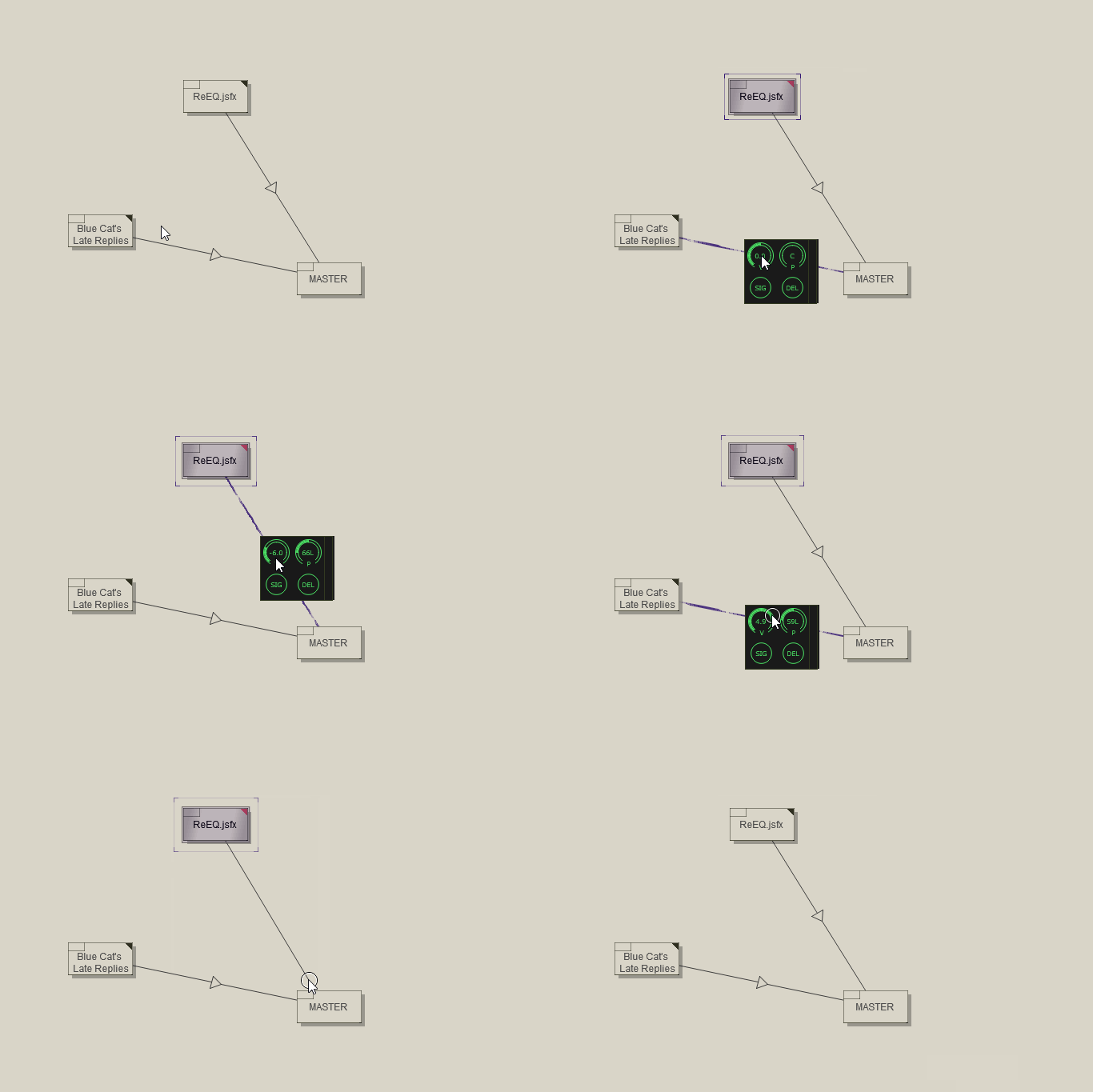
2. add a small arrow sign at the middle of the wires, when moving the mouse over it, vol/pan knobs will show up instead of the arrow for quick changes, moving the mouse from this area will hide the knobs automatically.
***important - notice that once the Vol is high - the wire has strong color and visa versa
I prefer method 2 much more. but both methods are much better than the current one.
Instead of the current way to edit vol/pan of wires which is:
1. Right click over the wire
2. Click Edit to open the setting window
3. Make changes...
4. Click on X to close
(not so intuitive workflow, I never use it because of this)
Here are two ideas:
1. add a small arrow sign at the middle of the wires, simple left click on it, will show up vol/pan controls, the controls will disappear/close automatically once clicking somewhere else..
example:
2. add a small arrow sign at the middle of the wires, when moving the mouse over it, vol/pan knobs will show up instead of the arrow for quick changes, moving the mouse from this area will hide the knobs automatically.
***important - notice that once the Vol is high - the wire has strong color and visa versa
I prefer method 2 much more. but both methods are much better than the current one.
-
- KVRist
- Topic Starter
- 41 posts since 19 Sep, 2021
Thank you so much, I'm glad to see that you take UX seriously, this is so important to me.mutools wrote: Mon Feb 14, 2022 1:16 pmPlease elaborate and let me know which is your single main improvement request wrt connecting modules. Of course also other users may reply on this and lets see which main improvement request wrt connecting modules is the most common one. Then depending on the dev time it would take to implement it (i really have to draw a line somewhere otherwise M9 never gets released) i'll do my best to add at least 1 improvement in M9.0 and will take note for more for M9.x)MightyMouse wrote: Mon Feb 14, 2022 12:35 pm I hope that UX (User experience) improvements are on high priority
that's the main reason I'm being lazzy and don't use MUX/Mulab vst it as much as I wish and need to.
Easier/Faster/Automatic connection between modules can really improve the UX.

The guys have noted even better ideas than I could think off.
I really want all the UI features that the guys mentioned. this can really improve my workflow. I will use it so much more with these features.
BUTTT If I need to choose the most important connecting feature, I guess it would be: automatically connect modules with drag n' drop whether it's from the browser or from the working area (moving/ copying).
this way I won't need to make so much unnecessary clicks when adding modules.
Thank you!
-
- KVRist
- Topic Starter
- 41 posts since 19 Sep, 2021
Exactly what I wish forHarmonicD wrote: Tue Feb 15, 2022 7:13 am Another must have workflow feature for faster-automatic connections:
1. Auto connect BETWEEN: Drag and drop a module/vst from the browser on a WIRE between 2 connected modules, to add and connect the module between these modules.
while holding the module over the desired wire, the wire should glow a little bit so the user will know the correct area for dropping the module.
2. Auto connect BEFORE AND AFTER: Drag and drop module over another module: hold SHIFT to connect it AFTER the desired module, hold Alt to connect it BEFORE the desired module

this can save me hundreds of unnecessary clicks

-
- KVRist
- 113 posts since 23 Mar, 2015
in the recent post " soft u whish still lives" i mention ext and vaz, dont have mulab but i allways think its the one could replace/merge this 2.. (that first pic above is very vaz ) .
one idea , stollen from one fr i did for ext long ago, split view for seq and modular views , and/or possibility of modular to be the base view and the sequencer a module(undocked).
thanks!
) .one idea , stollen from one fr i did for ext long ago, split view for seq and modular views , and/or possibility of modular to be the base view and the sequencer a module(undocked).
thanks!
You do not have the required permissions to view the files attached to this post.