


Okay, I just started playing around with Waveform today. I am playing around with some multi-track backing tracks from a Youtuber. I recorded background harmonies and then a lead vocal over everything. It was all fine, and I was getting great results, then I hit some really weird brick wall.
The backing track(s) have files for bass, drums, rhythm guitar, and keys. Vocals all came out fine, considering I did it all kind of off the cuff just to get my feet wet. But when I went to record a lead guitar track it all went to hell. The guitar and amp sound fine through the headphones, which are connected to the U-Phobia listed below. But when I record anything, two things happen:
1. It sounds like the sound is cutting in and out.
2. Also anything I record now is playing on a delay, meaning it is a a fraction of a second behind the rest of the tracks no matter how precise I am playing.
Nothing I have done gets rid of the problem. Here are all the steps I tried, one-by-one, in no particular order.
-I thought maybe there was some clipping or something, so I lowered the amp a lot and lowered the gain on the U-Phoria.
-Tried a bunch of different mics thinking maybe one of them was at fault (Sennheiser 609e, Shure SM57, Shure SM58, EV N/D757)
-Closed the Edit in Waveform
-While recording, I visually made certain I was getting no indication of clipping on the new track in the software as I went
-Closed Waveform and restarted it
-Closed all background programs in Windows
-Rebooted my computer
-Changed from using the first input on the U-Phoria to the second input.
-Played with all the levels and functions on the U-Phoria
-I even tried to re-record the lead vocal, thinking maybe something was amiss with instrument recording. So I muted the original lead vocal and did it again on another track, but the same problem is happening with any new vocals
-Loaded an earlier save of the same file, hoping I did something wrong during the later edits
-Started all over again, and just tried to add one vocal, the lead, to the backing tracks, which I imported again.
So at this point, I have no idea if the problem is my computer, some setting I messed up somewhere in Waveform, or maybe my U-Phoria interface got messed and failed somewhere between the last good tracks and...well, everything since.
Equipment:
-Behringer U-Phobia UMC304HD (XLR to USB Interface)
-Sennheiser HD280 Pro headphones
-High end XLR cable with Neutrick ends
-HP Gaming laptop (with GeForce 3070 GPU)
-Small practice amp with custom guitar. (So I wasn't expecting top quality recording, this was just experimenting)
Any idea what in the hell is going on here?
Edit: Okay, strange update. I went back and listened to the stuff I recorded today before trying the instrument, and I noticed something. The vocals I thought were good actually were every-so-slightly behind the backing track. I mean, it's so subtle, I didn't notice it right away until listening to it again now. It is NOT as pronounced as anything new I record, however. I don't know numbers, but assigning arbitrary/made-up values, it's like the vocals I did this afternoon are, say 10 ms behind the backing track. Like I said, so subtle it's almost easy to miss. But anything new I record has some serious lag, maybe 50ms. Again, these are made up numbers, as I have no idea how much the lag really is.
I am a gamer, and this reminds me of the input lag I sometimes get if I forget to put my TV in Gaming Mode, and play any fast action games on my PC/PS5/XBox.
Edit 2: Oh, I forgot to mention that everything is fine through the headphones while I am recording or just playing along. It's only the final recording that has these strange aural artifacts.
Weird Recording Track Problem
-
- KVRist
- 142 posts since 9 Apr, 2022
-
- KVRist
- Topic Starter
- 142 posts since 9 Apr, 2022
Okay, I solved part of my problem thanks to a friend of mine who knows the software, and lives Upstate and worked with me on the phone.
Apparently at least some of this is latency, so he suggested I add some time to the "Start Time" of all the instrumental tracks. Experimenting with it, it seems like adding 50 ms to each of the instrumental tracks lined them up with the vocals.
Oh and I am done for the day with this lol. I will work on trying to see what's going on with the new tracks I try to record with a much greater lag and the problem with the sound cutting in and out. I wonder if it has to do with these settings?
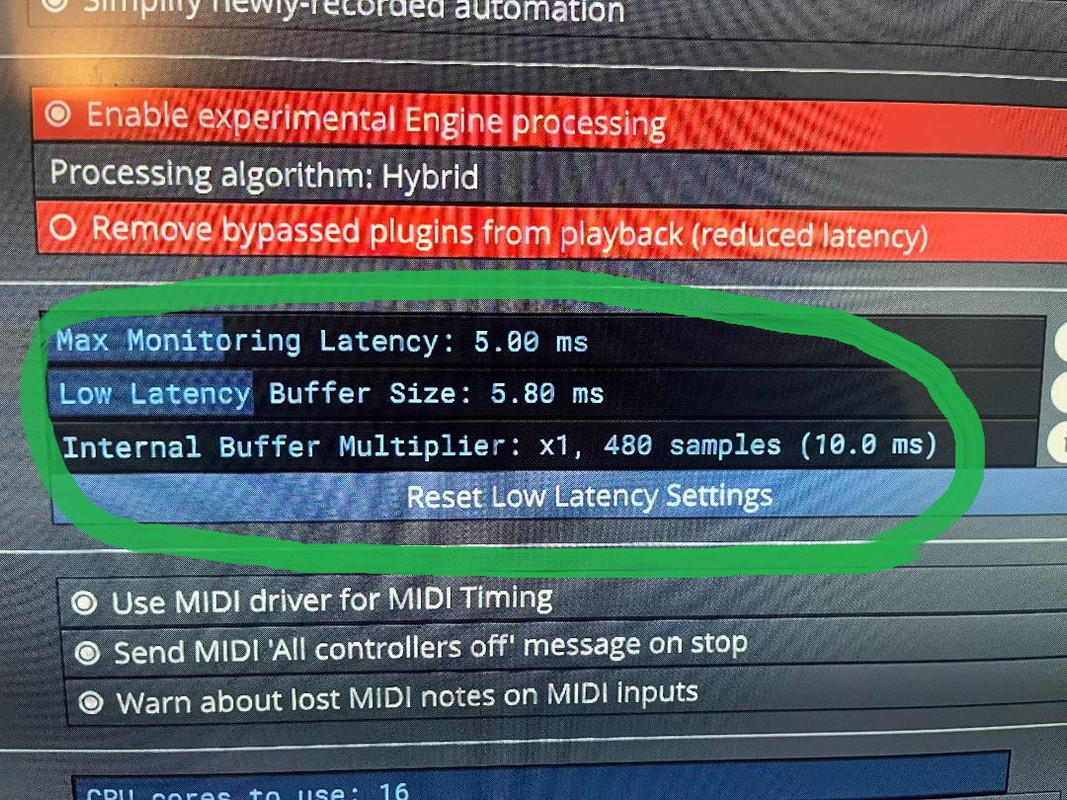
My friend seems to think I can solve my problem by increasing the latency in the settings? But he wasn't sure, so I left it for now. Oh, and those are the default settings for the software on my system, for what it's worth.
Edit: Okay, I may be on to something here. I decided before bed to try an experiment, and see if I can record at least another clear vocal. I haven't revisited recording the lead guitar yet. One step at a time, plus it's after midnight and I don't want to wake the neighbors in my semi-detached house. lol Anyway, I recorded the lead vocal again, muting the previously recorded track. The time was waaay off again for some reason, so I played with the start times. I was able to line the lead vocal with the other harmonies I recorded, as well as the instruments, by moving the start time of the new recording all the way back a full 300 ms. But I was able to line them up perfectly. Good thing there is an intro before vocals come in, so I had some wiggle room. Tomorrow at some point I will try recording lead guitar and see if I can line it up that way, and will cross my fingers and hope I don't get the same cutting in and out problem I was this afternoon.
Apparently at least some of this is latency, so he suggested I add some time to the "Start Time" of all the instrumental tracks. Experimenting with it, it seems like adding 50 ms to each of the instrumental tracks lined them up with the vocals.
Oh and I am done for the day with this lol. I will work on trying to see what's going on with the new tracks I try to record with a much greater lag and the problem with the sound cutting in and out. I wonder if it has to do with these settings?
My friend seems to think I can solve my problem by increasing the latency in the settings? But he wasn't sure, so I left it for now. Oh, and those are the default settings for the software on my system, for what it's worth.
Edit: Okay, I may be on to something here. I decided before bed to try an experiment, and see if I can record at least another clear vocal. I haven't revisited recording the lead guitar yet. One step at a time, plus it's after midnight and I don't want to wake the neighbors in my semi-detached house. lol Anyway, I recorded the lead vocal again, muting the previously recorded track. The time was waaay off again for some reason, so I played with the start times. I was able to line the lead vocal with the other harmonies I recorded, as well as the instruments, by moving the start time of the new recording all the way back a full 300 ms. But I was able to line them up perfectly. Good thing there is an intro before vocals come in, so I had some wiggle room. Tomorrow at some point I will try recording lead guitar and see if I can line it up that way, and will cross my fingers and hope I don't get the same cutting in and out problem I was this afternoon.
-
Peter Widdicombe Peter Widdicombe https://www.kvraudio.com/forum/memberlist.php?mode=viewprofile&u=336849
- KVRian
- 1205 posts since 29 Aug, 2014
Windows or Linux?
What driver are you using for audio (the Behringer)? It may have parameters to adjust or optimize (i.e. buffer sizes). Playing with moving tracks back and forth probably isn't the greatest way to go. ASIO4All tends to be a good driver, and much better than Windows Audio, however you may miss the capability of running a second audio stream from non-Waveform things while Waveform is loaded (i.e. Youtube), as it is "silenced" then while Waveform is running on that audio adapter.
There IS an auto-detect mechanism for audio input that will determine the actual latency and automatically compensate for it, although as you change audio devices and buffer size it may have to be repeated. It assumes you can actually loopback the output to that input, so it sends pulses out and monitors response, and figures out what the compensation needs to be for THAT device and the current buffer settings.
Oh, yeah, and TOO small a buffer size will lead to short dropouts or distortion.
What driver are you using for audio (the Behringer)? It may have parameters to adjust or optimize (i.e. buffer sizes). Playing with moving tracks back and forth probably isn't the greatest way to go. ASIO4All tends to be a good driver, and much better than Windows Audio, however you may miss the capability of running a second audio stream from non-Waveform things while Waveform is loaded (i.e. Youtube), as it is "silenced" then while Waveform is running on that audio adapter.
There IS an auto-detect mechanism for audio input that will determine the actual latency and automatically compensate for it, although as you change audio devices and buffer size it may have to be repeated. It assumes you can actually loopback the output to that input, so it sends pulses out and monitors response, and figures out what the compensation needs to be for THAT device and the current buffer settings.
Oh, yeah, and TOO small a buffer size will lead to short dropouts or distortion.
Waveform 13; Win10 desktop/8 Gig; Win11 Laptop; MPK261; VFX+disfunctional ESQ-1
-
- KVRist
- Topic Starter
- 142 posts since 9 Apr, 2022
Okay so another update. I tried again today, and determined that whatever is going on here has nothing to do with my gear (mics, U-Phoria, PC, guitar, am, etc.). I tried again and just recorded a straight up guitar track in a brand new project, no multi-tracks or anything. When isolated alone, it doesn't necessarily sound like the guitar is cutting in and out, but that there is a slight flange or a really bad chorus effect on the instrument. Which I play clean 99% of the time, so it isn't any effects. Plus I am not using any for these test recordings.
How I determined it isn't anything I am doing wrong, at least outside of Waveform anyway, is I downloaded Audacity. I recorded a track with the guitar through the U-Phoria, and it was perfect. Well, as "perfect" as it's going to sound through a little practice Fender Mustang amp, anyway. Suffice it to say, Audacity reproduced precisely what I was hearing in my headphones, crappy amp-blemishes and all. lol
Waveform does not. I even tried running both programs at the same time and recording my guitar simultaneously on Audacity and Waveform, with the same result. Audacity is perfect, Waveform sounds distorted and "flanged" or "chorused" or something.
____________________
Not sure about the driver. I am on a new gaming laptop, and my understanding is that the U-Phoria unit is plug-and-play, and I just plugged it in and used it right out of the box. I was never asked to manually install or download a driver
Also, to be clear, I tried closing all background apps/programs after a system reboot, justfor experimenting, but that didn't help.
How I determined it isn't anything I am doing wrong, at least outside of Waveform anyway, is I downloaded Audacity. I recorded a track with the guitar through the U-Phoria, and it was perfect. Well, as "perfect" as it's going to sound through a little practice Fender Mustang amp, anyway. Suffice it to say, Audacity reproduced precisely what I was hearing in my headphones, crappy amp-blemishes and all. lol
Waveform does not. I even tried running both programs at the same time and recording my guitar simultaneously on Audacity and Waveform, with the same result. Audacity is perfect, Waveform sounds distorted and "flanged" or "chorused" or something.
____________________
Windows. It is an HP gaming rig, top of the line, with a GeForce 3070, the latest i7, and a fast SSD, so it isn't any system weakness, I'm certain of that.Peter Widdicombe wrote: Sat May 07, 2022 12:46 pm Windows or Linux?
What driver are you using for audio (the Behringer)? It may have parameters to adjust or optimize (i.e. buffer sizes).
Not sure about the driver. I am on a new gaming laptop, and my understanding is that the U-Phoria unit is plug-and-play, and I just plugged it in and used it right out of the box. I was never asked to manually install or download a driver
Yeah lol tell me about it! Certainly not my first choice either.Peter Widdicombe wrote: Sat May 07, 2022 12:46 pm Playing with moving tracks back and forth probably isn't the greatest way to go.
It doesn't sound like this is a tenable solution, since I use a lot of programs, games, and other various sound oriented stuff, and often leave programs open in the background.Peter Widdicombe wrote: Sat May 07, 2022 12:46 pmASIO4All tends to be a good driver, and much better than Windows Audio, however you may miss the capability of running a second audio stream from non-Waveform things while Waveform is loaded (i.e. Youtube), as it is "silenced" then while Waveform is running on that audio adapter.
Also, to be clear, I tried closing all background apps/programs after a system reboot, justfor experimenting, but that didn't help.
Can you clarify what you're saying here, and any steps involved? Because I'm not getting it from reading the paragraph.Peter Widdicombe wrote: Sat May 07, 2022 12:46 pmThere IS an auto-detect mechanism for audio input that will determine the actual latency and automatically compensate for it, although as you change audio devices and buffer size it may have to be repeated. It assumes you can actually loopback the output to that input, so it sends pulses out and monitors response, and figures out what the compensation needs to be for THAT device and the current buffer settings.
I posted a pic above showing my latency settings. Can you be more specific about this?Peter Widdicombe wrote: Sat May 07, 2022 12:46 pm Oh, yeah, and TOO small a buffer size will lead to short dropouts or distortion.
-
Peter Widdicombe Peter Widdicombe https://www.kvraudio.com/forum/memberlist.php?mode=viewprofile&u=336849
- KVRian
- 1205 posts since 29 Aug, 2014
1. If you're hearing a flange effect, you are PROBABLY mixing some in/out signals somewhere (like feedback, but not to that degree), where the little bit of latency from input/raw and reprocessed give you that effect.
2. When recording guitar, do you "rely" on effects or VST in Waveform for distortion or cabinet simulation/overdrive? Or are you using line out from guitar amp, or using microphone in front of the amp? Or raw input where the guitar is straight into the center of the XLR, and the Behringer treated almost as a DI unit?
All have to be treated very differently while recording.
3. If you are NOT relying on, say, guitar rig or Waveform-induced effects, then make sure the "Live input monitoring" is turned off; or the input on that track will be sent to the output along with the rest of the mix; and if using mike will be fed back as input again. This CAN sometimes be remedied on the external mixer that it WON'T send incoming audio over USB back into the USB audio input; not sure about the behringer.
4. Exactly what is the MIX knob doing, and does it impact recording or only headphones?
5. Is it really a 304HD, or possibly a 204HD?
2. When recording guitar, do you "rely" on effects or VST in Waveform for distortion or cabinet simulation/overdrive? Or are you using line out from guitar amp, or using microphone in front of the amp? Or raw input where the guitar is straight into the center of the XLR, and the Behringer treated almost as a DI unit?
All have to be treated very differently while recording.
3. If you are NOT relying on, say, guitar rig or Waveform-induced effects, then make sure the "Live input monitoring" is turned off; or the input on that track will be sent to the output along with the rest of the mix; and if using mike will be fed back as input again. This CAN sometimes be remedied on the external mixer that it WON'T send incoming audio over USB back into the USB audio input; not sure about the behringer.
4. Exactly what is the MIX knob doing, and does it impact recording or only headphones?
5. Is it really a 304HD, or possibly a 204HD?
Waveform 13; Win10 desktop/8 Gig; Win11 Laptop; MPK261; VFX+disfunctional ESQ-1
-
- KVRist
- Topic Starter
- 142 posts since 9 Apr, 2022
That was my first thought as well this morning, when I tried my best to get a clean guitar recording using Waveform. So I closed the program and restarted it, and even began with a fresh Project with no other tracks in it. So starting with a blank slate, I recorded some random guitar noodling just to see what it sounded like by itself, and no other sounds from other tracks. That's when I realized it was not "cutting in and out" like I had thought last night, but was somehow being distorted.Peter Widdicombe wrote: Sat May 07, 2022 4:02 pm 1. If you're hearing a flange effect, you are PROBABLY mixing some in/out signals somewhere (like feedback, but not to that degree), where the little bit of latency from input/raw and reprocessed give you that effect.
See below:
If I were recording an acoustic guitar using an onboard pickup and a guitar cable, and without a mic, I would use a DI. But this is an electric guitar. If you see my equipment above, I was using the Behringer as a strict XLR to USB processor. So no line out from the amp, which would also probably require a DI now that I think about it. Instead I used a Sennheiser 609e to mic the guitar amp, and I swapped it out for a Shure SM57 thinking maybe the 609 was crapping out on me. The XLR from the mic was obviously plugged into the U-Phoria. So that should work well, and it certainly did for my vocals, for which I used an SM-58.Peter Widdicombe wrote: Sat May 07, 2022 4:02 pm 2. When recording guitar, do you "rely" on effects or VST in Waveform for distortion or cabinet simulation/overdrive? Or are you using line out from guitar amp, or using microphone in front of the amp? Or raw input where the guitar is straight into the center of the XLR, and the Behringer treated almost as a DI unit?
All have to be treated very differently while recording.
No effects on the guitar at all. As I said, yesterday was supposed to be all about getting my feet wet, so all I did was record some multi-track vocals and a single lead guitar track. The vocals sound fine, by the way, at least to my ear. Things only started to un-spool when I recorded the lead guitar track. But again, keeping it simple as possible, I used ZERO effects, well other than a little onboard reverb on the Fender amplifier. I kept the sound 100% clean, no distortion, delay, overdrive, compression or anything.Peter Widdicombe wrote: Sat May 07, 2022 4:02 pm3. If you are NOT relying on, say, guitar rig or Waveform-induced effects, then make sure the "Live input monitoring" is turned off; or the input on that track will be sent to the output along with the rest of the mix; and if using mike will be fed back as input again. This CAN sometimes be remedied on the external mixer that it WON'T send incoming audio over USB back into the USB audio input; not sure about the behringer.
Oh, I will say that I applied a light reverb to all the vocal tracks, and on a side note, I actually like the reverb in the Tracktion/Waveform software. Very sweet for the vocals, though I did have to really dial down the "Wet" signal knob to like -4.25 to -4.55db so the reverb wasn't too overbearing.
Oh and NO REVERB on the guitar channel at all, obviously, since the light reverb was already present from my amp.
One more thing: It was a little convoluted to find, but I did manage to hunt down "Live Input Monitoring" in the Audio Devices tab in the Settings page. I made sure that "Live Input Monitoring" was un-checked, and it was.
Sorry that was a typo, I meant to type 204HD.Peter Widdicombe wrote: Sat May 07, 2022 4:02 pm 4. Exactly what is the MIX knob doing, and does it impact recording or only headphones?
5. Is it really a 304HD, or possibly a 204HD?
I am not entirely sure what the mix knob does, but it seems to dial up and down whatever the computer is sending out to it, and mix it with what I am sending in with whatever mic I am using at the time.
Oh and just to reiterate, because this is important, recording my guitar using Audigy works fine. To be clear, I am not expecting aural gold from my little practice amp, but I do expect that what I am hearing in my headphones while playing should be what is recorded onto the track in Waveform. Also, to say it again, I downloaded Audigy a few hours after all these problems, just to see if it could record my guitar + amp mic'd with my Sennheiser, and Audigy performed admirably. The recording of the guitar is perfect, at least insofar as what a portable practice amp is capable of generating as a signal.
In other words, using Audigy, what I heard in my headphones was precisely what ended up on the track. To further test this, I actually set up both Audigy and Waveform and recorded my guitar playing on a single track at the exact same time. When I listened to the two recordings, which were done side-by-side, Audigy was still perfect and the Waveform recorded what sounds like garbage.
Finally, until I get this problem solved, I am going to try a temporary solution, like I am doing by editing the "starting time" of recorded tracks. At least until I figure out how to fix things. I am going to try rendering what I have in Waveform, without the lead guitar, and then I will load those rendered files into Audigy and record my lead guitar that way. It sucks as a solution, but like staggering the track starting time, it will hopefully at least get me up and running until I can fix whatever the hell is going on with Waveform.
-
Peter Widdicombe Peter Widdicombe https://www.kvraudio.com/forum/memberlist.php?mode=viewprofile&u=336849
- KVRian
- 1205 posts since 29 Aug, 2014
Laptop - you are SURE you are recording from the Behringer and not the built-in audio from the laptop's microphone? All recording levels are "moderate" and not overloaded or just at a bottom threshold? Distortion is normally a sign of overload (watch any metering!) or processor not keeping up with the audio stream (although that is not likely with a high-spec machine).
You get this on a single track as well, with no other tracks being processed? Do you see the waveform output meters "idle" in that situation; or possibly just bouncing with the Waveform metronome? No sidechain, added send effects, etc? No pre-assignment on the audio track that might be doing a key transposition?
Microphone is on a stand and not just sitting on a table getting any feedback?
Oh, and as a test, the Behringer MAY support 1/4" guitar being plugged in if you select "instrument" - it will be "raw", so no amp or mike on the path. In that case you use headphones out of the mixer, or have to enable the "live monitoring" to hear it...
(clutching at straws here...)
You get this on a single track as well, with no other tracks being processed? Do you see the waveform output meters "idle" in that situation; or possibly just bouncing with the Waveform metronome? No sidechain, added send effects, etc? No pre-assignment on the audio track that might be doing a key transposition?
Microphone is on a stand and not just sitting on a table getting any feedback?
Oh, and as a test, the Behringer MAY support 1/4" guitar being plugged in if you select "instrument" - it will be "raw", so no amp or mike on the path. In that case you use headphones out of the mixer, or have to enable the "live monitoring" to hear it...
(clutching at straws here...)
Waveform 13; Win10 desktop/8 Gig; Win11 Laptop; MPK261; VFX+disfunctional ESQ-1
-
- KVRist
- Topic Starter
- 142 posts since 9 Apr, 2022
lol Tell me about it. I'm doing the same here.
All your suggestions are valid, but the one thing that I keep circling back to is that Audigy is working just fine for the guitar. I am trying an experiment now to see if this will work, as I said above. I just rendered the audio file without led guitar. I exported it, then imported the rendered file into Audigy. I created a second track in Audigy, and I am going to just record some throwaway lead to see if I can get this to at least work. When I am done, I will either upload the file here, so you folks can give me some advice, or if the file is too large, I can upload it to my Youtube channel as audio only and make it a private/hidden link to power here.
I would just categorically abandon Waveform at this point, but I am REALLY growing to like the workflow a lot, other than a few niggles that make me want to strangle the developer(s), but that's another day!

Suffice it to say, if I wasn't really starting to like certain things about Waveform, I would have moved onto another DAW right now. Problem is, as much as I like Audigy for what it is, Tracktion/Waveform is really nice. So I am going to jump through hoops for now, until I can figure out why, 1) I can't get the time of the tracks I record to line up with the tracks I imported; and 2) why Waveform seems to HATE recording my guitar, but Audigy is fine with it. I will say that as much as I really like Waveform's workflow and functionality, I will run out of patience at some point, because while these hoops I am jumping through to sync up all the times and use a separate program to record my guitar will become untenable soon.
I am going to take a few minutes to record some throwaway lead track into Audigy now that I exported the .wav file from Traction/Waveform.
Edit: Oh, and when I play in my band, I usually do the sound, since it's my PA system, and I am micing my little practice amp the same way I do on stage. No table-top stand, as that is subject to vibration and artifacts, as you rightly said.
-
- KVRist
- Topic Starter
- 142 posts since 9 Apr, 2022
OMG lol hoops, nothing but hoops for me to jump through. First off, can I just whinge a little and say on the record that this is essentially an audio forum. LMAO how can I not upload an audio file? Okay, rant over. Not really. I figured better to just upload to Youtube, with all the internet security and hackers, maybe I shouldn't be asking people to download files anyway. BUT Youtube kept rejecting the audio file. So I imported the finished song to Sony Vegas, and had to try it FIVE times before it would output an acceptable video for Youtube, because I was trying to render audio only into a video. Mind you, this is after having to import vocals and the backing track from Tracktion/Waveform into Audigy so I could then have a clear guitar track; rendered that, and...well you know the rest. 
Okay this was really a throwaway guitar track, AND the vocals were decent, but I recorded all the harmonies in one or two easy takes. Fun fact: it took ten minutes to record the guitar into Audigy and process the video and well over TWO HOURS in total to finish up the Waveform part of the project, export to Audigy, export as a .Wav, then import THAT into Sony Vegas to make a fake freaking movie, before getting like 45 minutes of grief from youtube.
My sincere apologies about all my ranting in this post, particularly at the forum, but this has really been an insane day with this stupid audio test track that was just supposed to be to get my feet wet, not pull all my teeth out without novocaine!
Anyway, here is what I ended up with. I left all the mistakes and clams, as I am really done with this for the day.
Jack Straw - Grateful Dead Cover
Okay this was really a throwaway guitar track, AND the vocals were decent, but I recorded all the harmonies in one or two easy takes. Fun fact: it took ten minutes to record the guitar into Audigy and process the video and well over TWO HOURS in total to finish up the Waveform part of the project, export to Audigy, export as a .Wav, then import THAT into Sony Vegas to make a fake freaking movie, before getting like 45 minutes of grief from youtube.
My sincere apologies about all my ranting in this post, particularly at the forum, but this has really been an insane day with this stupid audio test track that was just supposed to be to get my feet wet, not pull all my teeth out without novocaine!
Anyway, here is what I ended up with. I left all the mistakes and clams, as I am really done with this for the day.
Jack Straw - Grateful Dead Cover
-
Peter Widdicombe Peter Widdicombe https://www.kvraudio.com/forum/memberlist.php?mode=viewprofile&u=336849
- KVRian
- 1205 posts since 29 Aug, 2014
Not sure what I was missing there - I didn't notice any phasing or odd sounds in the mix version there. Phasing might be easier to pick out if it was a "solo" track, and not confused with everything else. Bass in the mix was a little high.
On another note - I DO happen to have an ancient borrowed Behringer Xenyx 302USB, and did a quick experiment with that. Set up a simple drum loop with MT PowerDrumKit, and connected a guitar to the (ONLY) 1/4" TRS in that unit, and USB's into a much lesser spec desktop. Now admittedly, I *do* have ASIO4ALL installed and was using it.
Firstly on the ASIO control panel - under audio settings selecting ASIO, PC audio card was the output device, and the USB Audio input was the input device. On the AUDIO track I recorded, input was the "audio input 1+2". Live Input monitoring selected, so I could hear the guitar along with the drum track. Recorded a short solo along with the drum track; all nicely in sync when playing back.
THEN I switched to Windows Audio instead of ASIO, and set up the same input and output devices. Didn't even record it. When monitoring the guitar, there was an extremely annoying (what felt like 1/2 second or so, but probably less) delay in just playing live that way. Set to "Windows low latency" and Windows exclusive" modes which were better but still annoying.
Get Asio4All, for the recording latency issue...? Doing this exercise might also let you see whether you still have the phasing issue.
PS - guitar raw input was treated as "line" on this little mixer, so was kind of dead due to impedance mismatch ? I normally record from aux bus on the mixer through a Behringer UCA222 simple stereo-USB audio input, and guitar goes into the mixer with a Digitech pedal.
On another note - I DO happen to have an ancient borrowed Behringer Xenyx 302USB, and did a quick experiment with that. Set up a simple drum loop with MT PowerDrumKit, and connected a guitar to the (ONLY) 1/4" TRS in that unit, and USB's into a much lesser spec desktop. Now admittedly, I *do* have ASIO4ALL installed and was using it.
Firstly on the ASIO control panel - under audio settings selecting ASIO, PC audio card was the output device, and the USB Audio input was the input device. On the AUDIO track I recorded, input was the "audio input 1+2". Live Input monitoring selected, so I could hear the guitar along with the drum track. Recorded a short solo along with the drum track; all nicely in sync when playing back.
THEN I switched to Windows Audio instead of ASIO, and set up the same input and output devices. Didn't even record it. When monitoring the guitar, there was an extremely annoying (what felt like 1/2 second or so, but probably less) delay in just playing live that way. Set to "Windows low latency" and Windows exclusive" modes which were better but still annoying.
Get Asio4All, for the recording latency issue...? Doing this exercise might also let you see whether you still have the phasing issue.
PS - guitar raw input was treated as "line" on this little mixer, so was kind of dead due to impedance mismatch ? I normally record from aux bus on the mixer through a Behringer UCA222 simple stereo-USB audio input, and guitar goes into the mixer with a Digitech pedal.
Waveform 13; Win10 desktop/8 Gig; Win11 Laptop; MPK261; VFX+disfunctional ESQ-1
-
- KVRist
- Topic Starter
- 142 posts since 9 Apr, 2022
No, that was the point, the guitar track was fine in that recording. I meant what I said about jumping through hoops all day today to get my very first multi-track recording I have ever done in my life on my own. As I said above, I didn't use Waveform to record the guitar. I used Audigy for the lead guitar on that recording you listened to. The backing track was from a guy on Youtube helping me. The tracks were bass, drums, keys, and basic rhythm guitar. I recorded all the vocals myself using Waveform, mixed them with the backing track files, and then I exported that as a single Wave file to Audigy. I didn't use Waveform for the lead guitar. I used Audigy to record it after exporting everything else from Waveform.Peter Widdicombe wrote: Sun May 08, 2022 3:33 am Not sure what I was missing there - I didn't notice any phasing or odd sounds in the mix version there. Phasing might be easier to pick out if it was a "solo" track, and not confused with everything else. Bass in the mix was a little high.
You see what I was saying now? I couldn't record the guitar with Waveform, because of all the distortion. I had to use Audigy once I exported everything else from Waveform.
Okay, I didn't even know Behringer made a 302.Peter Widdicombe wrote: Sun May 08, 2022 3:33 am On another note - I DO happen to have an ancient borrowed Behringer Xenyx 302USB, and did a quick experiment with that. Set up a simple drum loop with MT PowerDrumKit, and connected a guitar to the (ONLY) 1/4" TRS in that unit, and USB's into a much lesser spec desktop. Now admittedly, I *do* have ASIO4ALL installed and was using it.
I guess I could give this a shot.Peter Widdicombe wrote: Sun May 08, 2022 3:33 am Firstly on the ASIO control panel - under audio settings selecting ASIO, PC audio card was the output device, and the USB Audio input was the input device. On the AUDIO track I recorded, input was the "audio input 1+2". Live Input monitoring selected, so I could hear the guitar along with the drum track. Recorded a short solo along with the drum track; all nicely in sync when playing back.
THEN I switched to Windows Audio instead of ASIO, and set up the same input and output devices. Didn't even record it. When monitoring the guitar, there was an extremely annoying (what felt like 1/2 second or so, but probably less) delay in just playing live that way. Set to "Windows low latency" and Windows exclusive" modes which were better but still annoying.
Get Asio4All, for the recording latency issue...? Doing this exercise might also let you see whether you still have the phasing issue.
I am happy with the way the guitar sounded when I recorded it with Audigy. Honestly, though, this is all right for now, but is an untenable solution moving forward. If I can't figure out relatively quickly why I am unable to record a guitar track with such a high end DAW like Waveform, without bouncing files back and forth between different programs, I will need to find another DAW and abandon Tracktion/Waveform. I'm sure there is a solution, though, and I would be willing to bet it's some weird crap in the settings of Waveform that I accidentaly F'd up or something.Peter Widdicombe wrote: Sun May 08, 2022 3:33 am PS - guitar raw input was treated as "line" on this little mixer, so was kind of dead due to impedance mismatch ? I normally record from aux bus on the mixer through a Behringer UCA222 simple stereo-USB audio input, and guitar goes into the mixer with a Digitech pedal.
I find it inconceivable that Audigy, a much simpler and far less sophisticated program than Waveform was able to achieve exactly what I expected recording my guitar, which as I said, was simply reproducing exactly what I am hearing in the headphones while playing, while Waveform cannot.
-
Peter Widdicombe Peter Widdicombe https://www.kvraudio.com/forum/memberlist.php?mode=viewprofile&u=336849
- KVRian
- 1205 posts since 29 Aug, 2014
Well, set up like I had in the description above. Feed guitar into the 204 through the center pin on the inputs, and on the track in Waveform set up monitoring enabled. You should then be able to set levels and hear the guitar (raw...) through PC output. What you hear there SHOULD be what you get on output after you record - so at least isolating it to an input or playback issue.
There MAY potentially be issues with input and output sampling rates ?? ASIO4All will normally not let you mix rates on input/output devices. Internally, though, don't know if there may be issues with whatever rate the 204 had been set to and what waveform uses internally. I have set (and I believe this is now default) 48 khz, while other common settings might be 44.1 khz (the old CD rate).
There MAY potentially be issues with input and output sampling rates ?? ASIO4All will normally not let you mix rates on input/output devices. Internally, though, don't know if there may be issues with whatever rate the 204 had been set to and what waveform uses internally. I have set (and I believe this is now default) 48 khz, while other common settings might be 44.1 khz (the old CD rate).
Waveform 13; Win10 desktop/8 Gig; Win11 Laptop; MPK261; VFX+disfunctional ESQ-1
-
- KVRist
- Topic Starter
- 142 posts since 9 Apr, 2022
First off, THANK YOU for all the time you're taking. It is much appreciated.Peter Widdicombe wrote: Sun May 08, 2022 12:38 pm Well, set up like I had in the description above. Feed guitar into the 204 through the center pin on the inputs, and on the track in Waveform set up monitoring enabled. You should then be able to set levels and hear the guitar (raw...) through PC output. What you hear there SHOULD be what you get on output after you record - so at least isolating it to an input or playback issue.
To your suggestion, I tried it, and unsurprisingly it works exactly like you said it would. Just as unsurprising to you I'm sure, at least if you're a serious guitarist, is that this is an untenable solution for me. Sure, it sounds "clear" if that's where you want to set the bar, but it also sounds absolutely horrible as a "guitar sound". Now, of course, this all comes with the caveat that since I started experimenting with Waveform, I have been using a little practice amp to record, lol mostly because I haven't summoned the will yet to drag my HUGE Fender Twin with the two JBL E120's I installed in them a few years back, up from my basement.
But that's only because I am just experimenting right now and trying to learn the software. Hence the half-hearted first-recording I did, where I spend a tiny fraction of the time recording my vocals and guitar as I did fiddling with Waveform. Don't get me wrong, the little practice Fender Mustang I am using sounds really good for what it is, but really crap compared to the real Twin, which brings me to the next reason why plugging my guitar cable straight into the Stereo Jack in the Behrginger is a non-starter. Amp modeling has come a loooong way since Line 6 released that first kidney bean shaped Pod back in the late nineties, but it's not there yet. No plug-in or amp model or signal processing I have ever heard has made me even consider abandoning a real amplifier, not live nor for recording.
I'm afraid that at least for the time being, there is only one way I am willing to record my electric guitar, which is with a microphone pointed directly at the speaker(s) in my amplifier, because the sound coming out of the amp is what I want to record, not the sound coming straight out of the guitar. Again, for experimentation purposes, your solution worked fine. Just as my use of an 8 pound practice amp worked fine for now, until I am ready to get serious about recording, and after I know my way around whatever DAW I end up using.
But in the long term, I am sure I will figure out how to mic my amp and send that signal into Waveform with some setting in the program I am missing now. But if not, and my only other solution is a direct box or just plugging a guitar jack straight into the Behringer, I will just have to move on and find another DAW. I hope it doesn't come to that, as I really like so much about Waveform, but I know that what I want absolutely can be done.
I already got what I wanted using Audigy to record my guitar. Unfortunately, Audigy doesn't have all the functions I want, but it at least proves that it can be done. I can record my guitar the way I want to. Now I just have to find out how to get what I want from Waveform or find another DAW that at least allows me to do what Audigy does with my guitar.
-
- KVRist
- Topic Starter
- 142 posts since 9 Apr, 2022
By the way, LMAO in the last few posts, I kept saying "Audigy" when I meant Audacity. No Earthly idea why my brain keeps wanting to say Audigy. 
-
Peter Widdicombe Peter Widdicombe https://www.kvraudio.com/forum/memberlist.php?mode=viewprofile&u=336849
- KVRian
- 1205 posts since 29 Aug, 2014
Well, that test was primarily to see if there was something else "amuck" in the signal chain.
In THEORY you can now keep all of those settings except for the "enable live monitoring" (unless you use headphones), and feed the guitar into the practice amp and use microphone. Just make sure there is no sound other than the little amp in the room (you can have headphones on...) or you implicitly have a feedback loop back to the mike - even if it's not howling feedback, it's enough to cause noise artifacts (which you don't get using DI all the way). Sort of like when recording voice - you really have to have headphones on to avoid cross-contamination of audio in the room.
In THEORY you can now keep all of those settings except for the "enable live monitoring" (unless you use headphones), and feed the guitar into the practice amp and use microphone. Just make sure there is no sound other than the little amp in the room (you can have headphones on...) or you implicitly have a feedback loop back to the mike - even if it's not howling feedback, it's enough to cause noise artifacts (which you don't get using DI all the way). Sort of like when recording voice - you really have to have headphones on to avoid cross-contamination of audio in the room.
Waveform 13; Win10 desktop/8 Gig; Win11 Laptop; MPK261; VFX+disfunctional ESQ-1