


Mac 10.8
Cubase 5.5.3
Melda v11 VST3
I cannot figure out how to use this as a side chain. I've watched / tried endless videos / tutorials. I even struggled through the Quadro set up. Nothing works. Any suggestions?
UPDATE- SOLVED! Thank God!
At my wit's end, looking through version release notes on the Melda website, I came across the statement (PARAPHRASING) " newer versions may run on older operating systems, just try it". I thought, what do I have to lose, so I downloaded / installed v12, AND IT WORKED! So, thank you Chandlerhimself and wexdan for taking the time to try to help me figure this out.
SOLVED! MSpectralDynamics Side Chain SOLVED!
-
- KVRer
- 4 posts since 3 Apr, 2022
Last edited by davernoise on Sun Jul 03, 2022 7:57 pm, edited 1 time in total.
-
Chandlerhimself Chandlerhimself https://www.kvraudio.com/forum/memberlist.php?mode=viewprofile&u=318799
- KVRAF
- 1821 posts since 19 Dec, 2013 from Japan
I don't know for sure, but it is most likey a VST3 problem. I find sidechaining with VST3 plugins often causes problems and you need to go through extra steps.
My Youtube page https://www.youtube.com/user/GuitarChandler
-
- KVRer
- Topic Starter
- 4 posts since 3 Apr, 2022
Why would Melda advertise these as working with VST and VST3 if they don't? That being said, I was told VST is the issue with side chaining, not VST3? Either way, if there are some extra steps, what are they? I tried the Quadro configuration (link below) but that didn't work either.
-
- KVRer
- 18 posts since 7 Jun, 2019
Hi,
I'm not sure what you are trying to achieve, but getting MSpectralDynamics VST3 to respond to a sidechain input works fine in Nuendo 12 (which I assume is the same as Cubase).
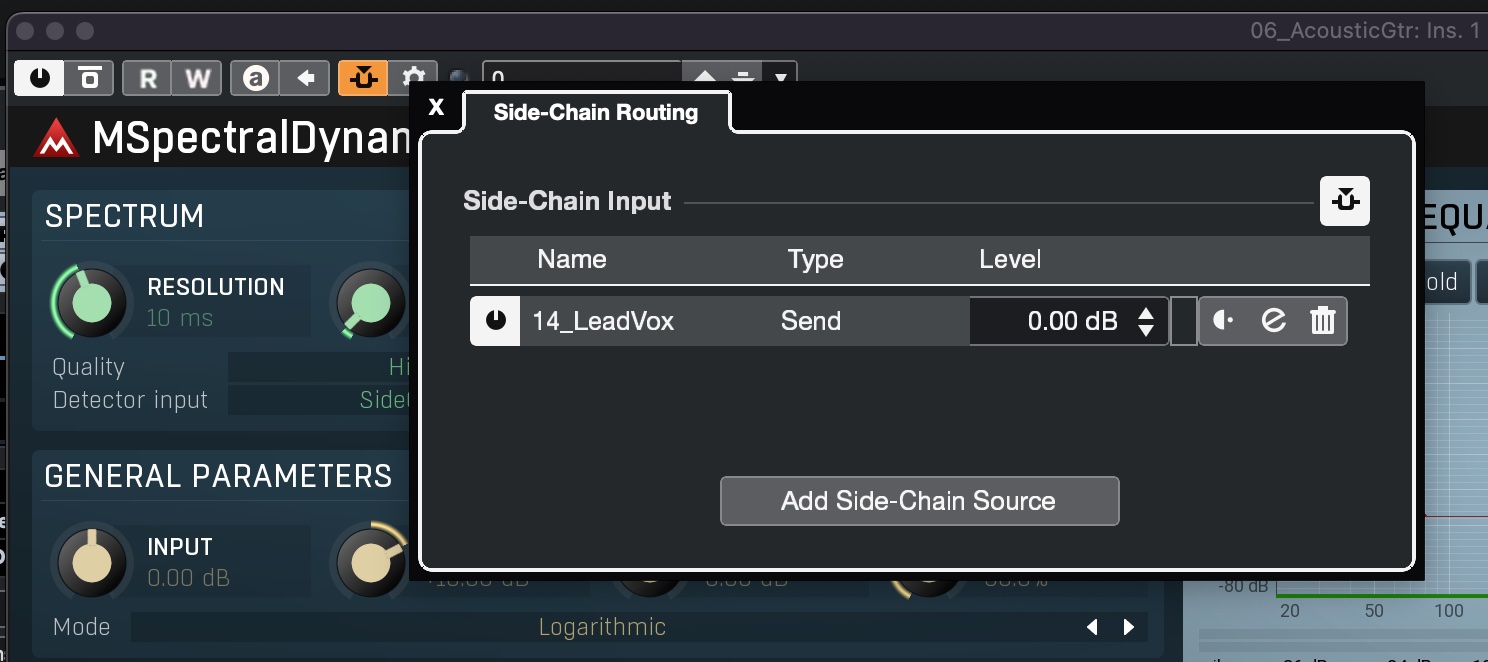
Turn on and configure the sidechain input in the MSD plugin window in Nuendo:
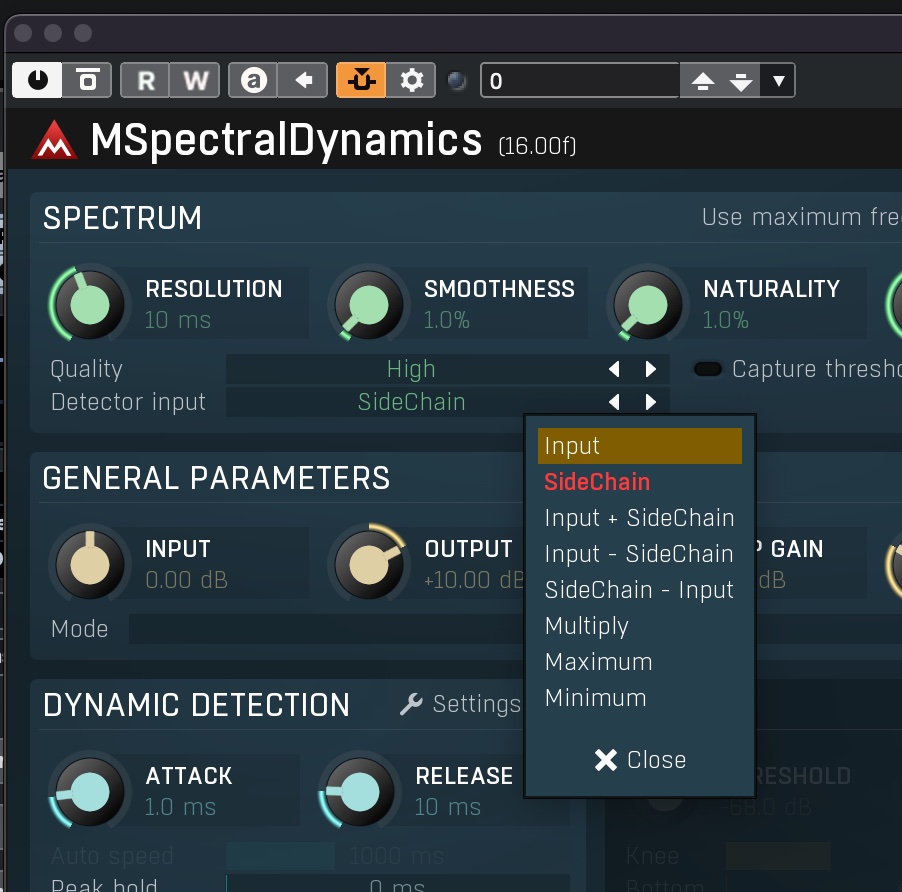
Set the detector to respond to the sidechain:
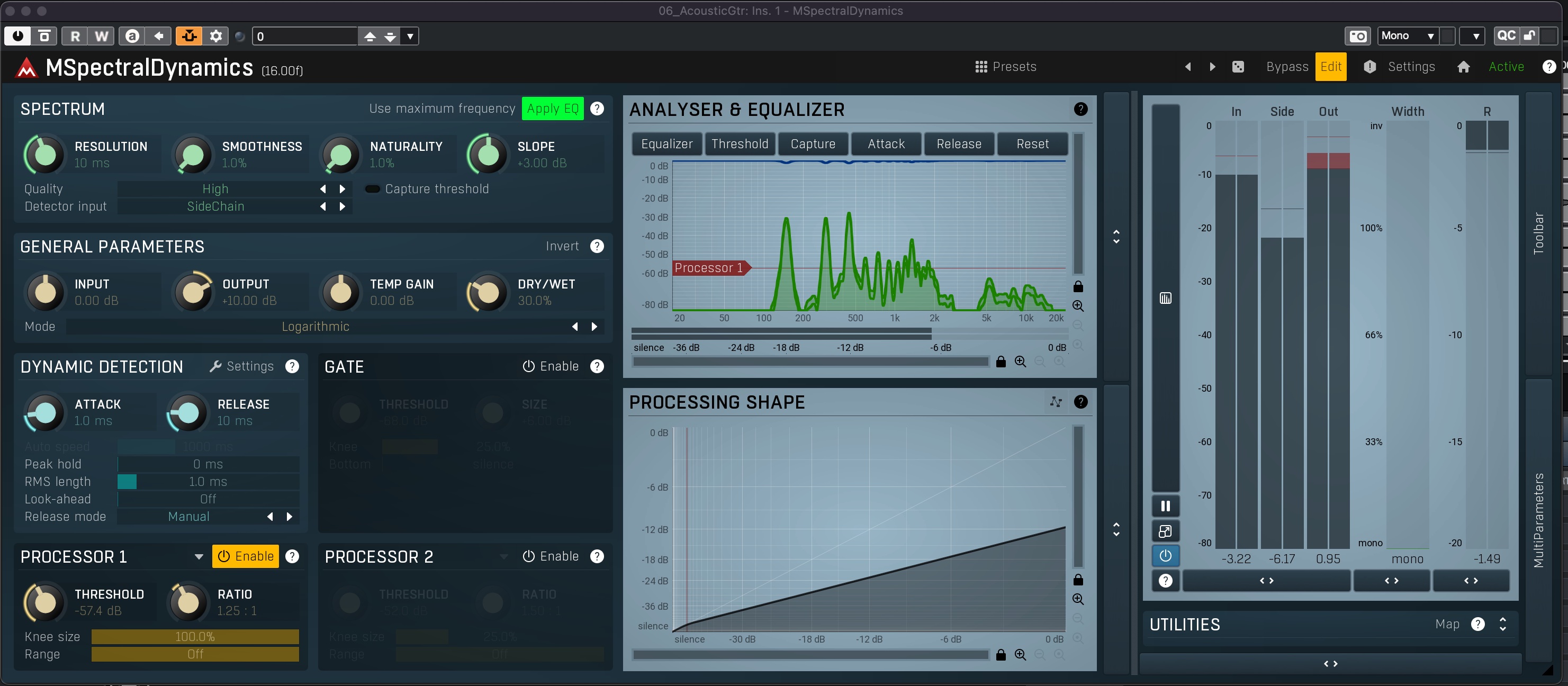
And that does it:
If that doesn't work, perhaps you might need to update things: Melda is now up to V15 - or 16 in beta (updates are free, so no need to stick to v11). And Cubase is v12.
Melda recommends VST3 in Cubase.
I'm not sure what you are trying to achieve, but getting MSpectralDynamics VST3 to respond to a sidechain input works fine in Nuendo 12 (which I assume is the same as Cubase).
Turn on and configure the sidechain input in the MSD plugin window in Nuendo:
Set the detector to respond to the sidechain:
And that does it:
If that doesn't work, perhaps you might need to update things: Melda is now up to V15 - or 16 in beta (updates are free, so no need to stick to v11). And Cubase is v12.
Melda recommends VST3 in Cubase.
-
- KVRer
- Topic Starter
- 4 posts since 3 Apr, 2022
Thanks,
I am trying to achieve what Melda told me I could achieve.
My original post specifically stated:
Mac 10.8
Cubase 5.5.3
Melda v11 VST3
I contacted Melda before purchasing asking them if these worked on my system. They said yes. V10 and v11(VST3) do not have the dropdown menu when you click on the side chain routing tab.
And what of Chandler's reply:
"I don't know for sure, but it is most likely a VST3 problem. I find sidechaining with VST3 plugins often causes problems and you need to go through extra steps".
Pardon my growing frustration but, does anyone know what these top secret extra steps are?
While updates are free in Melda, updating my entire system is out of my range currently, thus, my clearly stating:
Mac 10.8
Cubase 5.5.3
Melda v11 VST3
I am trying to achieve what Melda told me I could achieve.
My original post specifically stated:
Mac 10.8
Cubase 5.5.3
Melda v11 VST3
I contacted Melda before purchasing asking them if these worked on my system. They said yes. V10 and v11(VST3) do not have the dropdown menu when you click on the side chain routing tab.
And what of Chandler's reply:
"I don't know for sure, but it is most likely a VST3 problem. I find sidechaining with VST3 plugins often causes problems and you need to go through extra steps".
Pardon my growing frustration but, does anyone know what these top secret extra steps are?
While updates are free in Melda, updating my entire system is out of my range currently, thus, my clearly stating:
Mac 10.8
Cubase 5.5.3
Melda v11 VST3
-
- KVRer
- 18 posts since 7 Jun, 2019
Sorry to hear it isn't working for you.
Sounds like it is the old Cubase version that makes it complicated (it is Cubase that provides the sidechain routing tab, not MSD) - as I say, it all works fine here - no extra steps required.
I'm afraid I don't have any knowledge of Cubase version 5...
Good luck - I hope you manage to get it sorted.
Sounds like it is the old Cubase version that makes it complicated (it is Cubase that provides the sidechain routing tab, not MSD) - as I say, it all works fine here - no extra steps required.
I'm afraid I don't have any knowledge of Cubase version 5...
Good luck - I hope you manage to get it sorted.
-
- KVRer
- Topic Starter
- 4 posts since 3 Apr, 2022
UPDATE- SOLVED! Thank God!
At my wit's end, looking through version release notes on the Melda website, I came across the statement (PARAPHRASING), "newer versions may run on older operating systems, just try it". I thought, what do I have to lose, so I downloaded / installed v12, AND IT WORKED! So, thank you Chandlerhimself and wexdan for taking the time to try to help me figure this out.
At my wit's end, looking through version release notes on the Melda website, I came across the statement (PARAPHRASING), "newer versions may run on older operating systems, just try it". I thought, what do I have to lose, so I downloaded / installed v12, AND IT WORKED! So, thank you Chandlerhimself and wexdan for taking the time to try to help me figure this out.