
Best workflow for creating MSF instruments?

Official support for: meldaproduction.com
Post Reply New Topic
RELATED
PRODUCTS

Post

I got MSF and I'm wondering what is the best workflow for creating an instrument or a device with a custom GUI that I can then distribute for users of the free MSF player.

Can I just create regular presets and then bundle them somehow and add the GUI at the end?

Do I need to start by creating the device, the GUI, and then add presets?

As you can see I'm a bit confused :)

Edit:

Also, can the free MSF player use regular presets without a custom GUI? Is it mandatory to create an instrument?

Post

You should get some experience in creating MSF instruments and presets, and then think about creating a template that fits your style, and use that as a starting point.

As to your last question, don't equate custom GUI with "instrument". You need to create an instrument to distribute - the GUI is an optional enhancement.

Post

Thanks. Any resources you could recommend?

Post

They have a bunch of very good videos on YouTube. Here’s one specifically about creating instruments:


Post

Like it was said , you should first start to create some preset to understand how MSF works or get some inspiration. Then once you have an idea of what kind of things you like to create with MSF you can start to think about a template architecture that will be the "device".

The workflow that i use for creating devices is:

1. Think about a concept: what kind of sonority you want to achieve, what is the purpose, what kind of music, in which situation etc.

2. Think about the general: sampled? synthetized? wavetable ? additive? modulation? effects? what can he do? how will he do. You should think in advance about what you want precisely, otherwise you'll lose a lot of time later.

3. Design the instrument: Now that you have more precise answers,you'll have to decide concretely how to design the architecture of the synth. You'll have to ask yourself "which and how". which: order/ module/ effect/etc and how everything will work)

4. Start to build: Now that you have your design, build it into MSF, and I really recommend you to test EACH command and module at EACH step, it will help you confirm if it's really what you want and if the command works well. Having to correct an already set instrument architecture is a loooooot of labors works, so make sure to correct everything little by little. Also you can already start to test your instrument in situation, sometimes everything works well technically, but the result is not necessarily what you wanted.

5.Build the GUI: The GUI should be the very last thing that you do since he's linked to the instrument architecture. So make sure to validate everything and that you don't want to change nothing in the architecture.

6. Test your instruments even more: once that everything is done take the time to play with it, with the GUI it's easier to use the instrument and see if you've reached your goal. Sometime you'll realize that some commands are finally not necessary or in contrary you'll think that you should add some others, so test it out.

7. Build some presets: Now you can start to build some preset for you of for other that will show a panel of things that you can achieve with the instruments.

Last words: if it's your first intruments you will have to spend a enorm amount of time to just understand vaguely what you can and cannot do in MSF. You'll realise that you can do almost EVERYTHING with it. Be careful to not get lost in the amount of possibilities and set yourself some limitations from the beginning so that you stay focus on your ideas.

Voila !

Post

Thanks all for your tips and insights.

I see the general idea is to create a configurable device by the user that does one particular thing. Like the Braaam device in the factory devices or the devices in other Melda plugins (eg: MTurboReverb).

But what I envisioned initially is more like distributing a bunch of MSF presets into a single device and make a distribute it with custom UI to control the common parameters in all these presets.

For example, I recently released this library for Zebra with horror presets:

https://www.mercurysounddesign.com/prod ... uhe-zebra/

So what I was thinking would be to create an MSF device with a visual cover of the library and a way to control some standard parameters common to all presets. Like, enabling/disabling reverb, controlling the reverb mix, setting up the main ADSR env, etc.

Does that make sense?

Of course MSF users could always click on "edit" and open Pandora's box. I'm thinking about making things more user friendly for "presets surfers" or people using the MSF free player.

Post

pierb wrote: Mon Jul 18, 2022 6:39 pm So what I was thinking would be to create an MSF device with a visual cover of the library and a way to control some standard parameters common to all presets. Like, enabling/disabling reverb, controlling the reverb mix, setting up the main ADSR env, etc.

Does that make sense?
I've been away from MSF for a while, but was deeply into it before that. I've never worked with the GUI option, so this advice may be suspect. However, IMO just don't worry about the GUI in your first efforts, but instead focus on organizing the MPs in a sensible, user-friendly way. You've got more than enough to challenge you at the start of the learning curve without optional complications. If you can create a good instrument (device) without the GUI, it can only get better from there. But like I said, just my opinion.
pierb wrote: Mon Jul 18, 2022 6:39 pm Of course MSF users could always click on "edit" and open Pandora's box. I'm thinking about making things more user friendly for "presets surfers" or people using the MSF free player.
For some it's a Pandora's box. For others, like many of us here, it's Aladin's cave. :D

Post

humm you can do it however it will feel more like a work around.

You can make a device where you build your patch inside a "modular" module, then save each patch into a "bank". to make sure that the Multiparameter works will not be broken, i recommend putting all the common parameters outside the modular. but the amount of bank is limited to 64 so that mean that you could only do packs 64 presets. But once again, that's a work around. you might just want to design presets and distribute them as such, with their easy Gui that will follow a certain logic.

Post

pierb wrote: Mon Jul 18, 2022 6:39 pm Thanks all for your tips and insights.

I see the general idea is to create a configurable device by the user that does one particular thing. Like the Braaam device in the factory devices or the devices in other Melda plugins (eg: MTurboReverb).

But what I envisioned initially is more like distributing a bunch of MSF presets into a single device and make a distribute it with custom UI to control the common parameters in all these presets.

For example, I recently released this library for Zebra with horror presets:

https://www.mercurysounddesign.com/prod ... uhe-zebra/

So what I was thinking would be to create an MSF device with a visual cover of the library and a way to control some standard parameters common to all presets. Like, enabling/disabling reverb, controlling the reverb mix, setting up the main ADSR env, etc.

Does that make sense?

Of course MSF users could always click on "edit" and open Pandora's box. I'm thinking about making things more user friendly for "presets surfers" or people using the MSF free player.
I don't think your idea is impossible to do, but I imagine it will cause you and perhaps your users a lot of problems. If a parameter isn't controlled by an MP, its value won't be saved in the preset. Also if you put them all into 1 device you'll have to use a lot of work arounds to get all of the presets in there.

It might be better to split things into certain categories and just make devices for each category. You could keep similar looking GUIs and just change the knobs for each device. Ex, Horror pad device, Horror lead device, Horror FX device, etc.

Trying to put a lot of different presets in 1 device won't work without a lot of work and experimentation. The devices are like synths in themselves, so putting lots of different types of things together with minimal controls might not work well.

Post

Chandlerhimself wrote: Tue Jul 19, 2022 1:35 am I don't think your idea is impossible to do, but I imagine it will cause you and perhaps your users a lot of problems. If a parameter isn't controlled by an MP, its value won't be saved in the preset. Also if you put them all into 1 device you'll have to use a lot of work arounds to get all of the presets in there.

It might be better to split things into certain categories and just make devices for each category. You could keep similar looking GUIs and just change the knobs for each device. Ex, Horror pad device, Horror lead device, Horror FX device, etc.

Trying to put a lot of different presets in 1 device won't work without a lot of work and experimentation. The devices are like synths in themselves, so putting lots of different types of things together with minimal controls might not work well.
Thanks Chandler I think that makes more sense. I thought device presets were more like regular presets "encapsulated" in a device. But from what you wrote, I see now that these are more like presets of the device MPs.

When opening a plugin like MTurboReverb I can see on the left there's like an accordion to browse devices for that plugin. Is it possible to accomplish this somehow but for presets instead? Would I need to make a device for every preset to have that kind of browsing experience?

I find the default way of browsing presets via a file explorer is too barebones compared to what synths like Omnisphere, Zebra, or PhasePlant offer.

Post

pierb wrote: Tue Jul 19, 2022 4:20 am
Chandlerhimself wrote: Tue Jul 19, 2022 1:35 am I don't think your idea is impossible to do, but I imagine it will cause you and perhaps your users a lot of problems. If a parameter isn't controlled by an MP, its value won't be saved in the preset. Also if you put them all into 1 device you'll have to use a lot of work arounds to get all of the presets in there.

It might be better to split things into certain categories and just make devices for each category. You could keep similar looking GUIs and just change the knobs for each device. Ex, Horror pad device, Horror lead device, Horror FX device, etc.

Trying to put a lot of different presets in 1 device won't work without a lot of work and experimentation. The devices are like synths in themselves, so putting lots of different types of things together with minimal controls might not work well.
Thanks Chandler I think that makes more sense. I thought device presets were more like regular presets "encapsulated" in a device. But from what you wrote, I see now that these are more like presets of the device MPs.

When opening a plugin like MTurboReverb I can see on the left there's like an accordion to browse devices for that plugin. Is it possible to accomplish this somehow but for presets instead? Would I need to make a device for every preset to have that kind of browsing experience?

I find the default way of browsing presets via a file explorer is too barebones compared to what synths like Omnisphere, Zebra, or PhasePlant offer.
I don't know if you realized that devices have their own sets of presets. It's not in the accordian style, but they are seperate from all the other presets. Inside that preset browser you can seperate them into various categories if you want. I made a device called Analogy and seperated the presets into lead, bass, pad, etc, But you could seperate them anyway you want(or don't separate them at all). What other features would you want or need?

Post

The basic idea is that you use MSF - a wildly-flexible modular architecture synth - to design (mostly) fixed architecture devices, and then you make presets for those devices. Device presets configure the params of that device, that’s all.

Global presets are all separate - there’s no way to combine them into a device. And I believe they all require full MSF to use, but don’t quote me on that.

If you really wanted a bunch of different architecture patches and you want to distribute them, you can make your global presets and convert them to devices. Your just be distributing a bunch of devices, each with one preset (or more if you decide to make device presets as well). I don’t think there’s anything wrong with that approach.

Post

Chandlerhimself wrote: Tue Jul 19, 2022 6:28 am I don't know if you realized that devices have their own sets of presets.
Yeah of course, that's what I meant earlier with "I see now that these are more like presets of the device MPs".
What other features would you want or need?
I would like to improve the preset browsing experience.

If I'm going to work on a library for some months and ask people to download the free player, it should be as easy as possible to change presets. Of course for you and Melda users it all makes sense, but considering MSF is not that popular, most of my users would probably non Melda users. So instead of having to teach users how to find the global preset browser I would like to do that in the custom UI.

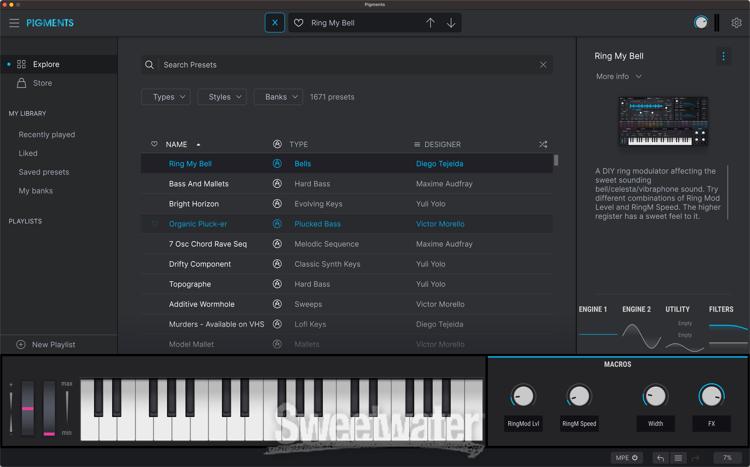
Something that is sorely missing IMO is more information about the presets themselves. If you look at presets browsers from Pigments, Omnisphere, PhasePlant, or Zebra, you will see there's more information give to the user such as a preset description, how to use it, favorites, and even hash tags. This makes navigation much more efficient than looking at (literally) a file explorer.

As an example, here's the Pigments preset explorer:

Image

Post

padillac wrote: Tue Jul 19, 2022 3:40 pm The basic idea is that you use MSF - a wildly-flexible modular architecture synth - to design (mostly) fixed architecture devices, and then you make presets for those devices. Device presets configure the params of that device, that’s all.

Global presets are all separate - there’s no way to combine them into a device. And I believe they all require full MSF to use, but don’t quote me on that.

If you really wanted a bunch of different architecture patches and you want to distribute them, you can make your global presets and convert them to devices. Your just be distributing a bunch of devices, each with one preset (or more if you decide to make device presets as well). I don’t think there’s anything wrong with that approach.
Thanks this makes a lot of sense.

Post Reply

Return to “MeldaProduction”