Martinic AX Chorus (AAX/AU/CLAP/VST2/VST3) plugin released

VST, AU, AAX, CLAP, etc. Plugin Virtual Effects Discussion
RELATED
PRODUCTS
AX Bundle$359.00Buy AX Chorus$49.00Buy

Post

plexuss wrote: Mon Jan 09, 2023 3:50 am
Digivolt wrote: Sun Jan 08, 2023 8:47 pm
martinic wrote: Thu Jan 05, 2023 8:09 am Thanks! Talking about the GUIs, what would you improve?
Remove the clutter and have just the UI as the entire plug, maybe preset dropdown in the LCD display with preset name ?

Image
Yes this design is much cleaner. Now, one refinement I'd recommend is making the knobs more "head on" - no angled effect. By making the front panel square/head on, the angled knobs are out of place. Of course its a lot of work to render that so perhaps you were thinking the same but wanted to pass this mockup by us first. I think if the knobs were symetrical is would look better. If you wanted to bring in a 3D effect you could still cast shadows from the knobs. Just make them faint just to bring out the 3D effect, if you go that route. Just my suggestions with no expectations.
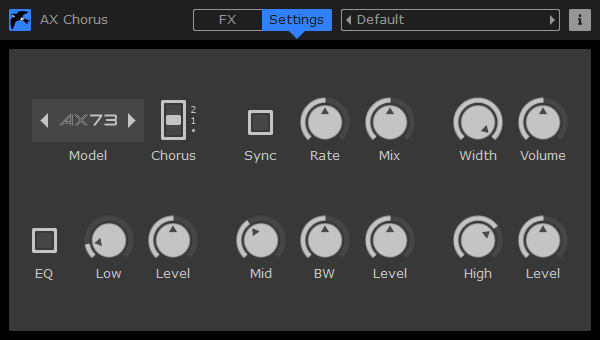
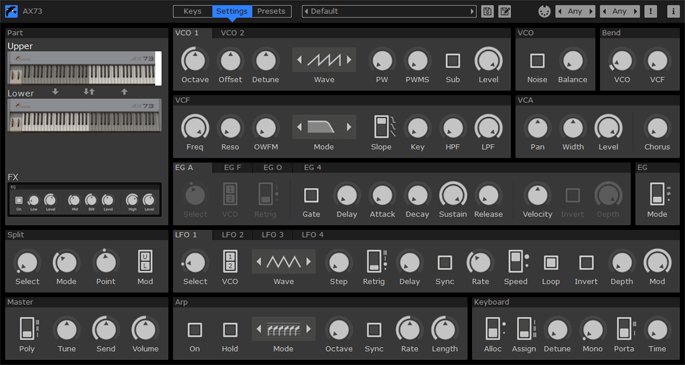
If we would go for this without showing it in a bigger box, the knobs on the setting screen or the About Box would be very tiny. At the moment the size of the settings screen determines the GUI size. We standardized on 600 x 300 pixels for smaller effects.

Image

or 1200 x 600 pixels for larger effects and instruments.
Image

We like the feedback. Thanks!

Post

I'd suggest having an option for the "Settings" screen to become the default. I'd probably just keep it there and never go back to the photorealistic one.

Post

martinic wrote: Mon Jan 09, 2023 10:53 am Image
Is it possible to have this page but with the silver background from the main UI + the LCD display to make it look more like the unit and have the LCD display, display the values of whatever knob you're tweaking ? It's not important really, the plug sounds great so that's all that really matters but eye candy is a nice bonus

And +1 for having an option for settings page as default view even if the above isn't something you want to do

Post

Digivolt wrote: Mon Jan 09, 2023 4:56 pm
martinic wrote: Mon Jan 09, 2023 10:53 am Image
Is it possible to have this page but with the silver background from the main UI + the LCD display to make it look more like the unit and have the LCD display, display the values of whatever knob you're tweaking ? It's not important really, the plug sounds great so that's all that really matters but eye candy is a nice bonus
martinic wrote: Thu Jan 05, 2023 4:12 pm But we could maybe make a config setting in the future to make a KnobMan view an option for the settings screen. You could think about replacing the instruments/effect view with the KnobMan view but that would make the setting view useless. We will look closely at your feedback for we like to always improve.
Digivolt wrote: Mon Jan 09, 2023 4:56 pm And +1 for having an option for settings page as default view even if the above isn't something you want to do
It is on our feature wishlist and will probably be added when we add a config page/file.

Post

Maybe add the option to use the same “color theme” as the simple view for the detail view so it’s not just the white and black parameters? It might not look good then, I suppose. I was thinking something like Valhalla does with just a gradient shift across the knobs or something to give it some variation.

Post

This sounds very good.
I second using a UI with just the box front and no 3D stuff. Just resize it for the settings page.
You can keep the old UI, and Iet the user set a default choice.
How do I save my own presets?
When is VST3 coming?

Post

RikkShow wrote: Wed Jan 11, 2023 9:28 am This sounds very good.
I second using a UI with just the box front and no 3D stuff. Just resize it for the settings page.
You can keep the old UI, and Iet the user set a default choice.
How do I save my own presets?
When is VST3 coming?
Thanks for the feedback.
The 16 presets are read-only on AU (by AU design) and you can change all 16 in VST. They are saved in your project and all 16 are restored when you load your project in the DAW. AU has only one state but this state will also be preserved in your project.
We are now working on AAX Support and VST3 support on all plugins is expected before Cubase stops supporting VST2 at the end of the year.

Post

martinic wrote: Mon Jan 09, 2023 10:53 am
Image
Actually, I think this GUI could be improved overall. It's not the worst, but it's kinda confusing and slows down the workflow, which is top priority for me (so I'm always inclined to pick another VA for the job). I always take a while to find out the parameter I'm looking for on it.

Post

I think that having two UIs with overlapping functionality is a bit iffy. I'm a sucker for a photorealistic skeuomorphic interface, but if you need to switch to a functional drab interface to get full control, the photorealistic one mostly will function as a splash screen, not something to actually use.

My biggest hangup with AX73 isn't with the look though, and certainly not with the sound (it's great), it's with the tabs.
For an analog emulator, tabs are (IMHO) a big drawback. I understand that AX73 could be too knob-ridden if all the knobs are exposed at the same time, but for the components that interact, like the two oscillators, or the EGs, I really want to see and access them all at the same time. If there are too many knobs to see at once, maybe the synth is just needlessly complex. Again, IMHO. Do we really need four LFOs (per layer, so eight!) in a vintage analog emulation?
Other things, like FX and Arpeggiator, fine, they can live behind a tab.

Post

MTorn wrote: Wed Jan 11, 2023 11:26 pm My biggest hangup with AX73 isn't with the look though, and certainly not with the sound (it's great), it's with the tabs.
The AX73 is so powerful because it has 356 parameters that control the sound. We spread all knobs to control these parameters across 3 screens but it would need 5 screens at least to remove the tabs. As sound designers love the control over the sound the 356 parameters give them we would not like to make the synth less good by removing LFO's or other features. It would not make something like the possible. Customers asked us to make a 'play' view hiding advanced options. This 'play' mode could be tab-less and show only 2 LFO's. It sounds like a good plan. Thanks!

Post

I appreciate that it's impossible to please everyone!

Whenever the word "sound designer" comes into play, I usually tap out. It general implies that there are two kinds of users - the people who are happy with the tedious work of making complex (but not necessarily musically useful) sound banks, and the people who are happy to use those patches. It tends to leave out the middle ground, the musician who makes sounds on the spot, to suit whatever is needed at the moment.

Some kind of "play view" might be a good compromise, as long as it doesn't dumb down the synthesis functions. I'd be more inclined to use a "hardcore vintage view", where only the original parameters are visible.
An example of this mindset = I'm much more thrilled by the Softube Juno 106, that has no FX and essentially zero modern features, than the Arturia Juno 6, with its extra envelope, LFO, and FX section.

A quick glance at the Akai AX73 manual tells me that, wow, I think it really had four ADSRs, so fair game, I can't blame you for including all those! But, unless I'm wrong, it had only one LFO.

Post

We're thrilled to announce the release of the AAX plugin standard for the AX Chorus. To celebrate this milestone, we're offering a special 40% discount on the AX Chorus plugin until September 12th.

We've also introduced the AX Bundle, an offer for Pro Tools users who could not buy our products before. With the AX Bundle, you can enjoy a generous 50% discount on a comprehensive package that includes all AX73-related products in one convenient bundle.

Post

RikkShow wrote: Wed Jan 11, 2023 9:28 am When is VST3 coming?
Today we have published VST3 RC1 versions of all Martinic plugins, which are available on the product download pages of our website.

Post

martinic wrote: Thu Nov 16, 2023 4:17 pm
RikkShow wrote: Wed Jan 11, 2023 9:28 am When is VST3 coming?
Today we have published VST3 RC1 versions of all Martinic plugins, which are available on the product download pages of our website.
VST3 support has been released today.

Post

We just released the improved AX Chorus version 1.3.1

Downloads:
https://www.martinic.com/products/ax-chorus/downloads

Changes:
  • Fixed crash with VST3 in Blue Cat's PatchWork.
  • Fixed VST3 failing examination in Digital Performer 11.
  • Fixed VST3 speaker arrangement.
  • Fixed CLAP resize issue with scaled GUI in REAPER on Windows.
  • Fixed GUI color space on macOS Sonoma.

Post Reply

Return to “Effects”