

AKAI VIP 3.0 released
-
- KVRist
- 169 posts since 7 Mar, 2007
I forgot to mention Arturia's Analog Lab solution, which is also an alternative. I'm owing several Arturia-based stuff including the V Collection.
One problem with their approach is that Analog Lab can only split/stack on 2 layers. And, of course, only Arturias in-house made emulations.
Of course, that is the only problem for me because of my specific requirements.
One problem with their approach is that Analog Lab can only split/stack on 2 layers. And, of course, only Arturias in-house made emulations.
Of course, that is the only problem for me because of my specific requirements.
-
- KVRAF
- 3735 posts since 17 Sep, 2016
If you wanted to try investing a bit of time (and a little more cash) in VIP, and could live with it's "legacy" status, you could get the most out of VIP by locating a pre-owned VIP integrated controller keyboard.DigiPRO wrote: Mon Feb 27, 2023 8:53 pm The AKAI VIP was the most promising "no mousing around" solution up to date.
The problem is that I'm unsure whether to invest more time and effort in something that hasn't been updated since 2018.
They work just like any generic USB MIDI controller, but when connected to VIP they are bound together in a 2-way link via the MIDI driver.
For example:
https://reverb.com/p/akai-advance-61-ke ... controller
https://reverb.com/p/m-audio-ctrl49
https://reverb.com/item/66351941-alesis ... 010s-black
Windows 10 and too many plugins
-
- KVRist
- 169 posts since 7 Mar, 2007
Yes, but then we're back to square one, and the main reason (aside from the software looking abandoned) - namely the lack of DPI support for its GUI.zzz00m wrote: Mon Feb 27, 2023 9:13 pmIf you wanted to try investing a bit of time (and a little more cash) in VIP, and could live with it's "legacy" status, you could get the most out of VIP by locating a pre-owned VIP integrated controller keyboard.DigiPRO wrote: Mon Feb 27, 2023 8:53 pm The AKAI VIP was the most promising "no mousing around" solution up to date.
The problem is that I'm unsure whether to invest more time and effort in something that hasn't been updated since 2018.
They work just like any generic USB MIDI controller, but when connected to VIP they are bound together in a 2-way link via the MIDI driver.
For example:
https://reverb.com/p/akai-advance-61-ke ... controller
https://reverb.com/p/m-audio-ctrl49
https://reverb.com/item/66351941-alesis ... 010s-black
If you take a look at the screenshot I sent earlier, you can see that it is absolutely impossible to work with such small fonts.
My goodwill to work with VIP, even though it is no longer being developed, has its limits.
-
- KVRAF
- 3735 posts since 17 Sep, 2016
I hear ya! I'm still living in the HD 1920 world (on a 24" IPS screen), and the fonts are OK here. I think that the bleeding edge 4K+ graphics thing is something that I will pass on for the near future...DigiPRO wrote: Mon Feb 27, 2023 10:51 pm Yes, but then we're back to square one, and the main reason (aside from the software looking abandoned) - namely the lack of DPI support for its GUI.
If you take a look at the screenshot I sent earlier, you can see that it is absolutely impossible to work with such small fonts.
My goodwill to work with VIP, even though it is no longer being developed, has its limits.

Windows 10 and too many plugins
-
- KVRist
- 169 posts since 7 Mar, 2007
I don't think the screen resolution is an issue, as I'm working with a screen resolution of 1680 x 1050. All other GUIs look good, except for the VIP. I've checked and the VIP doesn't support or recognize the DPI scaling settings at all.zzz00m wrote: Tue Feb 28, 2023 1:56 amI hear ya! I'm still living in the HD 1920 world (on a 24" IPS screen), and the fonts are OK here. I think that the bleeding edge 4K+ graphics thing is something that I will pass on for the near future...DigiPRO wrote: Mon Feb 27, 2023 10:51 pm Yes, but then we're back to square one, and the main reason (aside from the software looking abandoned) - namely the lack of DPI support for its GUI.
If you take a look at the screenshot I sent earlier, you can see that it is absolutely impossible to work with such small fonts.
My goodwill to work with VIP, even though it is no longer being developed, has its limits.
But, it would be good if someone could actually post a screen shoot over the VIP GUI and state the screen resolution. Maybe it is different on the HD 1920 screens?
Maybe there's still hope after all!?
Last edited by DigiPRO on Tue Feb 28, 2023 2:15 am, edited 1 time in total.
-
- KVRAF
- 3735 posts since 17 Sep, 2016
VIP at 1920 X 1200 with Windows scaling at 100% (right-click on image below, open in new tab).DigiPRO wrote: Tue Feb 28, 2023 2:13 am But, it would be good if someone could actually post a screen shoot over the VIP GUI and state the screen resolution. Maybe it is different on the HD 1920 screens?

Last edited by zzz00m on Tue Feb 28, 2023 2:35 am, edited 1 time in total.
Windows 10 and too many plugins
-
- KVRist
- 169 posts since 7 Mar, 2007
This is a screenshot of VIP software from an AKAI instructional YouTube video. As you can see, it is super different in term of text/font readability than the one I posted before from my system. So, something is odd.
Remark: The GUI appearance of the VIP software in this screenshot is much better.
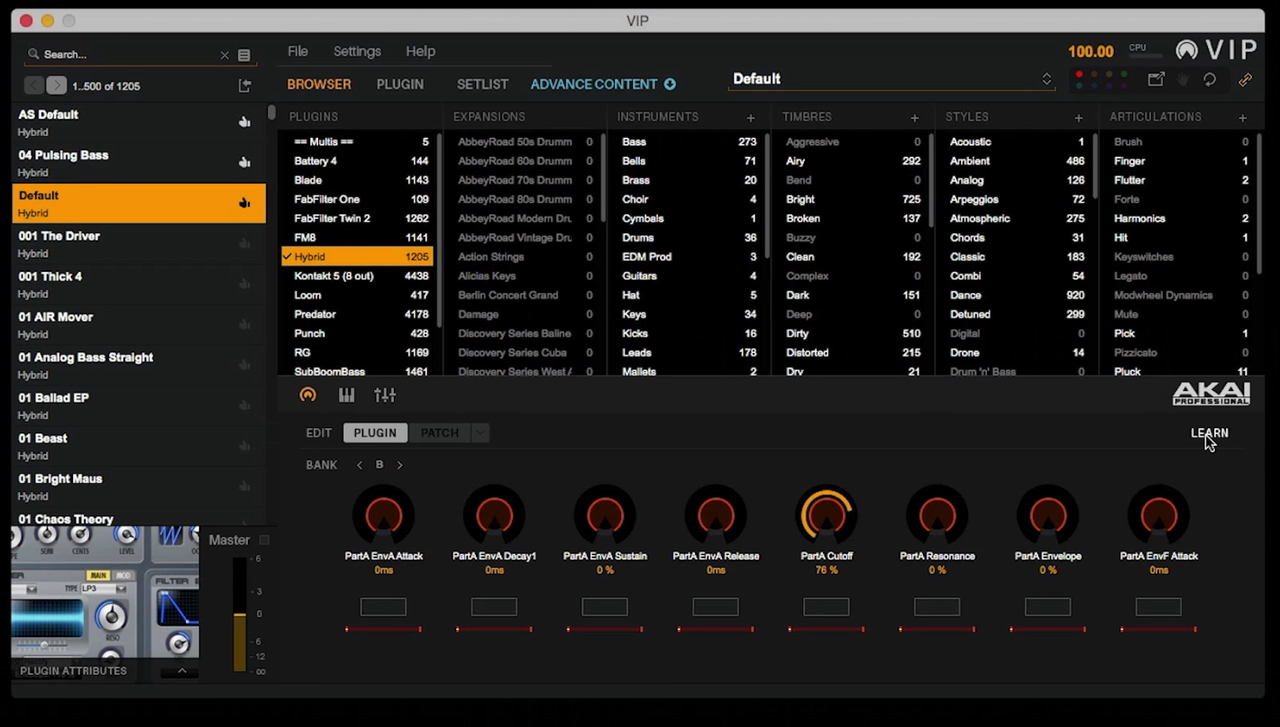
Remark: The GUI appearance of the VIP software in this screenshot is much better.
-
- KVRAF
- 3735 posts since 17 Sep, 2016
See above...
FYI: A screen resolution of "1680 x 1050" suggests that it might be a laptop screen. If so, suggest using an external monitor with more pixels.
FYI: A screen resolution of "1680 x 1050" suggests that it might be a laptop screen. If so, suggest using an external monitor with more pixels.
Windows 10 and too many plugins
-
- KVRist
- 169 posts since 7 Mar, 2007
OMG, the fonts are even smaller on your 1920 px machine than on my 1680 px one!zzz00m wrote: Tue Feb 28, 2023 2:33 amVIP at 1920 X 1200 with Windows scaling at 100% (right-click on image below, open in new tab).DigiPRO wrote: Tue Feb 28, 2023 2:13 am But, it would be good if someone could actually post a screen shoot over the VIP GUI and state the screen resolution. Maybe it is different on the HD 1920 screens?

Wondering if they developed VIP with 1280 px resolution users as a target group.
-
- KVRist
- 169 posts since 7 Mar, 2007
My point is, the higher resolution, the smaller font appears in the VIP apps GUI and there's no way I can do anything about it. No trace of a font resizing option in the settings or similar.zzz00m wrote: Tue Feb 28, 2023 2:35 am See above...
FYI: A screen resolution of "1680 x 1050" suggests that it might be a laptop screen. If so, suggest using an external monitor with more pixels.
-
- KVRAF
- 3735 posts since 17 Sep, 2016
But you do realize that if you are viewing my screen shot on your 1680 screen, that you are not seeing it as I do. It's all relative...DigiPRO wrote: Tue Feb 28, 2023 2:40 am OMG, the fonts are even smaller on your 1920 px machine than on my 1680 px one!
Wondering if they developed VIP with 1280 px resolution users as a target group.
Your screen is compressing my image to fit your pixel grid. You need a larger monitor.
Windows 10 and too many plugins
-
- KVRist
- 169 posts since 7 Mar, 2007
Yes, I have this in the calculation, I checked the relative size between the GUI ie the graphic parts versus the font size. It's amazing how small text appears inside VIP, especially the description of the tags. On the 1920 px monitor.zzz00m wrote: Tue Feb 28, 2023 2:45 amBut you do realize that if you are viewing my screen shot on your 1680 screen, that you are not seeing it as I do. It's all relative...DigiPRO wrote: Tue Feb 28, 2023 2:40 am OMG, the fonts are even smaller on your 1920 px machine than on my 1680 px one!
Wondering if they developed VIP with 1280 px resolution users as a target group.
Your screen is compressing my image to fit your pixel grid. You need a larger monitor.
-
- KVRist
- 169 posts since 7 Mar, 2007
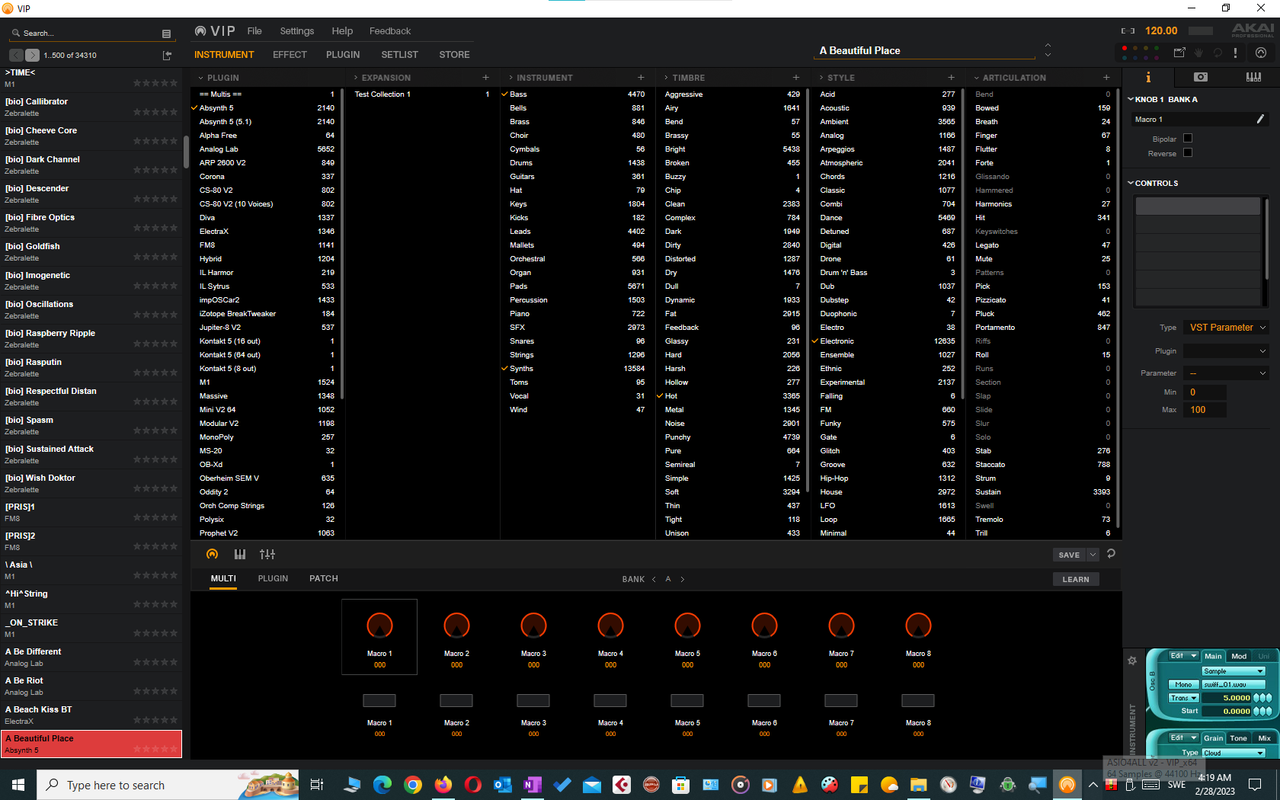
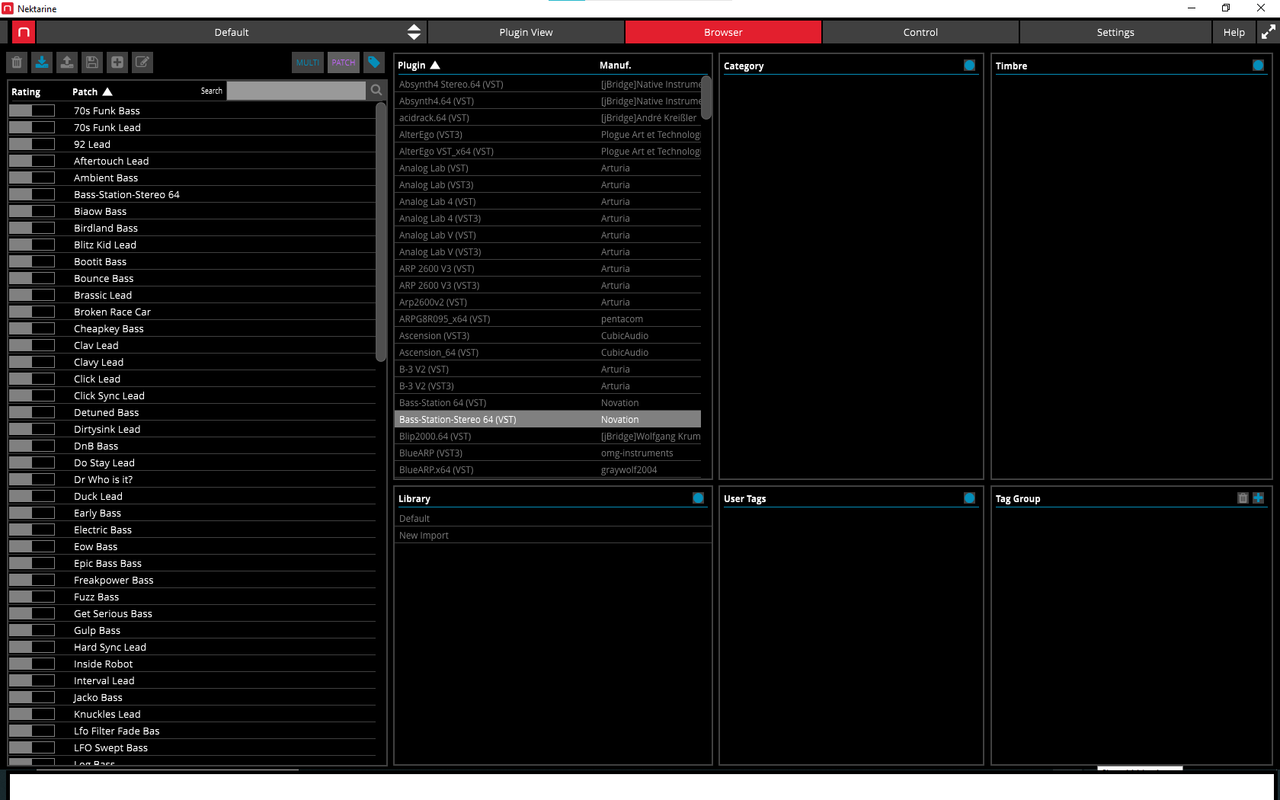
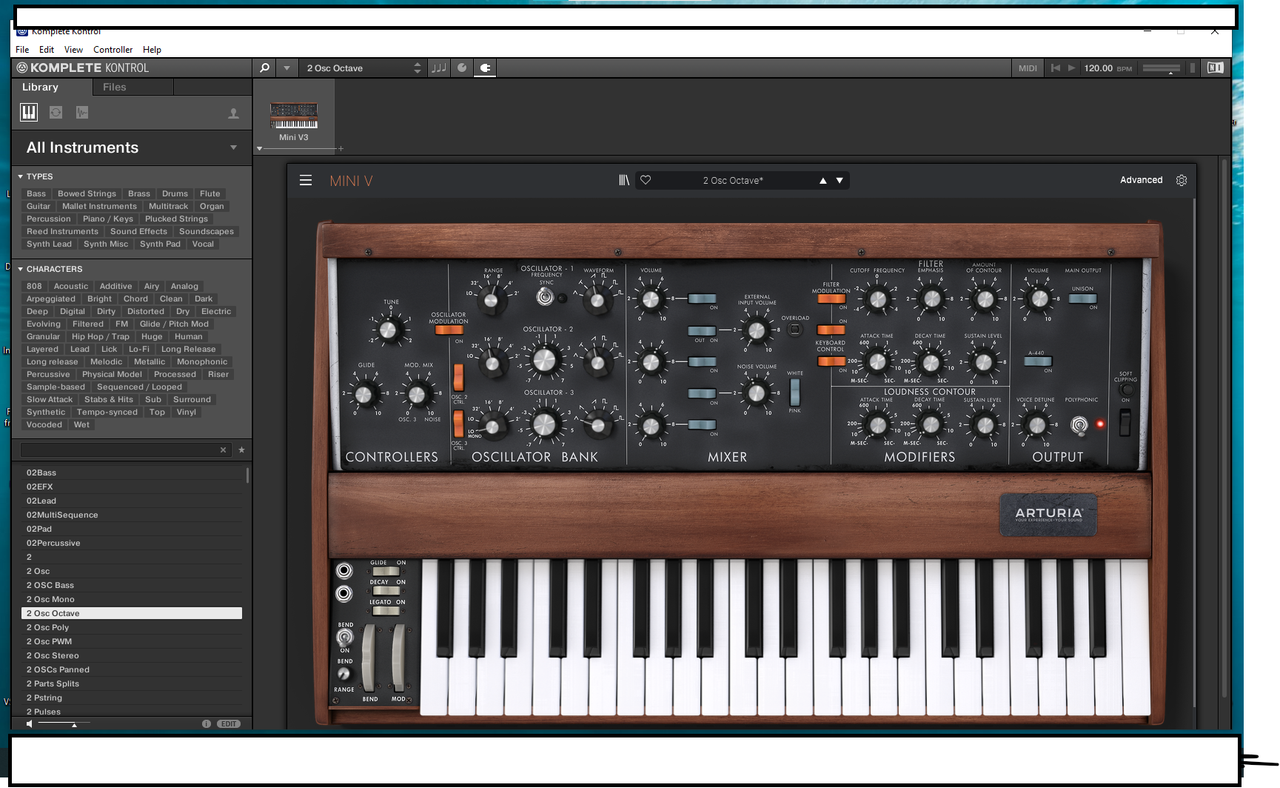
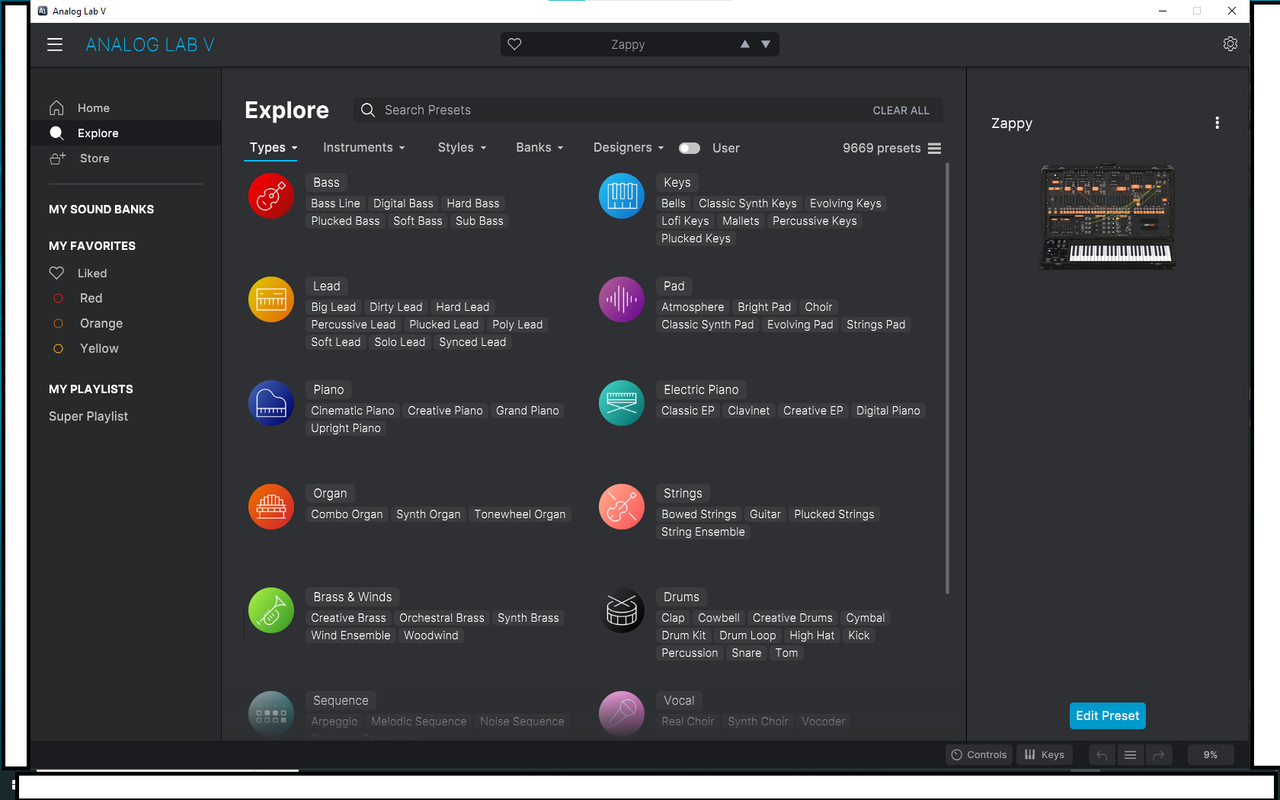
Check the VIP, Nektarine, Komplete Kontrol, and Arturia Analog Lab V GUIs on my 1680 px monitor, just for comparison. Arturia wins hands down, closely followed by the Nektarine. But that is not the point.
The point is -I just find it interesting that I've decided to abandon a hardware & software concept because of - inadequate (G)UI. In 2023.
I'm getting old I guess, heh
Is that a good or a bad thing actually!?
Note: Just right-click on the images below and select "Open in new tab" to see the original size.
-
-
-
The point is -I just find it interesting that I've decided to abandon a hardware & software concept because of - inadequate (G)UI. In 2023.
I'm getting old I guess, heh
Is that a good or a bad thing actually!?
Note: Just right-click on the images below and select "Open in new tab" to see the original size.
-
-
-
Last edited by DigiPRO on Tue Feb 28, 2023 9:00 pm, edited 1 time in total.