


Hi all,
I have recently bought a Behringer Crave and I have a bit of a problem with routing my midi sequence to trigger it. I have the synth connected to the computer via USB and to my audio interface. I can record audio, I can record midi from it, but I can't send midi for Crave to play. It is set up as midi in and out, the clip is set to channel 1, the same as Crave, but can't seem to figure out how to make it work.
I tried setting destination of the midi track to midi in on Crave, I tried setting it to the track, no dice. What am I doing wrong?
(win11, asio4all drivers, Behringer UMC22 interface, just for the record)
Midi to hardware synth over usb
-
- KVRAF
- 2456 posts since 9 Oct, 2008 from UK
This may be a daft question, but how is the Crave set to receive on MIDI channel 1? I note that there are four switches on the back, which suggests they code the channel in a binary format, and that would give a range from 0 to 15 rather than 1 to 16, and I'd expect 0 - with all buttons set the same way - to be MIDI channel 1. Does it say somewhere on the Crave what the MIDI channel is set to and are your buttons all set the same way? If not, it might be worth your time to cycle through all sixteen MIDI values within Waveform to see if sound comes from the Crave.
[W10-64, T5/6/7/W8/9/10/11/12/13, 32(to W8)&64 all, Spike],[W7-32, T5/6/7/W8, Gina16] everything underused.
-

- KVRist
- Topic Starter
- 30 posts since 18 Jul, 2005 from UK
There is a chart in the manual on jumper settings vs midi channel.jabe wrote: Sat Jun 10, 2023 1:48 pm This may be a daft question, but how is the Crave set to receive on MIDI channel 1? I note that there are four switches on the back, which suggests they code the channel in a binary format, and that would give a range from 0 to 15 rather than 1 to 16, and I'd expect 0 - with all buttons set the same way - to be MIDI channel 1. Does it say somewhere on the Crave what the MIDI channel is set to and are your buttons all set the same way? If not, it might be worth your time to cycle through all sixteen MIDI values within Waveform to see if sound comes from the Crave.
All these moments will be lost in time like tears in rain...
-
- KVRAF
- 2456 posts since 9 Oct, 2008 from UK
Good. I had a look through the quick guide, but all you've done seems in order.
[W10-64, T5/6/7/W8/9/10/11/12/13, 32(to W8)&64 all, Spike],[W7-32, T5/6/7/W8, Gina16] everything underused.
-
Peter Widdicombe Peter Widdicombe https://www.kvraudio.com/forum/memberlist.php?mode=viewprofile&u=336849
- KVRian
- 1205 posts since 29 Aug, 2014
Some quick questions:
1. You DO want to set the output device (right of track) to be the MIDI DEVICE. Sound like you have tried that.
2. You figured out that MIDI output channel is selected in the CLIP properties ?
3. You have no VST on the track that might swallow the MIDI events? If you did have, say, 4OSC on the track, it will input the MIDI and output audio - and the MIDI has been swallowed up. For a test, make sure you have NO VST's on the track your trying to send externally. You can play with arpeggiators or chord generators later...
4. Actually, if you happened to have it, put MIDI Monitor as a VST. That way you can actually SEE the channel and note events flowing through. By design, it DOES pass through all MIDI events.
5. If you ARE trying to play VST's and the external device at the same time, you can wrap it in a rack and make sure you ALSO feed track MIDI in to both the VST AND back out to the rack MIDI out.
1. You DO want to set the output device (right of track) to be the MIDI DEVICE. Sound like you have tried that.
2. You figured out that MIDI output channel is selected in the CLIP properties ?
3. You have no VST on the track that might swallow the MIDI events? If you did have, say, 4OSC on the track, it will input the MIDI and output audio - and the MIDI has been swallowed up. For a test, make sure you have NO VST's on the track your trying to send externally. You can play with arpeggiators or chord generators later...
4. Actually, if you happened to have it, put MIDI Monitor as a VST. That way you can actually SEE the channel and note events flowing through. By design, it DOES pass through all MIDI events.
5. If you ARE trying to play VST's and the external device at the same time, you can wrap it in a rack and make sure you ALSO feed track MIDI in to both the VST AND back out to the rack MIDI out.
Waveform 13; Win10 desktop/8 Gig; Win11 Laptop; MPK261; VFX+disfunctional ESQ-1
-
- KVRAF
- 2202 posts since 16 Apr, 2004 from between my ears
one thing i noticed on my system was that when I enabled the MIDI OUT device (in Settings) it did not work until I quit Waveform and restarted. i would guess you have already thought of that, but suggest it here for others since it confused me when I tried it.
-
- KVRist
- Topic Starter
- 30 posts since 18 Jul, 2005 from UK
Thanks to everyone for input, I'll attach the screenshot, so you can see what I've tried.
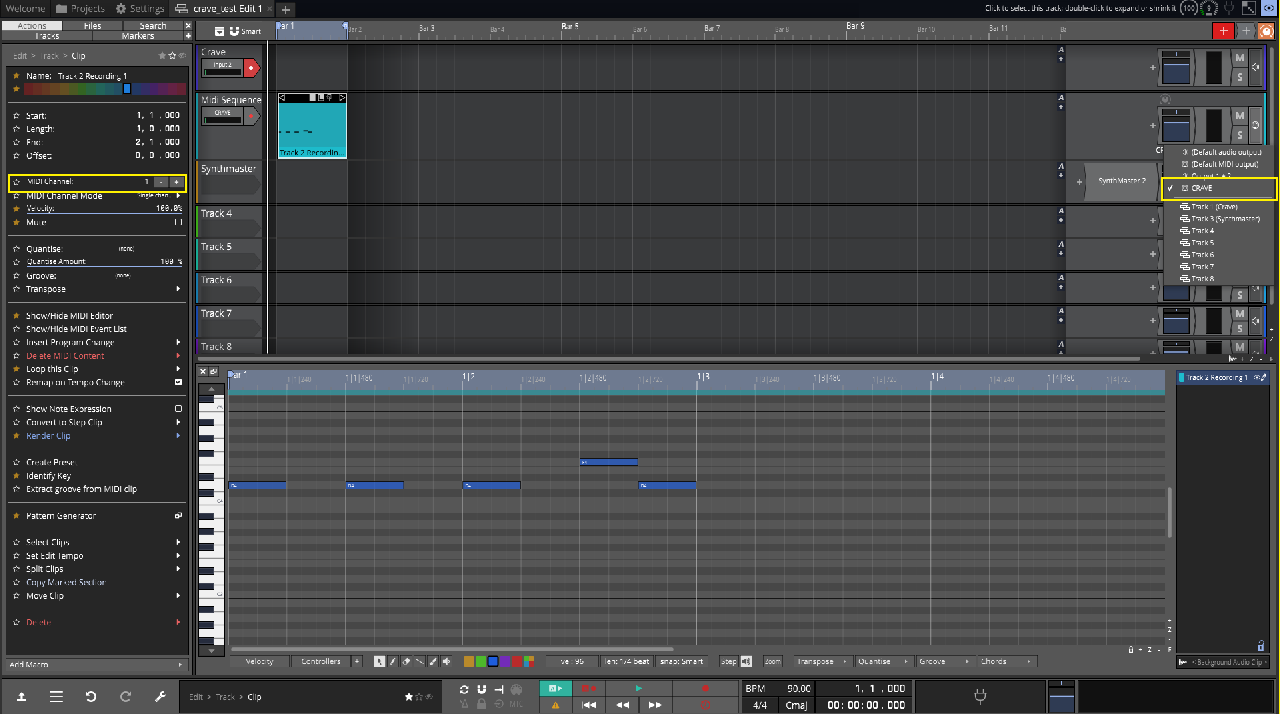
As you can see, I'm sending midi to crave, which is on input 2 of my interface, and it does react when I play it using midi keyboard or built in keyboard. As you can also see, the midi channel for clip is set to 1, just like the crave. I have Synthmaster on track 3, just to see whether I was doing something wrong, or what's the deal, but setting output to track 3 triggers Synthmaster. Setting midi output to track 1 or crave does nothing.
As you can see, I'm sending midi to crave, which is on input 2 of my interface, and it does react when I play it using midi keyboard or built in keyboard. As you can also see, the midi channel for clip is set to 1, just like the crave. I have Synthmaster on track 3, just to see whether I was doing something wrong, or what's the deal, but setting output to track 3 triggers Synthmaster. Setting midi output to track 1 or crave does nothing.
All these moments will be lost in time like tears in rain...
-
- KVRAF
- 2202 posts since 16 Apr, 2004 from between my ears
do you have any other hardware to test whether it is Crave specific?
-
- KVRAF
- 2202 posts since 16 Apr, 2004 from between my ears
I have been playing around with this some more on my system, and it is definitely flaky. sometimes it won't play any notes. other times it will. as it loops and i add more notes to the midi clip at different times it sometimes plays the new notes on one iteration and next time around, it might not.
i have no idea what is happening, but there is something wrong with midi to external devices on my system.
edit: OK. i discovered that if i go into Settings/Midi Devices and click the "Refresh MIDI device list" it wakes up and starts working again.
i have no idea what is happening, but there is something wrong with midi to external devices on my system.
edit: OK. i discovered that if i go into Settings/Midi Devices and click the "Refresh MIDI device list" it wakes up and starts working again.
-
- KVRist
- Topic Starter
- 30 posts since 18 Jul, 2005 from UK
Unfortunately no, that's my first hardware synth. Managed to get it working with Reaper and Live Lite using the same approach, so sounds like something wrong with Waveform.JamminFool wrote: Sun Jun 11, 2023 8:10 am do you have any other hardware to test whether it is Crave specific?
All these moments will be lost in time like tears in rain...
-
- KVRAF
- 2202 posts since 16 Apr, 2004 from between my ears
did you try to refresh the midi device list?
when i first tested this i got it to work. but when i saw your screenshot, i decided to try again. sure enough,this time it was like you described. no midi to my device.
i fiddled around thinking i had forgotten some step, and it suddenly "worked" but it was intermittent and unreliable.
i refreshed the midi device list and now it seems to be solid again.
when i first tested this i got it to work. but when i saw your screenshot, i decided to try again. sure enough,this time it was like you described. no midi to my device.
i fiddled around thinking i had forgotten some step, and it suddenly "worked" but it was intermittent and unreliable.
i refreshed the midi device list and now it seems to be solid again.
-
- KVRAF
- 2202 posts since 16 Apr, 2004 from between my ears
one last thing (long shot): i discovered that when it was acting flaky, it was because i had midi data in the clip that was longer than the clip and loop. this caused waveform to go flaky when i sent that to my external hardware. the same thing sent to a VST instrument worked fine. so that seems like a bug in waveform or possibly a bug in my hardware device that i am testing with.
is it possible that your midi clip has some weird data in it?
did you try deleting the clip and starting over with something clean and simple?
is it possible that your midi clip has some weird data in it?
did you try deleting the clip and starting over with something clean and simple?
-
- KVRist
- Topic Starter
- 30 posts since 18 Jul, 2005 from UK
I even tried starring a new project, just so there's no residual data. Although there is another thing that I just thought of, I'll see if that helps and report back.
All these moments will be lost in time like tears in rain...