



Well I bought it in all the excitement.
Sadly:
1) I realise I do like Tabs especially when it allows more real estate, larger fonts, larger elements.
2) ......
3) I definitely prefer the preset display in the browser of the original skin. these fonts are too small and too closely spaced for my aging eyes.
Hope you do decide to put the arp control in the preset browser.
rsp
MONA - New GUI for Diva
-
- KVRAF
- 3401 posts since 6 Nov, 2006
thanks! awesome easy quick fix. all better now.plugmon wrote: Thu Jun 29, 2023 6:09 pmuh, thanks, fixed and updated again now (v1.0.2).dayjob wrote: Thu Jun 29, 2023 4:23 pm text for env 2 is a bit scrambled. MacOS ventura 13.3.1, Apple silicon
To quickly fix it (rather than re-install the whole package), please delete the image file "ENV-MG-Label-ENV2.png" in "Pictures" folder.
-
- KVRer
- 9 posts since 29 Apr, 2020
I hope u-he has been in contact for the look and design of Zebra 3...
-
- KVRist
- 372 posts since 19 Feb, 2004
Immediate purchase! Thank you for your continued hard work and effort. While I have always love the sound of Diva, I have never taken to its UI. I also don't care for the weird logo with the script font. And of course, the modulation is really hard to get my head wrapped around. All of that was fixed by AIKO, but now taken to a whole new level with Mona. Well done and kudos!
I have a 14 inch MacBook Pro, so one my screen, I have to go to 80% or 90%, and it looks fine. When I am not traveling, dock to a large monitor, so Mona should be just fine at 90-100%.
I do agree with some of the commenters that the oscilloscope is a bit distracting. If I change it from Glow, it's a little easier not the eyes, but I'd love an option to just turn it off completely.
Again, GREAT WORK! Thank you!
I have a 14 inch MacBook Pro, so one my screen, I have to go to 80% or 90%, and it looks fine. When I am not traveling, dock to a large monitor, so Mona should be just fine at 90-100%.
I do agree with some of the commenters that the oscilloscope is a bit distracting. If I change it from Glow, it's a little easier not the eyes, but I'd love an option to just turn it off completely.
Again, GREAT WORK! Thank you!
-
- KVRian
- 1355 posts since 24 Sep, 2021
Come to think of Alpha Juno display and its control were actually the flaws, i think its defo better to resemple Juno 60 or 106plugmon wrote: Sun Jun 25, 2023 4:43 pmSale is currently planned to continue like 2-3 weeks, but it depends a bit on how the sales goes.Lbdunequest wrote: Sun Jun 25, 2023 4:14 pm This looks beatiful, when the sale ends?
A bit of nitpic to DCO module, why it didnt resembled the original device like other modules?
Actually the models of Diva modules are quite complex; Dual VCO is a composite of Jup 8 and 6. DCO is that of Jun 60 and alpha. The skin borrows the ideas from all these model synths.
-

- KVRist
- Topic Starter
- 395 posts since 3 Mar, 2015 from Japan
Good news! MONA is updated to v1.0.3 and took in these requests.nebulae wrote: Fri Jul 07, 2023 1:10 am I do agree with some of the commenters that the oscilloscope is a bit distracting. If I change it from Glow, it's a little easier not the eyes, but I'd love an option to just turn it off completely.
Showing nothing in the display results in a waste of space, so I decided to put a mini patch list there. its functionality is very limited as the space is tiny---No folder view, no tag view. But it does some small jobs, e.g. browsing through presets by [↓] key even with the large browser closed.
Also, ARP on/off toggle, voicemode, stack settings can be now accessible from the easy access section

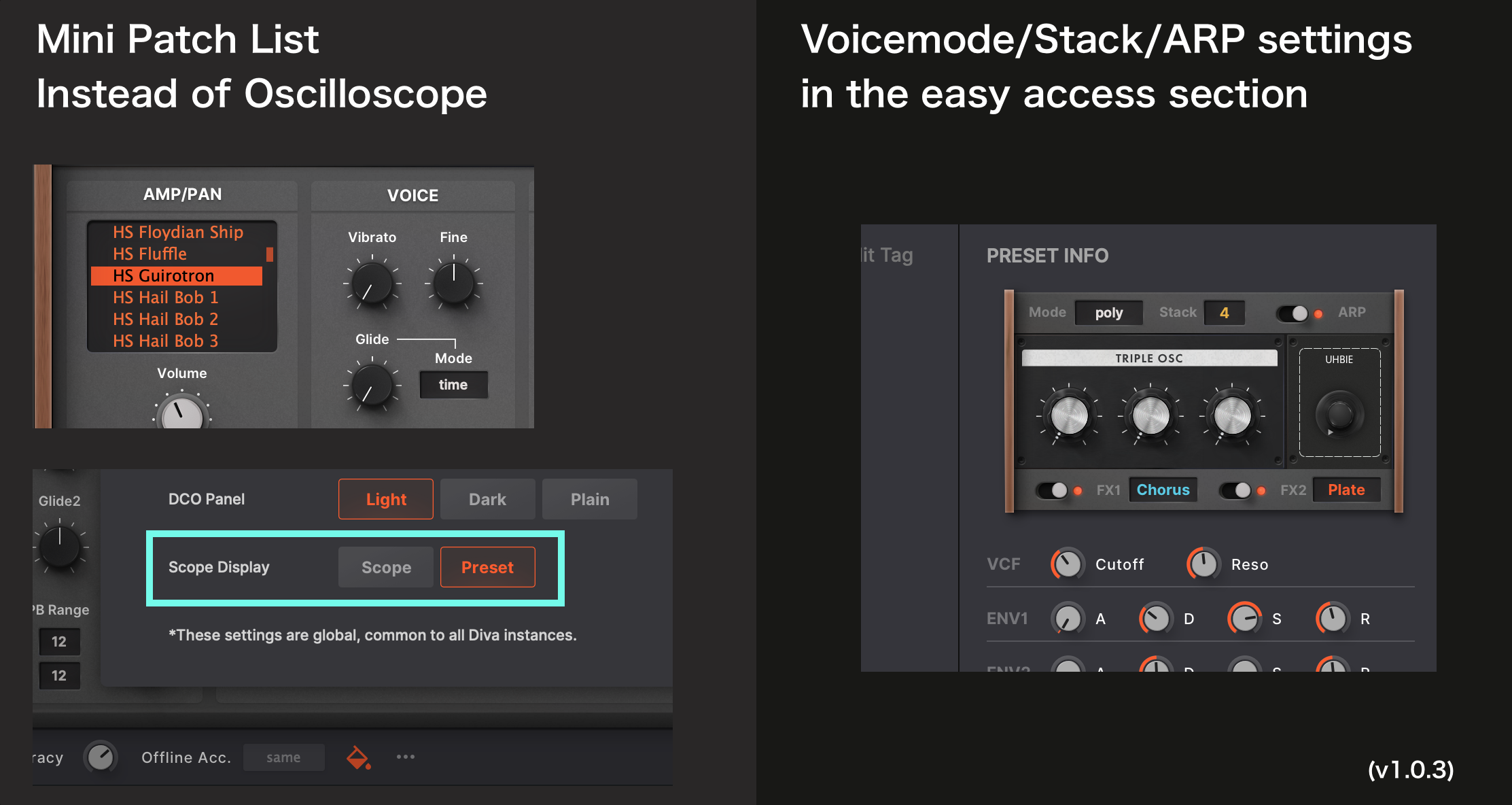
The "Appearance Settings" panel can serve various options without the sacrifice of UI clutter. So if an idea is technically possible, I'll be glad to actualize one.

-

- KVRAF
- 2248 posts since 10 Apr, 2002 from Saint Germain en Laye, France
The top nav bar does not display the Mona page when choosing theme menu

-
- KVRist
- Topic Starter
- 395 posts since 3 Mar, 2015 from Japan

-
- KVRist
- 43 posts since 12 Mar, 2021
This will sound nuts, but a modwheel in the easy access section would be amazing. I'm often browsing presets without a physical modwheel.
-
- KVRist
- Topic Starter
- 395 posts since 3 Mar, 2015 from Japan
I understand you, as I had been working without physical wheels before I finally bought a MIDI controler.Liquid lino wrote: Sat Jul 08, 2023 1:44 pm This will sound nuts, but a modwheel in the easy access section would be amazing. I'm often browsing presets without a physical modwheel.
Izmo for Hive does have wheels in browser so it's not strange for MONA to have it too. But the space in the right side panel is almost full considering the cases where description/usage texts get longer. I need to come up with some ideas of where to put wheels

-
- KVRist
- 372 posts since 19 Feb, 2004
Thank you for the update!
I honestly have to GUSH over this amazing skin. It has totally revitalized my love for Diva. It is entirely monumental and critical in adding functionality, usability, and real value to what remains the benchmark for virtual analog synths. Easily one of the best purchases I have made in software. Thank you, thank you, thank you.
Urs, take note and behold.
I honestly have to GUSH over this amazing skin. It has totally revitalized my love for Diva. It is entirely monumental and critical in adding functionality, usability, and real value to what remains the benchmark for virtual analog synths. Easily one of the best purchases I have made in software. Thank you, thank you, thank you.
Urs, take note and behold.
-
- KVRian
- 923 posts since 13 Jul, 2006
Great! Thanks for also considering one of my suggestions. But what I really like most is the idea to replace the Osc Scope with a mini preset browser!plugmon wrote: Sat Jul 08, 2023 11:56 am Good news! MONA is updated to v1.0.3 and took in these requests.
Regarding the Preset Info area, one idea (not sure if realistic): You already render the synth in a mini version to indicate what modules have been chosen. Have you thought about making the knobs there usable, e.g. show not only Cutoff in the filter, but also Reso? Then you could make the buttons interactive and avoid having the "VCF" section below. Same goes with volume of the OSCs.
But obviously you cannot have all the buttons in there, so adding ENV1 and ENV2 the way you did makes sense to me.
I've also got one very minor visual issue: If you lock some params, you cannot see the value anymore because the lock is directly on top of the value. See:
You do not have the required permissions to view the files attached to this post.
Find my (music) related software projects here: github.com/Fannon
-
Echoes in the Attic Echoes in the Attic https://www.kvraudio.com/forum/memberlist.php?mode=viewprofile&u=180417
- KVRAF
- 12014 posts since 12 May, 2008
When you reskin a synth like Diva, is it possible to make it multi-touch compatible? I don't know if Juce is uable for just a skin, but those are always multi-touch for example.
-
- KVRist
- Topic Starter
- 395 posts since 3 Mar, 2015 from Japan
First I thought of that kinda things but gave up. I doubt the area can serve a proper, comfortable experience. For example, knobs are smaller than main panel so the tick of Moog knobs are not so easy to read. If I put some working knobs I have to put labels as well but they will have to be tiny, et cetla.Fannon wrote: Sun Jul 09, 2023 5:54 am Regarding the Preset Info area, one idea (not sure if realistic): You already render the synth in a mini version to indicate what modules have been chosen. Have you thought about making the knobs there usable, e.g. show not only Cutoff in the filter, but also Reso? Then you could make the buttons interactive and avoid having the "VCF" section below. Same goes with volume of the OSCs.
But obviously you cannot have all the buttons in there, so adding ENV1 and ENV2 the way you did makes sense to me.
I've also got one very minor visual issue: If you lock some params, you cannot see the value anymore because the lock is directly on top of the value. See:
2023-07-09 07_50_15-CLAPi_ Diva (u-he) - Track 1 _Diva_ [2_8].png
That said, I didn't really try realizing the idea, stopped before coding, so there could be a chance.
As to lock icons, it's a problem all u-he synths have.
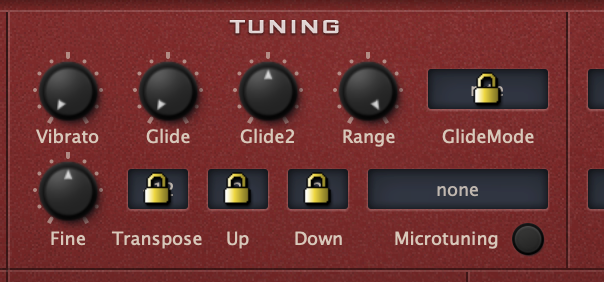
But I can make it a bit better by putting an icon off-center, and making it a little transparent. I'll do that!
-
- KVRist
- Topic Starter
- 395 posts since 3 Mar, 2015 from Japan
I don't believe it's possible. For reskinning you can only use what u-he's GUI system serves.Echoes in the Attic wrote: Sun Jul 09, 2023 2:27 pm When you reskin a synth like Diva, is it possible to make it multi-touch compatible? I don't know if Juce is uable for just a skin, but those are always multi-touch for example.