


took us a while, but we're back, hooray.

We are very happy to share the first public preview of our upcoming Filterscape 1.5 update with you today.
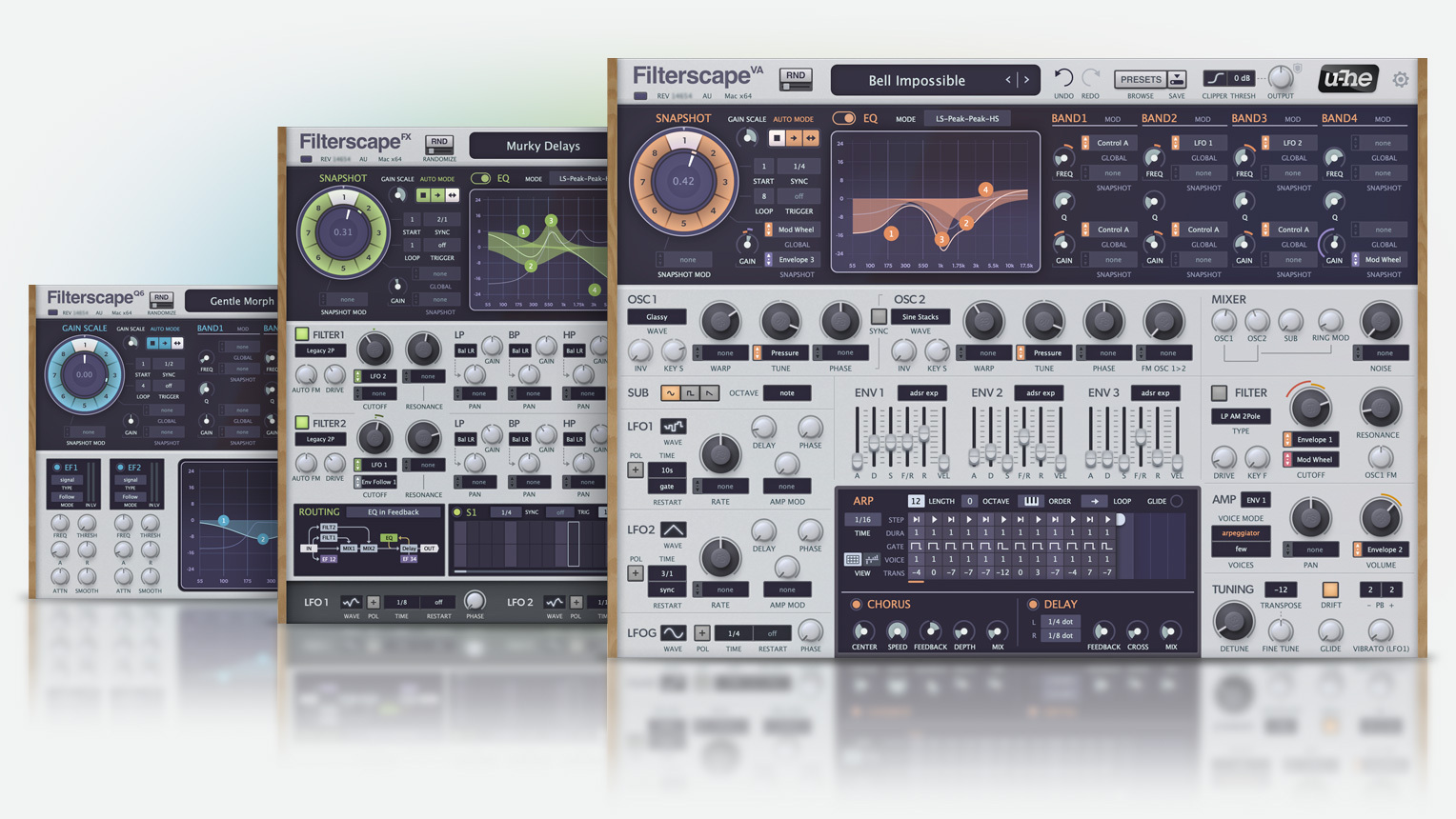
Downloads:
Filterscape 1.5 public preview 14785 Mac
Filterscape 1.5 public preview 14785 Win
Filterscape 1.5 public preview 14785 Linux
First and foremost, our GUI wizard did an amazing job at completely redesigning Filterscape's GUI, giving it a fresh look and a more intuitive layout.

Another highlight are the new and very yummy state variable filters.
FilterscapeVA, the synth plugin of the trio, got some new oscillator wavetables for a much expanded sound range.
The EQ section got some formant presets (best used with the LP-BP-BP-HP or 4 Bandpasses modes) for quickly producing vowel-like sounds, as well as some very convenient new functions.
And quite a few more new additions and improvements are ready to be discovered.
We are very curious to get your reaction, so please go ahead, download the preview and start exploring this new version of our beloved Filterscape.
Factory preset library:
The factory library has been completely overhauled, and although almost finished, is still work in progress.
So things might change a bit until the final release.
Windows and Linux users, in case you have an old Filterscape version installed, please manually delete the existing factory library prior to installing the new version, to avoid a bloody mess in the preset browser. Mac users don't need to worry, as old files are replaced automatically during installation.
About your existing licenses:
The license system of Filterscape has been updated.
This means whenever you start Filterscape, it will display a reminder that the license needs to get updated.
For the moment, simply click that message away. Your existing license will continue to function.
Once the Filterscape update is officially released, you will be able to request a new license through the My Licences form on the website.
There is no need to try this now, as it will only send you your old license.
Our work during the last months wasn't limited to just Filterscape. There have been countless refactorings, improvements and bug fixes in pretty much every area. So all plugins will benefit from our current tour de force.
This also means that we need your help in finding as many issues as possible during this beta.
As no stone has been left unturned in our codebase, there could potentially be undiscovered flaws hiding everywhere.
Before testing, please have a look at the changelog to get an overview of all the fixes and improvements.
And as always, this is a beta version, back up important files first, and don't install it if you are in the middle of an important project.
Dialogs and menus:
Our whole dialog system has been refactored on all platforms.
If you encounter any unexptected problems when saving or editing presets, or when using any of the dropdown menus, please let us know.
AAX:
This beta marks the return of AAX support on macOS, of course including native Silicon support.
We also fixed and improved a number of platform independent AAX issues, so the Windows version benefits from this as well.
In the coming months we hope to post stable builds of most plugins, so Mac Pro Tools users can finally work with the newest versions again.
CLAP and MPE:
Filterscape's internal codebase predates the times of MPE and other such modern features.
Thus Filterscape sadly won't be able to support MPE.
Bitwig parameter modulation has been implemented, but it's not per-voice.
However, we did implement note expressions (micro-pitch, pan, gain, pressure, timbre).
And we also improved our CLAP implementation in a few areas.
Linux:
We are also happy to share the Linux version of Filterscape.
As you can see in the changelog, a number of Linux issues has been fixed.
And, often requested, MTS-ESP microtuning support is now available on Linux as well.
With the next updates all synth plugins will gain this feature on Linux.
Windows:
We already try to prevent users from installing the data folder into the program files area, due to Windows limiting the permissions. Installation to the ProgramData location is now prohibited for the same reason.
Garbled or squashed installer windows should be a thing of the past on high-resolution displays.
And (you probably thought it would never come) we even got an uninstaller on Windows now.
Still not sure why anyone would ever want to uninstall a u-he plugin.

Changelog covering all the changes since the last release version 1.4.1 (rev. 3898):
Improvements:
* New SVF filters
* Completely redesigned GUI
* Added more oscillator wavetables
* New EQ display functions
* New output clipper
* Support for CLAP
* Support for latest macOS Ventura/Sonoma
* Native support for Apple Silicon Macs
* Improved VST3 support
* Improved GUI performance
* Improved dialog handling
* Improved noise behaviour
* Implemented our modern preset browser
* Revamped factory preset library
* Soundset installation via drag&drop
* More parameters added (pan modulation, LFO rate, global transpose)
* Support for MTS-ESP microtuning (Mac, Win, Linux)
* Preferences and MIDI-Learn sections added
* Ctrl A/B replaces fixed Breath and Expression modulation
* Ctrl A/B "Set as Default" option added to MIDI Table page
* Browser: New option to show/hide folders in the context menu
* Browser: Saving search results now works via drag&drop
* Browser: Description and usage fields now scroll during text input in preset save dialog
* Browser: Folders can now be dragged & dropped onto tag smart folders
* Improved parameter automation in Pro Tools
* Improved latency compensation during MIDI event scheduling
* Registration dialog now purges unsupported characters (e.g. accidental spaces)
* Windows installer now comes with an uninstaller
* Windows installer now remembers last used options
* Windows installer blocks installation to C:\ProgramData location
* CLAP: Optionally display module names next to parameter names
* CLAP: Support for note expression (micro-pitch, timbre, pressure, pan, gain)
Bug Fixes:
* Removed "duo" mode from voice mode selection (was never supported)
* Removed "keyfollow2" from modulation sources list (wasn't supported)
* Removed LFO on/off switches from GUI
* Fixed: Sequencer could go out of sync
* Fixed: Disabling EQ could route wet delay signal to output
* Fixed: Some presets could fall silent
* Fixed: Switching delay on/off could produce audible glitches
* Fixed: First note of arp could play two voices
* Fixed: Some presets could produce clicks
* Fixed: Trigger reset failing on loop wrap (Reaper only)
* Fixed: Crash when loading script presets (e.g. Randomizer)
* Fixed: Aborted preset save operation could lead to wrong meta data in inspector
* Fixed: Using "duplicate" option in browser could crash if permissions missing
* Fixed: VST3 synth plugin falsely reported inputs to host
* Fixed: Glide time was longer when using small audio buffer size
* Fixed: Renoise no longer needs "enable keyboard" option for menus to work
* Fixed: Plugin focus no longer needed for dropdown menus to work (Mac only)
* Fixed: Problem when loading init preset immediately after loading plugin (Mac only)
* Fixed: Plugin stayed mono when using "Mono > Stereo" option in Logic
* Fixed: GUI glitch when switching to smaller GUI size (Pro Tools only)
* Fixed: Problem automating parameters with identical names (Pro Tools only)
* Fixed: Preset search input field did not receive mouse input (Pro Tools only)
* Fixed: Stuck notes when using computer keyboard to play in FL Studio on Mac (VST3 only)
* Fixed: Scroll wheel not working on second display under some conditions (Windows only)
* Fixed: Installer now scaled correctly on high-resolution displays (Windows only)
* Fixed: Preset overwrite dialog was not showing up (Linux only)
* Fixed: Default Author was set to preset name (Linux only)
* Fixed: Auto versioning feature wasn't working (Linux only)
* Fixed: Right-click preset selection frame wasn't disappearing (Linux only)
* Fixed: Input field was empty when editing preset search result (Linux only)
* Fixed: Double-click on menus could lead to crash (Linux only)
* Fixed: Dialogs always opened at left edge of the screen (Linux only)
* Fixed: Dialogs could be opened multiple times (Linux only)
* CLAP: No more stuck notes when host playback is started repeatedly
* CLAP: Audio buffer now cleared on host reset
* CLAP: Improved reporting of latency changes
* Lots of small fixes and improvements
Special Notes:
* CPU needs to support SSE4.2 instruction set
* Linux: minimum required glibc version is 2.28
* macOS 32-bit support discontinued
* AAX and CLAP are 64-bit only
Enjoy,
Tas


